

Introduction to ABS FX Grid EA
ABS FX Grid EA is an automated Forex trading Expert Advisor (EA) designed for MetaTrader 5, featuring grid-based trading, configurable lot size progression, drawdown protection, and economic news filtering.
The EA provides flexible trading controls, allowing users to configure supported currency pairs, maximum spread, basket limits, and lot size calculations based on account balance. It also includes emergency drawdown protection and filters for important economic events such as interest rate announcements, CPI releases, and employment reports.
Additionally, ABS FX Grid offers a backtesting simulation feature designed to simulate profit withdrawals and evaluate account money management cycles.
General Settings
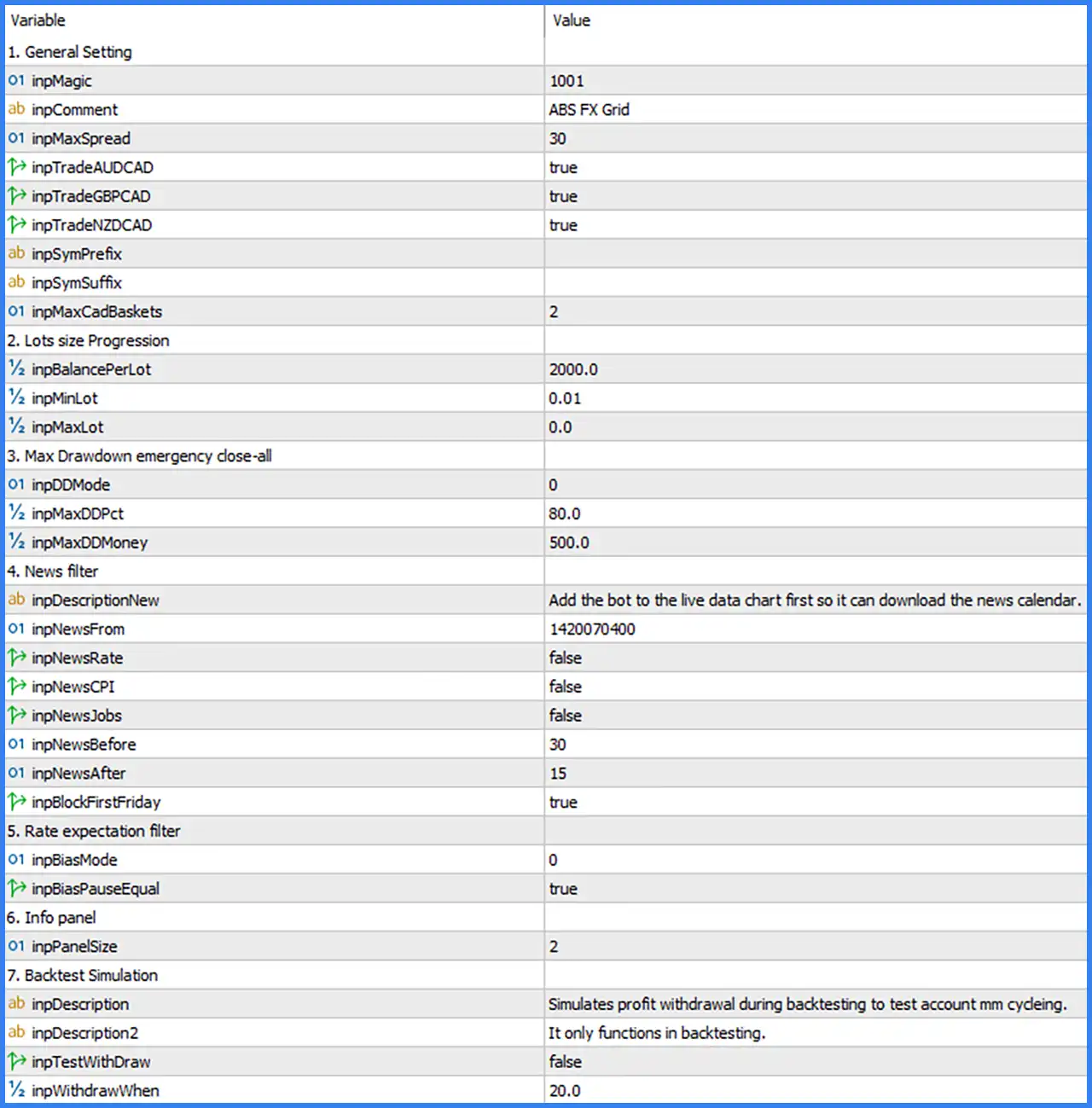
🔹 inpMagic = 1001 – Sets the EA's Magic Number to 1001, allowing MetaTrader to identify and distinguish trades opened by ABS FX Grid EA from manual trades and other Expert Advisors.
🔹 inpComment = ABS FX Grid – Sets the trade comment to "ABS FX Grid", allowing users to recognize the EA's positions in the MetaTrader trading terminal.
🔹 inpMaxSpread = 30 – Sets the maximum permitted spread to 30 points, defining the spread threshold for the EA's trading execution.
🔹 inpTradeAUDCAD = true – Enables automated trading on the AUDCAD currency pair, allowing the EA to include this instrument in its trading operations.
🔹 inpTradeGBPCAD = true – Enables automated trading on the GBPCAD currency pair, allowing the EA to open and manage positions on this instrument.
🔹 inpTradeNZDCAD = true – Enables automated trading on the NZDCAD currency pair, including this currency pair in the EA's trading configuration.
🔹 inpSymPrefix = (Empty) – Defines an optional symbol prefix for brokers that use additional characters before standard currency pair names.
🔹 inpSymSuffix = (Empty) – Defines an optional symbol suffix for brokers that append additional characters after standard currency pair names, such as ".m" or ".pro".
🔹 inpMaxCadBaskets = 2 – Sets the maximum number of CAD-related trading baskets to 2, controlling the configured basket limit for the EA's CAD currency pair operations.
Lots Size Progression
🔹 inpBalancePerLot = 2000.0 – Sets the balance reference to 2000.0 per lot for the EA's lot size progression calculation, determining how trading volume relates to account balance.
🔹 inpMinLot = 0.01 – Sets the minimum trading volume to 0.01 lots, establishing the lowest lot size permitted by the EA's lot sizing configuration.
🔹 inpMaxLot = 0.0 – Sets the maximum lot size parameter to 0.0, which may represent an unrestricted maximum or a special default condition depending on the EA's internal implementation.
Maximum Drawdown Emergency Close-All
🔹 inpDDMode = 0 – Selects drawdown protection mode 0, determining the configured emergency drawdown calculation method; the exact meaning of each mode requires the EA's documentation.
🔹 inpMaxDDPct = 80.0 – Sets the maximum drawdown percentage threshold to 80.0, defining the percentage-based emergency protection limit used by the EA.
🔹 inpMaxDDMoney = 500.0 – Sets the monetary drawdown threshold to 500.0, providing an additional account-loss limit for the EA's emergency close-all functionality.
News Filter Settings
🔹 inpDescriptionNew = Add the bot to the live data chart first so it can download the news calendar. – Displays an important instruction reminding users to attach the EA to a live data chart first so it can download the economic news calendar.
🔹 inpNewsFrom = 1420070400 – Sets the news calendar starting reference to 1420070400, providing a timestamp value used by the EA when handling economic news data.
🔹 inpNewsRate = false – Disables the interest rate news filter, meaning interest rate announcements are not included in this specific news-filter category.
🔹 inpNewsCPI = false – Disables the Consumer Price Index (CPI) news filter, so CPI-related economic announcements are not filtered by this setting.
🔹 inpNewsJobs = false – Disables the employment news filter, meaning job-related economic announcements are not included in this specific filtering category.
🔹 inpNewsBefore = 30 – Sets the news protection period to 30 minutes before a scheduled economic event, defining the configured pre-news filtering interval.
🔹 inpNewsAfter = 15 – Sets the news protection period to 15 minutes after a scheduled economic event, defining the configured post-news filtering interval.
🔹 inpBlockFirstFriday = true – Enables the first-Friday trading restriction, allowing the EA to apply special trading protection around the first Friday of the month, commonly associated with the US Non-Farm Payrolls (NFP) release.
Rate Expectation Filter
🔹 inpBiasMode = 0 – Sets the rate expectation bias mode to 0, selecting the default bias configuration used by the EA; the exact mode behavior is determined by its internal settings.
🔹 inpBiasPauseEqual = true – Enables the pause condition when rate expectation signals are equal, allowing the EA to avoid trading when the configured bias signals do not provide a directional distinction.
Information Panel Settings
🔹 inpPanelSize = 2 – Sets the information panel size parameter to 2, controlling the configured display size of the EA's on-chart information panel.
Backtest Simulation Settings
🔹 inpDescription = Simulates profit withdrawal during backtesting to test account mm cycling. – Describes the backtesting simulation feature, which simulates profit withdrawals to evaluate account money management and capital cycling.
🔹 inpDescription2 = It only functions in backtesting. – Specifies that the profit withdrawal simulation functionality operates exclusively during backtesting and does not function as a live-account withdrawal feature.
🔹 inpTestWithDraw = false – Disables the simulated profit withdrawal feature, meaning the EA will not perform the configured withdrawal simulation during backtesting.
🔹 inpWithdrawWhen = 20.0 – Sets the simulated withdrawal trigger parameter to 20.0, defining the configured threshold at which the backtesting withdrawal simulation is activated when enabled.
Conclusion
ABS FX Grid EA provides a range of configurable trading and account management parameters designed to support automated Forex grid trading.
Its default configuration supports three currency pairs: AUDCAD, GBPCAD, and NZDCAD, with a maximum of 2 CAD-related trading baskets. The lot sizing system uses a balance reference of 2000.0 per lot, a minimum lot size of 0.01, and a maximum lot parameter of 0.0.
For additional account protection, ABS FX Grid EA includes emergency drawdown settings with an 80.0% maximum drawdown parameter and a monetary threshold of 500.0. It also provides economic news filtering options, first-Friday restrictions, and rate expectation controls.
The backtesting withdrawal simulation adds another useful feature for evaluating account money management strategies without performing actual withdrawals.
Before using ABS FX Grid EA on a live account, traders should carefully review the drawdown limits, lot progression, basket exposure, and news filtering configuration. Particular attention should be given to the 80.0% drawdown setting, as it represents a substantial potential account-loss threshold.