Introduction to Golden Retirement MT5
Golden Retirement MT5 is a multi-strategy automated trading Expert Advisor (EA) designed for the MetaTrader 5 platform. The EA combines up to 10 independent trading strategies, flexible money management models, trading session filters and customizable trailing stop controls.
With support for percentage-based risk allocation and session-based execution, Golden Retirement MT5 is designed for traders seeking diversified automated trading with advanced portfolio-style management.
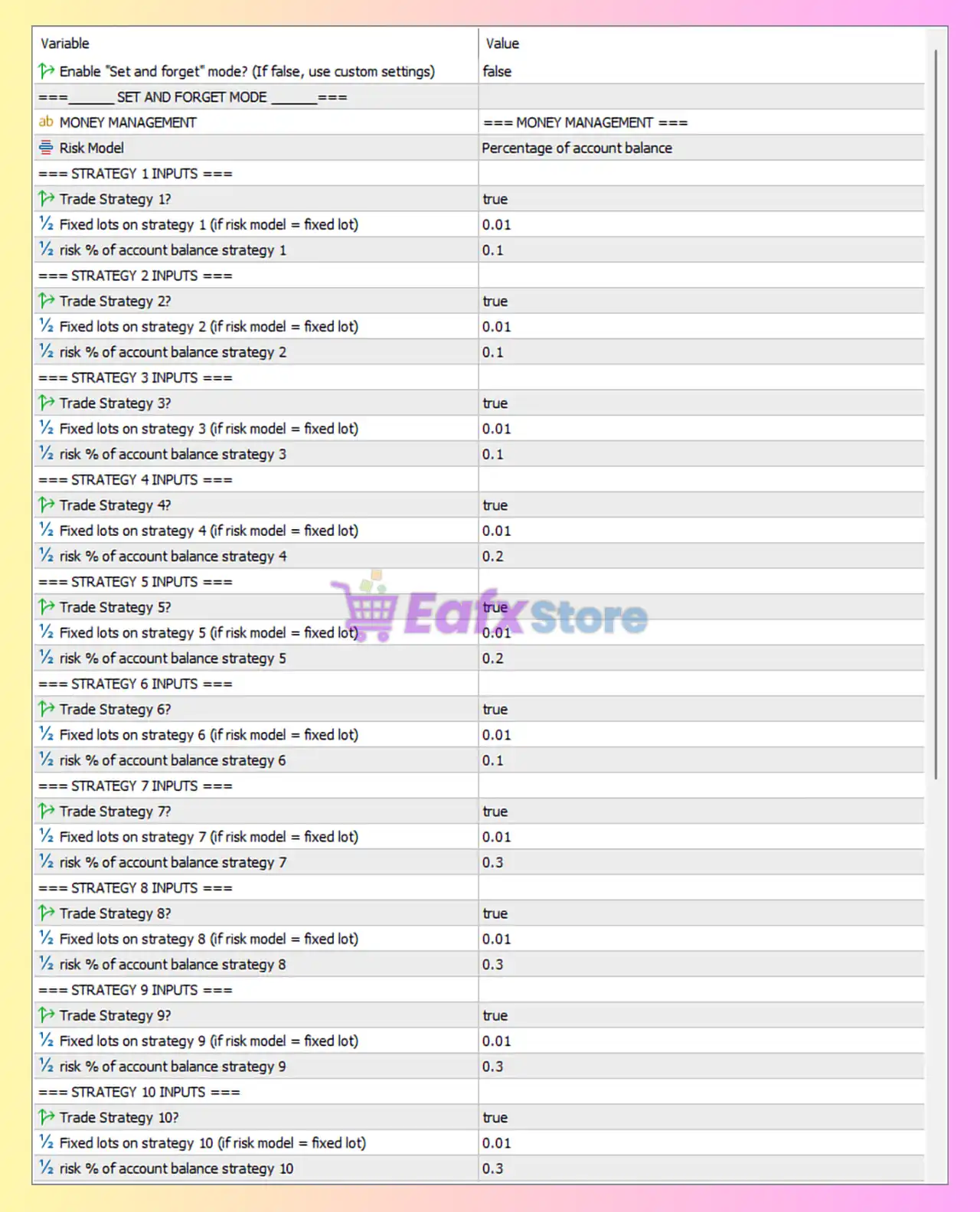
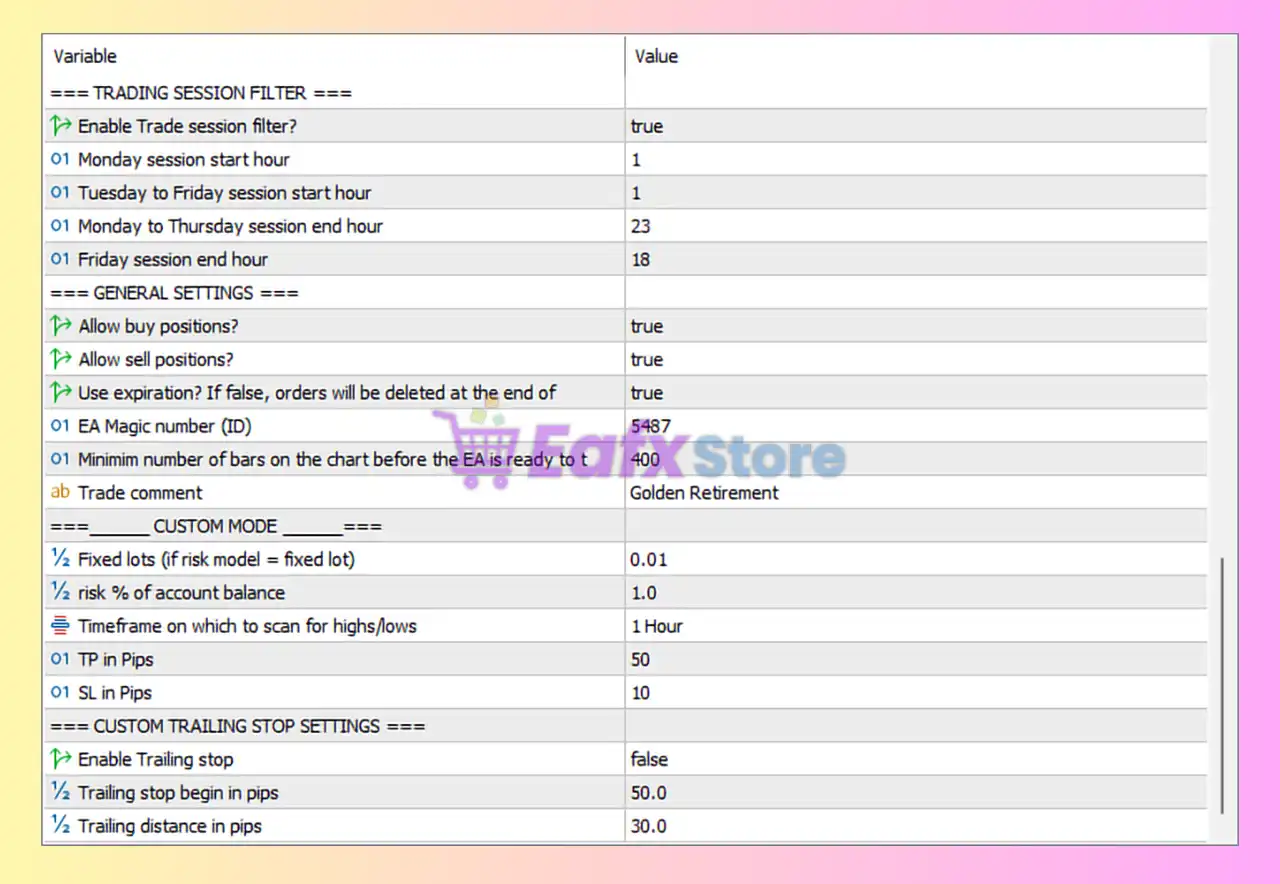
Full Parameters
Enable “Set and Forget” Mode
- Enable “Set and forget” mode? (If false, use custom settings) = false: Disables automatic preset mode and enables manual custom configuration.
SET AND FORGET MODE
- Risk Model = Percentage of account balance: Uses percentage-based risk management relative to account balance.
STRATEGY 1 INPUTS
- Trade Strategy 1? = true: Enables Strategy 1 trading logic.
- Fixed lots on strategy 1 (if risk model = fixed lot) = 0.01: Sets Strategy 1 fixed lot size to 0.01 lots.
- risk % of account balance strategy 1 = 0.1: Risks 0.1% of account balance for Strategy 1.
STRATEGY 2 INPUTS
- Trade Strategy 2? = true: Enables Strategy 2 trading logic.
- Fixed lots on strategy 2 (if risk model = fixed lot) = 0.01: Sets Strategy 2 fixed lot size to 0.01 lots.
- risk % of account balance strategy 2 = 0.1: Risks 0.1% of account balance for Strategy 2.
STRATEGY 3 INPUTS
- Trade Strategy 3? = true: Enables Strategy 3 trading logic.
- Fixed lots on strategy 3 (if risk model = fixed lot) = 0.01: Sets Strategy 3 fixed lot size to 0.01 lots.
- risk % of account balance strategy 3 = 0.1: Risks 0.1% of account balance for Strategy 3.
STRATEGY 4 INPUTS
- Trade Strategy 4? = true: Enables Strategy 4 trading logic.
- Fixed lots on strategy 4 (if risk model = fixed lot) = 0.01: Sets Strategy 4 fixed lot size to 0.01 lots.
- risk % of account balance strategy 4 = 0.2: Risks 0.2% of account balance for Strategy 4.
STRATEGY 5 INPUTS
- Trade Strategy 5? = true: Enables Strategy 5 trading logic.
- Fixed lots on strategy 5 (if risk model = fixed lot) = 0.01: Sets Strategy 5 fixed lot size to 0.01 lots.
- risk % of account balance strategy 5 = 0.2: Risks 0.2% of account balance for Strategy 5.
STRATEGY 6 INPUTS
- Trade Strategy 6? = true: Enables Strategy 6 trading logic.
- Fixed lots on strategy 6 (if risk model = fixed lot) = 0.01: Sets Strategy 6 fixed lot size to 0.01 lots.
- risk % of account balance strategy 6 = 0.1: Risks 0.1% of account balance for Strategy 6.
STRATEGY 7 INPUTS
- Trade Strategy 7? = true: Enables Strategy 7 trading logic.
- Fixed lots on strategy 7 (if risk model = fixed lot) = 0.01: Sets Strategy 7 fixed lot size to 0.01 lots.
- risk % of account balance strategy 7 = 0.3: Risks 0.3% of account balance for Strategy 7.
STRATEGY 8 INPUTS
- Trade Strategy 8? = true: Enables Strategy 8 trading logic.
- Fixed lots on strategy 8 (if risk model = fixed lot) = 0.01: Sets Strategy 8 fixed lot size to 0.01 lots.
- risk % of account balance strategy 8 = 0.3: Risks 0.3% of account balance for Strategy 8.
STRATEGY 9 INPUTS
- Trade Strategy 9? = true: Enables Strategy 9 trading logic.
- Fixed lots on strategy 9 (if risk model = fixed lot) = 0.01: Sets Strategy 9 fixed lot size to 0.01 lots.
- risk % of account balance strategy 9 = 0.3: Risks 0.3% of account balance for Strategy 9.
STRATEGY 10 INPUTS
- Trade Strategy 10? = true: Enables Strategy 10 trading logic.
- Fixed lots on strategy 10 (if risk model = fixed lot) = 0.01: Sets Strategy 10 fixed lot size to 0.01 lots.
- risk % of account balance strategy 10 = 0.3: Risks 0.3% of account balance for Strategy 10.
TRADING SESSION FILTER
- Enable Trade session filter? = true: Activates trading session time filtering.
- Monday session start hour = 1: Monday trading starts at 01:00.
- Tuesday to Friday session start hour = 1: Tuesday to Friday trading starts at 01:00.
- Monday to Thursday session end hour = 23: Trading ends at 23:00 Monday through Thursday.
- Friday session end hour = 18: Friday trading stops at 18:00.
GENERAL SETTINGS
- Allow buy positions? = true: Enables BUY trades.
- Allow sell positions? = true: Enables SELL trades.
- Use expiration? If false, orders will be deleted at the end of = true: Enables order expiration handling.
- EA Magic number (ID) = 5487: Unique identifier (5487) used for managing EA trades.
- Minimum number of bars on the chart before the EA is ready to t = 400: Requires at least 400 chart bars before trading begins.
- Trade comment = Golden Retirement: Adds “Golden Retirement” as the trade comment for orders.
CUSTOM MODE
- Fixed lots (if risk model = fixed lot) = 0.01: Sets fixed lot size to 0.01 in custom mode.
- risk % of account balance = 1.0: Risks 1.0% of account balance in custom mode.
- Timeframe on which to scan for highs/lows = 1 Hour: Uses the 1 Hour timeframe for high/low analysis.
- TP in Pips = 50: Sets Take Profit target to 50 pips.
- SL in Pips = 10: Sets Stop Loss level to 10 pips.
CUSTOM TRAILING STOP SETTINGS
- Enable Trailing stop = false: Disables trailing stop functionality.
- Trailing stop begin in pips = 50.0: Trailing stop would activate after 50.0 pips if enabled.
- Trailing distance in pips = 30.0: Trailing Stop distance configured at 30.0 pips.
Conclusion
The Golden Retirement MT5 settings provide a highly diversified multi-strategy trading framework with flexible risk allocation and advanced session management.
By supporting up to 10 independent strategies, percentage-based money management, and custom trading filters, the EA allows traders to build a portfolio-style automated trading approach. Understanding these parameters helps improve optimization, risk control and long-term trading consistency.
FAQs
❓ What does Risk Model = Percentage of account balance mean?
It means trade size is calculated based on a percentage of account balance.
❓ Why are all Trade Strategy settings enabled?
The EA is configured to run all 10 strategies simultaneously for diversification.
❓ What is the purpose of Enable Trade session filter = true?
It restricts trading to specified trading hours and sessions.
❓ Why is Minimum number of bars = 400 important?
The EA requires sufficient historical data before starting analysis and trading.
❓ What happens when Enable Trailing stop = false?
Trailing Stop management is disabled, so trades use fixed Stop Loss and Take Profit levels only.