

This guide walks through the inputs of Goldenity AI EA MT4 with the values recommended for live trading. The set files that come with the EA already contain these settings, so you can load them in one click and adjust only what your broker or account needs.
🔢 Goldenity AI MT4 – Complete Settings Guide for Smart Gold Trading
Goldenity AI MT4 is an advanced automated trading Expert Advisor (EA) designed specifically for XAUUSD (Gold) trading on MetaTrader 4. The EA combines AI-based risk management, ATR-driven martingale calculations, hedging capabilities, and dynamic Take Profit systems to optimize trading performance.
With flexible money management and intelligent order handling, Goldenity AI EA is suitable for traders looking for automated Gold trading with advanced recovery logic.
🔢 Goldenity AI MT4 Settings Explained
Below are the details of the parameters in the advisor’s trading system settings table:
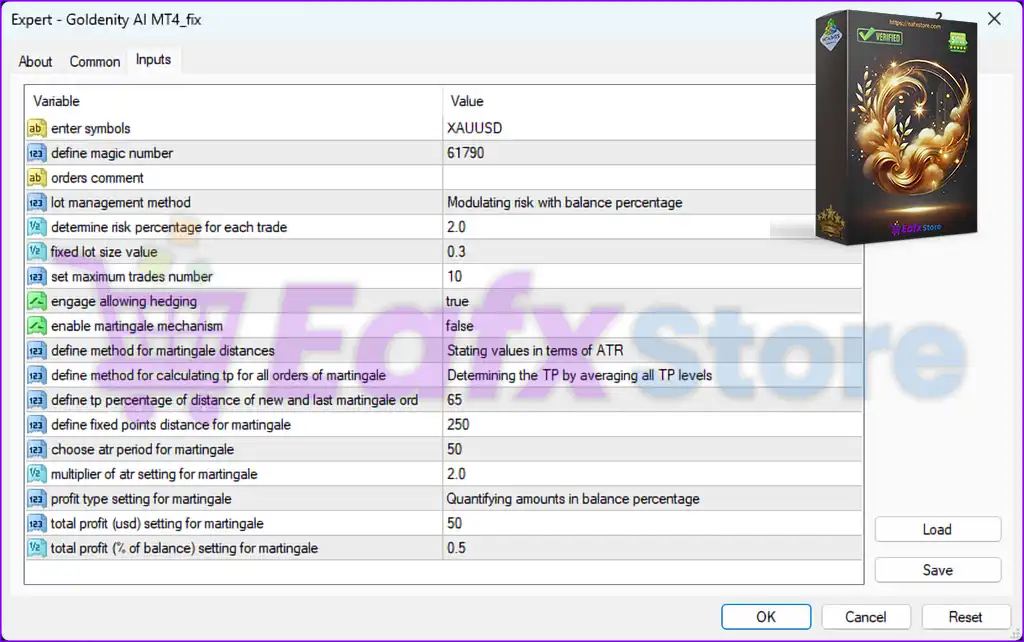
🔹 enter symbols = XAUUSD — Defines the trading symbol used by the EA, which is XAUUSD (Gold).
🔹 define magic number = 61790 — Assigns the unique Magic Number 61790 to identify and manage EA trades separately.
🔹 orders comment — Allows traders to add a custom comment to all trades opened by the EA.
🔹 lot management method = Modulating risk with balance percentage — Uses dynamic lot sizing based on a percentage of account balance.
🔹 determine risk percentage for each trade = 2.0 — Risks 2.0% of the account balance per trade.
🔹 fixed lot size value = 0.3 — Sets the fixed trading lot size to 0.3 when fixed lot mode is used.
🔹 set maximum trades number = 10 — Limits the EA to a maximum of 10 simultaneous trades.
🔹 engage allowing hedging = true — Enables hedging functionality, allowing both buy and sell trades simultaneously.
🔹 enable martingale mechanism = false — Disables the martingale recovery trading system.
🔹 define method for martingale distances = Stating values in terms of ATR — Uses ATR (Average True Range) values to calculate martingale trade distances.
🔹 define method for calculating tp for all orders of martingale = Determining the TP by averaging all TP levels — Calculates Take Profit levels using the average TP of all martingale positions.
🔹 define tp percentage of distance of new and last martingale ord = 65 — Sets the Take Profit percentage distance between new and previous martingale orders to 65%.
🔹 define fixed points distance for martingale = 250 — Sets a fixed martingale distance of 250 points between orders.
🔹 choose atr period for martingale = 50 — Uses ATR period 50 for martingale distance calculations.
🔹 multiplier of atr setting for martingale = 2.0 — Multiplies ATR values by 2.0 when calculating martingale spacing.
🔹 profit type setting for martingale = Quantifying amounts in balance percentage — Measures martingale profit targets as a percentage of account balance.
🔹 total profit (usd) setting for martingale = 50 — Sets the martingale total profit target to 50 USD.
🔹 total profit (%. of balance) setting for martingale = 0.5 — Sets the martingale profit target to 0.5% of account balance.
🔢 Conclusion
Goldenity AI MT4 is a professional-grade Gold trading Expert Advisor that integrates AI-driven money management, ATR-based martingale calculations, hedging support, and advanced Take Profit optimization. The EA offers traders a flexible and intelligent framework for automated XAUUSD trading while maintaining customizable risk management and recovery options.
🔢 FAQs
❓ What is Goldenity AI MT4?
Goldenity AI MT4 is an automated Expert Advisor designed for XAUUSD (Gold) trading on MetaTrader 4.
❓ Does Goldenity AI MT4 support hedging?
Yes, the EA includes hedging functionality, allowing simultaneous buy and sell positions.
❓ Can Goldenity AI MT4 use martingale trading?
Yes, the EA supports martingale recovery systems, although it is currently disabled in the provided settings.
❓ What risk management method does Goldenity AI MT4 use?
The EA uses balance percentage-based risk management with customizable risk levels.
❓ Why does Goldenity AI MT4 use ATR for martingale calculations?
ATR-based calculations help the EA adapt martingale spacing dynamically according to market volatility.
Get Goldenity AI EA MT4
Download Goldenity AI EA MT4 with its set files, read the full product details and requirements here: Goldenity AI EA MT4 →