
Introduction
King Robot Prop Firm MT4 is an automated trading Expert Advisor (EA) designed for the MetaTrader 4 platform. Its configuration panel provides essential parameters for trade identification, position sizing, loss recovery, and order management.
King Robot Prop Firm MT4 Version – UNLIMITED
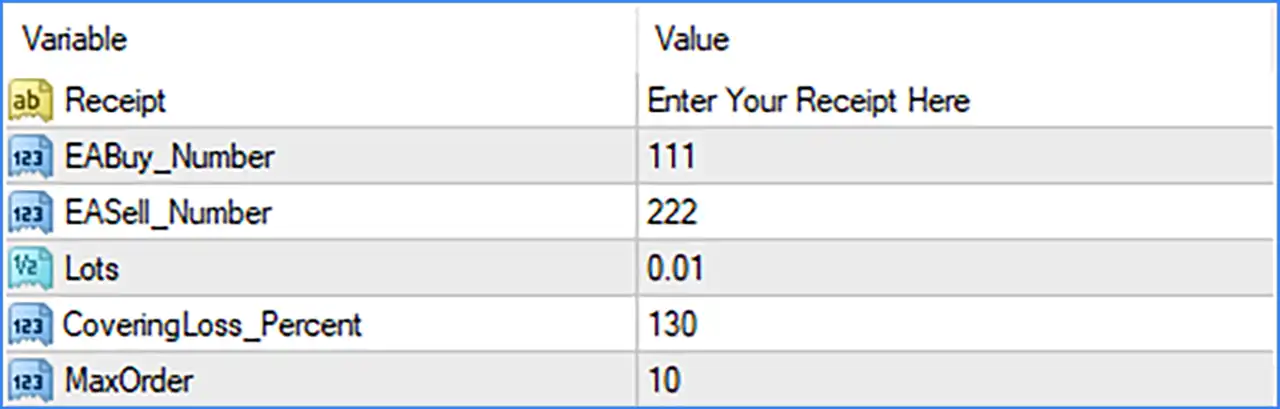
The EA includes separate BUY and SELL identification numbers, adjustable trading volume, a loss-covering percentage, and a maximum order limit. These settings allow traders to configure the EA's trading exposure and manage its order execution according to their account requirements.
Understanding the King Robot Prop Firm MT4 settings is important for configuring position sizes, controlling the number of open trades, and evaluating the EA's loss recovery mechanism.
BUY and SELL Identification Settings
🔹 EABuy_Number = 111: Sets the BUY identification number to 111, allowing the EA to distinguish or identify its BUY trading operations according to its internal order-management system.
🔹 EASell_Number = 222: Sets the SELL identification number to 222, allowing the EA to distinguish or identify its SELL trading operations separately from BUY operations.
Lot Size Settings
🔹 Lots = 0.01: Sets the trading volume to 0.01 lots, defining the configured position size for trades opened by King Robot Prop Firm MT4.
Loss Recovery Settings
🔹 CoveringLoss_Percent = 130: Sets the loss-covering percentage to 130%. This parameter indicates a recovery target based on 130% of the relevant loss amount, potentially allowing the EA to target recovery of the previous loss together with an additional profit margin. The exact calculation depends on the EA's internal recovery logic.
Order Management Settings
🔹 MaxOrder = 10: Sets the maximum order limit to 10, controlling the number of orders that the EA can manage or open according to its internal order-management rules.