
🔶 What is Project Python EA MT5?
Project Python EA for MetaTrader 5 (MT5) is a modern, multi-strategy automated trading system that integrates different trading styles such as scalping, intraday trading, and swing trading into a single framework. With built-in risk management modules, ATR-based protection, and news filters, this EA is designed to deliver stable and adaptive performance across varying market conditions.
📌📌📌 Buy this Project Python EA MT5 product here 📌📌📌
It is especially suitable for traders who want a fully automated, diversified trading system with strong emphasis on safety and consistency.
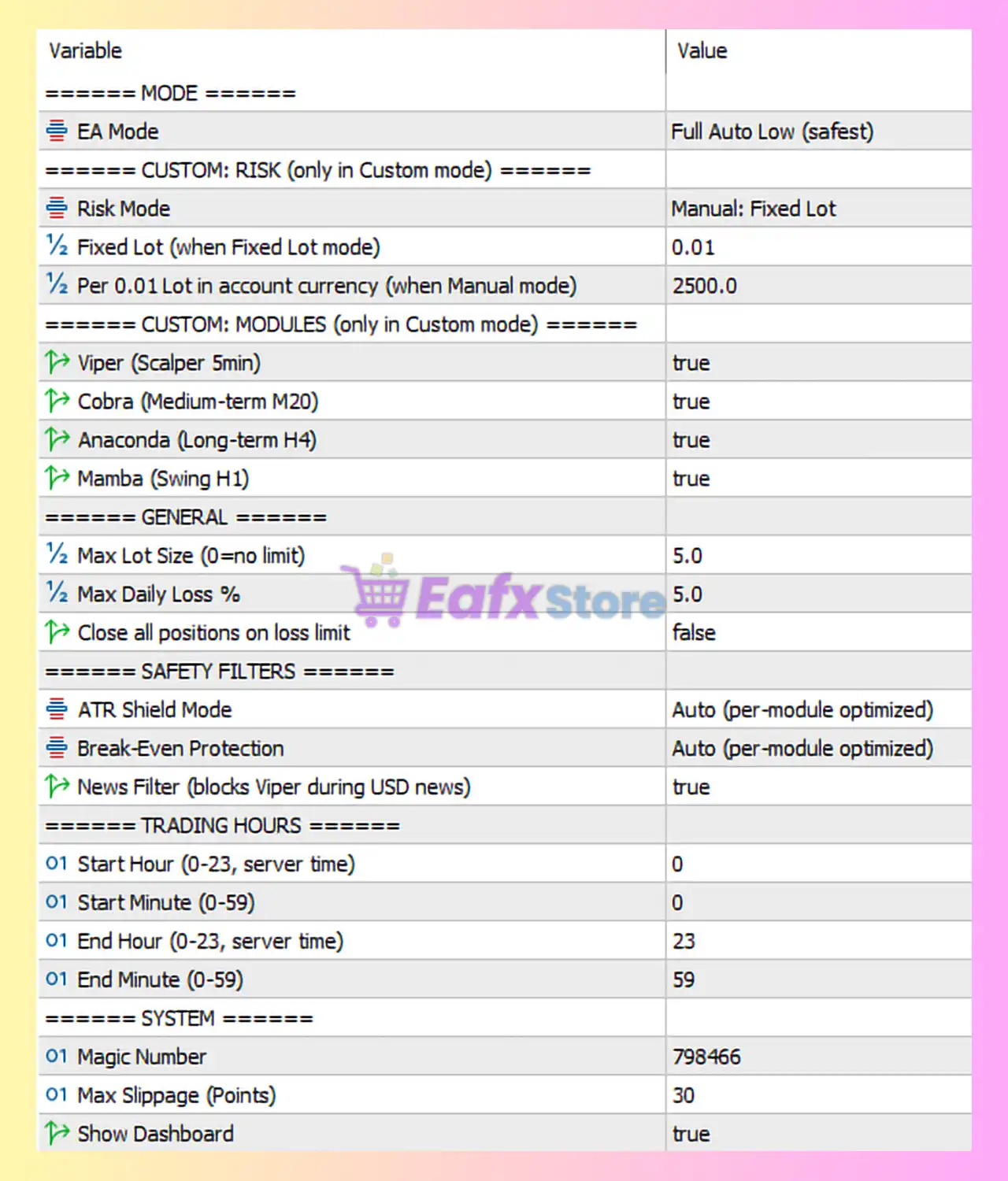
🔶 Detailed Analysis of Project Python EA Settings
Below is a complete breakdown of the configuration shown in your image:
🔄 EA Mode & Risk Settings
| Parameter | Value | Description |
|---|---|---|
| EA Mode | Full Auto Low (safest) | Fully automated mode with conservative risk settings. |
| Risk Mode | Manual: Fixed Lot | Uses fixed lot instead of % risk. |
| Fixed Lot | 0.01 | Minimum lot size per trade. |
| Per 0.01 Lot in account currency | 2500.0 | Balance scaling reference for manual mode. |
👉 Insight:
- “Full Auto Low” mode prioritizes capital protection over aggressive gains.
- Fixed lot (0.01) makes it ideal for small accounts or testing environments.
🔄 Strategy Modules (Multi-System Trading)
| Module | Timeframe | Status | Description |
|---|---|---|---|
| Viper | M5 | true | Scalping strategy for quick trades. |
| Cobra | M20 | true | Medium-term intraday trading. |
| Anaconda | H4 | true | Long-term trend-following. |
| Mamba | H1 | true | Swing trading strategy. |
👉 Insight:
- Combines multiple trading styles → diversification reduces risk.
- Works across multiple timeframes (M5 → H4) for better market coverage.
🔄 General Risk Control
| Parameter | Value | Description |
|---|---|---|
| Max Lot Size | 5.0 | Maximum allowed lot size. |
| Max Daily Loss % | 5.0 | Daily drawdown limit (5%). |
| Close all positions on loss limit | false | Does not auto-close all trades when limit reached. |
👉 Insight:
- 5% daily loss limit is moderately conservative
- Not closing all trades automatically may increase risk during drawdowns
🔄 Safety Filters
| Parameter | Value | Description |
|---|---|---|
| ATR Shield Mode | Auto (per-module optimized) | Uses volatility-based protection. |
| Break-Even Protection | Auto (per-module optimized) | Automatically moves SL to breakeven. |
| News Filter | true | Blocks trading (especially scalping) during high-impact news. |
👉 Insight:
- ATR filter helps avoid high volatility spikes
- News filter significantly improves trade quality and safety
🔄 Trading Hours
| Parameter | Value | Description |
|---|---|---|
| Start Hour | 0 | Trading starts at 00:00 |
| End Hour | 23 | Trading ends at 23:59 |
👉 Insight:
- EA runs 24/7, maximizing opportunities
- Combined with filters → reduces low-quality trades
🔄 System Settings
| Parameter | Value | Description |
|---|---|---|
| Magic Number | 798466 | Unique trade identifier |
| Max Slippage | 30 | Maximum slippage allowed |
| Show Dashboard | true | Displays real-time EA info |
👉 Insight:
- Dashboard improves monitoring and control
- High slippage tolerance ensures execution in fast markets
🔶 Strategy Evaluation
🔄 Strengths
- Multi-strategy system (Scalping + Swing + Trend)
- Conservative Full Auto Low mode
- Strong risk management (5% daily loss)
- Advanced ATR & News filters
- Automatic break-even protection
- Works across multiple timeframes
🔄 Weaknesses
- Fixed lot limits scalability
- No forced close at max loss (risk exposure remains)
- High slippage tolerance may reduce entry precision
🔶 Conclusion
The Project Python EA MT5 configuration demonstrates a well-balanced, safety-focused automated trading system. By combining multiple strategies (Viper, Cobra, Anaconda, Mamba) with advanced protection tools like ATR filtering, news filtering, and break-even automation, it offers a highly adaptive trading environment.
The use of Full Auto Low mode and fixed lot sizing (0.01) makes it particularly suitable for beginners or traders prioritizing capital preservation.
For further optimization, traders may consider:
- Enabling automatic closure at daily loss limit
- Scaling lot size gradually as account grows
- Fine-tuning module activation based on market conditions
Overall, Project Python EA is a robust, diversified, and safety-oriented trading solution, ideal for traders seeking consistent and controlled automated trading performance.