

RapidFX EA is an advanced Expert Advisor (EA) developed by Empire Market, designed to automate forex trading using a controlled risk management system, custom profit targets, and dual time filters for precision execution. Below is a detailed explanation of its configuration panel, helping traders understand how each parameter contributes to the EA’s behavior.
📌📌📌 Buy this unlimited RapidFX by Empire Market EA MT4 product here 📌📌📌
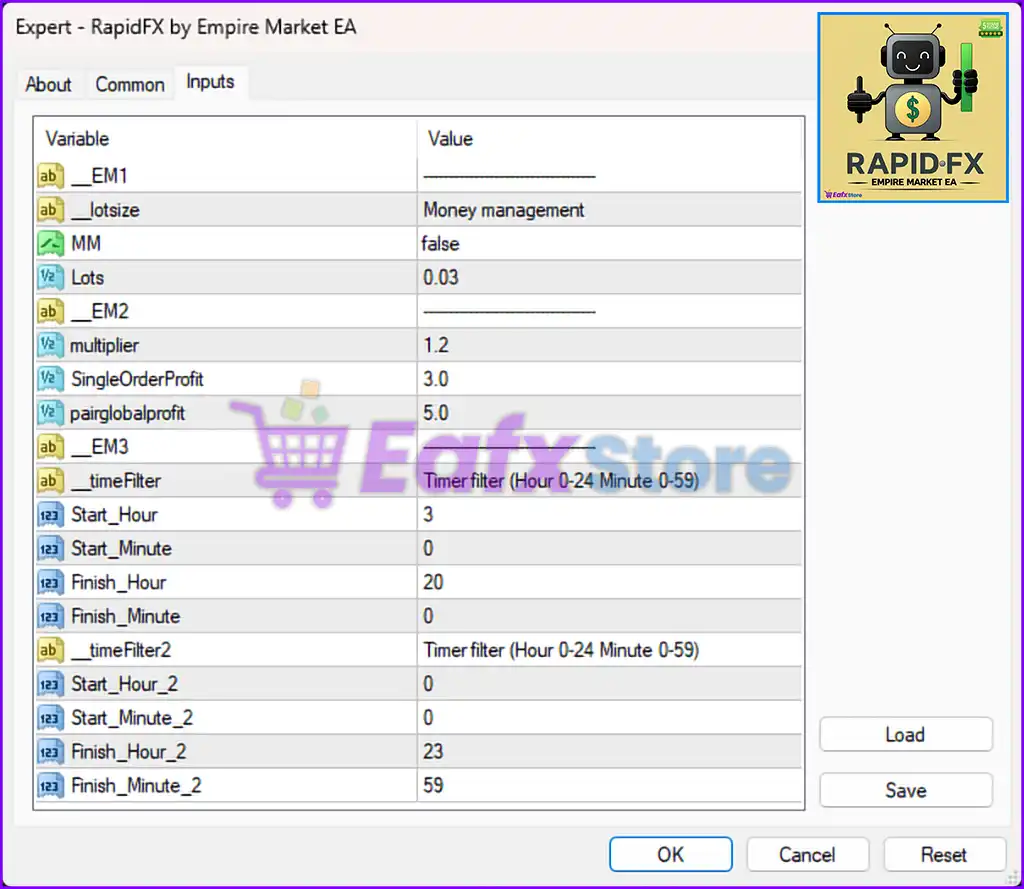
🔧 Money Management Settings
| Parameter | Value | Description |
|---|---|---|
| MM | false | Money Management is disabled. The EA will use the fixed lot size defined below. |
| Lots | 0.03 | Fixed lot size per trade. No dynamic lot scaling based on balance or equity. |
✅ Recommended for traders who prefer fixed exposure and want to avoid risk scaling with account balance.
📈 Profit Management Settings
| Parameter | Value | Description |
|---|---|---|
| multiplier | 1.2 | Lot multiplier for strategies like grid/martingale. May be used in trade scaling. |
| SingleOrderProfit | 3.0 | Target profit (in currency) for a single trade before closing. |
| pairglobalprofit | 5.0 | Total profit (in currency) for a pair before closing all trades on that symbol. |
🎯 These profit targets help the EA lock in gains either at the individual or group trade level.
⏱️ Primary Trading Time Filter
| Parameter | Value | Description |
|---|---|---|
| Start_Hour | 3 | Trading starts at 03:00 server time. |
| Start_Minute | 0 | |
| Finish_Hour | 20 | Trading stops at 20:00 server time. |
| Finish_Minute | 0 |
⏰ This filter allows trades to open only during the main session (03:00–20:00). Ideal for avoiding late-night low liquidity hours.
⏱️ Secondary Trading Time Filter
| Parameter | Value | Description |
|---|---|---|
| Start_Hour_2 | 0 | Secondary session begins at 00:00. |
| Start_Minute_2 | 0 | |
| Finish_Hour_2 | 23 | Ends at 23:59 — essentially allows trading all day. |
| Finish_Minute_2 | 59 |
📌 Acts as a global timer. When both filters are active, the EA will only trade during overlapping timeframes. This offers fine-tuned control over trading hours.
✅ Summary: Key Features of RapidFX EA (MT4)
- 🔐 Fixed lot strategy with optional multiplier-based scaling.
- 🎯 Dual profit targets (per trade & per pair) for better trade management.
- 🕒 Dual time filters for strict market session control.
- ⚖️ Ideal for semi-conservative grid or scalping strategies.