

This guide walks through the inputs of Synapse Trader MT5 with the values recommended for live trading. The set files that come with the EA already contain these settings, so you can load them in one click and adjust only what your broker or account needs.
🔢 Synapse Trader MT5 Settings Explained – Complete Parameter Guide
Synapse Trader MT5 is an intelligent Expert Advisor for MetaTrader 5 that combines automated trade execution with configurable money management, risk controls and optional news filtering.
Designed for XAUUSD (Gold) trading, it provides flexible position sizing, prop firm protection, and customizable trading parameters to help traders balance profitability and account safety. Understanding each setting ensures the EA is configured correctly for your trading style and broker environment.
🔢 Synapse Trader MT5 Parameters Explained
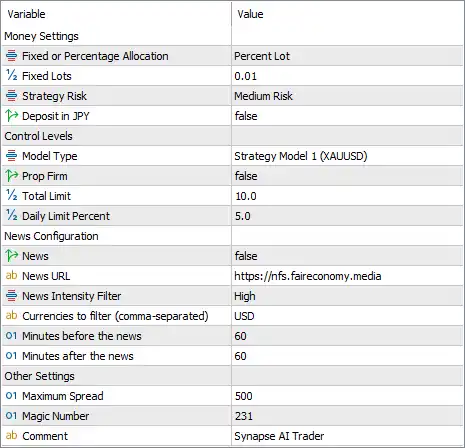
Below are the details of the parameters in the advisor’s trading system settings table:
🔶 Money Settings
🔹 Fixed or Percentage Allocation = Percent Lot – Selects Percent Lot as the position sizing method, allowing the EA to calculate trade volume based on the selected risk profile.
🔹 Fixed Lots = 0.01 – Sets the default fixed trading volume to 0.01 lots when fixed lot sizing is used.
🔹 Strategy Risk = Medium Risk – Configures the EA to operate using the predefined Medium Risk profile, balancing growth potential with controlled exposure.
🔹 Deposit in JPY = false – Indicates that the trading account is not denominated in Japanese Yen (JPY), so standard calculations are applied.
🔶 Control Levels
🔹 Model Type = Strategy Model 1 (XAUUSD) – Uses Strategy Model 1, specifically optimized for trading XAUUSD (Gold).
🔹 Prop Firm = false – Disables Prop Firm protection mode, allowing the EA to trade without proprietary firm restrictions.
🔹 Total Limit = 10.0 – Sets the maximum overall account protection limit to 10.0, helping control total account exposure.
🔹 Daily Limit Percent = 5.0 – Limits the maximum daily loss to 5.0% of the account before trading restrictions are applied.
🔶 News Configuration
🔹 News = false – Disables the built-in economic news filter.
🔹 News URL = https://nfs.faireconomy.media – Specifies the news data source used by the EA when the news filter is enabled.
🔹 News Intensity Filter = High – Configures the EA to monitor High-impact economic news events.
🔹 Currencies to Filter (comma-separated) = USD – Filters news events related to the USD currency.
🔹 Minutes Before the News = 60 – Stops opening new trades 60 minutes before a scheduled news event.
🔹 Minutes After the News = 60 – Resumes trading 60 minutes after the news event has passed.
🔶 Other Settings
🔹 Maximum Spread = 500 – Prevents the EA from opening new positions if the market spread exceeds 500 points.
🔹 Magic Number = 231 – Assigns 231 as the unique identifier for all trades managed by Synapse Trader MT5.
🔹 Comment = Synapse AI Trader – Adds "Synapse AI Trader" as the order comment for every trade opened by the EA.
🔢 Conclusion
Synapse Trader MT5 offers a clean and practical configuration focused on automated Gold trading with intelligent money management and built-in account protection. Its flexible Percent Lot allocation, Medium Risk profile, XAUUSD-specific strategy model, daily risk limits, and optional economic news filtering make it suitable for traders seeking both automation and disciplined risk control. Properly configuring these parameters can improve trading consistency while protecting capital under changing market conditions.
🔢 FAQs
❓ What market is Synapse Trader MT5 optimized for?
Synapse Trader MT5 is configured to use Strategy Model 1, which is specifically optimized for XAUUSD (Gold) trading.
❓ Does Synapse Trader MT5 support percentage-based position sizing?
Yes. The current configuration uses Percent Lot, allowing trade volume to be calculated according to the selected risk profile.
❓ Can Synapse Trader MT5 be used for Prop Firm accounts?
Yes. The EA includes a Prop Firm mode, although it is disabled in this configuration.
❓ Does the EA include an economic news filter?
Yes. Synapse Trader MT5 supports a configurable news filter using Fair Economy data, but the filter is disabled in the current settings.
❓ What is the purpose of the Magic Number?
The Magic Number (231) uniquely identifies trades opened by Synapse Trader MT5, allowing the EA to manage only its own positions independently from other Expert Advisors.
Get Synapse Trader MT5
Download Synapse Trader MT5 with its set files, read the full product details and requirements here: Synapse Trader MT5 →