
Venom EA MT4 is a grid-based Expert Advisor (EA) designed for high-frequency, semi-aggressive trading strategies. Its core trading logic revolves around Fibonacci-based lot progression, controlled drawdown thresholds, and smart take-profit locking. Below is a breakdown of its configurable parameters and what each setting implies for real-time trading performance.
📌📌📌 Buy this unlimited Venom EA MT4 product here 📌📌📌
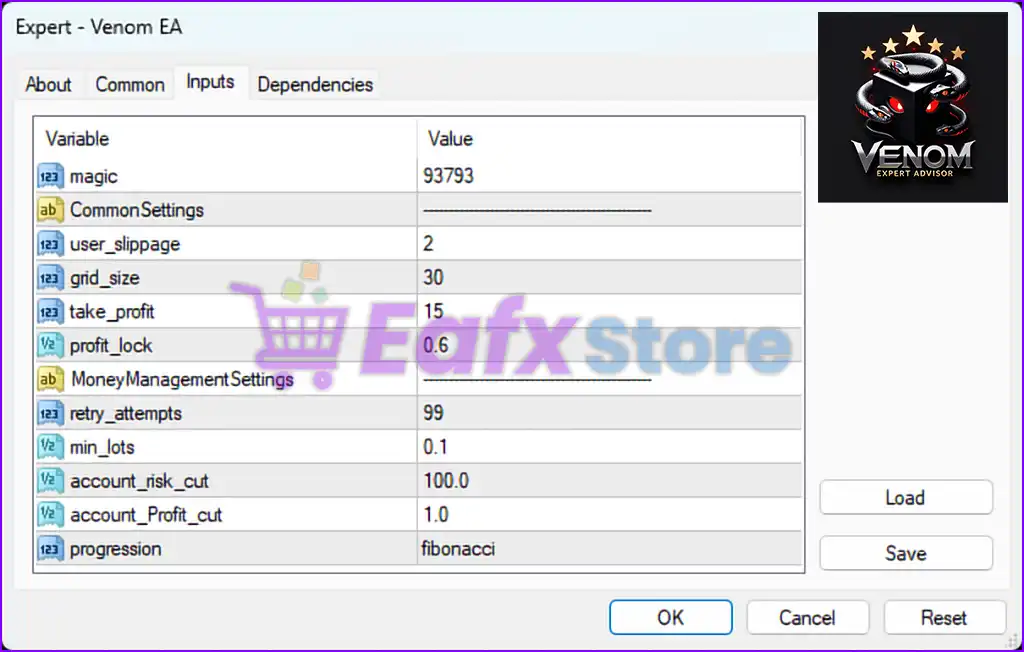
🧠 General Configuration
| Parameter | Value | Description |
|---|---|---|
magic | 93793 | Unique identifier for this EA’s trades on the chart. |
user_slippage | 2 | Maximum slippage (in points) allowed for order execution. Low value = tighter execution control. |
grid_size | 30 | Distance in pips between grid orders. Determines the spacing of recovery positions. |
take_profit | 15 | Fixed take profit target per trade (in pips). |
profit_lock | 0.6 | Locks in 60% of floating profit once predefined profit is achieved (likely used with trailing TP or breakeven logic). |
💰 Money Management Configuration
| Parameter | Value | Description |
|---|---|---|
retry_attempts | 99 | Max attempts to re-open a failed order—helps ensure trade execution reliability under network lag. |
min_lots | 0.1 | Minimum trading lot size per position. |
account_risk_cut | 100.0 | Emergency stop-out trigger (in %) based on account balance. When the account loses 100%, the EA halts. |
account_Profit_cut | 1.0 | Auto-close all trades when net profit reaches 1% of the account balance. |
progression | fibonacci | Lot sizing algorithm uses the Fibonacci sequence for dynamic risk scaling. More aggressive than fixed lot or linear methods. |
📈 Strategy Characteristics
- Grid Trading Logic: With a 30-pip grid size, the EA builds layered positions in trending or ranging markets.
- Fibonacci Progression: Risk increases exponentially with each new trade in the sequence, which enhances recovery but also increases drawdown if not managed.
- Take-Profit Focused: Fixed 15-pip TP with 60% profit locking allows for partial profit capture in volatile reversals.
- Protective Exit Parameters: The
account_Profit_cutandaccount_risk_cutact as safety valves to secure gains or limit catastrophic losses.
✅ Strengths of Venom EA
- Designed for precision grid spacing in low to medium volatility conditions.
- Fibonacci lot progression allows for rapid equity recovery in trending markets.
- Profit lock mechanism provides flexibility during floating profit stages.
- Includes account-wide emergency controls to prevent large losses.
⚠️ Risk Considerations
- Fibonacci progression can amplify lot sizes dangerously in strong adverse moves.
- 100%
account_risk_cutmeans the EA will only stop once the account is entirely depleted—not beginner-friendly without adjustment. - Best used with VPS hosting, solid broker execution, and continuous monitoring.
💡 Recommended Use
- Account Size: $1000+
- Leverage: 1:100 preferred.
- Pairs: AUDCAD, EURUSD, GBPUSD.
- Sessions: London and New York overlap.
📌 Conclusion
Venom EA MT4 is a potent, Fibonacci-based grid trading robot built for traders who understand risk escalation strategies. Its configuration emphasizes flexibility in profit capture, slippage control, and account-wide safety nets. While highly customizable, this EA is best deployed by intermediate to advanced traders with proper risk mitigation.