

🧩 Overview of VR Lollipop MT5
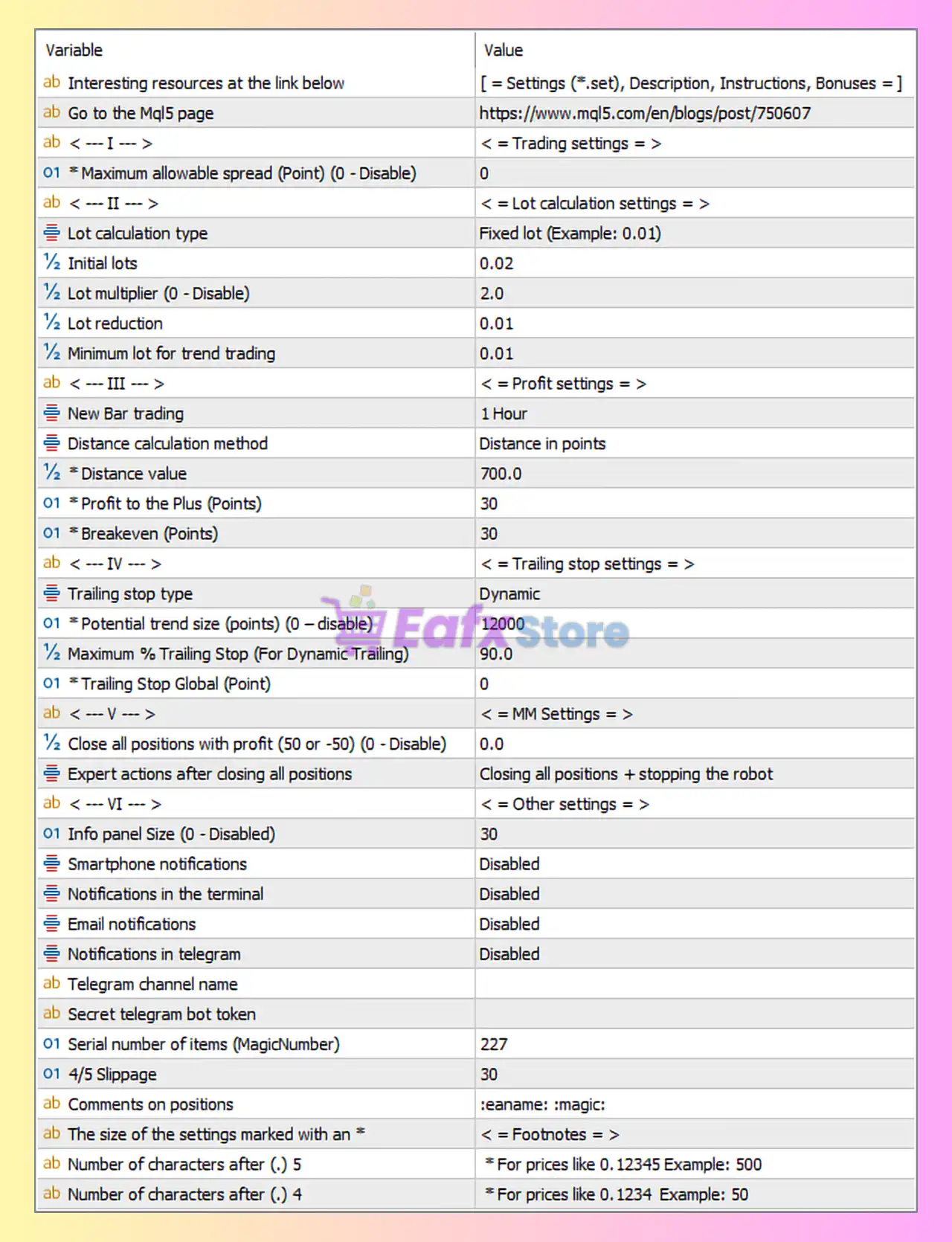
VR Lollipop MT5 is an automated trading Expert Advisor (EA) designed with a fixed-lot, trend-following grid logic, combined with dynamic trailing stops and basic profit protection mechanisms. The configuration shown in the image reflects a moderate-risk, semi-conservative trading setup, suitable for traders seeking controlled automation rather than aggressive martingale strategies.
➡️ Vendor website: View here
🧩 Trading & Spread Control Settings
🔹 Maximum Allowable Spread
- Value:
0(Disabled)
📌 Analysis:
The EA does not filter trades based on spread, meaning it can open positions during high-spread periods (e.g., news or low-liquidity sessions). This increases trade frequency but may reduce entry quality on volatile symbols.
⚠️ Best used on low-spread pairs (EURUSD, USDJPY, XAUUSD with ECN brokers).
🧩 Lot Calculation & Risk Management
🔹 Lot Calculation Type
- Type: Fixed Lot
- Initial Lot Size:
0.02
📌 Analysis:
The EA starts with a fixed 0.02 lot, ensuring predictable exposure. This is appropriate for small to medium accounts and avoids balance-based overexposure.
🔹 Lot Multiplier
- Multiplier:
2.0
📌 Analysis:
A lot multiplier of 2.0 introduces mild martingale behavior, meaning each additional position may double in size. This allows faster recovery but increases drawdown risk during strong trends.
🔹 Lot Reduction & Trend Protection
- Lot Reduction:
0.01 - Minimum Lot for Trend Trading:
0.01
📌 Analysis:
These parameters help limit excessive lot growth, especially during trend-following phases. This is a safety mechanism to prevent uncontrolled exposure.
✅ Balanced between recovery speed and capital protection.
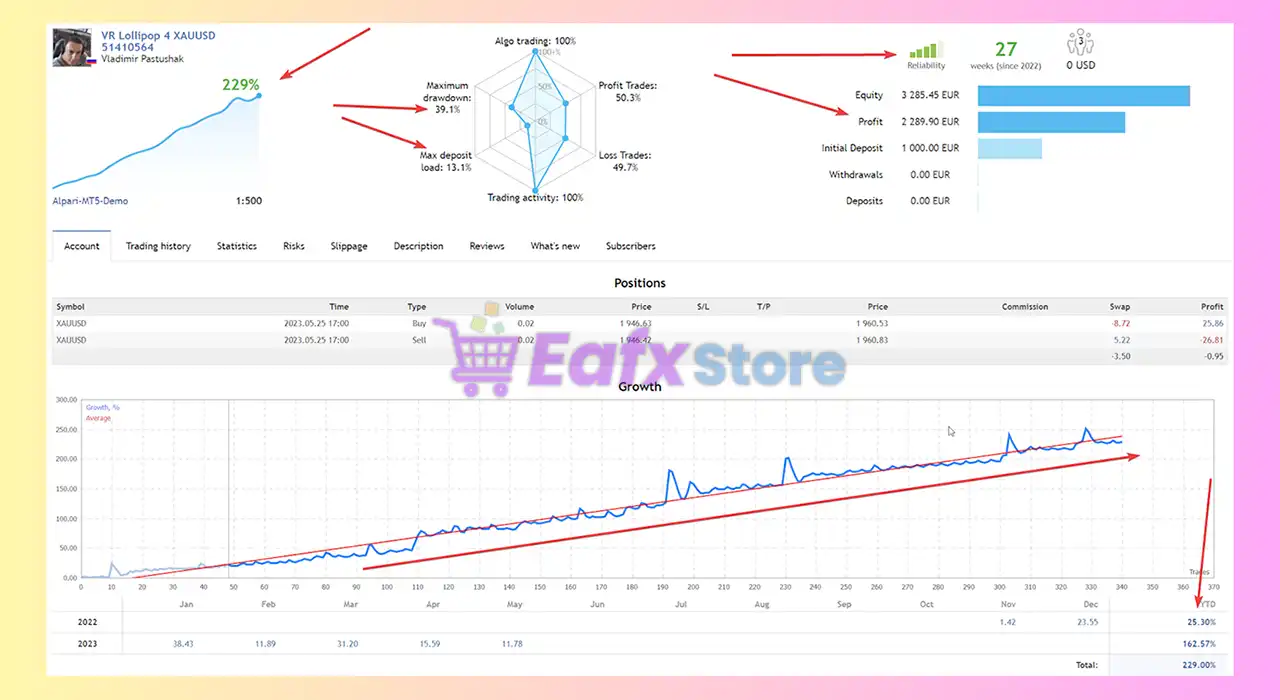
🧩 Entry Logic & Profit Settings
🔹 New Bar Trading
- Timeframe: 1 Hour
📌 Analysis:
Trades are evaluated once per new H1 candle, reducing market noise and avoiding overtrading. This makes the EA more stable and systematic.
🔹 Distance Calculation
- Method: Distance in points
- Distance Value:
700 points
📌 Analysis:
This is a wide grid spacing, meaning new trades are placed far apart. This reduces trade frequency and drawdown but requires patience.
📌 Suitable for volatile instruments and trend-prone markets.
🔹 Profit & Breakeven Targets
- Profit to the Plus:
30 points - Breakeven:
30 points
📌 Analysis:
Once price moves 30 points in favor, the EA:
- Locks in breakeven
- Begins profit protection
This is a tight and efficient profit control mechanism, ideal for short-term market swings.
🧩 Trailing Stop Strategy
🔹 Trailing Stop Type
- Mode: Dynamic
- Potential Trend Size:
12000 points - Maximum Trailing %:
90% - Global Trailing Stop:
0(Disabled)
📌 Analysis:
The EA uses dynamic trailing stops based on trend strength, allowing profits to run while still protecting equity.
- Large potential trend size = suited for strong, sustained trends
- 90% trailing allows deep pullbacks before exit
This feature enhances profit maximization in trending markets.
🧩 Money Management (MM) Settings
🔹 Close All Positions Condition
- Value:
0.0(Disabled)
📌 Analysis:
There is no equity-based global stop or take profit. Trades are closed based on internal logic (TP, breakeven, trailing stop).
⚠️ This increases dependency on market behavior and requires adequate margin.
🔹 Post-Closure Action
- Action: Close all positions & stop the EA
📌 Analysis:
Once a global closure event happens (manual or condition-based), the EA stops trading, preventing revenge or re-entry trades.
🧩 Notifications & Interface Settings
- Info Panel Size:
30 - All Notifications: Disabled
- Magic Number:
227 - Slippage:
30 - Order Comments: Enabled
📌 Analysis:
This is a clean, minimalistic operational setup:
- Proper trade identification via Magic Number
- Slippage tolerance suitable for volatile assets
- No distractions from notifications
🧩 Technical & Price Formatting Settings
- Price Digits (0.5 pricing):
500 - Price Digits (0.4 pricing):
50
📌 Analysis:
These settings ensure correct price calculation across brokers with different decimal formats, improving execution accuracy.
🧩 Final Conclusion
The VR Lollipop MT5 settings shown in the image represent a moderately conservative, trend-aware automated trading strategy with controlled grid expansion and advanced trailing stop logic.
➡️ Key Strengths:
✔ Fixed initial lot with controlled multiplier
✔ Wide grid spacing reduces overtrading
✔ Dynamic trailing stop for trend capture
✔ New-bar (H1) execution for stability
✔ Built-in breakeven protection
➡️ Potential Risks:
⚠️ Martingale multiplier increases drawdown risk
⚠️ No equity-based stop loss
⚠️ Spread filtering disabled
➡️ Best Suited For:
- Traders seeking stable MT5 automation
- Medium-sized accounts with sufficient margin
- Trending or semi-volatile markets
- Long-term EA deployment with monitoring