
🔄 CyNera EA Overview
CyNera MT4 is a revolutionary Expert Advisor (EA) designed to optimize Gold trading. Powered by cutting-edge Neural Network Technology, CyNera thoroughly analyzes market data, predicts price movements and executes trades with pinpoint accuracy.
Whether you're an experienced trader or just starting out, CyNera’s adaptive strategies and sophisticated risk management tools make it an ideal solution for anyone looking to thrive in the dynamic Gold market. With its intuitive interface, CyNera offers automation and intelligence for consistent and profitable trading.
🔄 Installation panel parameters
Here’s a detailed analysis of the CyNera MT4 v4.55 Expert Advisor (EA) settings:
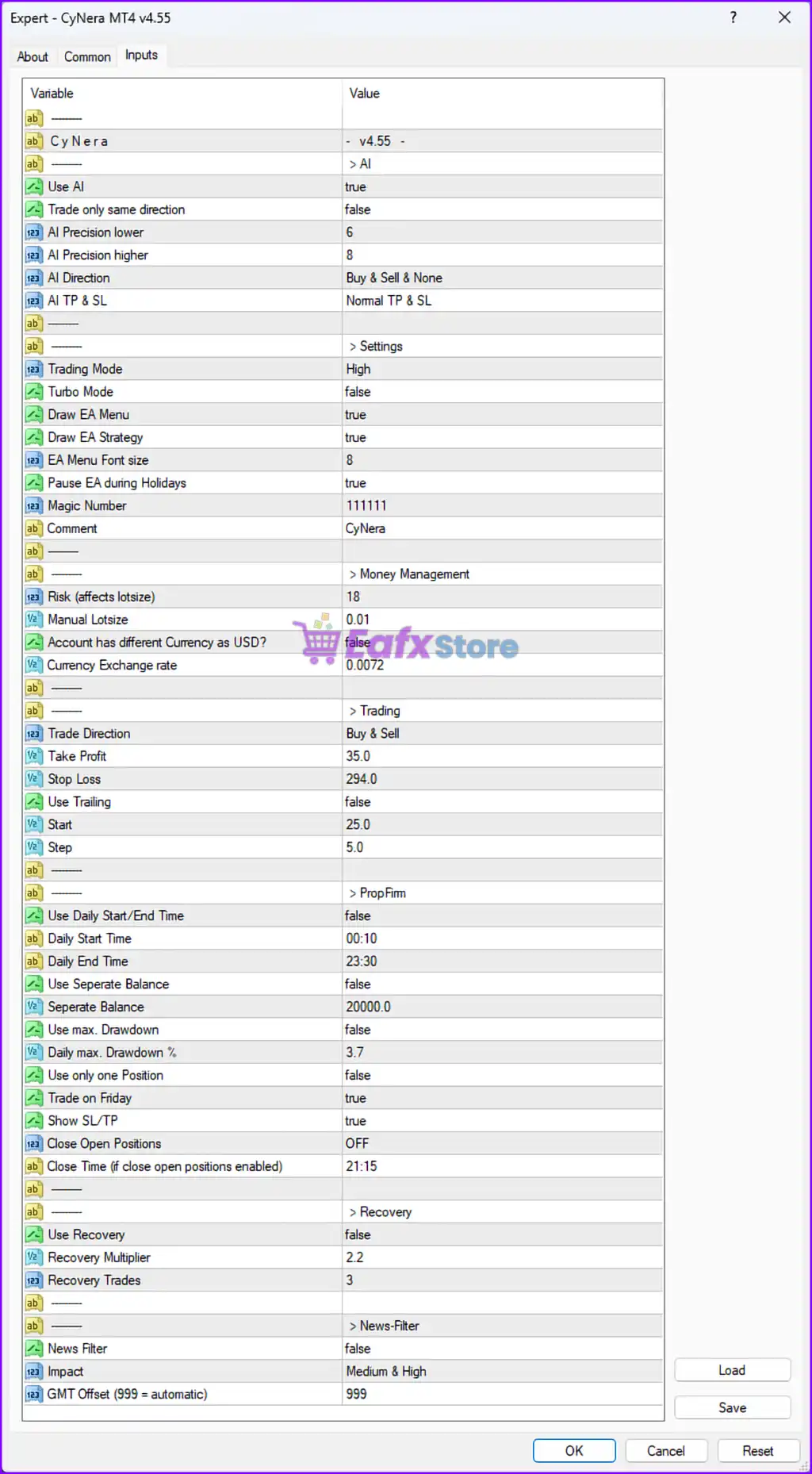
1. General Information:
- EA Name: CyNera MT4 v4.55 - The name and version of the EA.
- Use AI: true - The EA leverages Artificial Intelligence (AI) for trading decisions.
- AI Precision Lower: 6 - Indicates the lower threshold for AI precision. Affects sensitivity to signals.
- AI Precision Higher: 8 - Specifies the upper threshold for AI precision, ensuring stricter conditions for trade entries.
- AI Direction: Buy & Sell & None - The AI operates in all directions: buying, selling, or no trades depending on conditions.
- AI TP & SL: Normal TP & SL - Uses standard Take Profit (TP) and Stop Loss (SL) levels.
2. General Settings:
- Trading Mode: High - Indicates a high-risk trading strategy or aggressive trade frequency.
- Turbo Mode: false - Turbo mode is disabled, suggesting normal-speed processing.
- Draw EA Menu: true - Displays the EA control panel on the chart.
- EA Menu Font Size: 8 - Sets the font size for the on-screen menu.
- Pause EA during Holidays: true - The EA stops trading during holidays, reducing exposure to low-liquidity conditions.
- Magic Number: 1111111 - A unique identifier for trades executed by this EA.
- Comment: CyNera - Orders executed by the EA will include this comment.
3. Money Management:
- Risk (affects lotsize): 18 - Specifies the risk level for position sizing. Higher values indicate more risk.
- Manual Lotsize: 0.01 - The fixed lot size if automatic lot sizing is not used.
- Account has different Currency as USD?: false - Indicates that the account’s base currency is USD.
- Currency Exchange Rate: 0.0072 - Sets the exchange rate for non-USD accounts (not applicable here).
4. Trading Settings:
- Trade Direction: Buy & Sell - Allows both buying and selling opportunities.
- Take Profit: 35.0 - Sets the TP level at 35 pips.
- Stop Loss: 294.0 - Sets the SL level at 294 pips, creating a high-risk reward ratio.
- Use Trailing: false - Trailing stops are disabled.
- Start: 25.0, Step: 5.0 - Likely used for grid or step-based strategies, controlling the distance between trades.
5. Prop Firm Settings:
- Use Daily Start/End Time: false - Disables time-based trading windows.
- Daily Start Time: 00:10, Daily End Time: 23:30 - Defines the daily trading window if enabled.
- Use Separate Balance: false - Trades with the full account balance instead of a defined balance.
- Separate Balance: 20,000.0 - Specifies the balance to be used for trading when the "Use Separate Balance" option is enabled.
- Use max. Drawdown: false - Disables drawdown protection for prop firm accounts.
- Daily max. Drawdown %: 3.7 - Limits daily drawdown to 3.7% if enabled.
6. Recovery Settings:
- Use Recovery: false - Disables recovery trading, which typically attempts to recover losses with increased lot sizes.
- Recovery Multiplier: 2.2 - Lot sizes for recovery trades would be increased by a factor of 2.2 (if enabled).
- Recovery Trades: 3 - Limits the number of recovery trades to 3.
7. News Filter Settings:
- News Filter: false - Disables the news filter, so the EA will trade during news events.
- Impact: Medium & High - If enabled, the filter would exclude trading during medium- and high-impact news events.
- GMT Offset: 999 - The EA automatically detects the server's GMT offset.
8. Other Settings:
- Show SL/TP: true - Displays TP and SL levels on the chart for transparency.
- Close Open Positions: OFF - The EA will not automatically close all positions.
- Close Time (if close open positions enabled): 21:15 - The specified time for closing open positions (if enabled).
- Trade on Friday: true - Allows trading on Fridays, which is riskier due to weekend gaps.
🔄 How to set up CyNera EA
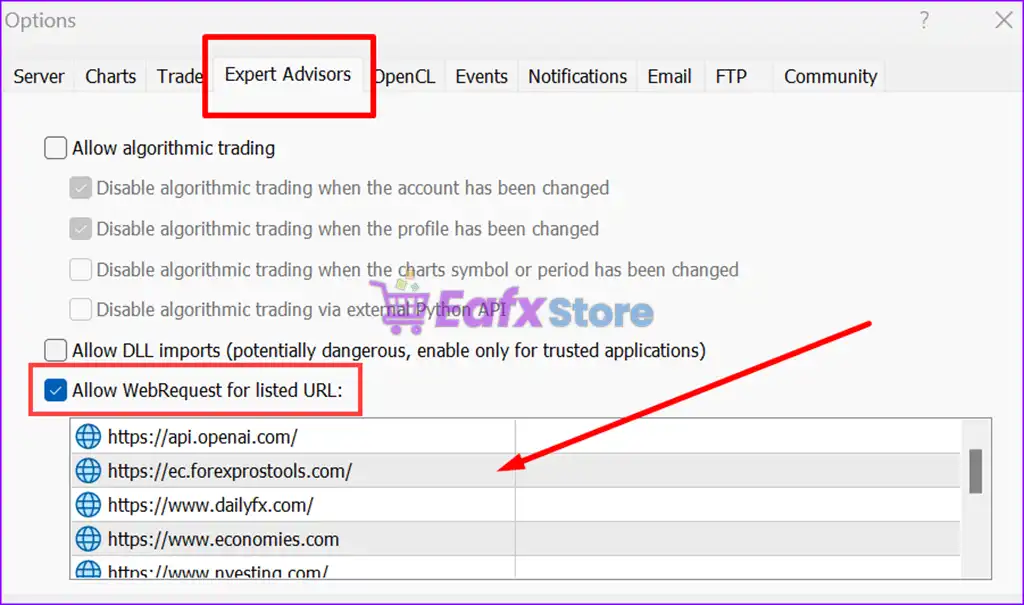
First, before adding the EA to the Chart, please open your Metatrader, navigate to “Tools” -> “Options” and click on “Expert Advisors“.
Please activate “Allow WebRequest for listed URL” and add following URLs:
- https://nfs.faireconomy.media
- https://api.openai.com/
- https://ec.forexprostools.com/
- https://smartfx.com/
- https://www.dailyfx.com/
- https://www.economies.com
- https://www.investing.com/
- https://www.myfxbook.com
- https://www.worldtimeserver.com
- https://www.xe.com
1. GPT Model:
- Each GPT model has its own strategy. The strategies differ and can also be tested first before deciding for a model. The strategies are in the EA, with the setting "Chat GPT Function" you can determine how the Chat GPT should interact with the strategies.
2. AI Level:
- Represents the risk for the respective trades, which also influences the lot size. The higher the level, the greater the risk but also the profit.
3. AI Aggressivity:
- This influences the "aggressiveness" of the strategy. It is currently only possible with model GPT-4o. The greater the aggressiveness, the more aggressive the trades are triggered. Hedging can occur and the lot size can also increase when trading.
On aggressivity "No .." there will be only 1 trade at the same time.
4. Chat GPT Function:
- This setting sets the chat GPT, whether it should function as a simple helper or as a "filter" or even as a full assistant.
- Advisor only: Chat GPT provides a brief analysis and does not interfere in the strategies and trades. This serves as a simple info.
- Filter: After the analysis, the Chat GPT will check whether the next trade should really be triggered or not. It functions as a "filter", so to speak, and can therefore prevent some trades in live trading.
- Trade Assistant: After the analysis, the Chat GPT will check whether the next trade is going in the right direction. If it is not, the Chat GPT can simply change or omit the trade. With this setting the Chat GPT can not only prevent the trades but also change them.
5. Prop Firm:
- This setting is used for the Prop Firm accounts. If this is desired, simply set it to "true" and the EA is automatically set to support Prop Firm. You can also adjust the aggressiveness, but this is not a must.
- For lowest risk, just set the Aggressivity level to "No Aggressivity" after enabling the Prop Firm setting.
🔄 Analysis and Recommendations
- Risk Management:
- The SL of 294 pips is significantly higher than the TP of 35 pips, creating an unfavorable risk-to-reward ratio. Consider adjusting these levels for better balance.
- With a risk level of 18, ensure sufficient equity to avoid over-leveraging.
- AI Features:
- The use of AI adds flexibility, but the effectiveness depends on the precision thresholds. Monitor the lower and higher precision settings to match market conditions.
- News Trading:
- The news filter is disabled, meaning the EA will trade during volatile periods. If risk-averse, consider enabling the news filter for medium- and high-impact events.
- Trading Mode:
- The "High" trading mode suggests aggressive strategies. Test the EA in a demo account before live trading to understand its risk profile.
- Recovery Mode:
- Recovery is disabled by default. If enabled, the recovery multiplier of 2.2 could lead to significant drawdowns during losing streaks. Use with caution.
- Prop Firm Compatibility:
- While the EA has prop firm-specific settings, such as drawdown limits and separate balances, these are disabled by default. Enable and configure them if trading on a funded account.
- Daily Time Management:
- Trading is not restricted by time. If market hours matter to your strategy, enable the "Daily Start/End Time" feature.
🔄 Conclusion
CyNera EA is a powerful and innovative trading solution, designed to elevate your Gold (XAUUSD) trading experience to new heights. Leveraging cutting-edge Neural Network Technology, CyNera EA delivers impressive results in both live trading and backtesting. With an initial deposit of just $100, it achieved a remarkable +104.04% profit over three months, showcasing its ability to generate significant returns while maintaining a low risk level. Similarly, backtests with starting capitals of $500 and $1,000 resulted in extraordinary profits, reinforcing its potential for consistent success.
CyNera EA's sophisticated AI-driven strategies, along with its multi-timeframe analysis, allow for precise and adaptive trading. Traders can rely on the system’s automation to optimize profits and minimize risks, ensuring a smooth trading journey. With a user-friendly interface and extensive customization options, CyNera EA caters to both novice and experienced traders. Its impressive winning rate, robust risk management, and adaptability make it a trusted choice for those looking to excel in the volatile Gold market.
For traders seeking a high-performance automated trading system with proven results, CyNera EA offers the ideal solution. Whether you are looking to enhance your trading strategy or fully automate your trading process, CyNera EA is a reliable partner to achieve your financial goals.