

This guide walks through the inputs of Alien Mattrix EA MT4 with the values recommended for live trading. The set files that come with the EA already contain these settings, so you can load them in one click and adjust only what your broker or account needs.
🔢 Alien Mattrix EA – Complete Settings Guide for Smart Grid Forex Trading
Alien Mattrix EA is an automated Forex trading Expert Advisor (EA) designed for MetaTrader platforms with advanced grid trading, smart distance calculations, hidden stop systems, and time-based trade management.
The EA combines intelligent order spacing, customizable filters, holiday protection, and stealth trading functions to help traders automate their trading strategies efficiently while maintaining flexible risk management controls.
🔢 Alien Mattrix EA Settings Explained
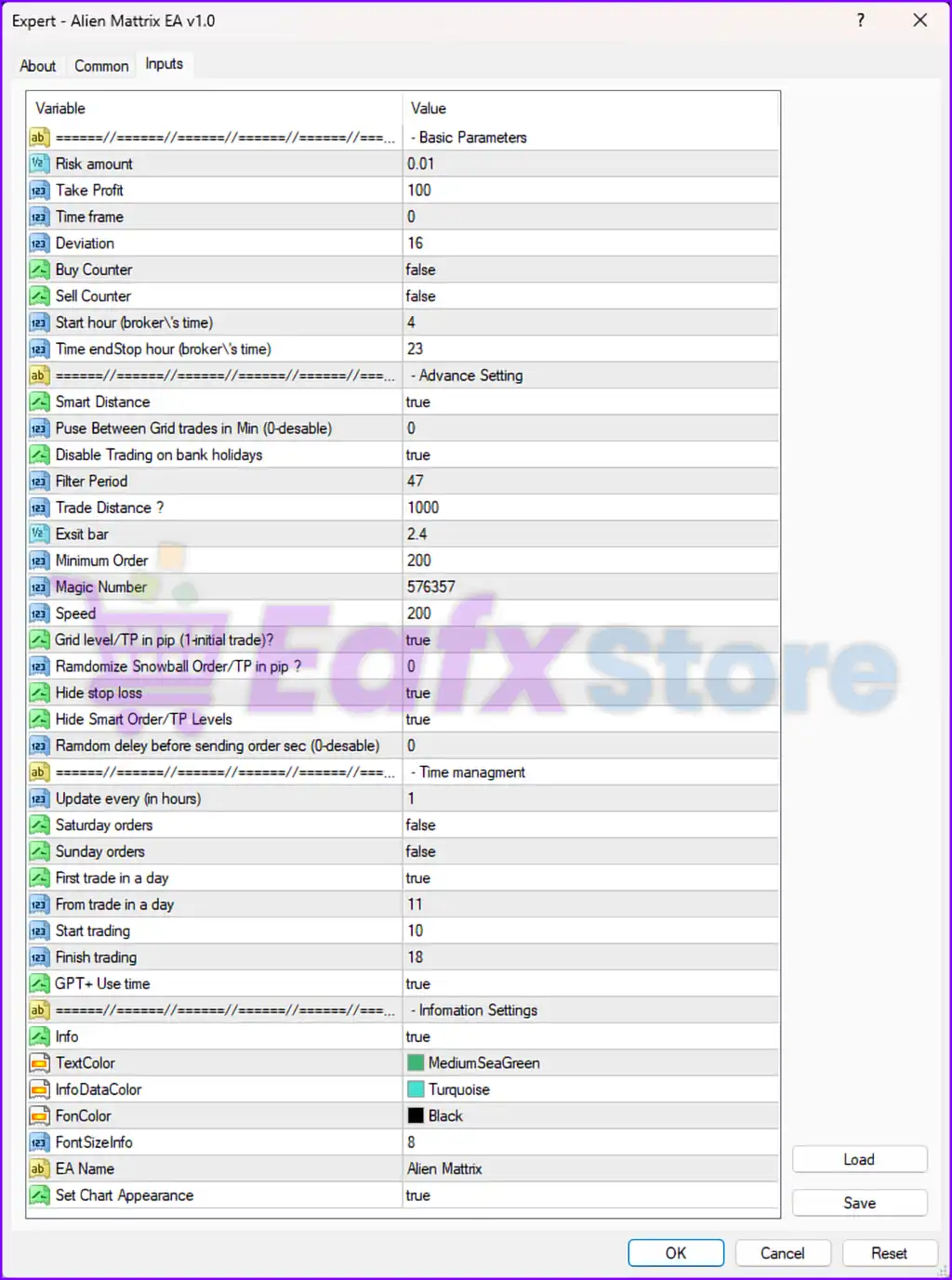
Below are the details of the parameters in the advisor’s trading system settings table:
🔶 Basic Parameters
🔹 Risk amount = 0.01 — Sets the trading risk amount or initial lot risk value to 0.01.
🔹 Take Profit = 100 — Defines the Take Profit target at 100 points.
🔹 Time frame = 0 — Uses the current chart timeframe for trading operations.
🔹 Deviation = 16 — Sets the maximum allowed slippage/deviation to 16 points.
🔹 Buy Counter = false — Disables counter-trend Buy trading mode.
🔹 Sell Counter = false — Disables counter-trend Sell trading mode.
🔹 Start hour (broker's time) = 4 — Begins trading at broker server time 04:00.
🔹 Time endStop hour (broker's time) = 23 — Stops trading operations at broker server time 23:00.
🔶 Advance Settings
🔹 Smart Distance = true — Enables intelligent distance calculation between trades.
🔹 Pause Between Grid trades in Min (0-disable) = 0 — No delay between grid trades because the value is set to 0.
🔹 Disable Trading on bank holidays = true — Prevents trading during bank holidays.
🔹 Filter Period = 47 — Uses filter period value 47 for market condition calculations.
🔹 Trade Distance ? = 1000 — Sets the minimum distance between trades to 1000 points.
🔹 Exist bar = 2.4 — Defines the exit bar/filter value at 2.4.
🔹 Minimum Order = 200 — Sets the minimum order threshold to 200.
🔹 Magic Number = 576357 — Assigns the unique Magic Number 576357 to identify EA trades.
🔹 Speed = 200 — Defines execution or order management speed value as 200.
🔹 Grid level/TP in pip (1-initial trade)? = true — Enables Grid level and Take Profit calculations based on pip values.
🔹 Randomize Snowball Order/TP in pip ? = 0 — Disables randomization for snowball orders and TP settings.
🔹 Hide stop loss = true — Uses hidden Stop Loss levels instead of broker-visible stops.
🔹 Hide Smart Order/TP Levels = true — Hides smart order and Take Profit levels from the broker.
🔹 Random delay before sending order sec (0-disable) = 0 — Disables random execution delay because the value is 0.
🔶 Time Management Settings
🔹 Update every n (hours) = 1 — Updates EA calculations every 1 hour.
🔹 Saturday orders = false — Disables trading on Saturdays.
🔹 Sunday orders = false — Disables trading on Sundays.
🔹 First trade in a day = true — Allows only the first trading condition of the day.
🔹 From trade in a day = 11 — Defines the starting trade count/time parameter as 11.
🔹 Start trading = 10 — Starts active trading at 10:00.
🔹 Finish trading = 18 — Stops active trading at 18:00.
🔹 GPT+ Use time = true — Enables time-based operational logic for GPT+ mode.
🔶 Information Settings
🔹 Info = true — Displays trading information panel on the chart.
🔹 TextColor = MediumSeaGreen — Uses MediumSeaGreen as the primary text color.
🔹 InfoDataColor = Turquoise — Uses Turquoise for information data display.
🔹 FonColor = Black — Uses Black as the panel font/background color.
🔹 FontSizeInfo = 8 — Sets the information panel font size to 8.
🔹 EA Name = Alien Mattrix — Displays the Expert Advisor name as Alien Mattrix.
🔹 Set Chart Appearance = true — Automatically customizes the chart appearance when the EA is attached.
🔢 Conclusion
Alien Mattrix EA is a sophisticated grid-based Forex trading robot that combines smart trade distance calculations, hidden Stop Loss systems, time-based trading controls and broker protection features.
With advanced automation tools such as smart distance logic, hidden TP/SL management, and holiday filters, the EA offers traders a flexible and intelligent solution for automated Forex trading.
🔢 FAQs
❓ What is Alien Mattrix EA?
Alien Mattrix EA is an automated Forex trading Expert Advisor designed with grid trading and smart order management systems.
❓ Does Alien Mattrix EA use hidden Stop Loss levels?
Yes, the EA supports hidden Stop Loss and hidden Take Profit management.
❓ Can Alien Mattrix EA avoid trading during holidays?
Yes, the EA includes bank holiday filters and weekend trading restrictions.
❓ What does Smart Distance do in Alien Mattrix EA?
Smart Distance dynamically manages the spacing between trades based on market conditions.
❓ Does Alien Mattrix EA support grid trading?
Yes, the EA includes grid trading functionality with configurable trade distance and order management controls.
Get Alien Mattrix EA MT4
Download Alien Mattrix EA MT4 with its set files, read the full product details and requirements here: Alien Mattrix EA MT4 →