
🧩 What is Cent Builder EA?
Cent Builder EA is a grid / position-building Expert Advisor (EA) designed mainly for cent accounts, focusing on controlled lot scaling, optional hedging, and partial recovery mechanisms.
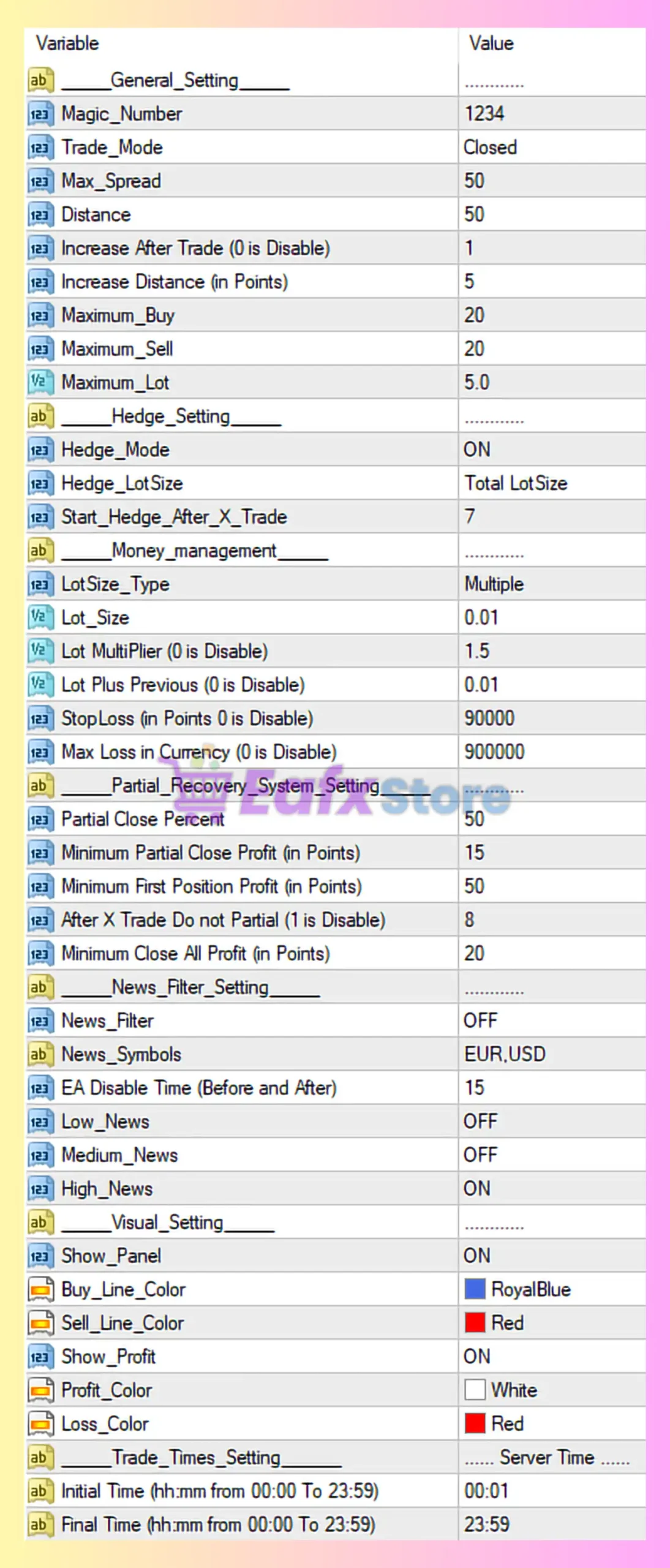
🧩 General Trading Settings
| Parameter | Value | Explanation |
|---|---|---|
| Magic_Number | 1234 | Unique identifier to distinguish EA trades from others |
| Trade_Mode | Closed | EA will not open new trades unless enabled |
| Max_Spread | 50 | EA avoids trading if spread exceeds 50 points |
| Distance | 50 | Base distance between grid orders |
| Increase After Trade | 1 | Distance increases after each new trade |
| Increase Distance (Points) | 5 | Adds 5 points spacing per additional trade |
| Maximum_Buy | 20 | Maximum number of Buy positions |
| Maximum_Sell | 20 | Maximum number of Sell positions |
| Maximum_Lot | 5.0 | Caps total lot exposure |
Assessment:
✔ Good protection via spread filter and max lot
⚠ Grid depth up to 20 trades can be risky in strong trends
🧩 Hedge Settings
| Parameter | Value | Explanation |
|---|---|---|
| Hedge_Mode | ON | Enables hedging to reduce drawdown |
| Hedge_LotSize | Total LotSize | Hedge lot equals total open exposure |
| Start_Hedge_After_X_Trade | 7 | Hedging begins after 7 grid trades |
Assessment:
✔ Smart hedging trigger after drawdown develops
⚠ Full-size hedge can freeze equity if market trends strongly
🧩 Money Management Settings
| Parameter | Value | Explanation |
|---|---|---|
| LotSize_Type | Multiple | Uses progressive lot scaling |
| Lot_Size | 0.01 | Initial lot size (cent-account friendly) |
| Lot_Multiplier | 1.5 | Each new trade increases lot by 1.5x |
| Lot Plus Previous | 0.01 | Adds fixed lot increment |
| StopLoss (Points) | 90000 | Effectively disabled |
| Max Loss in Currency | 900000 | Practically unlimited drawdown |
Assessment:
✔ Designed for cent accounts
❌ No real stop-loss → high risk in runaway markets
🧩 Partial Recovery System Settings
| Parameter | Value | Explanation |
|---|---|---|
| Partial Close Percent | 50 | Closes 50% of positions |
| Minimum Partial Close Profit | 15 | Minimum profit before partial close |
| Minimum First Position Profit | 50 | First trade must be profitable |
| After X Trade Do Not Partial | 8 | Stops partial closes after 8 trades |
| Minimum Close All Profit | 20 | Profit threshold to close all trades |
Assessment:
✔ Helps reduce drawdown gradually
✔ Intelligent partial exit logic
⚠ Less effective in one-directional trends
🧩 News Filter Settings
| Parameter | Value | Explanation |
|---|---|---|
| News_Filter | OFF | News filtering disabled |
| News_Symbols | EUR,USD | Symbols monitored |
| EA Disable Time | 15 | Pause before/after news (minutes) |
| Low_News | OFF | Low-impact ignored |
| Medium_News | OFF | Medium-impact ignored |
| High_News | ON | High-impact enabled (but filter OFF) |
Assessment:
⚠ News filter is OFF → EA may trade during major news
✔ High-impact filter ready if enabled
🧩 Visual Settings
| Parameter | Value | Explanation |
|---|---|---|
| Show_Panel | ON | Displays EA dashboard |
| Buy_Line_Color | RoyalBlue | Buy level visualization |
| Sell_Line_Color | Red | Sell level visualization |
| Show_Profit | ON | Displays floating profit |
| Profit_Color | White | Profit text color |
| Loss_Color | Red | Loss text color |
Assessment:
✔ Clean and user-friendly chart display
🧩 Trading Time Settings
| Parameter | Value | Explanation |
|---|---|---|
| Initial Time | 00:01 | Trading starts at midnight |
| Final Time | 23:59 | Trades all day |
| Server Time | Broker Time | Uses broker server time |
Assessment:
✔ Full-day trading enabled
⚠ No session filter → higher exposure
🧩 Conclusion
Cent Builder EA MT4 – Configuration Verdict
✅ Suitable for cent accounts.
✅ Strong grid + hedging + partial recovery logic.
⚠ No hard stop-loss = high drawdown risk.
⚠ Not recommended for small standard accounts.
⚠ Requires stable broker & low spread.
🔶 Best Use Case:
- Cent account.
- Low leverage (1:200 or lower).
- Pairs with ranging behavior (EURUSD, AUDUSD).
- Manual monitoring advised.
🔶 Risk Level:
🔴 Medium to High (depending on market conditions).