

🧩 What is Forex Envy EA MT4?
Forex Envy EA is a grid-based automated trading system designed to manage multiple positions in a basket-style strategy. It focuses on progressive order levels, lot multipliers, basket take profit, and time-based trading control. This EA is suitable for traders who understand grid trading and want a flexible framework to build a customized recovery and profit system.
📌📌📌 Buy this unlimited Forex Envy EA MQ4 product here 📌📌📌
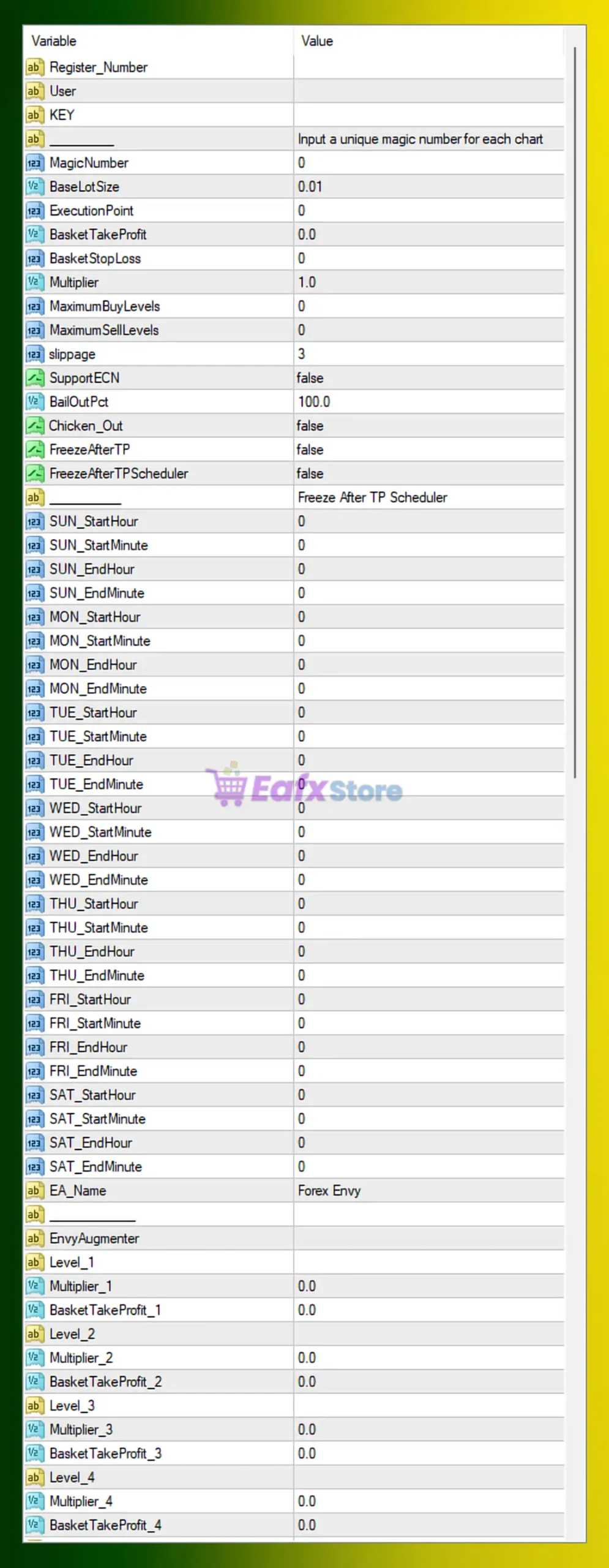
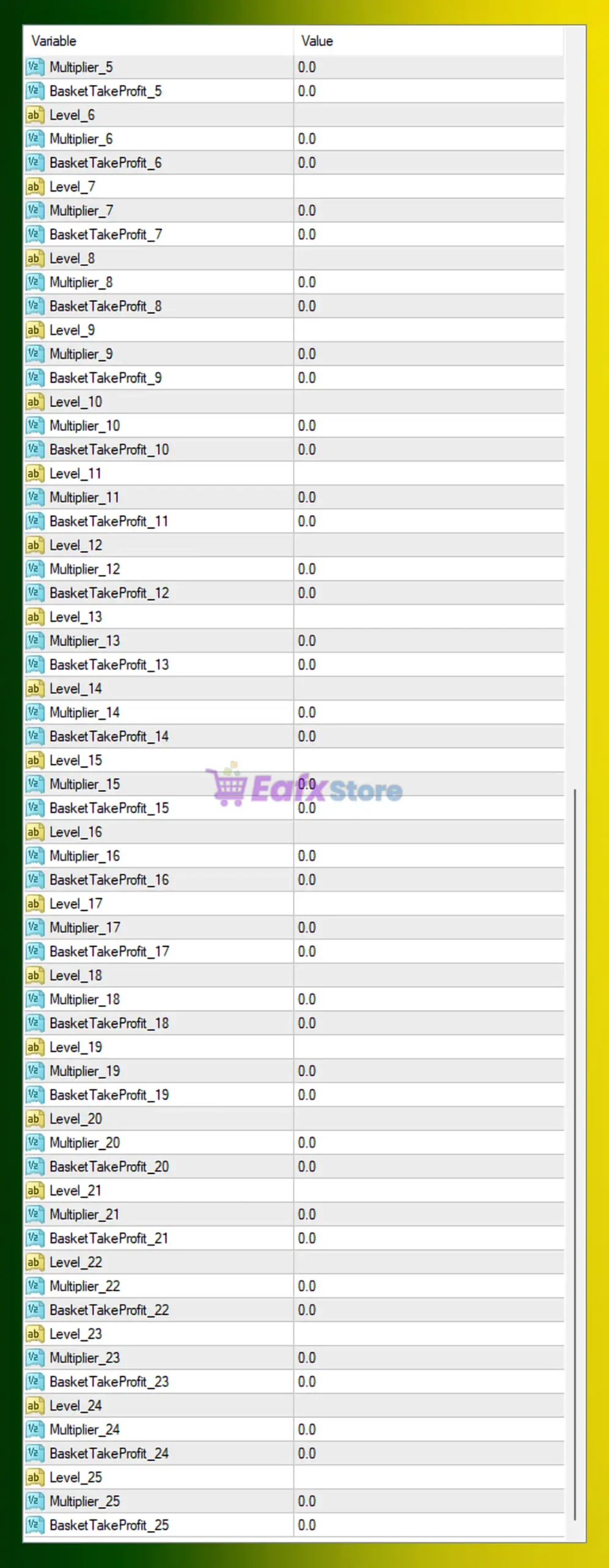
The configuration shown in the images represents a neutral and highly customizable setup, where most advanced grid levels are currently inactive. This allows traders to manually design how the EA behaves at each recovery level.
🔧 Core Trading & Risk Settings
| Parameter | Value | Description | Trading Impact |
|---|---|---|---|
EA_Name | Forex Envy | EA identification | Easy management |
MagicNumber | 0 | Unique order ID | Should be set per chart |
BaseLotSize | 0.01 | Starting lot size | Very safe for small accounts |
ExecutionPoint | 0 | Entry offset | Default execution |
BasketTakeProfit | 0.0 | Global TP for all trades | Disabled |
BasketStopLoss | 0 | Basket-level SL | Disabled |
Multiplier | 1.0 | Global lot multiplier | No martingale |
MaximumBuyLevels | 0 | Max Buy grid levels | Unlimited |
MaximumSellLevels | 0 | Max Sell grid levels | Unlimited |
Slippage | 3 | Allowed slippage | Standard MT4 |
SupportECN | false | ECN broker mode | Standard execution |
BailOutPct | 100.0 | Emergency equity close | Very high threshold |
Chicken_Out | false | Panic exit | Disabled |
FreezeAfterTP | false | Pause after TP | Disabled |
FreezeAfterTPScheduler | false | Time-based pause | Disabled |
This configuration emphasizes manual control and flexibility, allowing traders to define their own grid depth and recovery behavior.
⏰ Trading Schedule Control
Forex Envy EA provides per-day session control, allowing precise timing:
| Day | Start | End |
|---|---|---|
| Sunday – Saturday | 00:00 | 00:00 |
All values are set to 0, meaning no time restrictions. The EA can trade 24/7 unless modified. Traders can limit activity to specific sessions (e.g., London or New York) for better performance and lower spread.
🔄 Grid Levels & Basket Logic
Forex Envy EA uses Level-based configuration:
Each level contains:
Level_XMultiplier_XBasketTakeProfit_X
Example:
| Level | Multiplier | Basket TP |
|---|---|---|
| Level_1 | 0.0 | 0.0 |
| Level_2 | 0.0 | 0.0 |
| … | … | … |
| Level_25 | 0.0 | 0.0 |
Since all values are 0.0, the EA is currently in a passive / base mode:
- No progressive lot increase
- No per-level basket take profit
- No structured grid recovery
This makes the EA extremely safe but also inactive in recovery logic. Traders must manually define these values to enable true grid behavior.
📊 Strategy & Risk Profile
With the current settings:
- Base lot is very small (
0.01) - No martingale or lot multiplication
- No basket TP or SL
- Unlimited grid potential (but inactive)
- No time filter
- Emergency bailout only at 100% equity loss
This means Forex Envy EA is configured as a framework, not an aggressive trading system. It is ideal for:
- Advanced users who want to design their own grid logic
- Developers testing custom recovery structures
- Traders who prefer extreme safety before enabling risk
🧩 Conclusion
The Forex Envy EA MT4 configuration shown in the images represents a neutral and highly flexible grid framework rather than an aggressive trading system. With:
BaseLotSize = 0.01- All
Multiplier_XandBasketTakeProfit_Xset to0.0 - No basket Stop Loss or Take Profit
- No time restriction
the EA operates in a very conservative mode with minimal automation logic.
To turn Forex Envy into a functional grid EA, traders should define:
| Setting | Suggested Starting Value |
|---|---|
Multiplier | 1.2 – 1.4 |
MaximumBuyLevels | 5 – 8 |
MaximumSellLevels | 5 – 8 |
BasketTakeProfit | 5 – 20 (pips or money) |
BailOutPct | 15 – 25 |
With proper tuning, Forex Envy EA becomes:
A customizable grid-based MT4 trading robot capable of controlled recovery, basket management, and long-term automated Forex trading.
Forex Envy is best suited for traders who want full control over grid logic and prefer to build their own risk model rather than rely on fixed presets.