

Are you looking to understand or optimize the FundedEA Apex settings for prop firm challenges like FTMO, Apex, MyForexFunds, or others?
Below is a complete guide and detailed explanation of all parameters shown in your EA input tab, with clear insights into how each affects trading performance.
📌📌📌 Buy this unlimited FundedEA Apex MT4 product here 📌📌📌
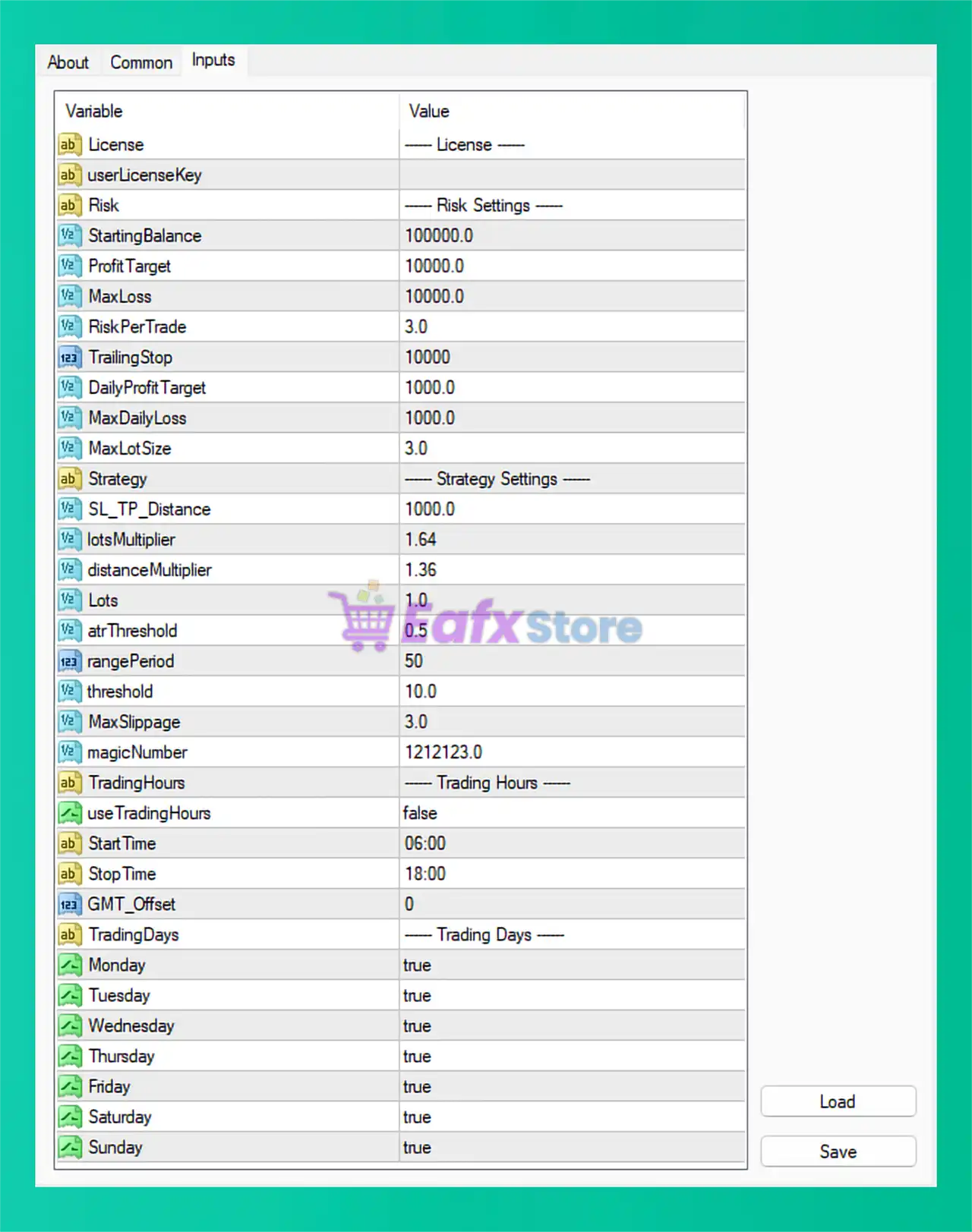
🛡️ 1. Risk Settings
| Parameter | Value | Description |
|---|---|---|
StartingBalance | 100000.0 | Initial account balance. Standard for most prop firm challenges. |
ProfitTarget | 10000.0 | Target profit to pass the challenge. 10% gain aligns with Apex/FTMO Phase 1 rules. |
MaxLoss | 10000.0 | Maximum total loss allowed. A 10% drawdown cap to avoid disqualification. |
RiskPerTrade | 3.0 | Risk 3% of balance per trade. Aggressive setting suitable for fast challenge passing. |
TrailingStop | 10000 | High trailing stop in points. Gives trades breathing room and avoids early exits. |
DailyProfitTarget | 1000.0 | Daily goal of $1,000 profit. A 1% benchmark per day to steadily reach the main target. |
MaxDailyLoss | 1000.0 | Caps daily loss at $1,000. Prevents breaching daily loss limits imposed by most prop firms. |
MaxLotSize | 3.0 | Maximum lot size allowed per position. Limits exposure and prevents over-leveraging. |
🟢 Summary: These parameters are specifically tailored for prop firm risk compliance while offering flexibility to reach profit targets quickly.
📈 2. Strategy Settings
| Parameter | Value | Explanation |
|---|---|---|
Strategy | (not named) | Placeholder or internal logic. This could refer to a predefined strategy inside the EA. |
SL_TP_Distance | 1000.0 | Distance in points between stop loss and take profit. A wide SL/TP setup indicates a trend-following strategy. |
lotsMultiplier | 1.64 | Scales lot size dynamically based on signal strength or market condition. |
distanceMultiplier | 1.36 | Adjusts SL/TP distance based on market volatility. |
Lots | 1.0 | Base trading volume used before applying multipliers. |
atrThreshold | 0.5 | Uses Average True Range (ATR) to filter trade entries during low volatility. |
rangePeriod | 50 | Period (in candles) for calculating price range or volatility. |
threshold | 10.0 | Entry trigger threshold; trade is opened if signals exceed this value. |
MaxSlippage | 3.0 | Protects against high slippage in volatile markets. |
magicNumber | 1212123.0 | Unique identifier for EA trades; important for managing multiple EAs or sessions. |
💡 Insight: This setup is likely based on breakout or volatility-based strategies with dynamic scaling and built-in risk filters to control overtrading.
⏰ 3. Trading Hours Configuration
| Parameter | Value | Explanation |
|---|---|---|
useTradingHours | false | The EA is allowed to trade all day without time restrictions. |
StartTime / StopTime | 06:00 / 18:00 | Defined but inactive due to useTradingHours = false. |
GMT_Offset | 0 | Time zone reference for brokers using GMT time. |
📌 Note: Disabling trading hours can be beneficial for 24/5 strategies but might expose trades to high volatility during news events or rollovers.
📅 4. Trading Days
| Days Active | All Days (Mon–Sun) | The EA is set to trade 7 days a week. |
|---|---|---|
Monday–Sunday | true for all | While most brokers don't allow weekend trading, EA will execute if permitted. |
⚠️ Recommendation: Ensure your broker supports weekend trading if this setting is kept active, or set Saturday/Sunday = false for safety.
✅ Conclusion
The current configuration of FundedEA Apex is prop-firm ready, optimized for challenges like Apex, FTMO, and MFF, with an aggressive yet controlled trading style.
🔍 Key Strengths:
- Aggressive 3% risk per trade helps hit 10% profit fast.
- Daily and total drawdown settings fully comply with prop firm rules.
- Uses volatility filters like ATR and range for smarter entries.
- Dynamic lot sizing and SL/TP adaptation increase trade efficiency.
- Fully automated with all-day and all-week trading enabled.