
This guide walks through the inputs of Gecko EA MT4 with the values recommended for live trading. The set files that come with the EA already contain these settings, so you can load them in one click and adjust only what your broker or account needs.
🔢 Gecko EA MT4 Settings Guide
Gecko EA is an automated trading Expert Advisor designed to manage trade entries, position sizing, Stop Loss, Take Profit, trailing protection, and break-even management through a comprehensive set of configurable parameters. The EA provides dedicated controls for lot calculation, spread filtering, entry timing, pending-order expiration, Friday trading restrictions, and multiple Stop Loss management methods.
With adjustable risk, trade-entry, trailing, and protection settings, Gecko EA MT4 allows traders to configure the trading behavior according to their preferred trading environment and account-management approach.
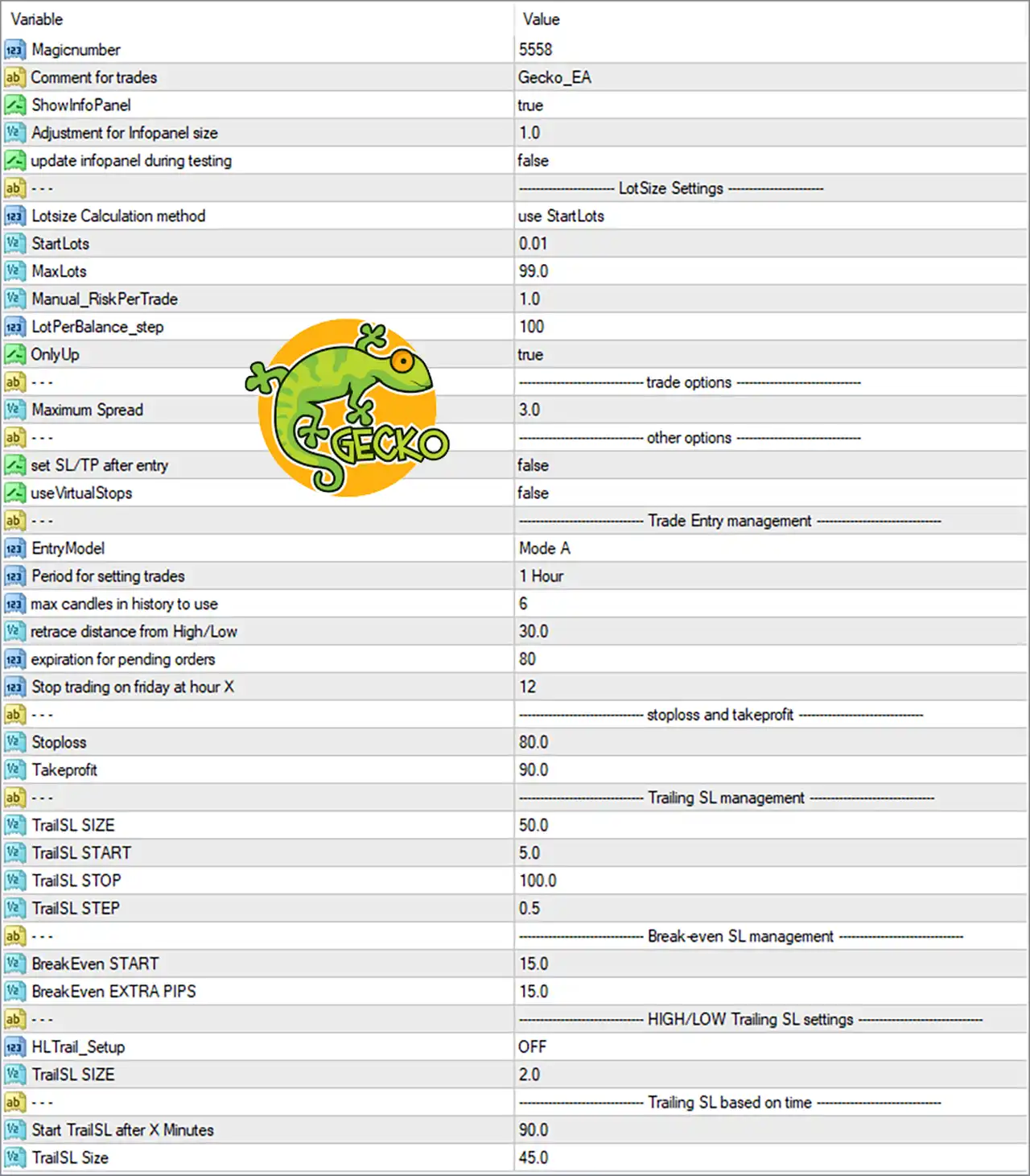
🔢 Gecko EA MT4 Input Settings
General Settings
🔹 Magicnumber = 5558 — Sets the unique Magic Number used by Gecko EA MT4 to identify and manage its own trades separately from other Expert Advisors or manual positions.
🔹 Comment for trades = Gecko_EA — Defines the comment attached to trades opened by the EA, making Gecko EA positions easier to identify in the MT4 terminal.
🔹 ShowInfoPanel = true — Enables the EA information panel on the trading chart, allowing important EA information and operating details to be displayed.
🔹 Adjustment for Inpofiler size = 1.0 — Sets the adjustment factor for the information-panel size, with 1.0 representing the displayed default scale.
🔹 update infopanel during testing = false — Disables continuous information-panel updates during Strategy Tester operation.
LotSize Settings
🔹 Lotsize Calculation method = use StartLots — Selects the StartLots method as the active calculation approach for determining the initial trading lot size.
🔹 StartLots = 0.01 — Sets the starting lot size to 0.01 lots, providing the base volume used by the EA when opening trades.
🔹 MaxLots = 99.0 — Defines the maximum permitted lot size at 99.0 lots, preventing the calculated position volume from exceeding this value.
🔹 Manual_RiskPerTrade = 1.0 — Sets the manual risk-per-trade parameter to 1.0, providing a configurable value for the EA's manual risk calculation mode.
🔹 LotPerBalance_step = 100 — Sets the balance step at 100, which is used by the EA when calculating lot size according to account balance increments.
🔹 OnlyUp = true — Enables the OnlyUp option, allowing the EA to apply its lot-sizing logic in an upward direction according to the selected calculation method.
Trade Options
🔹 Maximum Spread = 3.0 — Limits trading to market conditions where the spread is within the configured maximum value of 3.0.
Other Options
🔹 set SL/TP after entry = false — Disables the option to set Stop Loss and Take Profit after the trade entry has been executed.
🔹 useVirtualStops = false — Disables virtual Stop Loss and Take Profit functionality, so the EA does not use virtual stops through this setting.
⚙️ Trade Entry Management
🔹 EntryModel = Mode A — Selects Mode A as the active entry model for Gecko EA MT4.
🔹 Period for setting trades = 1 Hour — Sets the trading setup period to 1 Hour, meaning the EA uses the 1-hour timeframe as the configured period for establishing trade setups.
🔹 max candles in history to use = 6 — Limits the historical candle data used by the entry logic to 6 candles.
🔹 retrace distance from High/Low = 30.0 — Sets the configured retracement distance from the relevant High/Low level to 30.0.
🔹 expiration for pending orders = 80 — Sets the pending-order expiration parameter to 80, controlling how long pending orders remain active according to the EA's internal logic.
🔹 Stop trading on friday at hour X = 12 — Configures Gecko EA MT4 to stop opening new trades on Friday at hour 12, helping control trading activity toward the end of the trading week.
⚙️ Stop Loss and Take Profit
🔹 Stoploss = 80.0 — Sets the Stop Loss distance to 80.0, defining the configured protective-loss distance for EA trades.
🔹 Takeprofit = 90.0 — Sets the Take Profit distance to 90.0, defining the configured profit-target distance for EA trades.
⚙️ Trailing SL Management
🔹 TrailSL SIZE = 50.0 — Sets the main trailing Stop Loss size to 50.0, controlling the configured trailing distance.
🔹 TrailSL START = 5.0 — Activates the trailing Stop Loss mechanism after the configured condition reaches 5.0.
🔹 TrailSL STOP = 10.0 — Sets the trailing Stop Loss parameter to 10.0, defining the configured protective distance used by the trailing mechanism.
🔹 TrailSL STEP = 0.5 — Sets the trailing Stop Loss adjustment step to 0.5, controlling how frequently the trailing level can be adjusted.
⚙️ Break-Even SL Management
🔹 BreakEven START = 15.0 — Configures break-even activation at 15.0, determining the point at which the EA begins applying its break-even protection logic.
🔹 BreakEven EXTRA PIPS = 15.0 — Adds 15.0 pips beyond the break-even level when the break-even management function is applied.
⚙️ HIGH/LOW Trailing SL Settings
🔹 HLTrail_Setup = OFF — Disables the High/Low-based trailing Stop Loss setup.
🔹 TrailSL SIZE = 2.0 — Sets the High/Low trailing Stop Loss size to 2.0 for this specific trailing configuration.
⚙️ Trailing SL Based on Time
🔹 Start TrailSL after X Minutes = 90.0 — Configures the time-based trailing Stop Loss to start after 90.0 minutes.
🔹 TrailSL Size = 45.0 — Sets the trailing Stop Loss size for the time-based trailing system to 45.0.
🔢 Gecko EA MT4 Risk and Trade Management Overview
The Gecko EA MT4 configuration shown above combines several layers of automated trade management. The StartLots = 0.01 setting establishes the initial position size, while MaxLots = 99.0 defines the upper lot-size limit. The EA also includes a Maximum Spread = 3.0 filter to control trading under wider spread conditions.
For trade protection, the configuration uses Stoploss = 80.0 and Takeprofit = 90.0, together with several optional management mechanisms. The main trailing system uses TrailSL SIZE = 50.0, TrailSL START = 5.0, TrailSL STOP = 10.0, and TrailSL STEP = 0.5. Break-even management is configured with BreakEven START = 15.0 and BreakEven EXTRA PIPS = 15.0.
The EA also provides additional High/Low and time-based trailing controls. In the displayed configuration, HLTrail_Setup = OFF, while the time-based trailing system is configured to start after 90.0 minutes with a TrailSL Size = 45.0.
🔢 Conclusion
Gecko EA MT4 provides a detailed collection of settings for automated trade entry, lot-size calculation, market-condition filtering, Stop Loss, Take Profit, break-even protection, and trailing Stop Loss management. The displayed configuration uses StartLots = 0.01, a Maximum Spread of 3.0, an 80.0 Stop Loss, and a 90.0 Take Profit, while also incorporating multiple trailing and break-even parameters.
Because several protection systems can operate independently, traders should understand how each setting interacts with the EA's entry and position-management logic before changing the default configuration. Testing the selected parameters in the MT4 Strategy Tester and on a demo account can help verify how Gecko EA MT4 behaves under different market conditions.
Get Gecko EA MT4
Download Gecko EA MT4 with its set files, read the full product details and requirements here: Gecko EA MT4 →