

This guide walks through the inputs of Luna AI PRO EA MT4 with the values recommended for live trading. The set files that come with the EA already contain these settings, so you can load them in one click and adjust only what your broker or account needs.
🔢 Luna AI PRO EA MT4 Settings Guide
Luna AI PRO EA is an advanced automated trading Expert Advisor designed to manage multi-pair trading with configurable entry filters, trading sessions, news protection, spread controls, swap filtering, rollover management and dynamic position sizing.
The EA includes dedicated risk-management features such as performance-based lot sizing, maximum historical drawdown adjustment, trade-splitting options, correlation controls, and account-balance-based calculations. Its detailed configuration allows traders to customize how trades are opened, filtered, sized, and managed across different market conditions.
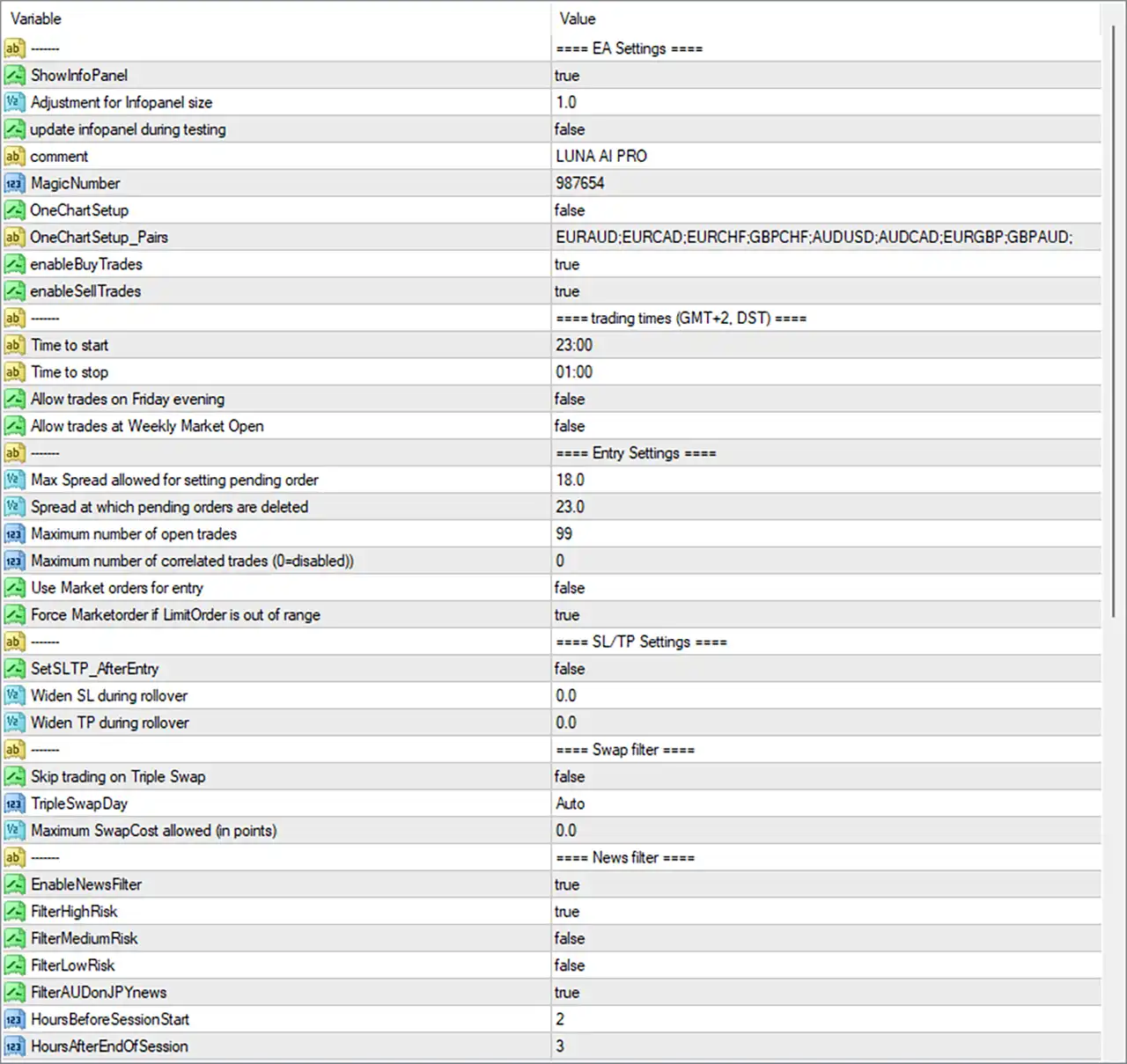
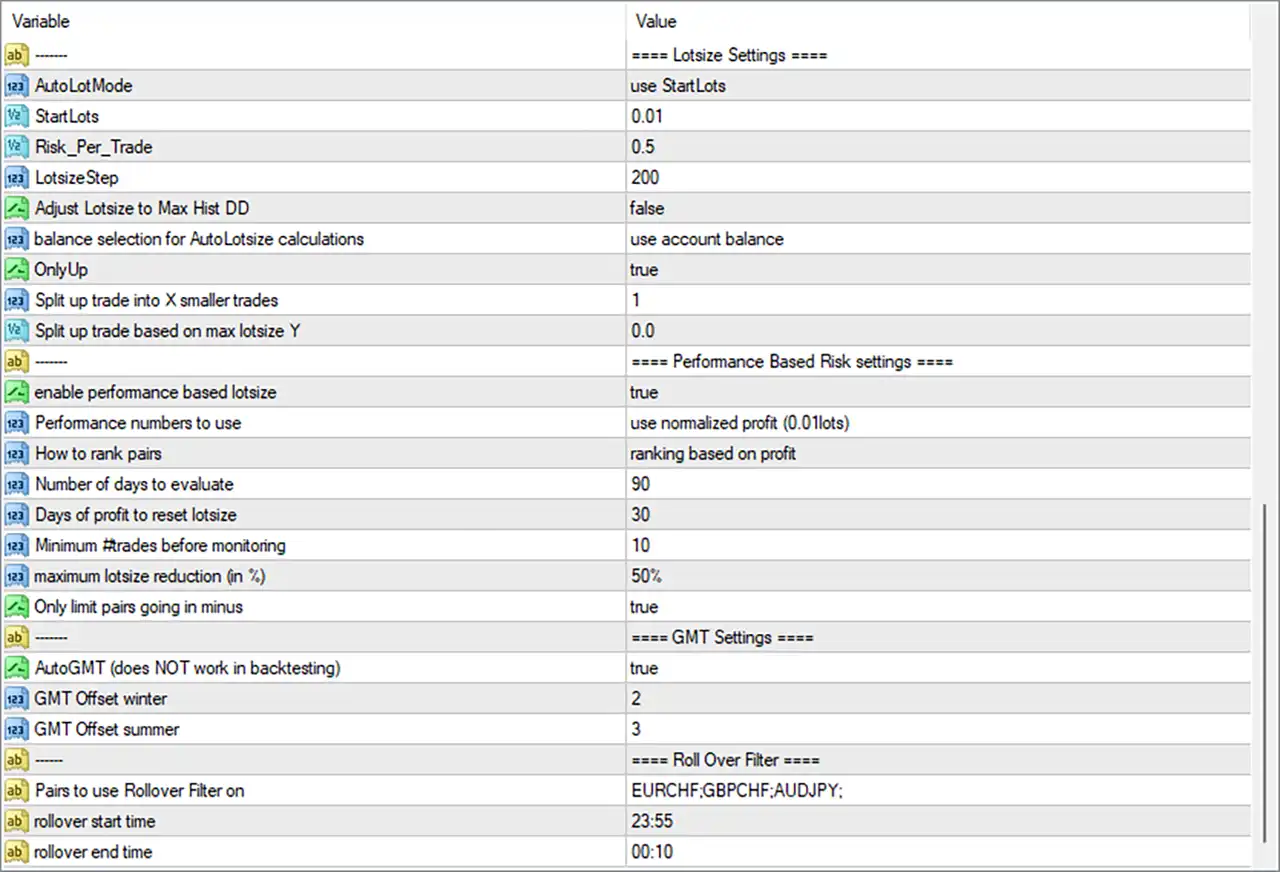
🔢 Luna AI PRO EA MT4 Input Settings
⚙️ EA Settings
🔹 ShowInfoPanel = true — Enables the EA information panel on the MT4 chart so important operating information can be displayed.
🔹 Adjustment for Infopanel size = 1.0 — Sets the information-panel size adjustment to 1.0, defining the configured display scale.
🔹 update infopanel during testing = false — Disables information-panel updates while the EA is running in backtesting or Strategy Tester mode.
🔹 comment = LUNA AI PRO — Sets LUNA AI PRO as the trade comment used to identify positions opened by the EA.
🔹 MagicNumber = 987654 — Assigns the unique Magic Number 987654 so the EA can identify and manage its own trades.
🔹 OneChartSetup = false — Disables the One Chart Setup mode in the displayed configuration.
🔹 OneChartSetup_Pairs = EURAUD;EURCAD;EURCHF;GBPCHF;AUDUSD;AUDCAD;EURGBP;GBPAUD; — Defines the configured symbol list for One Chart Setup: EURAUD, EURCAD, EURCHF, GBPCHF, AUDUSD, AUDCAD, EURGBP and GBPAUD.
🔹 enableBuyTrades = true — Enables Buy trades, allowing the EA to open long positions when its trading conditions are satisfied.
🔹 enableSellTrades = true — Enables Sell trades, allowing the EA to open short positions when its trading conditions are satisfied.
⚙️ Trading Times — GMT+2, DST
🔹 Time to start = 23:00 — Sets the configured trading-session start time to 23:00.
🔹 Time to stop = 01:00 — Sets the configured trading-session stop time to 01:00.
🔹 Allow trades on Friday evening = false — Disables trading during the configured Friday evening period.
🔹 Allow trades at Weekly Market Open = false — Disables trading around the weekly market opening period.
⚙️ Entry Settings
🔹 Max Spread allowed for setting pending order = 18.0 — Sets the maximum spread condition at 18.0 for placing pending orders.
🔹 Spread at which pending orders are deleted = 23.0 — Configures pending orders to be deleted when the spread reaches 23.0, according to the EA's spread-management logic.
🔹 Maximum number of open trades = 99 — Sets the maximum configured number of simultaneously open trades to 99.
🔹 Maximum number of correlated trades (0=disabled) = 0 — Sets the correlated-trade limit to 0; according to the parameter description, 0 = disabled.
🔹 Use Market orders for entry = false — Disables the use of Market orders as the primary entry method.
🔹 Force Marketorder if LimitOrder is out of range = true — Enables the EA to use a Market order when a Limit Order is considered outside the permitted range.
⚙️ SL/TP Settings
🔹 SetSLTP_AfterEntry = false — Disables the option to set Stop Loss and Take Profit after the entry has been executed.
🔹 Widen SL during rollover = 0.0 — Sets the additional Stop Loss widening during rollover to 0.0.
🔹 Widen TP during rollover = 0.0 — Sets the additional Take Profit widening during rollover to 0.0.
⚙️ Swap Filter
🔹 Skip trading on Triple Swap = false — Disables the option to automatically skip trading on the Triple Swap day.
🔹 TripleSwapDay = Auto — Sets the Triple Swap day detection to Auto, allowing the EA to determine the applicable day automatically.
🔹 Maximum SwapCost allowed (in points) = 0.0 — Sets the maximum allowed swap cost to 0.0 points.
⚙️ News Filter
🔹 EnableNewsFilter = true — Enables the EA's economic-news filtering system.
🔹 FilterHighRisk = true — Enables filtering around High Risk economic news events.
🔹 FilterMediumRisk = false — Disables filtering around Medium Risk news events.
🔹 FilterLowRisk = false — Disables filtering around Low Risk news events.
🔹 FilterAUDonJPYnews = true — Enables special filtering for AUD-related exposure during JPY news events.
🔹 HoursBeforeSessionStart = 2 — Configures the news filter to consider the specified news window 2 hours before the session starts.
🔹 HoursAfterEndOfSession = 3 — Configures the news filter to consider the specified news window for 3 hours after the session ends.
⚙️ Lotsize Settings
🔹 AutoLotMode = use StartLots — Selects use StartLots as the active lot-size calculation method.
🔹 StartLots = 0.01 — Sets the starting trading volume to 0.01 lots.
🔹 Risk_Per_Trade = 0.5 — Sets the configured risk-per-trade value to 0.5.
🔹 LotsizeStep = 200 — Sets the lot-size calculation step to 200.
🔹 Adjust Lotsize to Max Hist DD = false — Disables adjustment of lot size based on the maximum historical drawdown.
🔹 balance selection for AutoLotsize calculations = use account balance — Configures automatic lot-size calculations to use the account balance as the selected balance reference.
🔹 OnlyUp = true — Enables the OnlyUp option within the lot-size management system.
🔹 Split up trade into X smaller trades = 1 — Sets the trade-splitting value to 1, meaning the configured trade is not divided into multiple smaller orders through this parameter.
🔹 Split up trade based on max lotsize Y = 0.0 — Sets the maximum-lot-size-based trade splitting threshold to 0.0.
⚙️ Performance Based Risk Settings
🔹 enable performance based lotsize = true — Enables performance-based lot-size management.
🔹 Performance numbers to use = use normalized profit (0.01lots) — Configures the EA to evaluate performance using normalized profit based on 0.01 lots.
🔹 How to rank pairs = ranking based on profit — Ranks trading pairs according to their recorded profit performance.
🔹 Number of days to evaluate = 90 — Sets the performance evaluation period to 90 days.
🔹 Days of profit to reset lotsize = 30 — Sets the profit period used to reset the lot-size calculation to 30 days.
🔹 Minimum #trades before monitoring = 10 — Requires a minimum of 10 trades before the performance-monitoring logic is applied.
🔹 maximum lotsize reduction (in %) = 50% — Limits the maximum lot-size reduction to 50% under the performance-based risk system.
🔹 Only limit pairs going in minus = true — Enables the EA to limit pairs that are moving into negative performance according to the performance-based lot-size logic.
⚙️ GMT Settings
🔹 AutoGMT (does NOT work in backtesting) = true — Enables automatic GMT detection; the parameter explicitly indicates that AutoGMT does NOT work in backtesting.
🔹 GMT Offset winter = 2 — Sets the winter GMT offset to 2.
🔹 GMT Offset summer = 3 — Sets the summer GMT offset to 3.
⚙️ Rollover Filter
🔹 Pairs to use Rollover Filter on = EURCHF:GBPCHF:AUDJPY: — Applies the Rollover Filter to EURCHF, GBPCHF, and AUDJPY.
🔹 rollover start time = 23:55 — Sets the Rollover Filter start time to 23:55.
🔹 rollover end time = 00:10 — Sets the Rollover Filter end time to 00:10.
🔢 Luna AI PRO EA MT4 Risk Management Overview
Luna AI PRO EA MT4 combines several layers of automated risk and trade-management controls. The displayed configuration starts with StartLots = 0.01 and uses account balance for AutoLotsize calculations. The EA also has Risk_Per_Trade = 0.5, LotsizeStep = 200, and performance-based lot sizing enabled.
The performance module evaluates trading results over 90 days, requires at least 10 trades before monitoring, and can reduce the maximum lot size by up to 50%. Pair performance is ranked based on profit using normalized profit (0.01lots).
For market protection, the EA uses a maximum pending-order spread of 18.0 and deletes pending orders when the spread reaches 23.0. The maximum number of open trades is configured at 99, while correlated-trade control is disabled because Maximum number of correlated trades = 0.
The news filter is enabled, with High Risk news filtering active while Medium Risk and Low Risk filtering remain disabled. The configuration also enables FilterAUDonJPYnews = true, adding a specific news filter for AUD exposure during JPY-related news events.
🔢 Trading Session and Rollover Management
The displayed trading-time configuration uses GMT+2, DST, with a session from 23:00 to 01:00. Friday evening trading and trading at the weekly market open are both disabled.
The Rollover Filter is specifically applied to EURCHF, GBPCHF, and AUDJPY, with a rollover window from 23:55 to 00:10. Both Widen SL during rollover = 0.0 and Widen TP during rollover = 0.0 indicate that no additional SL or TP widening is configured during rollover.
🔢 Conclusion
Luna AI PRO EA MT4 provides a highly configurable framework for automated trading, combining trade-entry controls, multi-pair support, news filtering, spread protection, swap management, rollover filtering, GMT synchronization, and dynamic performance-based position sizing.
The displayed configuration uses MagicNumber = 987654, StartLots = 0.01, Risk_Per_Trade = 0.5, LotsizeStep = 200, and a 50% maximum lotsize reduction under the performance-based risk module. The EA also evaluates pair performance over 90 days and requires 10 trades before monitoring begins.
For market-event protection, EnableNewsFilter = true and FilterHighRisk = true, while the configured trading session is 23:00–01:00 under the GMT+2, DST settings. Traders should test any changes to these parameters in the MT4 Strategy Tester or on a demo account first, particularly when changing risk, lot-size, trading-session, or news-filter settings.
Get Luna AI PRO EA MT4
Download Luna AI PRO EA MT4 with its set files, read the full product details and requirements here: Luna AI PRO EA MT4 →