

This guide walks through the inputs of GoldFlow Pro1 EA MT5 with the values recommended for live trading. The set files that come with the EA already contain these settings, so you can load them in one click and adjust only what your broker or account needs.
🔢 GoldFlow Pro1 EA MT5 – Complete Settings Guide
GoldFlow Pro1 EA is an automated trading system designed with a straightforward structure for position sizing, trade protection, scheduled execution, and high-impact news filtering. Its settings provide direct control over lot size, account-based risk, Stop Loss, Take Profit, trading hours, news-pause behavior, and the currencies monitored for major economic events.
This configuratio
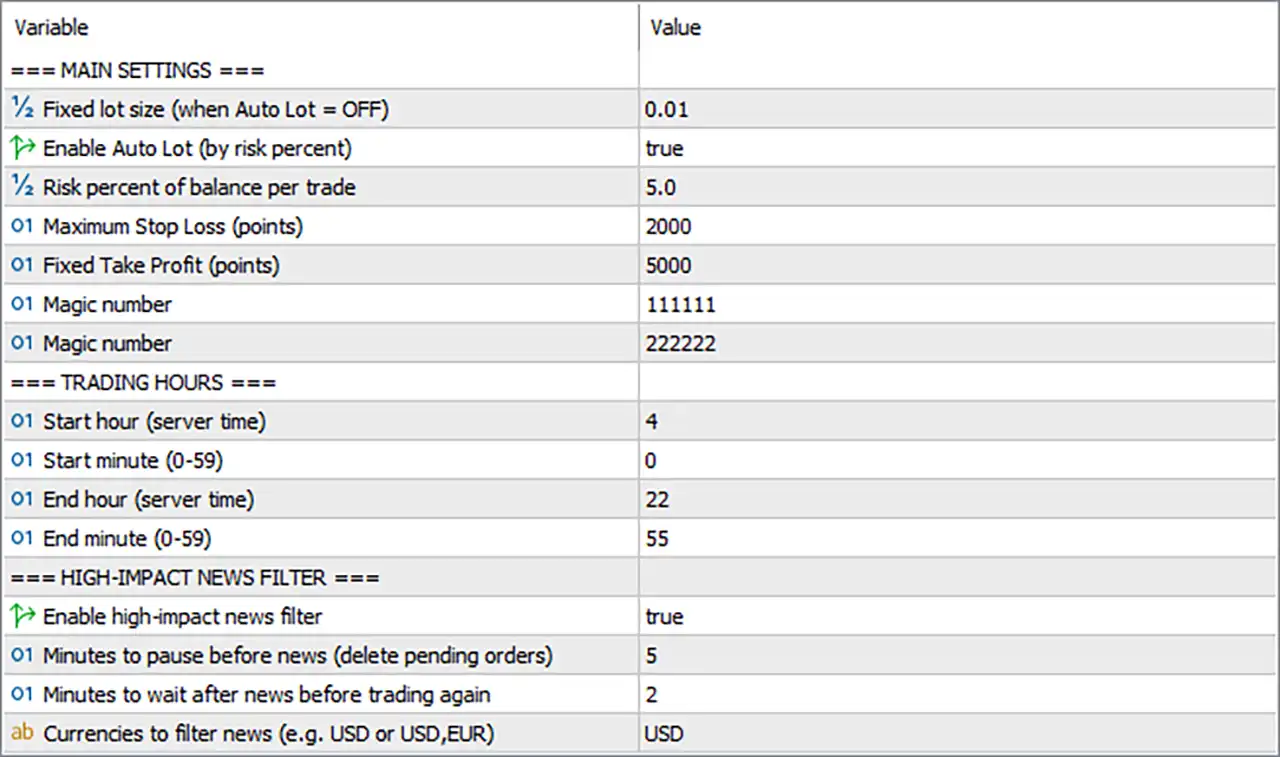
n is designed to give traders greater control over when and how GoldFlow Pro1 EA participates in the market.
🔄 Main Settings
🔹 Fixed lot size (when Auto Lot = OFF) = 0.01 — Sets the fixed trading volume to 0.01 lots when the automatic lot-sizing function is disabled.
🔹 Enable Auto Lot (by risk percent) = true — Enables automatic lot calculation based on the configured account risk percentage instead of relying on the fixed lot size.
🔹 Risk percent of balance per trade = 5.0 — Sets the risk allocation to 5.0% of account balance per trade when Auto Lot is enabled.
🔹 Maximum Stop Loss (points) = 2000 — Sets the maximum Stop Loss distance to 2000 points, providing a predefined limit for trade-loss protection.
🔹 Fixed Take Profit (points) = 5000 — Sets the Take Profit distance to 5000 points, establishing the configured profit target for each trade.
🔹 Magic number = 111111 — Uses 111111 as a Magic Number for identifying and managing EA-generated trades.
🔹 Magic number = 222222 — Uses 222222 as an additional Magic Number, providing a separate trade identifier within the EA's configuration.
🔄 Trading Hours
🔹 Start hour (server time) = 4 — Sets the beginning of the permitted trading period at 04:00 server time.
🔹 Start minute (0–59) = 0 — Sets the trading start minute to 0, resulting in a starting time of 04:00 server time.
🔹 End hour (server time) = 22 — Sets the end of the permitted trading period at 22:00 server time.
🔹 End minute (0–59) = 55 — Sets the final trading minute to 55, resulting in an ending time of 22:55 server time.
🔄 High-Impact News Filter
🔹 Enable high-impact news filter = true — Enables the high-impact news filter so the EA can pause trading around major scheduled economic events.
🔹 Minutes to pause before news (delete pending orders) = 5 — Configures the EA to pause trading 5 minutes before a relevant high-impact news event and delete applicable pending orders.
🔹 Minutes to wait after news before trading again = 2 — Configures the EA to wait 2 minutes after the news event before resuming trading.
🔹 Currencies to filter news (e.g. USD,EUR) = USD — Restricts the high-impact news filter to events associated with USD.
🔢 Conclusion
GoldFlow Pro1 EA MT5 uses a clearly defined configuration combining automatic risk-based lot sizing, fixed Stop Loss and Take Profit levels, trading-hour restrictions, and high-impact news protection.
The current setup has Auto Lot enabled, with a 5.0% risk per trade, while the fallback fixed lot size is 0.01 when Auto Lot is disabled. Trade protection is configured with a Maximum Stop Loss of 2000 points and a Fixed Take Profit of 5000 points. The EA also uses the Magic Numbers 111111 and 222222 for trade identification.
Trading is permitted from 04:00 to 22:55 server time based on the configured start and end values. The high-impact news filter is enabled for USD events, with trading paused 5 minutes before news and resumed 2 minutes after the event. Applicable pending orders are also configured to be deleted before the news event.
Because the configured risk level is 5.0% per trade, traders should carefully evaluate the resulting position sizes and potential drawdown before using these settings on a live account. Broker server time, symbol specifications, point values, spreads, and news-calendar behavior should also be verified through demo or backtesting before deployment.
🔢 FAQs
❓ What is the fixed lot size of GoldFlow Pro1 EA MT5?
The Fixed lot size is 0.01 lots, and this value is used when Auto Lot = OFF.
❓ What risk percentage is configured for Auto Lot?
The Risk percent of balance per trade is set to 5.0, meaning Auto Lot uses a configured risk level of 5.0% per trade.
❓ What are the Stop Loss and Take Profit settings?
The Maximum Stop Loss is 2000 points, while the Fixed Take Profit is 5000 points.
❓ What are the trading hours for GoldFlow Pro1 EA MT5?
The EA is configured to trade from 04:00 to 22:55 server time, using Start hour = 4, Start minute = 0, End hour = 22, and End minute = 55.
❓ How does the high-impact news filter work?
The filter is enabled and monitors USD news. It pauses trading 5 minutes before high-impact news, deletes pending orders, and waits 2 minutes after the event before trading resumes.
Get GoldFlow Pro1 EA MT5
Download GoldFlow Pro1 EA MT5 with its set files, read the full product details and requirements here: GoldFlow Pro1 EA MT5 →