

This guide walks through the inputs of GOLD FREQUENCY EA MT5 with the values recommended for live trading. The set files that come with the EA already contain these settings, so you can load them in one click and adjust only what your broker or account needs.
🔢 GOLD FREQUENCY EA MT5 Settings Guide
GOLD FREQUENCY EA is a multi-timeframe automated Gold trading Expert Advisor designed to monitor several chart periods simultaneously while providing flexible risk management, execution control and an intuitive visual status panel.
The EA allows traders to customize lot sizing, spread protection, slippage tolerance, and timeframe activation, making it suitable for both conservative and advanced trading strategies.
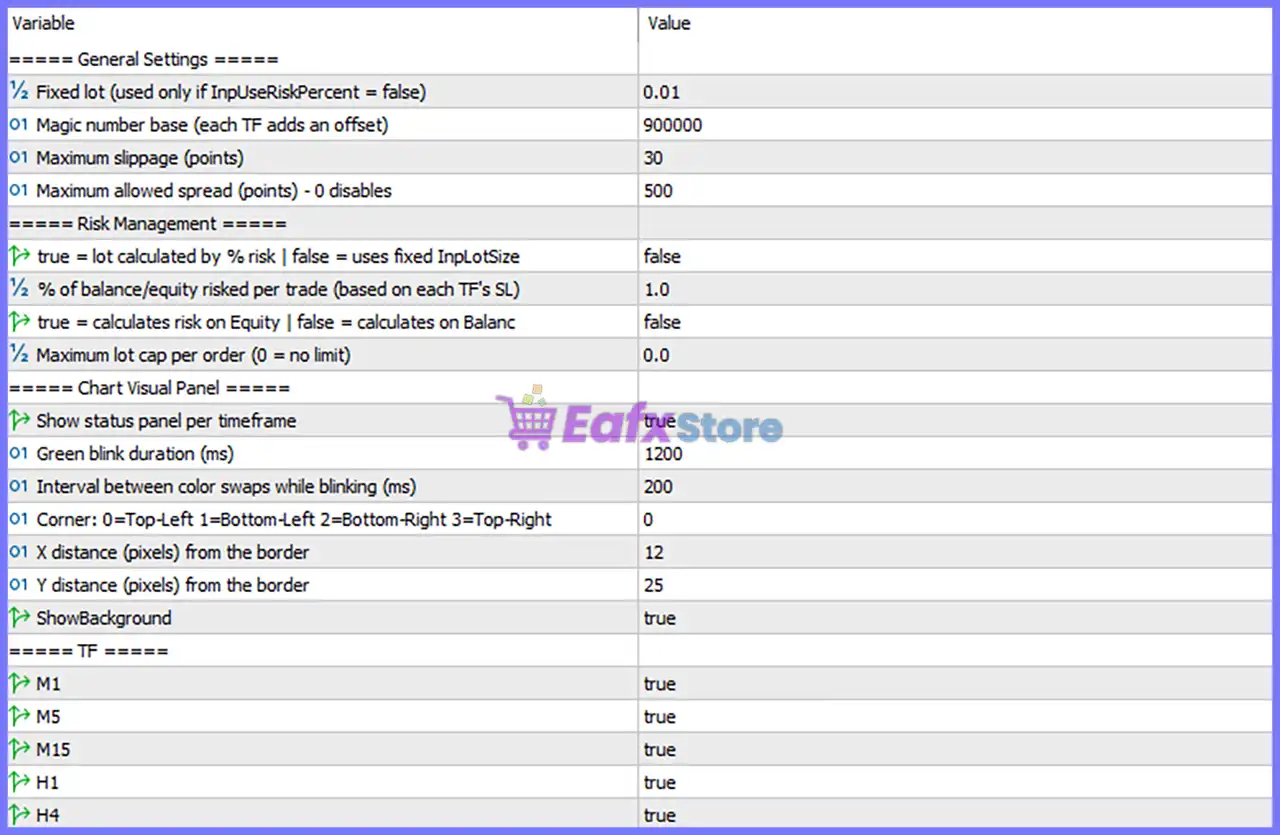
🔢 General Settings
🔹 Fixed lot (used only if InpUseRiskPercent = false) = 0.01 – Sets the manual trading volume to 0.01 lots when percentage-based risk management is disabled.
🔹 Magic number base (each TF adds an offset) = 900000 – Assigns the base Magic Number 900000, with each enabled timeframe automatically using its own offset for trade identification.
🔹 Maximum slippage (points) = 30 – Limits trade execution slippage to a maximum of 30 points.
🔹 Maximum allowed spread (points) – 0 disables = 500 – Allows trading only when the spread is 500 points or less; setting this value to 0 would disable the spread filter.
🔢 Risk Management
🔹 true = lot calculated by % risk | false = uses fixed InpLotSize = false – Uses the fixed lot size method because percentage-based risk calculation is disabled.
🔹 % of balance/equity risked per trade (based on each TF's SL) = 1.0 – Risks approximately 1.0% of the account balance or equity per trade when risk-based sizing is enabled.
🔹 true = calculates risk on Equity | false = calculates on Balance = false – Calculates risk using the account balance instead of the floating equity.
🔹 Maximum lot cap per order (0 = no limit) = 0.0 – No maximum lot size restriction is applied to individual orders.
🔢 Chart Visual Panel
🔹 Show status panel per timeframe = true – Displays a separate status panel for each monitored timeframe.
🔹 Green blink duration (ms) = 1200 – Sets the green status indicator to blink for 1200 milliseconds.
🔹 Interval between color swaps while blinking (ms) = 200 – Changes the blinking color every 200 milliseconds.
🔹 Corner: 0=Top-Left 1=Bottom-Left 2=Bottom-Right 3=Top-Right = 0 – Positions the status panel in the Top-Left corner of the chart.
🔹 X distance (pixels) from the border = 12 – Places the panel 12 pixels from the horizontal chart border.
🔹 Y distance (pixels) from the border = 25 – Places the panel 25 pixels from the vertical chart border.
🔹 ShowBackground = true – Displays the dashboard background behind the status panel.
🔢 Timeframe Monitoring
🔹 M1 = true – Enables monitoring and trading signals on the 1-Minute (M1) timeframe.
🔹 M5 = true – Enables monitoring and trading signals on the 5-Minute (M5) timeframe.
🔹 M15 = true – Enables monitoring and trading signals on the 15-Minute (M15) timeframe.
🔹 H1 = true – Enables monitoring and trading signals on the 1-Hour (H1) timeframe.
🔹 H4 = true – Enables monitoring and trading signals on the 4-Hour (H4) timeframe.
🔢 Risk Level
🔹 Fix Lot – Uses a constant lot size for every trade regardless of account balance, providing predictable position sizing.
🔹 Safe – Applies conservative exposure with smaller trading volume to minimize drawdown and preserve capital.
🔹 Balanced – Offers a balanced combination of risk and return, making it suitable for most traders.
🔹 Aggressive – Increases trading exposure to maximize potential profits while accepting significantly higher risk.
🔢 Conclusion
GOLD FREQUENCY EA MT5 combines multi-timeframe analysis, flexible risk management, execution protection, and a real-time visual dashboard into a single automated trading solution. With configurable lot sizing, spread filtering, Magic Number management, and support for multiple timeframes, the EA provides traders with the flexibility to adapt its behavior to different market conditions and trading objectives.
🔢 FAQs
❓ What is the purpose of the Magic Number Base?
The Magic Number Base uniquely identifies the EA's trades, while each enabled timeframe automatically receives its own offset to avoid conflicts.
❓ Can I use percentage-based risk management?
Yes. By enabling the risk calculation option, the EA can automatically size positions according to the specified 1.0% account risk.
❓ Why is the maximum spread set to 500 points?
This filter prevents new trades when market spreads become excessively wide, helping improve execution quality.
❓ Can I disable specific timeframes?
Yes. Each timeframe (M1, M5, M15, H1, and H4) can be enabled or disabled independently according to your trading preferences.
❓ Which Risk Level is recommended for beginners?
The Safe or Balanced risk level is generally recommended for new users because it provides better capital protection while maintaining consistent trading performance.
Get GOLD FREQUENCY EA MT5
Download GOLD FREQUENCY EA MT5 with its set files, read the full product details and requirements here: GOLD FREQUENCY EA MT5 →