

Goldenity AI MT4 Overview
Goldenity AI MT4 is a cutting-edge, AI-driven Expert Advisor (EA) designed exclusively for trading gold (XAUUSD) on the MetaTrader 4 (MT4) platform. Engineered with advanced machine learning algorithms, this powerful trading bot seamlessly integrates years of expert gold trading experience with automation technology. Developed by a seasoned trader and a skilled programmer, Goldenity AI MT4 is built to execute proven trading strategies with accuracy, efficiency, and precision—helping traders maximize their potential in the gold market.
- Goldenity AI MT4 Version: Click here
- Goldenity AI MT5 Version: Click here
Detailed Analysis of Goldenity AI MT4 EA
The Goldenity AI MT4 EA is an automated trading system designed for XAU/USD (Gold). It features risk-based lot management, hedging capabilities, and a customizable martingale strategy. Below is a detailed breakdown of its settings and potential optimizations.
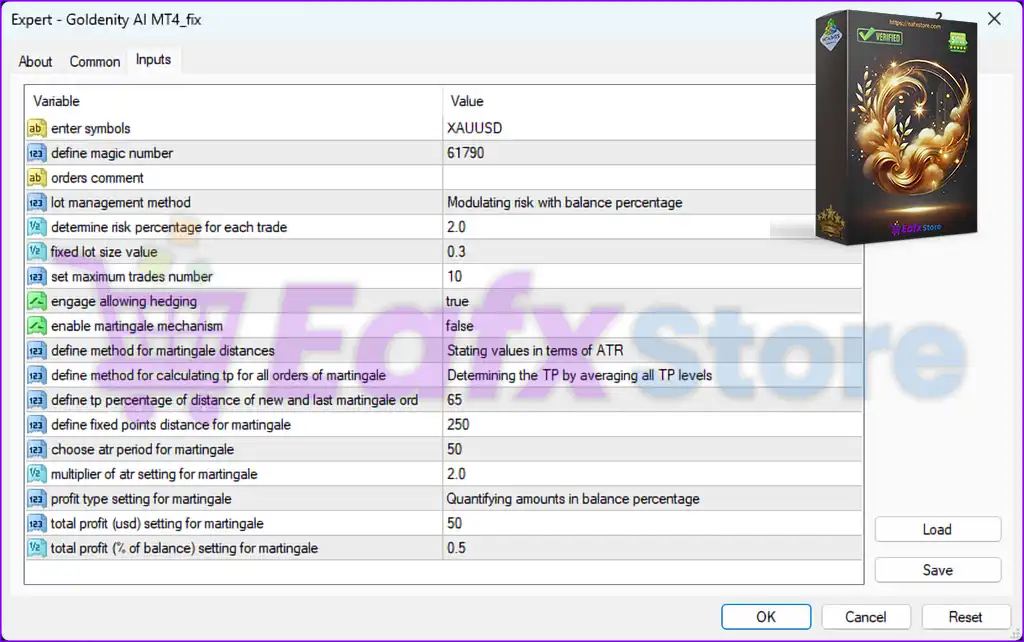
1. General Settings:
| Parameter | Value | Description |
|---|---|---|
| Enter Symbols | XAUUSD | The EA is optimized for Gold trading. |
| Define Magic Number | 61790 | A unique identifier to distinguish trades. |
| Orders Comment | - | Not specified but useful for tracking EA trades. |
🟢 Implications:
- The EA is strictly designed for XAU/USD.
- Magic number ensures tracking of trades within the MT4 terminal.
2. Risk & Lot Management:
| Parameter | Value | Description |
|---|---|---|
| Lot Management Method | Modulating risk with balance percentage | The EA adjusts lot sizes based on balance percentage. |
| Determine Risk Percentage per Trade | 2.0 | Each trade risks 2% of the balance. |
| Fixed Lot Size Value | 0.3 | If not using risk-based sizing, the lot size is fixed at 0.3 lots. |
| Set Maximum Trades Number | 10 | The EA can open up to 10 simultaneous trades. |
🟢 Implications:
- Dynamic risk-based lot sizing allows scalability with account growth.
- 2% risk per trade is within standard safe limits.
- 10 max trades could lead to higher drawdowns in volatile conditions.
⚠️ Recommendation:
- Reduce max trades to 5-7 for lower exposure.
- Ensure proper balance allocation if using fixed lot size (0.3).
3. Hedging & Martingale Settings:
| Parameter | Value | Description |
|---|---|---|
| Engage Allowing Hedging | true | Hedging is enabled (opening buy & sell positions simultaneously). |
| Enable Martingale Mechanism | false | Martingale is disabled (no automatic lot doubling). |
🟢 Implications:
- Hedging allows simultaneous long/short trades for risk mitigation.
- Martingale is disabled, which avoids exponential risk increase.
⚠️ Recommendation:
- If hedging is active, ensure a proper risk/reward ratio to avoid excessive margin usage.
4. Martingale Distance & Take Profit Calculation:
| Parameter | Value | Description |
|---|---|---|
| Define Method for Martingale Distances | Stating values in terms of ATR | Uses ATR (Average True Range) to space orders. |
| Define Method for Calculating TP for All Orders of Martingale | Determining TP by averaging all TP levels | TP is set based on an average of all trade positions. |
| Define TP Percentage of Distance of New and Last Martingale Order | 65% | Each new Martingale trade is 65% closer to the previous one. |
| Define Fixed Points Distance for Martingale | 250 | Fixed 250 points (25 pips) between orders. |
| Choose ATR Period for Martingale | 50 | ATR period is set to 50 candles for volatility calculations. |
| Multiplier of ATR Setting for Martingale | 2.0 | Order spacing is 2 times ATR value. |
🟢 Implications:
- Martingale is currently disabled, so these settings do not impact trading.
- ATR-based order spacing adjusts dynamically to volatility.
⚠️ Recommendation:
- Keep Martingale disabled for lower risk.
- If enabling Martingale, reduce ATR multiplier to 1.5 to avoid excessive position scaling.
5. Profit Targets & Martingale Profit Settings:
| Parameter | Value | Description |
|---|---|---|
| Profit Type Setting for Martingale | Quantifying amounts in balance percentage | TP is set based on balance percentage gains. |
| Total Profit (USD) Setting for Martingale | 50 | Martingale profit target is $50 per cycle. |
| Total Profit (% of Balance) Setting for Martingale | 0.5 | Martingale closes positions when 0.5% of balance is reached. |
🟢 Implications:
- If Martingale is enabled, profit-taking follows a balance-percentage rule.
- Profit target of $50 per cycle ensures gradual gains without excessive holding.
⚠️ Recommendation:
- Increase total profit percentage to 1.0% for better profit-taking per trade cycle.
Final Summary
| Feature | Setting | Analysis |
|---|---|---|
| Risk-Based Lot Management | ✅ Enabled | Balances lot size with equity |
| Fixed Lot Size | ✅ 0.3 | Suitable for controlled trading |
| Risk Per Trade | ✅ 2% | Moderate risk setting |
| Max Open Trades | ⚠️ 10 | May cause higher drawdowns – reduce to 5-7 |
| Hedging | ✅ Enabled | Allows simultaneous long/short trades |
| Martingale | ❌ Disabled | Avoids high risk, but settings are prepared if enabled |
| Martingale TP Calculation | ✅ ATR-Based | Adapts TP to volatility |
| Fixed Points Distance for Martingale | ✅ 250 Points | Keeps spacing manageable |
| Profit Taking | ✅ 0.5% Balance Target | Locks in small but steady profits |
Suggested Optimizations
1️⃣ Reduce Max Trades from 10 to 5-7 for lower drawdowns.
2️⃣ Increase total profit percentage to 1.0% for better take-profit per cycle.
3️⃣ Reduce ATR multiplier from 2.0 to 1.5 if enabling Martingale to lower risk.
4️⃣ Adjust Fixed Lot Size to Auto Lot to scale positions with account size.
5️⃣ Monitor Hedging Exposure to prevent unnecessary margin usage.
Conclusion
The Goldenity AI MT4 is a structured Gold trading system with risk-based lot sizing, ATR-driven trade spacing, and hedging capabilities. The Martingale system is disabled, but its configurations suggest it can be activated for aggressive risk-taking. To optimize performance, reduce max trades, adjust lot size settings, and fine-tune take-profit percentages.