

SpaceX Gold Pro EA Overview
Unleash the power of automated gold trading with the SpaceX Gold Pro EA, a revolutionary Expert Advisor (EA) designed for MetaTrader 4 (MT4). Optimized specifically for XAUUSD (Gold), this cutting-edge EA combines advanced technology with robust risk management, delivering exceptional profitability. Experience the unique advantage of low drawdowns (2%) coupled with impressive monthly returns (15%-40%), making it an ideal solution for traders of all levels, from beginners to seasoned professionals. The SpaceX Gold Pro EA's intelligent features, including trailing stop, automatic take profit/stop loss (TP/SL), and strict trade limits, ensure disciplined and efficient trading execution. Its versatility extends to compatibility with all brokers and suitability for funding challenges like FTMO and SurgeTrader, opening doors to expanded trading opportunities. Backed by verified Myfxbook records, the SpaceX Gold Pro EA's proven track record showcases its ability to generate substantial profits while maintaining stringent risk control. Elevate your gold trading strategy with the SpaceX Gold Pro EA and achieve your financial goals.
>>> Original source code version: download here <<<
Detailed Analysis of SpaceX Gold Pro EA
The SpaceX Gold Pro EA is a specialized scalping-based trading algorithm designed for gold trading (XAUUSD) on the 15-minute timeframe. This EA integrates advanced technical strategies, including Elliott Wave Theory, XABCD Patterns, and Fibonacci Speed Resistance Fan, to optimize trade entries and exits.
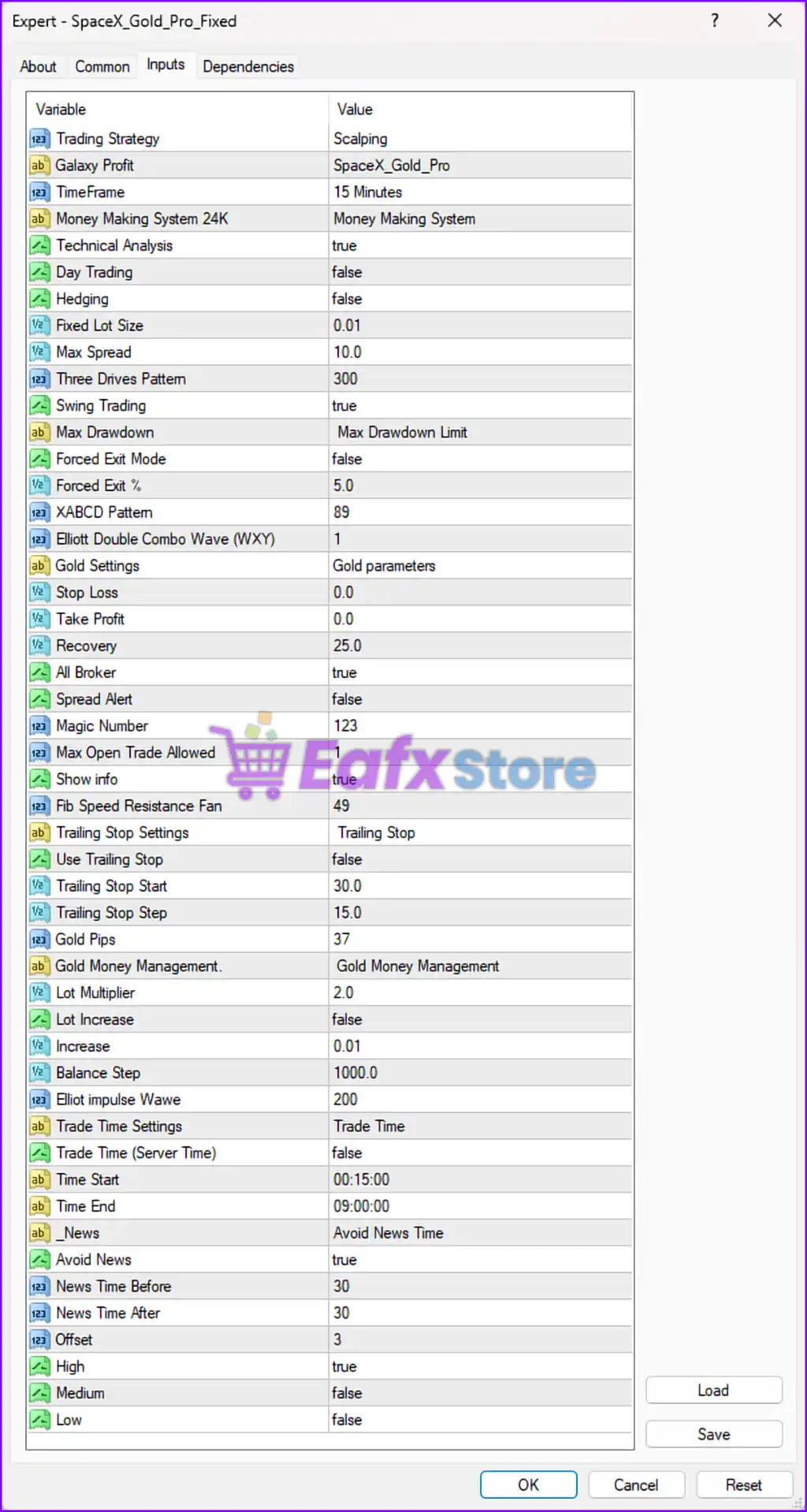
🔹 Key Features & Settings
| Parameter | Value | Description |
|---|---|---|
| Trading Strategy | Scalping | The EA focuses on quick trades for small profits per position. |
| TimeFrame | 15 Minutes | Suitable for short-term trading strategies. |
| Technical Analysis | True | Indicates the use of advanced technical indicators. |
| Swing Trading | True | The EA supports longer-term trend trading in addition to scalping. |
| Fixed Lot Size | 0.01 | Default trading lot size per position. |
| Max Spread | 10.0 | Trades will only be executed when spreads are within 10 pips. |
| Stop Loss | 0.0 | No predefined stop loss, which means risk needs manual control. |
| Take Profit | 0.0 | No fixed take profit, likely depends on trailing stops. |
| Lot Multiplier | 2.0 | If using grid trading or martingale, the lot size will double after each loss. |
| Trailing Stop | False | Not enabled by default but available as an option. |
| Max Open Trades | 1 | Ensures only one active trade at a time. |
| News Filter | Enabled | Avoids trading around high-impact news events. |
| Trade Time Settings | 00:15 - 09:00 | Limits trading within a specific time window. |
| Recovery Mode | 25.0 | Adjusts trade sizes to recover losses over time. |
| Avoid News Time | True | Prevents trading before and after major news events. |
📉 1. Scalping & Swing Trading Approach
- Scalping Mode:
- The 15-minute timeframe suggests the EA will execute high-frequency trades.
- No stop loss or take profit is set, meaning it relies on dynamic exits.
- The max open trade limit is 1, which prevents over-leveraging.
- Swing Trading Mode:
- Since swing trading is enabled, the EA likely identifies longer trends.
- Uses Elliott Wave & XABCD Pattern Recognition to analyze potential price movements.
⚠️ Recommendation:
- Enable a stop loss to reduce risk exposure, especially in volatile markets like gold.
- Activate the trailing stop feature for better risk management.
🔄 2. Martingale & Risk Management
- Lot Multiplier:2.0
- This means if a trade loses, the next trade doubles the lot size.
- High risk if not managed properly.
- Max Drawdown Limit:
- The EA has a drawdown management system but no specific % is set.
⚠️ Recommendation:
- Use risk-based lot sizing instead of fixed doubling of lots to prevent large drawdowns.
- Manually monitor drawdown levels or enable a safety mechanism.
📊 3. Advanced Trading Strategies
The EA uses multiple pattern recognition techniques, including:
- XABCD Patterns - Identifies harmonic reversal zones.
- Elliott Wave Theory - Predicts trend continuation or reversal.
- Fibonacci Speed Resistance Fan - Determines support/resistance levels.
✅ These indicators help in identifying high-probability trade setups.
⚠️ However, without a clear stop-loss mechanism, risk exposure remains high.
🕒 4. Time-Restricted Trading & News Avoidance
- Trading Time: 00:15 - 09:00
- This timeframe avoids major market volatility in New York & London sessions.
- Reduces slippage risks by avoiding high-impact trading hours.
- Avoid News Filter: Enabled
- The EA pauses trading before and after major economic events.
- News Protection:
- Stops trading 30 minutes before and after high-impact news.
- Medium and low-impact news is ignored.
✅ This is a good risk management feature to prevent unpredictable volatility.
🚀 Final Summary & Recommendations
| Feature | Current Setting | Recommendation |
|---|---|---|
| Scalping Strategy | ✅ Enabled | Works best with tight spread accounts. |
| Stop Loss | ❌ 0.0 | Set a dynamic SL (e.g., 50-100 pips) for risk control. |
| Take Profit | ❌ 0.0 | Consider adding a TP (e.g., 50-200 pips) for consistent gains. |
| Trailing Stop | ❌ Disabled | Enable for better exit strategies. |
| Martingale System | ⚠️ Enabled (Lot Multiplier: 2.0) | Lower to 1.2 - 1.5 or disable to reduce risk. |
| News Filter | ✅ Enabled | Good for avoiding high-impact volatility. |
| Max Open Trades | ✅ 1 | Low-risk setting, but can be adjusted based on strategy. |