

This guide walks through the inputs of NorthEastWay MT5 with the values recommended for live trading. The set files that come with the EA already contain these settings, so you can load them in one click and adjust only what your broker or account needs.
🔢 NorthEastWay MT5 Settings Guide
NorthEastWay MT5 is a professional multi-currency Expert Advisor designed for automated portfolio trading with advanced money management, adaptive grid control, volatility filtering, hedging and risk protection.
The EA includes configurable execution parameters, cross-symbol management, preventive chain closing, emergency protection, and optimization features, allowing traders to customize performance for different market conditions while maintaining strict control over risk exposure.
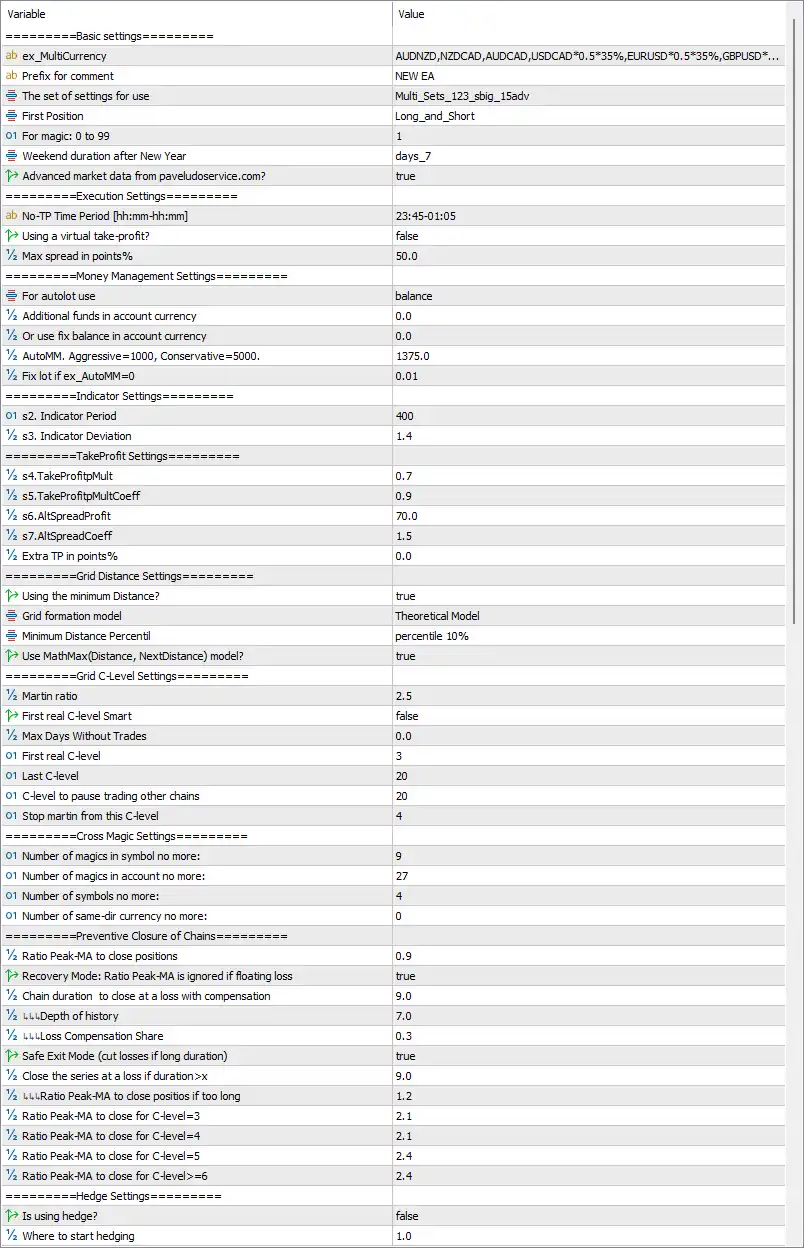
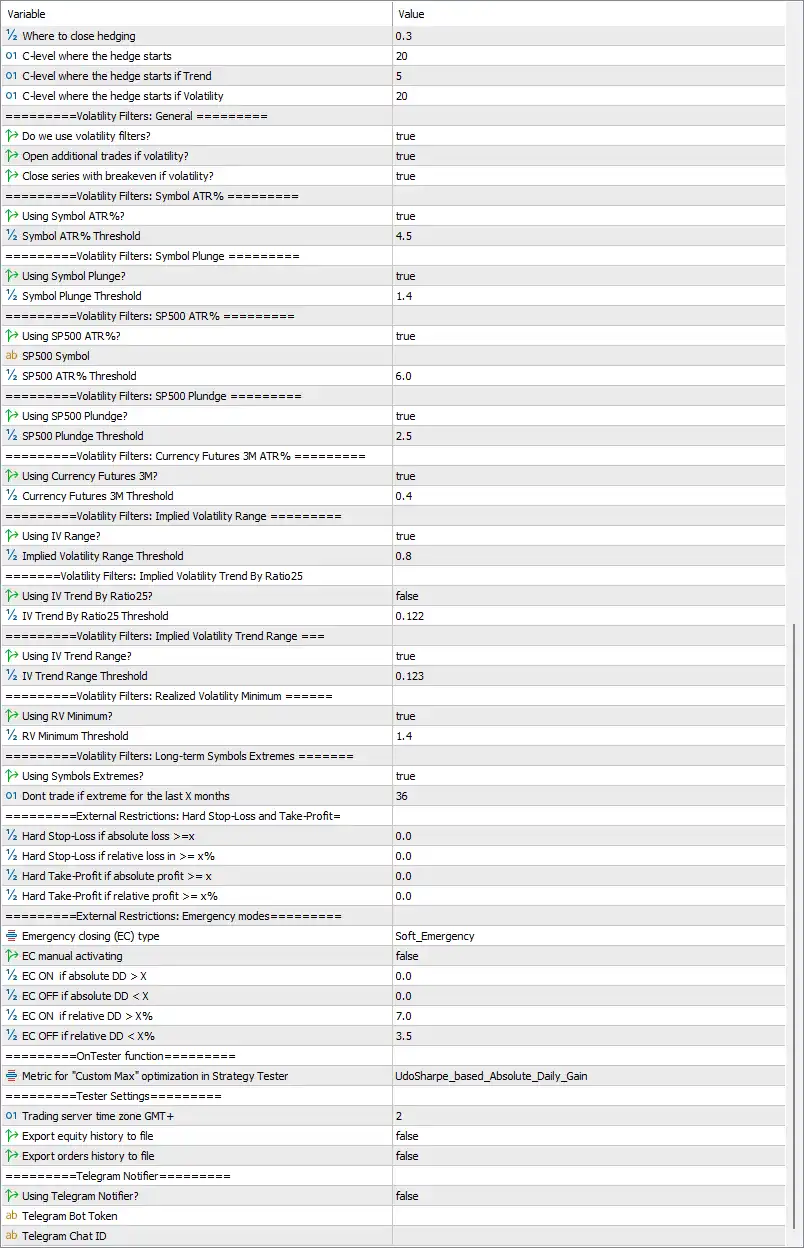
🔢 NorthEastWay MT5 Settings Explained
🔶 Basic Settings
🔹 ex_MultiCurrency = AUDNZD,NZDCAD,AUDCAD,USDCAD0.535%,EURUSD0.535%,GBPUSD...* – Defines the multi-currency portfolio and weighting used by the EA.
🔹 Prefix for comment = NEW EA – Adds the comment NEW EA to every trade opened by the Expert Advisor.
🔹 The set of settings for use = Multi_Sets_123_sbig_15adv – Specifies the preset configuration profile loaded by the EA.
🔹 First Position = Long_and_Short – Allows both Buy and Sell positions as initial entries.
🔹 For magic: 0 to 99 = 1 – Sets the internal Magic Number group identifier to 1.
🔹 Weekend duration after New Year = days_7 – Defines a 7-day trading pause after the New Year holiday.
🔹 Advanced market data from pavelduroservice.com? = true – Enables the use of external advanced market data services.
🔶 Execution Settings
🔹 No-TP Time Period [hh:mm-hh:mm] = 23:45-01:05 – Disables Take Profit execution during the specified time window.
🔹 Using a virtual take-profit? = false – Uses broker-side Take Profit instead of a virtual TP.
🔹 Max spread in points% = 50.0 – Rejects new entries when the spread exceeds 50.0 points.
🔶 Money Management Settings
🔹 For autolot use = balance – Calculates automatic lot sizing based on account balance.
🔹 Additional funds in account currency = 0.0 – No additional balance is included in lot calculations.
🔹 Or use fix balance in account currency = 0.0 – Fixed balance mode is disabled.
🔹 AutoMM, Aggressive=1000, Conservative=5000 = 1375.0 – Uses an Auto Money Management factor of 1375.0.
🔹 Fix lot if ex_AutoMM=0 = 0.01 – Uses a fixed lot size of 0.01 when AutoMM is disabled.
🔶 Indicator Settings
🔹 s2. Indicator Period = 400 – Sets the indicator calculation period to 400.
🔹 s3. Indicator Deviation = 1.4 – Defines the indicator deviation parameter as 1.4.
🔶 Take Profit Settings
🔹 s4.TakeProfitMult = 0.7 – Sets the primary Take Profit multiplier to 0.7.
🔹 s5.TakeProfitMultCoeff = 0.9 – Applies a coefficient of 0.9 to TP calculations.
🔹 s6.AltSpreadProfit = 70.0 – Uses 70.0 points for alternative spread profit calculations.
🔹 s7.AltSpreadCoeff = 1.5 – Sets the spread coefficient to 1.5.
🔹 Extra TP in points% = 0.0 – No additional Take Profit buffer is added.
🔶 Grid Distance Settings
🔹 Using the minimum Distance? = true – Enables minimum grid distance control.
🔹 Grid formation model = Theoretical Model – Uses the theoretical model for grid spacing calculations.
🔹 Minimum Distance Percentile = percentile 10% – Uses the 10th percentile as the minimum distance reference.
🔹 Use MathMax(Distance, NextDistance) model? = true – Enables MathMax logic for adaptive grid spacing.
🔶 Grid C-Level Settings
🔹 Martin ratio = 2.5 – Sets the martingale multiplier ratio to 2.5.
🔹 First real C-level Smart = false – Smart first C-Level logic is disabled.
🔹 Max Days Without Trades = 0.0 – No inactivity limit is applied.
🔹 First real C-level = 3 – Starts real C-Level management from level 3.
🔹 Last C-level = 20 – Limits grid expansion to 20 C-Levels.
🔹 C-level to pause trading other chains = 20 – Suspends other trading chains when C-Level reaches 20.
🔹 Stop martin from this C-level = 4 – Stops Martingale progression starting from C-Level 4.
🔶 Cross Magic Settings
🔹 Number of magics in symbol no more = 9 – Allows up to 9 Magic Numbers per symbol.
🔹 Number of magics in account no more = 27 – Limits the account to 27 Magic Numbers.
🔹 Number of symbols no more = 4 – Trades a maximum of 4 symbols simultaneously.
🔹 Number of same-dir currency no more = 0 – No additional same-direction currency restriction is applied.
🔶 Preventive Closure of Chains
🔹 Ratio Peak-MA to close positions = 0.9 – Uses a Peak/Moving Average ratio of 0.9 to trigger closures.
🔹 Recovery Mode: Ratio Peak-MA is ignored if floating loss = true – Ignores Peak-MA logic during floating losses.
🔹 Chain duration to close at a loss with compensation = 9.0 – Closes long-running chains after 9.0 units with compensation.
🔹 LL Depth of history = 7.0 – Uses 7.0 historical depth for calculations.
🔹 LL Loss Compensation Share = 0.3 – Allocates 30% for loss compensation.
🔹 Safe Exit Mode (cut losses if long duration) = true – Enables safe exit for prolonged losing trades.
🔹 Close the series at a loss if duration > X = 9.0 – Forces closure after 9.0 duration units.
🔹 LL Ratio Peak-MA to close positions if too long = 1.2 – Uses 1.2 ratio for extended-duration exits.
🔹 Ratio Peak-MA to close for C-level=3 = 2.1 – Uses 2.1 ratio at C-Level 3.
🔹 Ratio Peak-MA to close for C-level=4 = 2.1 – Uses 2.1 ratio at C-Level 4.
🔹 Ratio Peak-MA to close for C-level=5 = 2.4 – Uses 2.4 ratio at C-Level 5.
🔹 Ratio Peak-MA to close for C-level>=6 = 2.4 – Uses 2.4 ratio from C-Level 6 onward.
🔶 Hedge Settings
🔹 Is using hedge? = false – Hedging is disabled.
🔹 Where to start hedging = 1.0 – Defines hedge activation starting point at 1.0.
🔹 Where to close hedging = 0.3 – Closes hedge positions when the hedge ratio reaches 0.3.
🔹 C-level where the hedge starts = 20 – Starts hedging at C-Level 20.
🔹 C-level where the hedge starts if Trend = 5 – Starts hedging earlier during trend conditions at C-Level 5.
🔹 C-level where the hedge starts if Volatility = 20 – Starts hedging at C-Level 20 under volatile conditions.
🔶 General Volatility Filters
🔹 Do we use volatility filters? = true – Enables all volatility-based trade filters.
🔹 Open additional trades if volatility? = true – Allows additional entries during acceptable volatility.
🔹 Close series with breakeven if volatility? = true – Closes trade series at breakeven during high volatility.
🔶 Symbol ATR Filter
🔹 Using Symbol ATR%? = true – Enables ATR percentage filtering.
🔹 Symbol ATR% Threshold = 4.5 – Uses 4.5% as the ATR threshold.
🔶 Symbol Plunge Filter
🔹 Using Symbol Plunge? = true – Enables sudden price plunge detection.
🔹 Symbol Plunge Threshold = 1.4 – Sets plunge sensitivity to 1.4.
🔶 S&P500 Volatility Filters
🔹 Using SP500 ATR%? = true – Enables S&P500 ATR monitoring.
🔹 SP500 Symbol = (blank) – No custom S&P500 symbol is specified.
🔹 SP500 ATR% Threshold = 6.0 – Uses 6.0% as the S&P500 ATR threshold.
🔹 Using SP500 Plunge? = true – Enables S&P500 plunge detection.
🔹 SP500 Plunge Threshold = 2.5 – Uses 2.5 as the plunge threshold.
🔶 Currency Futures Filter
🔹 Using Currency Futures 3M? = true – Enables 3-month currency futures monitoring.
🔹 Currency Futures 3M Threshold = 0.4 – Uses 0.4 as the futures volatility threshold.
🔶 Implied Volatility Filters
🔹 Using IV Range? = true – Enables implied volatility range analysis.
🔹 Implied Volatility Range Threshold = 0.8 – Sets IV range threshold to 0.8.
🔹 Using IV Trend By Ratio25? = false – Disables Ratio25 IV trend filtering.
🔹 IV Trend By Ratio25 Threshold = 0.122 – Ratio25 threshold remains 0.122.
🔹 Using IV Trend Range? = true – Enables IV trend range filtering.
🔹 IV Trend Range Threshold = 0.123 – Uses 0.123 as the trend threshold.
🔶 Realized Volatility & Symbol Extremes
🔹 Using RV Minimum? = true – Enables realized volatility minimum filtering.
🔹 RV Minimum Threshold = 1.4 – Uses 1.4 as the minimum RV threshold.
🔹 Using Symbols Extremes? = true – Enables long-term symbol extreme filtering.
🔹 Don't trade if extreme for the last X months = 36 – Avoids trading symbols with extremes during the past 36 months.
🔶 External Restrictions
🔹 Hard Stop-Loss if absolute loss >= X = 0.0 – Absolute loss restriction is disabled.
🔹 Hard Stop-Loss if relative loss >= X% = 0.0 – Relative loss restriction is disabled.
🔹 Hard Take-Profit if absolute profit >= X = 0.0 – Absolute profit restriction is disabled.
🔹 Hard Take-Profit if relative profit >= X% = 0.0 – Relative profit restriction is disabled.
🔶 Emergency Modes
🔹 Emergency closing (EC) type = Soft_Emergency – Uses Soft Emergency protection mode.
🔹 EC manual activating = false – Manual emergency mode is disabled.
🔹 EC ON if absolute DD > X = 0.0 – Absolute drawdown trigger is disabled.
🔹 EC OFF if absolute DD < X = 0.0 – Absolute recovery trigger is disabled.
🔹 EC ON if relative DD > X% = 7.0 – Activates emergency mode at 7.0% drawdown.
🔹 EC OFF if relative DD < X% = 3.5 – Disables emergency mode when drawdown falls below 3.5%.
🔶 Strategy Tester
🔹 Metric for "Custom Max" optimization = UdoSharpe_based_Absolute_Daily_Gain – Uses the UdoSharpe_based_Absolute_Daily_Gain optimization metric.
🔶 Tester Settings
🔹 Trading server time zone GMT+ = 2 – Uses GMT+2 server time.
🔹 Export equity history to file = false – Disables exporting equity history.
🔹 Export orders history to file = false – Disables exporting order history.
🔶 Telegram Notifications
🔹 Using Telegram Notifier? = false – Telegram notifications are disabled.
🔹 Telegram Bot Token = (empty) – No Telegram Bot Token is configured.
🔹 Telegram Chat ID = (empty) – No Telegram Chat ID is configured.
🔢 Conclusion
NorthEastWay MT5 is an advanced multi-currency Expert Advisor featuring sophisticated portfolio management, adaptive grid trading, intelligent volatility filters, comprehensive risk controls, emergency protection, and optimization tools. Its extensive configuration options allow experienced traders to fine-tune execution, money management, and market filtering for diversified automated trading while maintaining strict control over drawdown and portfolio exposure.
🔢 FAQs
❓ What is the purpose of Auto Money Management in NorthEastWay MT5?
Auto Money Management automatically adjusts position sizes according to the account balance and the configured AutoMM value.
❓ Does NorthEastWay MT5 support multi-currency trading?
Yes. The EA is designed for portfolio trading and supports multiple currency pairs simultaneously through the ex_MultiCurrency configuration.
❓ Can NorthEastWay MT5 automatically filter high-volatility markets?
Yes. The EA includes ATR, implied volatility, S&P500, currency futures, realized volatility, and symbol extreme filters.
❓ What happens when Emergency Mode is activated?
The Soft Emergency system applies protective actions when relative drawdown reaches 7.0%, helping reduce portfolio risk until recovery.
❓ Does NorthEastWay MT5 support Telegram notifications?
Yes. The EA includes built-in Telegram notification support, although it is disabled by default until a valid Bot Token and Chat ID are configured.
Get NorthEastWay MT5
Download NorthEastWay MT5 with its set files, read the full product details and requirements here: NorthEastWay MT5 →