



🔢 NorthEastWay MT5 Settings Guide
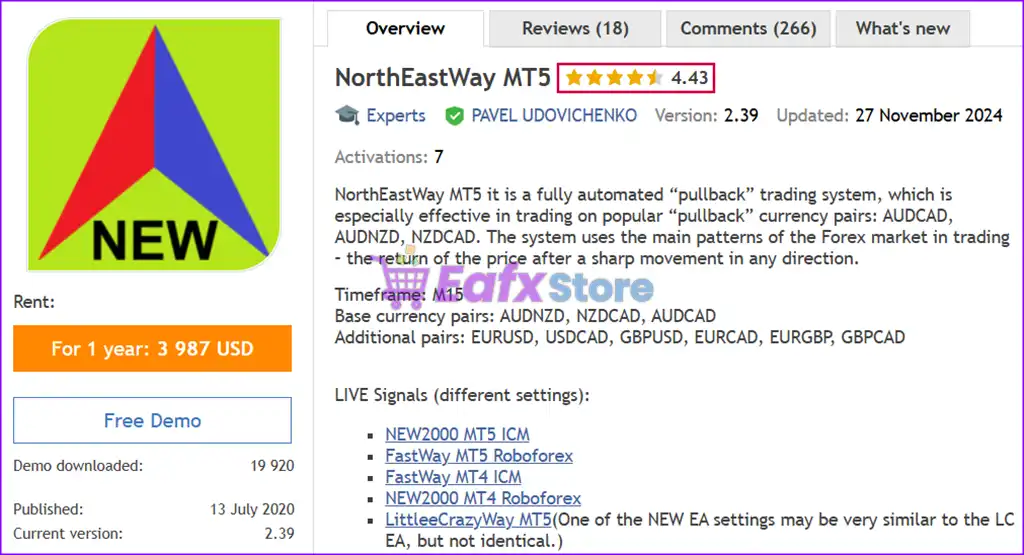
NorthEastWay MT5 is a professional multi-currency Expert Advisor designed for automated portfolio trading with advanced money management, adaptive grid control, volatility filtering, hedging and risk protection.
The EA includes configurable execution parameters, cross-symbol management, preventive chain closing, emergency protection, and optimization features, allowing traders to customize performance for different market conditions while maintaining strict control over risk exposure.
🔢 NorthEastWay MT5 Settings Explained
🔶 Basic Settings
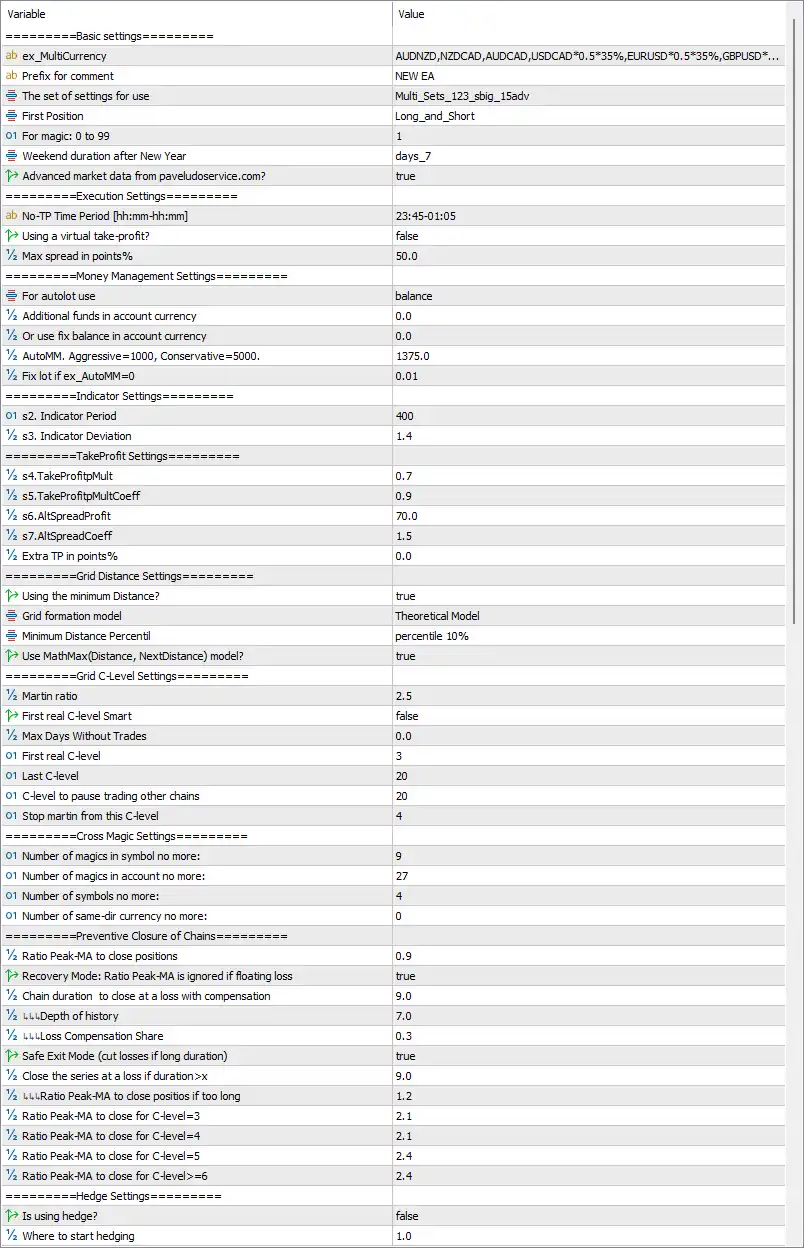
🔹 ex_MultiCurrency = AUDNZD,NZDCAD,AUDCAD,USDCAD0.535%,EURUSD0.535%,GBPUSD...* – Defines the multi-currency portfolio and weighting used by the EA.
🔹 Prefix for comment = NEW EA – Adds the comment NEW EA to every trade opened by the Expert Advisor.
🔹 The set of settings for use = Multi_Sets_123_sbig_15adv – Specifies the preset configuration profile loaded by the EA.
🔹 First Position = Long_and_Short – Allows both Buy and Sell positions as initial entries.
🔹 For magic: 0 to 99 = 1 – Sets the internal Magic Number group identifier to 1.
🔹 Weekend duration after New Year = days_7 – Defines a 7-day trading pause after the New Year holiday.
🔹 Advanced market data from pavelduroservice.com? = true – Enables the use of external advanced market data services.
🔶 Execution Settings
🔹 No-TP Time Period [hh:mm-hh:mm] = 23:45-01:05 – Disables Take Profit execution during the specified time window.
🔹 Using a virtual take-profit? = false – Uses broker-side Take Profit instead of a virtual TP.
🔹 Max spread in points% = 50.0 – Rejects new entries when the spread exceeds 50.0 points.
🔶 Money Management Settings
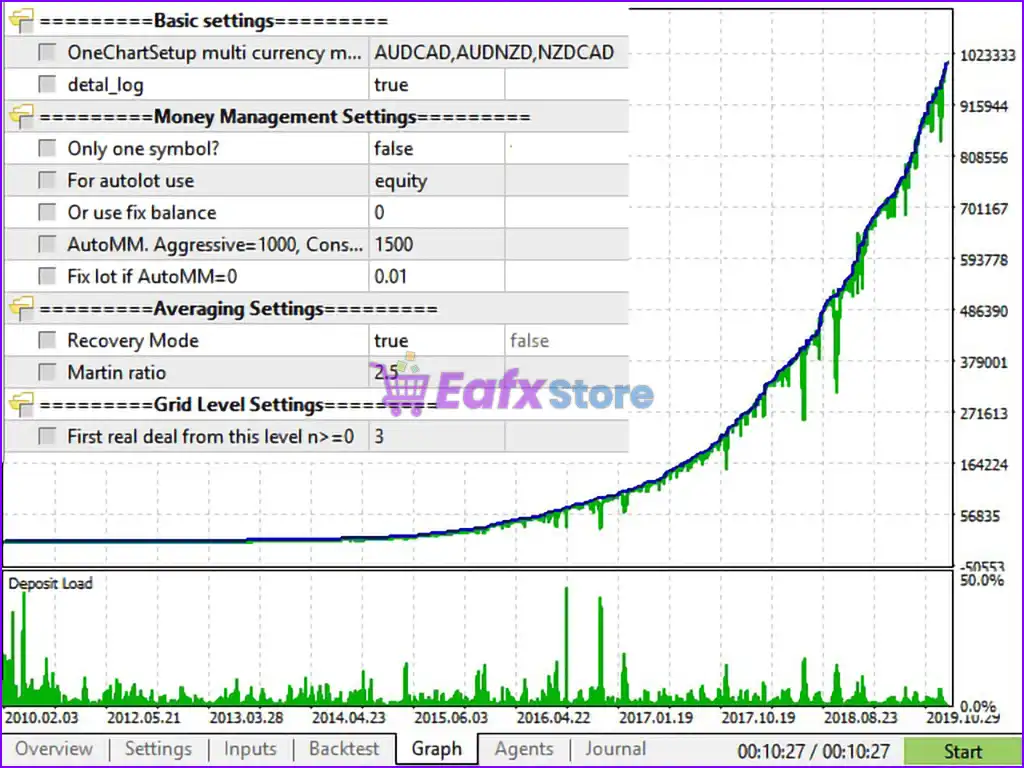
🔹 For autolot use = balance – Calculates automatic lot sizing based on account balance.
🔹 Additional funds in account currency = 0.0 – No additional balance is included in lot calculations.
🔹 Or use fix balance in account currency = 0.0 – Fixed balance mode is disabled.
🔹 AutoMM, Aggressive=1000, Conservative=5000 = 1375.0 – Uses an Auto Money Management factor of 1375.0.
🔹 Fix lot if ex_AutoMM=0 = 0.01 – Uses a fixed lot size of 0.01 when AutoMM is disabled.
🔶 Indicator Settings
🔹 s2. Indicator Period = 400 – Sets the indicator calculation period to 400.
🔹 s3. Indicator Deviation = 1.4 – Defines the indicator deviation parameter as 1.4.
🔶 Take Profit Settings
🔹 s4.TakeProfitMult = 0.7 – Sets the primary Take Profit multiplier to 0.7.
🔹 s5.TakeProfitMultCoeff = 0.9 – Applies a coefficient of 0.9 to TP calculations.
🔹 s6.AltSpreadProfit = 70.0 – Uses 70.0 points for alternative spread profit calculations.
🔹 s7.AltSpreadCoeff = 1.5 – Sets the spread coefficient to 1.5.
🔹 Extra TP in points% = 0.0 – No additional Take Profit buffer is added.
🔶 Grid Distance Settings
🔹 Using the minimum Distance? = true – Enables minimum grid distance control.
🔹 Grid formation model = Theoretical Model – Uses the theoretical model for grid spacing calculations.
🔹 Minimum Distance Percentile = percentile 10% – Uses the 10th percentile as the minimum distance reference.
🔹 Use MathMax(Distance, NextDistance) model? = true – Enables MathMax logic for adaptive grid spacing.
🔶 Grid C-Level Settings
🔹 Martin ratio = 2.5 – Sets the martingale multiplier ratio to 2.5.
🔹 First real C-level Smart = false – Smart first C-Level logic is disabled.
🔹 Max Days Without Trades = 0.0 – No inactivity limit is applied.
🔹 First real C-level = 3 – Starts real C-Level management from level 3.
🔹 Last C-level = 20 – Limits grid expansion to 20 C-Levels.
🔹 C-level to pause trading other chains = 20 – Suspends other trading chains when C-Level reaches 20.
🔹 Stop martin from this C-level = 4 – Stops Martingale progression starting from C-Level 4.
🔶 Cross Magic Settings
🔹 Number of magics in symbol no more = 9 – Allows up to 9 Magic Numbers per symbol.
🔹 Number of magics in account no more = 27 – Limits the account to 27 Magic Numbers.
🔹 Number of symbols no more = 4 – Trades a maximum of 4 symbols simultaneously.
🔹 Number of same-dir currency no more = 0 – No additional same-direction currency restriction is applied.
🔶 Preventive Closure of Chains
🔹 Ratio Peak-MA to close positions = 0.9 – Uses a Peak/Moving Average ratio of 0.9 to trigger closures.
🔹 Recovery Mode: Ratio Peak-MA is ignored if floating loss = true – Ignores Peak-MA logic during floating losses.
🔹 Chain duration to close at a loss with compensation = 9.0 – Closes long-running chains after 9.0 units with compensation.
🔹 LL Depth of history = 7.0 – Uses 7.0 historical depth for calculations.
🔹 LL Loss Compensation Share = 0.3 – Allocates 30% for loss compensation.
🔹 Safe Exit Mode (cut losses if long duration) = true – Enables safe exit for prolonged losing trades.
🔹 Close the series at a loss if duration > X = 9.0 – Forces closure after 9.0 duration units.
🔹 LL Ratio Peak-MA to close positions if too long = 1.2 – Uses 1.2 ratio for extended-duration exits.
🔹 Ratio Peak-MA to close for C-level=3 = 2.1 – Uses 2.1 ratio at C-Level 3.
🔹 Ratio Peak-MA to close for C-level=4 = 2.1 – Uses 2.1 ratio at C-Level 4.
🔹 Ratio Peak-MA to close for C-level=5 = 2.4 – Uses 2.4 ratio at C-Level 5.
🔹 Ratio Peak-MA to close for C-level>=6 = 2.4 – Uses 2.4 ratio from C-Level 6 onward.
🔶 Hedge Settings
🔹 Is using hedge? = false – Hedging is disabled.
🔹 Where to start hedging = 1.0 – Defines hedge activation starting point at 1.0.
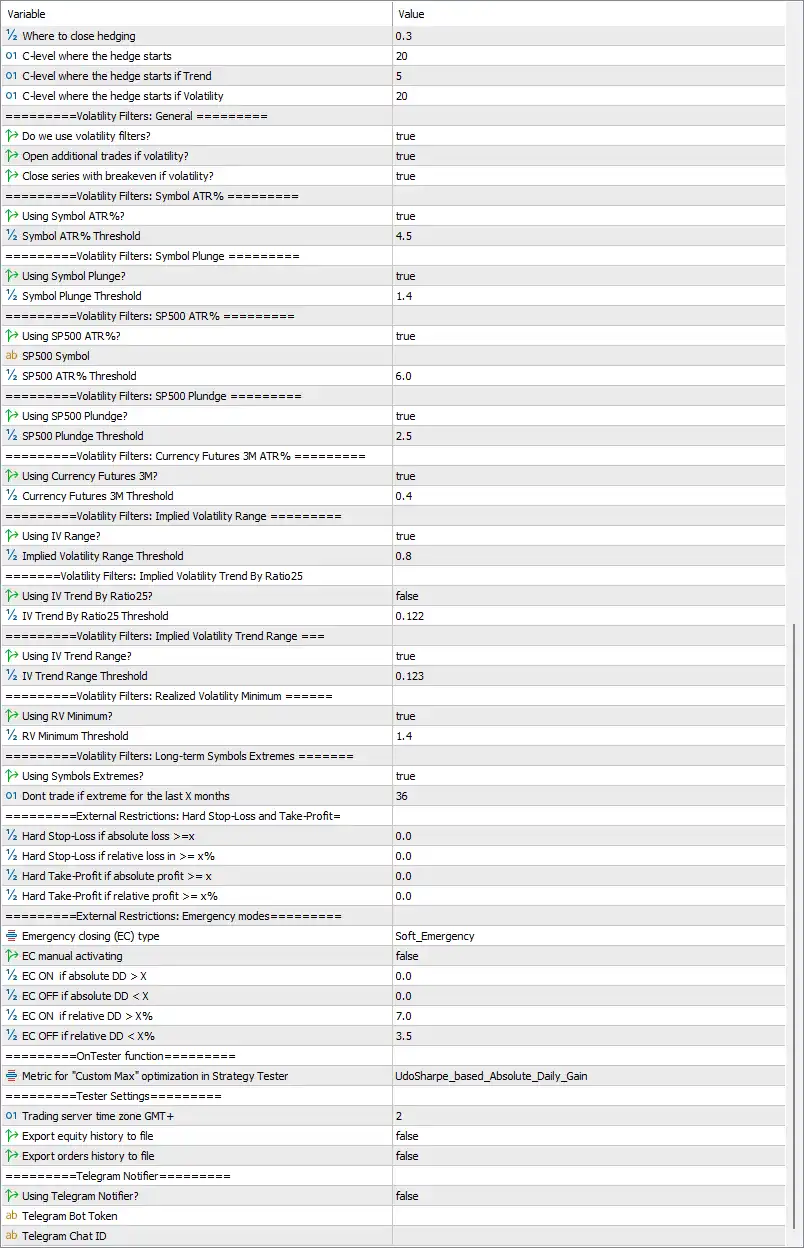
🔹 Where to close hedging = 0.3 – Closes hedge positions when the hedge ratio reaches 0.3.
🔹 C-level where the hedge starts = 20 – Starts hedging at C-Level 20.
🔹 C-level where the hedge starts if Trend = 5 – Starts hedging earlier during trend conditions at C-Level 5.
🔹 C-level where the hedge starts if Volatility = 20 – Starts hedging at C-Level 20 under volatile conditions.
🔶 General Volatility Filters
🔹 Do we use volatility filters? = true – Enables all volatility-based trade filters.
🔹 Open additional trades if volatility? = true – Allows additional entries during acceptable volatility.
🔹 Close series with breakeven if volatility? = true – Closes trade series at breakeven during high volatility.
🔶 Symbol ATR Filter
🔹 Using Symbol ATR%? = true – Enables ATR percentage filtering.
🔹 Symbol ATR% Threshold = 4.5 – Uses 4.5% as the ATR threshold.
🔶 Symbol Plunge Filter
🔹 Using Symbol Plunge? = true – Enables sudden price plunge detection.
🔹 Symbol Plunge Threshold = 1.4 – Sets plunge sensitivity to 1.4.
🔶 S&P500 Volatility Filters
🔹 Using SP500 ATR%? = true – Enables S&P500 ATR monitoring.
🔹 SP500 Symbol = (blank) – No custom S&P500 symbol is specified.
🔹 SP500 ATR% Threshold = 6.0 – Uses 6.0% as the S&P500 ATR threshold.
🔹 Using SP500 Plunge? = true – Enables S&P500 plunge detection.
🔹 SP500 Plunge Threshold = 2.5 – Uses 2.5 as the plunge threshold.
🔶 Currency Futures Filter
🔹 Using Currency Futures 3M? = true – Enables 3-month currency futures monitoring.
🔹 Currency Futures 3M Threshold = 0.4 – Uses 0.4 as the futures volatility threshold.
🔶 Implied Volatility Filters
🔹 Using IV Range? = true – Enables implied volatility range analysis.
🔹 Implied Volatility Range Threshold = 0.8 – Sets IV range threshold to 0.8.
🔹 Using IV Trend By Ratio25? = false – Disables Ratio25 IV trend filtering.
🔹 IV Trend By Ratio25 Threshold = 0.122 – Ratio25 threshold remains 0.122.
🔹 Using IV Trend Range? = true – Enables IV trend range filtering.
🔹 IV Trend Range Threshold = 0.123 – Uses 0.123 as the trend threshold.
🔶 Realized Volatility & Symbol Extremes
🔹 Using RV Minimum? = true – Enables realized volatility minimum filtering.
🔹 RV Minimum Threshold = 1.4 – Uses 1.4 as the minimum RV threshold.
🔹 Using Symbols Extremes? = true – Enables long-term symbol extreme filtering.
🔹 Don't trade if extreme for the last X months = 36 – Avoids trading symbols with extremes during the past 36 months.
🔶 External Restrictions
🔹 Hard Stop-Loss if absolute loss >= X = 0.0 – Absolute loss restriction is disabled.
🔹 Hard Stop-Loss if relative loss >= X% = 0.0 – Relative loss restriction is disabled.
🔹 Hard Take-Profit if absolute profit >= X = 0.0 – Absolute profit restriction is disabled.
🔹 Hard Take-Profit if relative profit >= X% = 0.0 – Relative profit restriction is disabled.
🔶 Emergency Modes
🔹 Emergency closing (EC) type = Soft_Emergency – Uses Soft Emergency protection mode.
🔹 EC manual activating = false – Manual emergency mode is disabled.
🔹 EC ON if absolute DD > X = 0.0 – Absolute drawdown trigger is disabled.
🔹 EC OFF if absolute DD < X = 0.0 – Absolute recovery trigger is disabled.
🔹 EC ON if relative DD > X% = 7.0 – Activates emergency mode at 7.0% drawdown.
🔹 EC OFF if relative DD < X% = 3.5 – Disables emergency mode when drawdown falls below 3.5%.
🔶 Strategy Tester
🔹 Metric for "Custom Max" optimization = UdoSharpe_based_Absolute_Daily_Gain – Uses the UdoSharpe_based_Absolute_Daily_Gain optimization metric.
🔶 Tester Settings
🔹 Trading server time zone GMT+ = 2 – Uses GMT+2 server time.
🔹 Export equity history to file = false – Disables exporting equity history.
🔹 Export orders history to file = false – Disables exporting order history.
🔶 Telegram Notifications
🔹 Using Telegram Notifier? = false – Telegram notifications are disabled.
🔹 Telegram Bot Token = (empty) – No Telegram Bot Token is configured.
🔹 Telegram Chat ID = (empty) – No Telegram Chat ID is configured.
🔢 Conclusion
NorthEastWay MT5 is an advanced multi-currency Expert Advisor featuring sophisticated portfolio management, adaptive grid trading, intelligent volatility filters, comprehensive risk controls, emergency protection, and optimization tools. Its extensive configuration options allow experienced traders to fine-tune execution, money management, and market filtering for diversified automated trading while maintaining strict control over drawdown and portfolio exposure.
🔢 FAQs
❓ What is the purpose of Auto Money Management in NorthEastWay MT5?
Auto Money Management automatically adjusts position sizes according to the account balance and the configured AutoMM value.
❓ Does NorthEastWay MT5 support multi-currency trading?
Yes. The EA is designed for portfolio trading and supports multiple currency pairs simultaneously through the ex_MultiCurrency configuration.
❓ Can NorthEastWay MT5 automatically filter high-volatility markets?
Yes. The EA includes ATR, implied volatility, S&P500, currency futures, realized volatility, and symbol extreme filters.
❓ What happens when Emergency Mode is activated?
The Soft Emergency system applies protective actions when relative drawdown reaches 7.0%, helping reduce portfolio risk until recovery.
❓ Does NorthEastWay MT5 support Telegram notifications?
Yes. The EA includes built-in Telegram notification support, although it is disabled by default until a valid Bot Token and Chat ID are configured.


