

This guide walks through the inputs of OctoGold EA MT5 with the values recommended for live trading. The set files that come with the EA already contain these settings, so you can load them in one click and adjust only what your broker or account needs.
🔢 OctoGold EA MT5 Settings Explained – Complete Parameter Guide
OctoGold EA is an automated MetaTrader 5 Expert Advisor designed with built-in risk management, account protection and news filtering features. It provides flexible controls for trade entries, daily drawdown limits, equity protection, and real-time trading statistics, allowing traders to customize risk while maintaining stable automated trading performance.

🔢 Installation Panel Parameters
Below are the details of the parameters in the advisor’s trading system settings table:
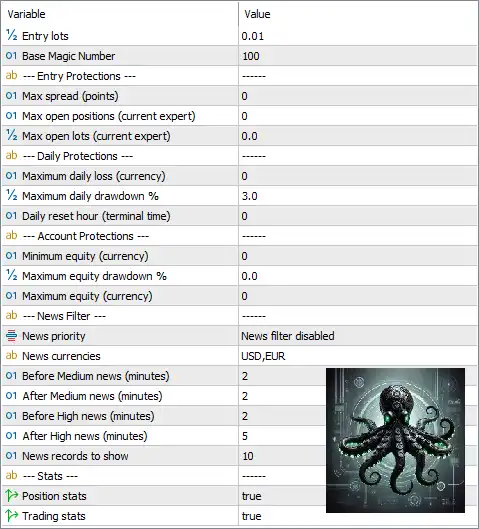
🔶 Trading Settings
🔹 Entry lots = 0.01 – Sets the initial trade volume to 0.01 lots for every new position opened by the EA.
🔹 Base Magic Number = 100 – Assigns the unique Magic Number 100 to identify and manage all trades placed by OctoGold EA MT5.
🔶 Entry Protections
🔹 Max spread (points) = 0 – Sets the maximum allowed spread to 0 points. A value of 0 typically disables the spread restriction.
🔹 Max open positions (current expert) = 0 – Limits the number of simultaneously open positions managed by the current EA instance. A value of 0 means no limit is applied.
🔹 Max open lots (current expert) = 0.0 – Defines the maximum total lot exposure for this EA. A value of 0.0 disables the restriction.
🔶 Daily Protections
🔹 Maximum daily loss (currency) = 0 – Sets the maximum daily loss in account currency. A value of 0 disables this protection.
🔹 Maximum daily drawdown % = 3.0 – Stops or limits trading when the account reaches a daily drawdown of 3.0%.
🔹 Daily reset hour (terminal time) = 0 – Resets all daily protection calculations at 00:00 terminal time.
🔶 Account Protections
🔹 Minimum equity (currency) = 0 – Specifies the minimum account equity required for trading. A value of 0 disables this protection.
🔹 Maximum equity drawdown % = 0.0 – Defines the maximum allowable account equity drawdown percentage. A value of 0.0 means no limit is enforced.
🔹 Maximum equity (currency) = 0 – Sets the maximum account equity threshold. A value of 0 disables the limit.
🔶 News Filter
🔹 News priority = News filter disabled – Disables the economic news filter, allowing trading during all news events.
🔹 News currencies = USD,EUR – Specifies that USD and EUR economic events are monitored when the news filter is enabled.
🔹 Before Medium news (minutes) = 2 – Stops trading 2 minutes before medium-impact news events.
🔹 After Medium news (minutes) = 2 – Resumes trading 2 minutes after medium-impact news events.
🔹 Before High news (minutes) = 2 – Stops trading 2 minutes before high-impact news releases.
🔹 After High news (minutes) = 5 – Resumes trading 5 minutes after high-impact news events.
🔹 News records to show = 10 – Displays the latest 10 economic news events on the EA interface.
🔶 Statistics
🔹 Position stats = true – Enables real-time statistics for currently open trading positions.
🔹 Trading stats = true – Displays overall trading performance statistics directly on the chart.
🔢 Conclusion
OctoGold EA MT5 offers a straightforward yet effective configuration focused on capital preservation and automated trade management. Its settings include entry protection, daily loss control, equity safeguards, optional news filtering, and real-time trading statistics. These features make the EA suitable for traders who want reliable automation with configurable risk management on MetaTrader 5.
🔢 FAQs
❓ What is the default lot size in OctoGold EA MT5?
The EA starts trading with a default 0.01 lot position size.
❓ Does OctoGold EA MT5 include daily drawdown protection?
Yes. The default configuration limits the daily drawdown to 3.0%.
❓ Can I limit the maximum number of open positions?
Yes. The Max open positions (current expert) parameter allows you to control how many trades the EA can manage simultaneously.
❓ Does OctoGold EA MT5 support economic news filtering?
Yes. The EA includes configurable news filter parameters for USD and EUR events, although the default preset has the news filter disabled.
❓ Can the EA display live trading statistics?
Yes. Both Position stats and Trading stats are enabled by default, providing real-time information about open trades and overall trading performance.
Get OctoGold EA MT5
Download OctoGold EA MT5 with its set files, read the full product details and requirements here: OctoGold EA MT5 →