

This guide walks through the inputs of Madness EA MT5 with the values recommended for live trading. The set files that come with the EA already contain these settings, so you can load them in one click and adjust only what your broker or account needs.
🔢 Madness EA MT5 Settings Explained – Complete Parameter Guide
Madness EA is an automated MetaTrader 5 Expert Advisor (EA) that combines trend analysis, currency strength filtering, averaging management and built-in risk protection.
With configurable Take Profit, Trailing Stop, Drawdown protection, Currency Strength filters, and lot management, the EA offers traders a flexible framework for automated Forex trading while maintaining comprehensive risk control.

🔢 Installation Panel Parameters
Below are the details of the parameters in the advisor’s trading system settings table:
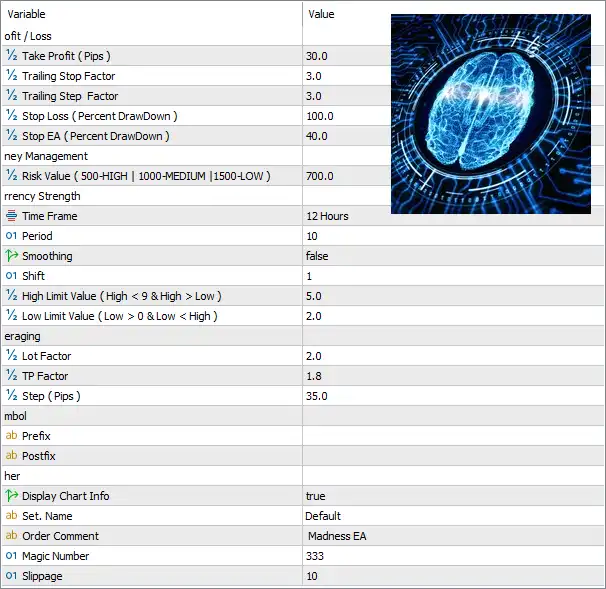
🔶 Profit / Loss Settings
🔹 Take Profit (Pips) = 30.0 – Sets the default Take Profit target to 30.0 pips for each completed trade.
🔹 Trailing Stop Factor = 3.0 – Defines the multiplier used to calculate the Trailing Stop distance dynamically.
🔹 Trailing Step Factor = 3.0 – Sets the multiplier used for each Trailing Stop adjustment as the market moves in favor of the trade.
🔹 Stop Loss (Percent DrawDown) = 100.0 – Closes positions if the account reaches a maximum drawdown of 100.0%.
🔹 Stop EA (Percent DrawDown) = 40.0 – Automatically stops the EA from opening new trades once the account reaches a 40.0% drawdown.
🔶 Money Management
🔹 Risk Value (500-HIGH | 1000-MEDIUM | 1500-LOW) = 700.0 – Sets the internal money management risk level to 700.0, representing a risk level between the recommended HIGH (500) and MEDIUM (1000) profiles.
🔶 Currency Strength Settings
🔹 Time Frame = 12 Hours – Uses the 12-hour timeframe for Currency Strength analysis.
🔹 Period = 10 – Calculates Currency Strength using a lookback period of 10.
🔹 Smoothing = false – Disables smoothing in the Currency Strength calculation.
🔹 Shift = 1 – Uses data shifted by 1 candle for indicator calculations.
🔹 High Limit Value (High < 9 & High > Low) = 5.0 – Sets the upper Currency Strength threshold to 5.0 for identifying strong currencies.
🔹 Low Limit Value (Low > 0 & Low < High) = 2.0 – Sets the lower Currency Strength threshold to 2.0 for identifying weak currencies.
🔶 Averaging Settings
🔹 Lot Factor = 2.0 – Multiplies the lot size by 2.0 for each averaging position.
🔹 TP Factor = 1.8 – Uses a 1.8 multiplier when calculating the Take Profit level for averaged positions.
🔹 Step (Pips) = 35.0 – Opens the next averaging position every 35.0 pips of adverse price movement.
🔶 Symbol Settings
🔹 Prefix = (blank) – No broker-specific symbol prefix is required.
🔹 Postfix = (blank) – No broker-specific symbol suffix is required.
🔶 Other Settings
🔹 Display Chart Info = true – Displays the EA information panel and trading statistics directly on the chart.
🔹 Set. Name = Default – Loads the default preset configuration.
🔹 Order Comment = Madness EA – Adds the comment "Madness EA" to every order opened by the Expert Advisor.
🔹 Magic Number = 333 – Assigns the unique Magic Number 333 for identifying trades managed by the EA.
🔹 Slippage = 10 – Allows a maximum execution slippage of 10 points during order placement.
🔢 Conclusion
Madness EA MT5 is a versatile automated trading system that combines Currency Strength analysis, averaging logic, dynamic trailing stops, and configurable risk management into a single Expert Advisor. Its flexible parameters allow traders to fine-tune trade entries, money management, drawdown protection, and averaging behavior, making it suitable for both conservative and aggressive automated trading strategies on MetaTrader 5.
🔢 FAQs
❓ What is the default Take Profit in Madness EA MT5?
The default Take Profit is set to 30.0 pips.
❓ How does the Risk Value parameter work?
The Risk Value controls the EA's internal money management. Lower values represent higher risk, while higher values produce a more conservative trading approach.
❓ Does Madness EA MT5 use Currency Strength analysis?
Yes. The EA analyzes Currency Strength using a 12-hour timeframe with a 10-period calculation by default.
❓ Can Madness EA MT5 perform averaging trades?
Yes. The EA supports averaging with configurable Lot Factor, TP Factor, and 35.0-pip averaging intervals.
❓ Does Madness EA MT5 include drawdown protection?
Yes. The EA can stop opening new trades after a 40.0% drawdown and includes configurable drawdown-based Stop Loss protection for enhanced account safety.
Get Madness EA MT5
Download Madness EA MT5 with its set files, read the full product details and requirements here: Madness EA MT5 →