

🧩 What is Orbit Rage Final MT4?
Orbit Rage Final EA is an automated trading robot for MT4 that combines RSI signals, time filters and strict money management. From the settings shown, this Expert Advisor (EA) is configured for a low-risk, fast scalping or short-term trading approach, with grid and trailing features disabled.
📌📌📌 Buy this unlimited Orbit Rage Final EA MT4 product here 📌📌📌
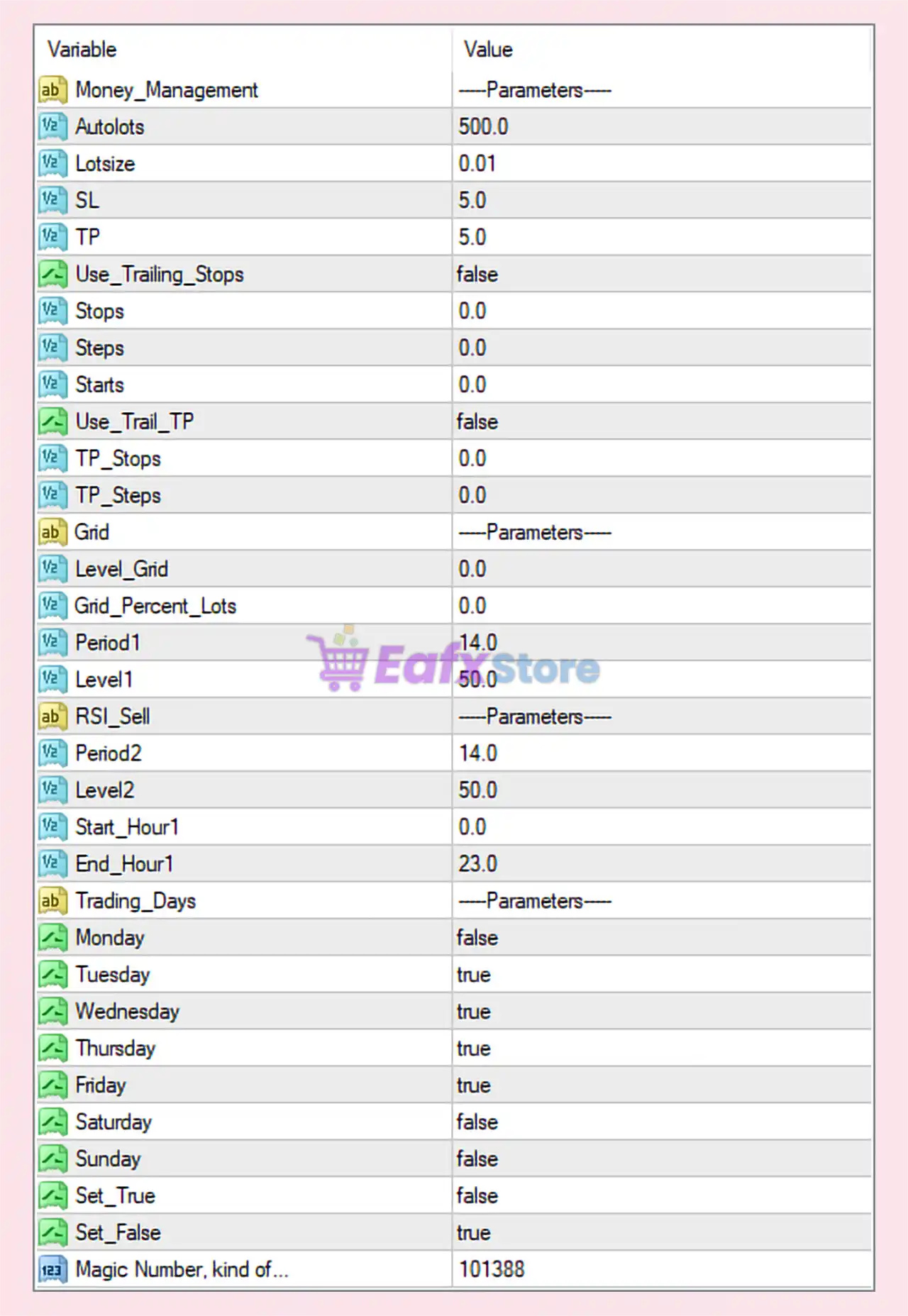
📊 Money Management & Risk Control Settings
| Parameter | Value | Explanation & Trading Impact |
|---|---|---|
| Autolots | 500.0 | Account balance reference for automatic lot calculation. Indicates very conservative risk scaling. |
| Lotsize | 0.01 | Fixed minimum lot size. Suitable for small accounts or safe testing. |
| SL (Stop Loss) | 5.0 | Very tight stop loss. Limits drawdown but requires high entry accuracy. |
| TP (Take Profit) | 5.0 | Small profit target. Typical scalping configuration. |
| Use_Trailing_Stops | false | Trailing stop is disabled, trades close only at SL or TP. |
| Stops / Steps / Starts | 0.0 | Trailing stop parameters inactive due to trailing being disabled. |
| Use_Trail_TP | false | Trailing take profit disabled. Trades exit at fixed TP only. |
| TP_Stops / TP_Steps | 0.0 | Inactive because TP trailing is disabled. |
📌 Summary:
This setup prioritizes fixed, predictable exits, avoiding trailing logic that may interfere with fast scalping trades.
📊 Grid Trading Settings
| Parameter | Value | Explanation |
|---|---|---|
| Level_Grid | 0.0 | Grid trading disabled. |
| Grid_Percent_Lots | 0.0 | No lot size increase. No martingale or recovery system used. |
📌 Summary:
Orbit Rage Final EA is running in non-grid, non-martingale mode, significantly reducing risk.
📊 RSI Indicator Settings (Trade Logic Core)
| Parameter | Value | Explanation & Strategy Role |
|---|---|---|
| Period1 (RSI Buy) | 14.0 | Standard RSI period for buy signals. |
| Level1 | 50.0 | Mid-level RSI threshold. Trades are taken near momentum shifts. |
| Period2 (RSI Sell) | 14.0 | RSI period for sell signals. |
| Level2 | 50.0 | Balanced RSI level for sell confirmation. |
📌 Summary:
Using RSI 14 with level 50 suggests a trend-confirmation or momentum-based scalping strategy, not extreme overbought/oversold trading.
⏰ Trading Time & Session Filters
| Parameter | Value | Explanation |
|---|---|---|
| Start_Hour1 | 0.0 | Trading allowed from 00:00 server time. |
| End_Hour1 | 23.0 | Trading allowed until 23:00. Nearly full-day trading. |
📌 Summary:
EA trades almost 24 hours per day, excluding rollover risk depending on broker.
📅 Trading Days Configuration
| Day | Enabled | Impact |
|---|---|---|
| Monday | false | Avoids early-week volatility and spread widening. |
| Tuesday | true | Active trading day. |
| Wednesday | true | Active trading day. |
| Thursday | true | Active trading day. |
| Friday | true | Trades until market close (potential news risk). |
| Saturday | false | Market closed. |
| Sunday | false | Avoids illiquid opening conditions. |
📌 Summary:
EA focuses on mid-week market stability, which is ideal for scalping strategies.
⚙️ System & Control Parameters
| Parameter | Value | Explanation |
|---|---|---|
| Set_True | false | Unused or inactive logic flag. |
| Set_False | true | Confirms default stable trading mode. |
| Magic Number | 101388 | Unique trade identifier to avoid conflicts with other EAs. |
✅ Strengths of This Orbit Rage Final EA Setup
✔ Very low risk (no grid, no martingale)
✔ Tight SL & TP for fast scalping
✔ RSI-based logic with balanced confirmation
✔ Clear trading days filter
✔ Suitable for small accounts and VPS trading
⚠️ Potential Weaknesses
⚠ Tight SL (5 points) may be sensitive to spread
⚠ No trailing stop → profits are capped
⚠ Fixed lot size limits account growth
⚠ Requires low-spread broker for best performance
📌 Best Use Recommendations
This configuration is best suited for:
- Forex scalping on low-spread pairs
- Small or beginner trading accounts
- Conservative traders avoiding grid & martingale
- VPS environments with stable execution
Not recommended for:
- High-volatility news trading
- Brokers with wide or variable spreads
🔍 Final Conclusion
The Orbit Rage Final EA settings shown represent a low-risk, non-grid, RSI-based scalping strategy.
This configuration prioritizes capital protection, simplicity, and consistency over aggressive profit growth.
When used with a tight-spread broker, it can deliver stable and controlled trading performance.