

This guide walks through the inputs of Orion Gold Scalper EA MT4 with the values recommended for live trading. The set files that come with the EA already contain these settings, so you can load them in one click and adjust only what your broker or account needs.
🔢 Orion Gold Scalper EA MT4 Settings Guide
🔶 Introduction
Orion Gold Scalper EA is an automated trading solution designed for traders who want to streamline their Gold trading through predefined execution, take-profit, trailing-stop, news-filter, drawdown, and trading-session controls.
The settings shown in the configuration panel provide detailed control over position sizing, trade spacing, risk parameters, economic-news protection, and the hours during which the EA is allowed to operate.
By understanding each parameter carefully, traders can adjust Orion Gold Scalper to better match their preferred trading style and account conditions.
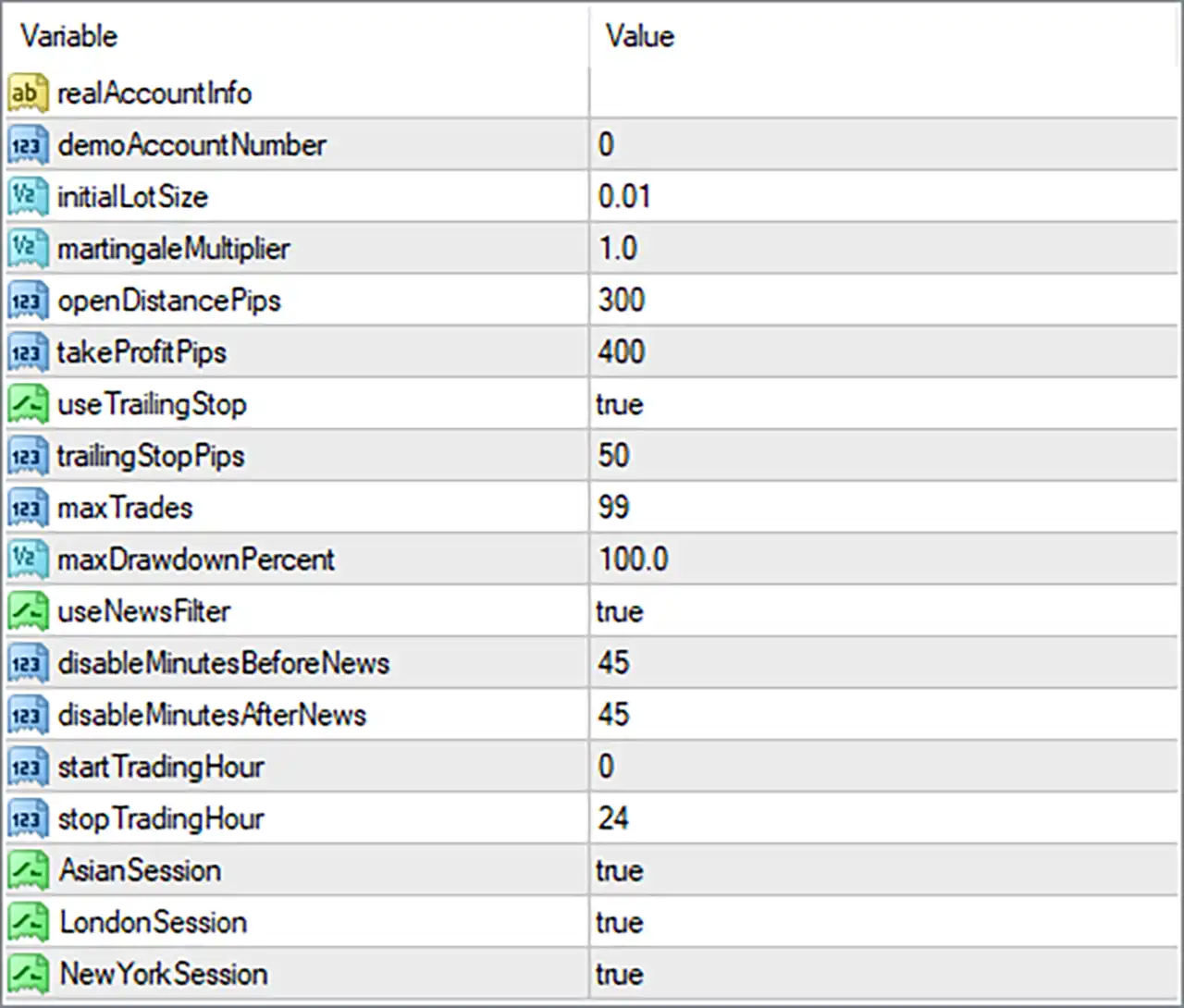
🔶 Orion Gold Scalper EA MT4 Settings Explained
🔹 realAccountInfo: This field is designed for real-account information and is currently left blank in the displayed settings. Its exact function depends on the EA's internal authorization or account-validation logic.
🔹 demoAccountNumber: 0: Defines the Demo Account Number associated with the EA. A value of 0 generally indicates that no specific demo account number has been entered.
🔹 initialLotSize: 0.01: Sets the initial trading volume to 0.01 lots, providing a relatively small starting position size suitable for controlled trade exposure.
🔹 martingaleMultiplier: 1.0: Defines the multiplier applied to subsequent position sizing when the EA's recovery or martingale mechanism is used. The value 1.0 means the lot size is not increased by this multiplier.
🔹 openDistancePips: 300: Sets the required distance of 300 pips between qualifying trade entries according to the EA's trading logic, helping control entry spacing.
🔹 takeProfitPips: 400: Sets the Take Profit target at 400 pips, determining the predefined profit distance used by the EA when closing qualifying trades.
🔹 useTrailingStop: true: Enables the trailing-stop function with the value true, allowing the EA to dynamically adjust the stop level as a trade moves favorably.
🔹 trailingStopPips: 50: Sets the trailing-stop distance to 50 pips, defining how far the protective stop can remain behind the market price when trailing is active.
🔹 maxTrades: 99: Allows a maximum of 99 trades under the EA's configured trade-management logic, representing the upper trade-count limit shown in the settings.
🔹 maxDrawdownPercent: 100.0: Sets the maximum drawdown threshold to 100.0%. This is an extremely high configured limit, so traders should understand how the EA interprets this parameter before using it for live risk management.
🔹 useNewsFilter: true: Activates the news filter with true, allowing the EA to use its economic-news protection mechanism to restrict trading around scheduled news events.
🔹 disableMinutesBeforeNews: 45: Instructs the EA to disable or restrict new trading 45 minutes before a relevant news event when the news filter is enabled.
🔹 disableMinutesAfterNews: 45: Instructs the EA to remain disabled or restrict new trading for 45 minutes after a relevant news event.
🔹 startTradingHour: 0: Sets the EA's configured trading start time to hour 0, representing the beginning of the trading-day schedule used by the EA.
🔹 stopTradingHour: 24: Sets the configured trading stop time to hour 24, effectively covering the full 24-hour period when combined with the start time.
🔹 AsianSession: true: Enables trading during the Asian Session, allowing the EA to operate during its configured Asian-session trading period.
🔹 LondonSession: true: Enables trading during the London Session, allowing the EA to participate in opportunities during the configured London trading period.
🔹 NewYorkSession: true: Enables trading during the New York Session, allowing the EA to operate during the configured New York trading period.
🔶 Key Configuration Highlights
🔹 Initial Lot Size: The EA starts with 0.01 lots, giving traders a clearly defined base position size.
🔹 Entry Distance: The configured 300 pips open distance determines the spacing requirement used for qualifying entries.
🔹 Take Profit: A 400-pip Take Profit target is configured for the EA's trade-management logic.
🔹 Trailing Protection: The trailing stop is enabled with true and uses a 50-pip trailing distance.
🔹 Trade Limit: The maximum number of trades is set to 99, which is a relatively high upper limit.
🔹 News Protection: The news filter is enabled and blocks/restricts trading 45 minutes before and 45 minutes after relevant news.
🔹 Trading Hours: The EA is configured from hour 0 to hour 24, providing a full-day trading schedule.
🔹 Trading Sessions: AsianSession, LondonSession, and NewYorkSession are all set to true, meaning all three configured sessions are enabled.
🔹 Position Multiplier: The martingaleMultiplier is 1.0, so the displayed configuration does not increase position size through a multiplier greater than 1.0.
🔶 Risk Management Considerations
🔹 Lot Size Control: The 0.01 initial lot size is an important starting parameter because actual monetary exposure depends on the trading instrument, broker contract specifications, and account size.
🔹 Drawdown Setting: The displayed 100.0% maxDrawdownPercent should receive particular attention because it represents a very high threshold and should not automatically be interpreted as conservative account protection.
🔹 Trade Frequency: The 99 maxTrades setting allows substantial trade capacity, so traders should evaluate how the EA behaves during volatile or unfavorable market conditions.
🔹 News Protection: The 45-minute pre-news and 45-minute post-news restrictions can help reduce exposure around major economic announcements when the EA's news calendar recognizes the event.
🔹 Trailing Stop: The 50-pip trailing stop can help protect floating profits after the EA has moved a trade into a favorable direction, subject to market volatility and execution conditions.
🔢 Conclusion
Orion Gold Scalper EA provides a broad range of configurable parameters for automated Gold trading, covering position sizing, entry distance, Take Profit, trailing-stop management, maximum trades, drawdown control, economic-news filtering, trading hours, and market sessions. The displayed configuration uses an initial lot size of 0.01, 300 pips open distance, 400 pips Take Profit, 50 pips trailing stop, 99 maximum trades, and a 100.0% maximum drawdown setting, while enabling the Asian, London, and New York sessions.
Before using these settings on a live account, traders should verify how each parameter is implemented by the EA, particularly the 100.0% drawdown limit, 99-trade maximum, and 1.0 martingale multiplier. Proper backtesting, forward testing, broker evaluation, and position-size management remain important when deploying an automated Gold trading strategy.
🔢 FAQs
❓ What is the recommended initial lot size for Orion Gold Scalper EA MT4?
The displayed configuration uses an initialLotSize of 0.01 lots. Traders should adjust position size according to their account balance, risk tolerance, and broker conditions.
❓ Does Orion Gold Scalper EA MT4 use a martingale multiplier?
The setting martingaleMultiplier is 1.0. This means the configured multiplier does not increase the position size above the preceding lot size through multiplication.
❓ What are the Take Profit and trailing-stop settings?
The EA is configured with takeProfitPips = 400 and trailingStopPips = 50, with useTrailingStop = true.
❓ Does Orion Gold Scalper EA MT4 trade around major news events?
The useNewsFilter parameter is set to true, with trading restrictions configured for 45 minutes before and 45 minutes after relevant news events.
❓ Which trading sessions are enabled?
All three displayed sessions are enabled: AsianSession = true, LondonSession = true, and NewYorkSession = true, with the overall trading schedule configured from 0 to 24 hours.
Get Orion Gold Scalper EA MT4
Download Orion Gold Scalper EA MT4 with its set files, read the full product details and requirements here: Orion Gold Scalper EA MT4 →