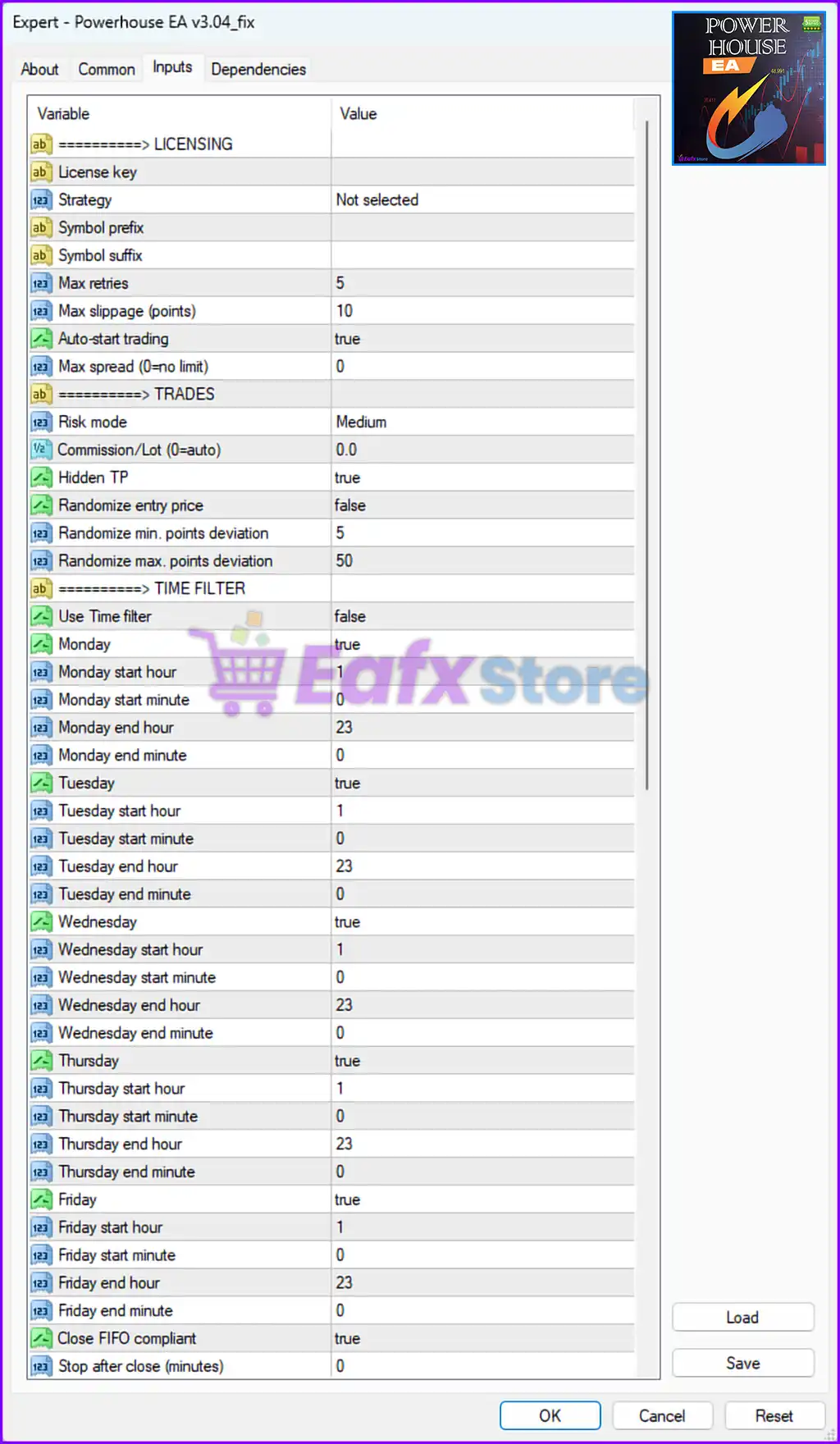
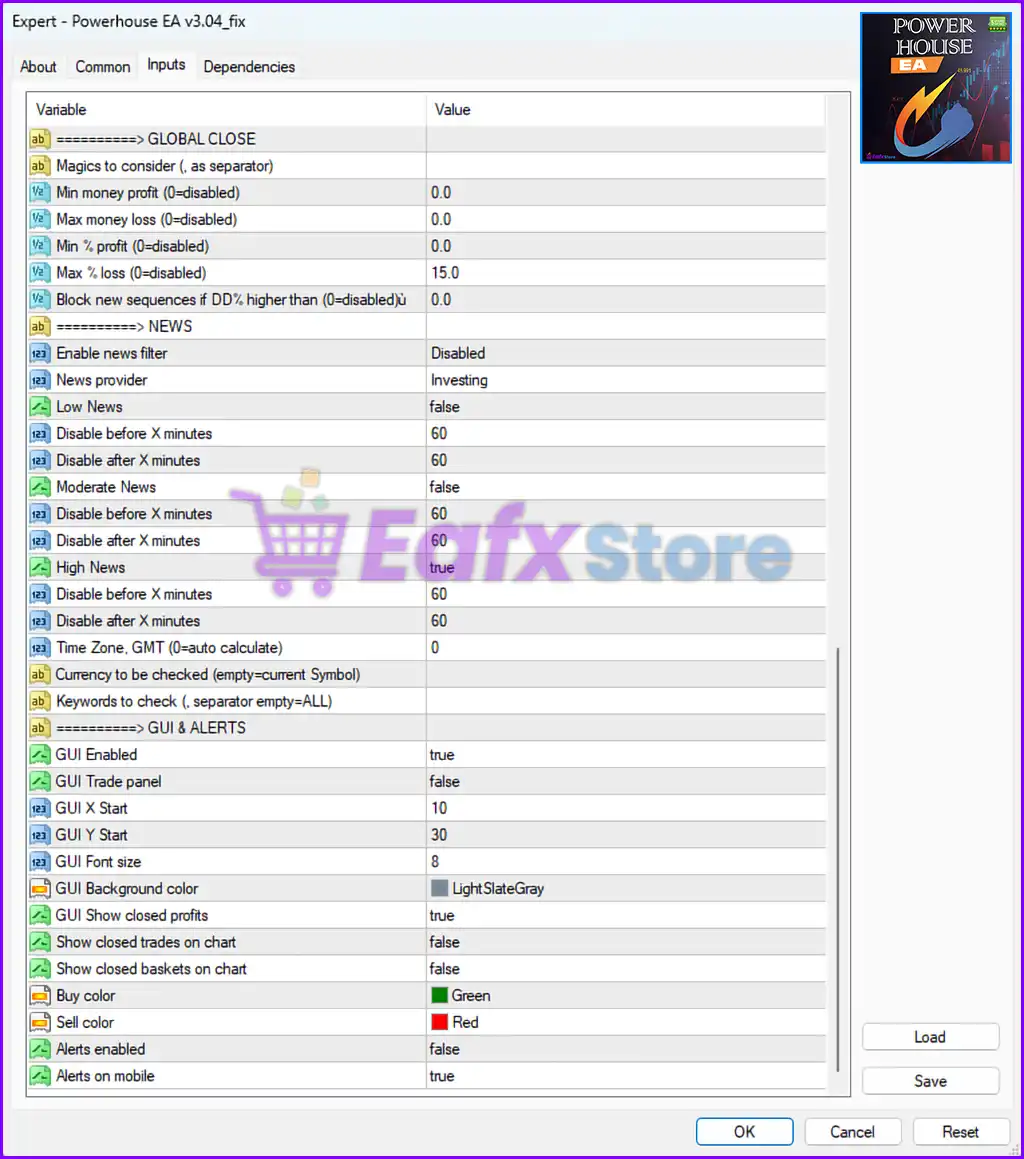
Powerhouse EA is a flexible multi-strategy automated trading robot for MetaTrader 4 (MT4). It offers high customization for risk control, trade execution, news filtering, and visual display. Below is a full breakdown of its parameters to help users understand how to optimize performance.
📌📌📌 Buy this unlimited Powerhouse EA MT4 product here 📌📌📌
⚙️ LICENSING & INITIAL SETUP
Parameter Value Description License Key Empty Field reserved for activation key, used in licensing protection. Strategy Crackerjack EURUSD No specific strategy selected; possibly allows loading external modules. Symbol Prefix/Suffix Empty Supports brokers using instrument name modifications (e.g., EURUSD.f). Max Retries 5 EA will attempt up to 5 retries on failed trade operations. Max Slippage (points) 10 Acceptable slippage tolerance (1 pip = 10 points). Auto-start Trading true EA begins trading immediately upon activation. Max Spread (0 = no limit) 0 Set to 0 means no spread restriction — risky in volatile pairs.
📊 TRADE SETTINGS
Parameter Value Description Risk Mode Medium Preset risk level balancing profitability and drawdown. Commission per Lot 0.0 No extra cost per trade; assumes commission-free broker. Hidden TP true Take Profit is hidden from broker, reducing broker manipulation risk. Randomize Entry Price false Entry price remains fixed; can be enabled to avoid pattern recognition. Randomize Point Deviation (Min/Max) 5 / 50 Adds controlled randomness in TP/SL for trade stealth.
⏰ TIME FILTER SETTINGS
Parameter Value Description Use Time Filter false Disabled – trades allowed at any time. Day Filters Mon–Fri: true Each day is enabled individually. Trading Hours 01:00 – 23:00 Avoids potential market gaps or spreads at midnight.
🚨 GLOBAL CLOSE & DRAWDOWN PROTECTION
Parameter Value Description Global Close Conditions (Money/Profit/Loss) 0.0 (disabled) Not active. Can be used to auto-close all trades based on performance metrics. Max % Loss 15.0 If account drawdown exceeds 15%, EA will halt all trading. Block New Sequences If DD% > X 0.0 Disabled; otherwise used to block trading under high drawdown conditions.
📰 NEWS FILTER (Volatility Protection)
Parameter Value Description Enable News Filter Disabled Not currently filtering trades around news. News Source Investing.com Source defined for when filter is active. High Impact News Block true Would disable trading 1 hour before and after high-impact news if enabled. Low/Moderate News Block false Not blocking trades for lower-impact events.
🧑💻 GUI & VISUAL INTERFACE
Parameter Value Description GUI Enabled true On-screen panel is active for easy monitoring. GUI Trade Panel false Full trading panel is disabled. X/Y Start & Font Size X: 10, Y: 30, Size: 8 Controls visual placement and size of the display. Buy/Sell Color Green / Red Clear color-coding for market positions. Show Closed Profits true Displays closed trade performance in GUI. Alerts on Mobile true Sends mobile push notifications on trade actions.
✅ Summary of Key Features
✅ High Trade Stealth – Hidden TP and randomized deviations help prevent broker-side interference.
✅ News Filtering Available – Though disabled by default, it can block risky trades during news events.
✅ Drawdown Guard – Global risk management halts operations at a 15% equity drawdown.
✅ Session Control – Daily trading time can be customized down to the minute.
✅ Custom GUI Support – Clean interface with adjustable settings for user monitoring.
🧠 Recommended Improvements
Enable spread filter : Max spread = 0 may lead to trading under unfavorable conditions.Enable news filter : For real accounts, turning this on is strongly advised.Activate time filter : Could reduce exposure to off-session volatility.