

This guide walks through the inputs of RT Pro Symbiosis EA MT5 with the values recommended for live trading. The set files that come with the EA already contain these settings, so you can load them in one click and adjust only what your broker or account needs.
🔢 RT Pro Symbiosis EA MT5 Settings Explained – Complete Parameter Guide
RT Pro Symbiosis EA is an automated MetaTrader 5 Expert Advisor designed to combine intelligent trade execution with a built-in recovery mechanism. It offers customizable money management, ATR- and RSI-based market analysis, fixed lot trading, drawdown protection, and optimization settings.

🔢 Installation Panel Parameters
Below are the details of the parameters in the advisor’s trading system settings table:
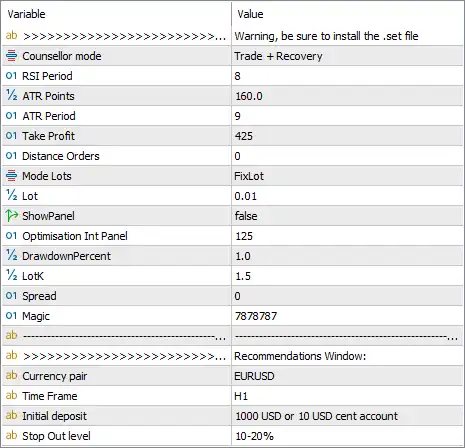
🔶 General Settings
🔹 Warning = Be sure to install the .set file – Recommends loading the official preset (.set) file to ensure the EA operates with the developer's optimized configuration.
🔹 Counsellor mode = Trade + Recovery – Enables both standard trading and the built-in recovery system to manage unfavorable market movements.
🔹 RSI Period = 8 – Uses an 8-period Relative Strength Index (RSI) to evaluate market momentum and potential entry opportunities.
🔹 ATR Points = 160.0 – Sets the Average True Range (ATR) volatility threshold to 160.0 points, helping the EA adapt to market volatility.
🔹 ATR Period = 9 – Calculates the ATR using the previous 9 candles.
🔹 Take Profit = 425 – Sets the default Take Profit target at 425 points.
🔹 Distance Orders = 0 – The spacing between recovery or additional orders is configured at 0 points, allowing the EA to use its internal logic or immediate placement.
🔶 Money Management
🔹 Mode Lots = FixLot – Uses a fixed lot sizing method instead of automatic or percentage-based position sizing.
🔹 Lot = 0.01 – Opens each new trade with a fixed volume of 0.01 lots.
🔶 Display & Optimization
🔹 ShowPanel = false – Disables the on-chart information panel.
🔹 Optimisation Int Panel = 125 – Sets the optimization interval or internal optimization parameter to 125 for strategy tuning.
🔶 Risk Management
🔹 DrawdownPercent = 1.0 – Defines the drawdown control threshold at 1.0%, helping limit excessive account losses.
🔹 LotK = 1.5 – Applies a 1.5 lot multiplier during the EA's recovery or scaling process.
🔹 Spread = 0 – A spread value of 0 allows the EA to use broker spread or internal spread handling without imposing an additional limit.
🔹 Magic = 7878787 – Unique Magic Number used to identify and manage all trades opened by RT Pro Symbiosis EA MT5.
Recommended Trading Configuration
🔹 Currency Pair = EURUSD – The developer recommends using the EA on the EURUSD currency pair.
🔹 Time Frame = H1 – Recommended trading timeframe is H1 (1 Hour) for optimal strategy performance.
🔹 Initial Deposit = 1000 USD or 10 USD cent account – Suggested minimum capital is $1,000 for a standard account or $10 for a cent account.
🔢 Conclusion
RT Pro Symbiosis EA MT5 is designed for traders seeking an automated trading solution with integrated recovery capabilities and volatility-based decision making. Its combination of RSI momentum analysis, ATR volatility filtering, fixed lot management, drawdown control, and optimized H1 trading makes it suitable for disciplined Forex traders who want a balance between consistent entries and controlled risk management. Loading the official preset (.set) file is recommended to achieve the intended performance.
🔢 FAQs
❓ What is the recommended trading pair for RT Pro Symbiosis EA MT5?
The developer recommends using EURUSD for the best trading performance.
❓ Which timeframe should I use with RT Pro Symbiosis EA MT5?
The recommended timeframe is H1 (1 Hour).
❓ Does RT Pro Symbiosis EA MT5 include a recovery system?
Yes. The EA operates in Trade + Recovery mode, combining standard trade execution with automated recovery management.
❓ Can I change the lot size?
Yes. The EA uses FixLot mode by default with 0.01 lots, but the lot size can be adjusted according to your trading preferences.
❓ Why should I load the official .set file?
The official preset file contains the developer's optimized configuration, helping ensure the EA performs as intended under recommended market conditions.
Get RT Pro Symbiosis EA MT5
Download RT Pro Symbiosis EA MT5 with its set files, read the full product details and requirements here: RT Pro Symbiosis EA MT5 →