

This guide walks through the inputs of Trend DCA EA MT5 with the values recommended for live trading. The set files that come with the EA already contain these settings, so you can load them in one click and adjust only what your broker or account needs.
Trend DCA EA Settings Guide
Trend DCA EA is an automated trading Expert Advisor built around trend-following logic and Dollar-Cost Averaging (DCA) position management. The EA provides extensive controls for market permissions, Buy and Sell modes, fixed-volume settings, DCA range spacing, smart Stop Loss and Take Profit management, account-level risk controls, and individual-position protection.
The displayed configuration uses Sensor-X (Multi-layers) - News trading, a fixed starting volume of 0.01, a volume multiplier of 3.2, and Random Dispersion for DCA range management. Smart SL-TP is enabled with TP = 550 points, SL activation = 450 points, and SL = 300 points.
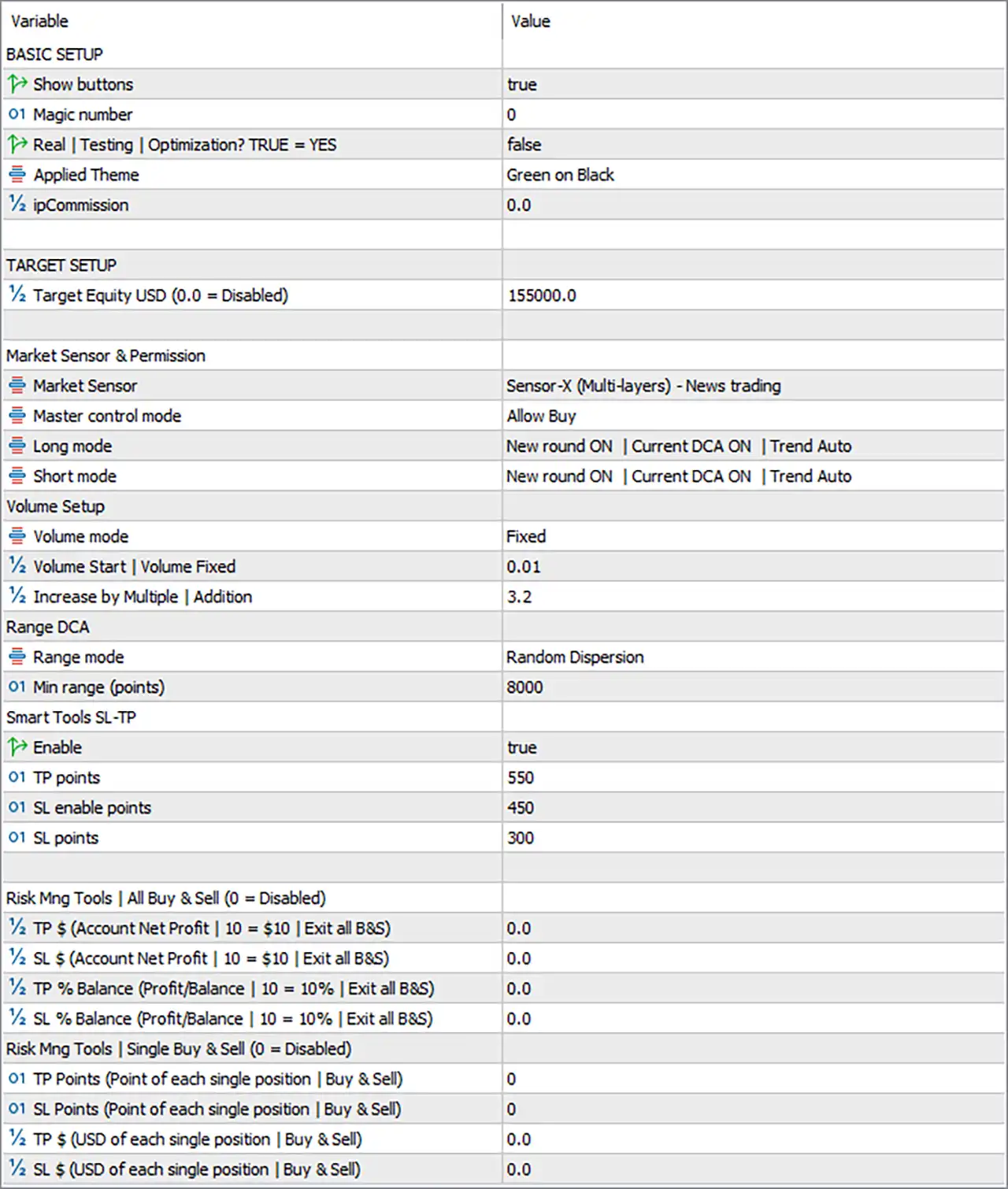
Basic Setup
🔹 Show buttons = true — Displays the EA's control buttons on the trading chart, allowing available manual controls to remain visible.
🔹 Magic number = 0 — Sets the Magic Number to 0, which identifies the EA's trades according to the platform's standard Magic Number convention.
🔹 Real | Testing | Optimization? TRUE = YES = false — Sets this parameter to false, indicating that the special Real/Testing/Optimization mode is not enabled.
🔹 Applied Theme = Green on Black — Selects the Green on Black interface theme for the EA's visual controls and chart panel.
🔹 ipCommission = 0.0 — Sets the commission-related input to 0.0, meaning no additional commission value is specified in this configuration.
Target Setup
🔹 Target Equity USD (0.0 = Disabled) = 155000.0 — Sets the target account equity level to 155000.0 USD; because the value is above 0.0, the target-equity function is configured with a specific target rather than disabled.
Market Sensor & Permission
🔹 Market Sensor = Sensor-X (Multi-layers) - News trading — Selects Sensor-X (Multi-layers) - News trading as the active market-sensing system for the EA.
🔹 Master control mode = Allow Buy — Sets the master trading permission to Allow Buy, controlling the overall Buy-side trading permission.
🔹 Long mode = New round ON | Current DCA ON | Trend Auto — Enables a new Long trading round, allows current DCA activity, and sets the trend direction for Long trades to Auto.
🔹 Short mode = New round ON | Current DCA ON | Trend Auto — Enables a new Short trading round, allows current DCA activity, and sets the trend direction for Short trades to Auto.
Volume Setup
🔹 Volume mode = Fixed — Selects Fixed as the volume-management mode.
🔹 Volume Start | Volume Fixed = 0.01 — Sets the starting/fixed trading volume to 0.01 lots.
🔹 Increase by Multiple | Addition = 3.2 — Sets the DCA volume increase multiplier to 3.2, controlling how position volume increases according to the EA's DCA logic.
Range DCA
🔹 Range mode = Random Dispersion — Selects Random Dispersion as the method for determining DCA trade spacing within the configured range.
🔹 Min range (points) = 8000 — Sets the minimum DCA range distance to 8000 points, establishing the minimum spacing used by the configured Range DCA system.
Smart Tools SL-TP
🔹 Enable = true — Activates the Smart Tools SL-TP module.
🔹 TP points = 550 — Sets the Take Profit level to 550 points for the Smart SL-TP system.
🔹 SL enable points = 450 — Sets the activation threshold for the Smart Stop Loss to 450 points.
🔹 SL points = 300 — Sets the Stop Loss distance to 300 points once the Smart SL-TP Stop Loss mechanism is activated.
Risk Management Tools – All Buy & Sell
🔹 TP $ (Account Net Profit | 10 = $10 | Exit all B&S) = 0.0 — Sets the account-level Buy & Sell Take Profit target to 0.0 USD, which disables this specific global TP function.
🔹 SL $ (Account Net Profit | 10 = $10 | Exit all B&S) = 0.0 — Sets the account-level Buy & Sell Stop Loss threshold to 0.0 USD, disabling this specific global SL function.
🔹 TP % Balance (Profit/Balance | 10 = 10% | Exit all B&S) = 0.0 — Sets the account-level Take Profit target based on Balance percentage to 0.0%, disabling this percentage-based global TP function.
🔹 SL % Balance (Profit/Balance | 10 = 10% | Exit all B&S) = 0.0 — Sets the account-level Stop Loss threshold based on Balance percentage to 0.0%, disabling this percentage-based global SL function.
Risk Management Tools – Single Buy & Sell
🔹 TP Points (Point of each single position | Buy & Sell) = 0 — Sets the individual-position Take Profit distance to 0 points, meaning this specific individual-position TP function is disabled.
🔹 SL Points (Point of each single position | Buy & Sell) = 0 — Sets the individual-position Stop Loss distance to 0 points, meaning this specific individual-position SL function is disabled.
🔹 TP $ (USD of each single position | Buy & Sell) = 0.0 — Sets the individual-position monetary Take Profit target to 0.0 USD, disabling this specific individual-position TP function.
🔹 SL $ (USD of each single position | Buy & Sell) = 0.0 — Sets the individual-position monetary Stop Loss threshold to 0.0 USD, disabling this specific individual-position SL function.
Key Features of This Trend DCA EA Configuration
🔹 Trend-Based Market Detection — The configuration uses Sensor-X (Multi-layers) - News trading for market sensing.
🔹 DCA Position Management — Both Long and Short modes have New round ON and Current DCA ON.
🔹 Automatic Trend Direction — Both Long and Short modes use Trend Auto.
🔹 Fixed Starting Volume — The EA starts with 0.01 lots under the Fixed volume mode.
🔹 DCA Volume Multiplier — Increase by Multiple = 3.2 controls the configured volume increase between DCA positions.
🔹 Large DCA Range — Min range = 8000 points establishes the configured minimum spacing for the Range DCA system.
🔹 Random DCA Dispersion — Range mode = Random Dispersion adds the selected spacing method to the DCA logic.
🔹 Smart TP/SL Protection — Smart Tools SL-TP is enabled with TP = 550, SL activation = 450, and SL = 300 points.
🔹 Global Profit/Loss Targets Disabled — All four account-level TP/SL parameters are set to 0.0, disabling those specific global controls.
🔹 Individual Monetary and Point Targets Disabled — The individual-position TP/SL values are all 0 or 0.0.
🔹 Equity Target Configured — Target Equity = 155000.0 USD provides a defined account-equity target.
Important Notes About the Current Configuration
The Trend DCA EA configuration contains several layers of trade and risk management. The active Smart Tools SL-TP system is separate from the individual-position TP/SL inputs, which are all set to 0 or 0.0.
The DCA configuration is particularly important because Volume Start = 0.01 is combined with Increase by Multiple = 3.2. This means the EA's configured DCA volume progression uses a relatively large multiplication factor when additional DCA positions are created. The actual sequence depends on the EA's internal DCA implementation and broker volume rules.
The Min range = 8000 points should also be interpreted according to the traded symbol's point size. The monetary and price impact of 8000 points can differ substantially between Forex pairs, indices, metals, and cryptocurrencies.
The Target Equity = 155000.0 USD is also a significant account-level parameter. The input description explicitly states that 0.0 = Disabled, while the current value is 155000.0, so the target is configured rather than disabled.
Conclusion
The displayed Trend DCA EA setup combines trend detection, DCA position management, fixed-volume trading, random DCA dispersion, and Smart SL-TP protection.
The core configuration uses Sensor-X (Multi-layers) - News trading, Fixed volume mode, 0.01 lots as the starting/fixed volume, and an Increase by Multiple of 3.2. The DCA range is configured with Random Dispersion and a minimum range of 8000 points.
For trade protection, Smart Tools SL-TP = true, with TP = 550 points, SL activation = 450 points, and SL = 300 points. Meanwhile, the separate account-level and individual-position TP/SL controls are disabled through their 0 and 0.0 values.
The configuration also includes a 155000.0 USD Target Equity, a Green on Black interface theme, and enabled chart buttons. Both Long and Short modes show New round ON | Current DCA ON | Trend Auto, providing automated direction handling for the respective trade modes.
Because this EA uses DCA and a 3.2 volume multiplier, traders should carefully evaluate the potential position-size progression, margin requirements, maximum exposure, and drawdown characteristics through backtesting and forward testing before applying the configuration to a live account.
Get Trend DCA EA MT5
Download Trend DCA EA MT5 with its set files, read the full product details and requirements here: Trend DCA EA MT5 →