
This guide walks through the inputs of Straddle EA MT5 with the values recommended for live trading. The set files that come with the EA already contain these settings, so you can load them in one click and adjust only what your broker or account needs.
🔢 Straddle MT5 Settings Guide – Complete Parameter Explanation
Straddle MT5 is a professional grid and straddle trading Expert Advisor designed for MetaTrader 5. It provides flexible configuration for grid spacing, dynamic lot sizing, profit targeting, daily drawdown protection, trend detection, trailing management, recovery engines and account safety controls.
With customizable money management and multiple protection layers, Straddle MT5 allows traders to optimize automated trading performance while maintaining strict risk management.
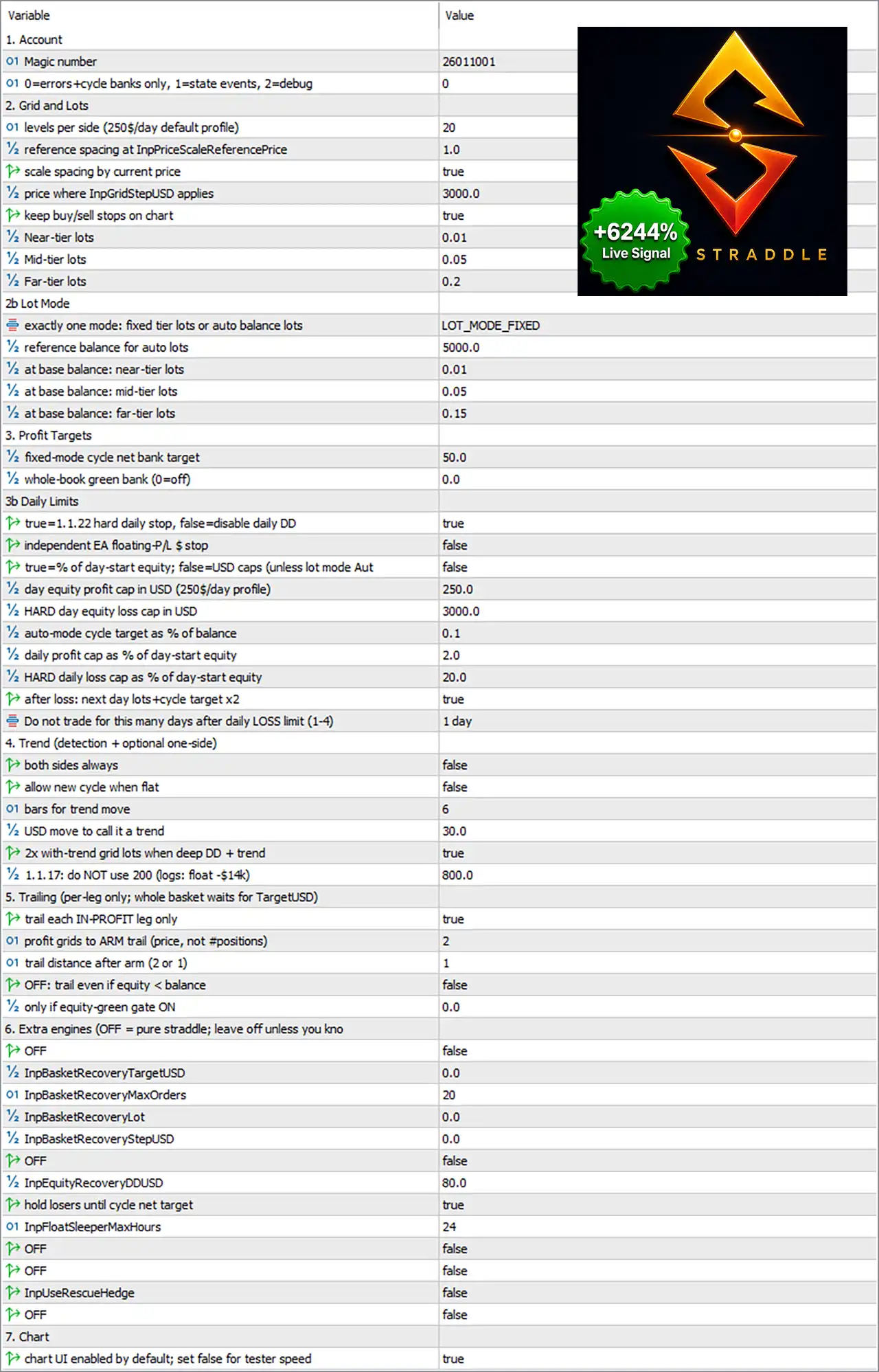
🔢 Account Settings
🔹 Magic number = 26011001 – Assigns the unique Magic Number 26011001 to identify all trades opened by Straddle MT5.
🔹 0=errors+cycle banks only, 1=state events, 2=debug = 0 – Sets the logging mode to 0, recording only errors and cycle bank events for optimal performance.
🔢 Grid and Lots
🔹 Levels per side (250$/day default profile) = 20 – Configures 20 grid levels on each side of the trading range.
🔹 Reference spacing at InpPriceScaleReferencePrice = 1.0 – Defines the reference spacing multiplier as 1.0 for price scaling calculations.
🔹 Scale spacing by current price = true – Enables automatic grid spacing adjustment according to the current market price.
🔹 Price where InpGridStepUSD applies = 3000.0 – Sets 3000.0 as the reference price where the USD-based grid step calculation becomes effective.
🔹 Keep buy/sell stops on chart = true – Keeps all pending Buy Stop and Sell Stop orders visible on the trading chart.
🔹 Near-tier lots = 0.01 – Sets the lot size for the nearest grid tier to 0.01 lots.
🔹 Mid-tier lots = 0.05 – Sets the lot size for the middle grid tier to 0.05 lots.
🔹 Far-tier lots = 0.2 – Sets the lot size for the farthest grid tier to 0.20 lots.
🔢 Lot Mode
🔹 Exactly one mode: fixed tier lots or auto balance lots = LOT_MODE_FIXED – Uses the LOT_MODE_FIXED money management mode with predefined lot sizes.
🔹 Reference balance for auto lots = 5000.0 – Uses 5000.0 as the reference account balance for automatic lot calculations.
🔹 At base balance: near-tier lots = 0.01 – Uses 0.01 lots for near-tier positions at the reference balance.
🔹 At base balance: mid-tier lots = 0.05 – Uses 0.05 lots for mid-tier positions at the reference balance.
🔹 At base balance: far-tier lots = 0.15 – Uses 0.15 lots for far-tier positions at the reference balance.
🔢 Profit Targets
🔹 Fixed-mode cycle net bank target = 50.0 – Sets the cycle profit target to 50.0 account currency units before closing the basket.
🔹 Whole-book green bank (0 = off) = 0.0 – Disables the overall account-wide profit target by setting the value to 0.0.
🔢 Daily Limits
🔹 True=1,22 hard daily stop, false=disable daily DD = true – Enables the hard daily drawdown protection system.
🔹 Independent EA floating P/L $ stop = false – Disables floating profit/loss protection based on the EA's own trades.
🔹 True=% of day-start equity; false=USD caps (unless lot mode Auto) = false – Uses fixed USD limits instead of percentage-based limits.
🔹 Day equity profit cap (250$/day profile) = 250.0 – Sets the daily profit target to 250.0 USD.
🔹 HARD day equity loss cap in USD = 3000.0 – Limits the maximum daily account loss to 3000.0 USD.
🔹 Auto-mode cycle target as % of balance = 0.1 – Sets automatic cycle profit targeting to 0.1% of account balance.
🔹 Daily profit cap as % of day-start equity = 2.0 – Stops trading after reaching 2.0% daily profit.
🔹 HARD daily loss cap as % of day-start equity = 20.0 – Prevents further trading after a 20.0% daily loss.
🔹 After loss: next day lots +cycle target x2 = true – Doubles the next day's lot size and cycle target after a losing day.
🔹 Do not trade for this many days after Daily Loss limit (1-4) = 1 day – Pauses trading for 1 day after reaching the daily loss limit.
🔢 Trend Detection
🔹 Both sides always = false – Prevents simultaneous trading on both market directions continuously.
🔹 Allow new cycle when flat = false – Disables automatic cycle restart immediately after all trades close.
🔹 Bars for trend move = 6 – Uses 6 candles to determine trend direction.
🔹 USD move to call it a trend = 30.0 – Requires a 30.0 USD movement before recognizing a trend.
🔹 2x with-trend grid lots when deep DD + trend = true – Doubles grid lot size during deep drawdown when trading with the detected trend.
🔹 1.1.17: do NOT use 200 (log; float -$14) = 800.0 – Sets the internal trend-related calculation value to 800.0.
🔢 Trailing Settings
🔹 Trail each IN-PROFIT leg only = true – Applies trailing stops only to profitable positions.
🔹 Profit grids to ARM trail (price, not #positions) = 2 – Arms trailing after achieving 2 price grid units of profit.
🔹 Trail distance after arm (2 or 1) = 1 – Uses a trailing distance of 1 grid unit once activated.
🔹 OFF: trail even if equity < balance = false – Disables trailing when account equity falls below account balance.
🔹 Only if equity-green gate ON = 0.0 – Keeps the equity gate disabled by using 0.0.
🔢 Extra Engines
🔹 OFF = false – Keeps the optional extra engine disabled.
🔹 InpBasketRecoveryTargetUSD = 0.0 – Disables the basket recovery profit target.
🔹 InpBasketRecoveryMaxOrders = 20 – Allows a maximum of 20 recovery orders.
🔹 InpBasketRecoveryLot = 0.0 – Disables dedicated recovery lot sizing.
🔹 InpBasketRecoveryStepUSD = 0.0 – Disables recovery step calculations.
🔹 OFF = false – Keeps the additional recovery engine disabled.
🔹 InpEquityRecoveryDDUSD = 80.0 – Starts equity recovery after an 80.0 USD drawdown.
🔹 Hold losers until cycle net target = true – Holds losing positions until the basket reaches its overall profit target.
🔹 InpFloatSleeperMaxHours = 24 – Allows floating positions to remain active for up to 24 hours.
🔹 OFF = false – Additional optional feature remains disabled.
🔹 OFF = false – Additional optional feature remains disabled.
🔹 InpUseRescueHedge = false – Disables the emergency rescue hedge function.
🔹 OFF = false – Keeps the final optional engine disabled.
🔢 Chart
🔹 Chart UI enabled by default; set false for tester speed = true – Enables the graphical trading interface during live trading while allowing it to be disabled for faster Strategy Tester performance.
🔢 Risk Level
🔹 Fix Lot – Uses constant predefined lot sizes regardless of account balance, providing predictable risk exposure.
🔹 Safe – Applies conservative position sizing designed to reduce drawdown and preserve trading capital.
🔹 Balanced – Maintains a moderate balance between profitability and risk, making it suitable for most traders.
🔹 Aggressive – Increases position sizing and overall market exposure to maximize potential returns while accepting significantly higher risk.
🔢 Conclusion
Straddle MT5 is a comprehensive grid-based Expert Advisor that combines advanced lot management, intelligent trend detection, dynamic trailing, daily risk protection, and optional recovery mechanisms into a single automated trading system.
Its flexible configuration allows traders to customize every aspect of position sizing, basket management, drawdown protection and market behavior.
Properly configuring these parameters can significantly improve trading stability, optimize long-term performance, and maintain effective account risk control across varying market conditions.
🔢 FAQs
❓ What is the purpose of LOT_MODE_FIXED?
LOT_MODE_FIXED uses predefined lot sizes for each grid tier instead of automatically adjusting lots according to account balance.
❓ How does the daily loss protection work?
When enabled, the EA monitors daily equity loss and stops opening new trades once the configured loss limit is reached.
❓ Why are different lot sizes used for Near, Mid, and Far tiers?
Different lot sizes help optimize exposure across the grid, allowing the EA to adapt risk depending on the distance from the current market price.
❓ What does the Hold Losers Until Cycle Net Target option do?
This feature keeps losing positions open until the entire trading basket reaches its predefined overall profit target.
❓ Can Straddle MT5 automatically scale grid spacing?
Yes. With Scale spacing by current price = true, the EA dynamically adjusts grid spacing based on the current market price to maintain consistent trading behavior across different price levels.
Get Straddle EA MT5
Download Straddle EA MT5 with its set files, read the full product details and requirements here: Straddle EA MT5 →