

🔶 What is TwisterPro Scalper EA?
TwisterPro Scalper EA is an automated Forex scalping Expert Advisor (EA) designed for the MetaTrader 5 (MT5) platform. The EA focuses on short-term market opportunities using precise risk management settings and configurable trade execution modes. With options for dynamic risk control, drawdown protection, and an integrated monitoring panel, TwisterPro Scalper aims to deliver efficient automated trading for both beginner and advanced traders.
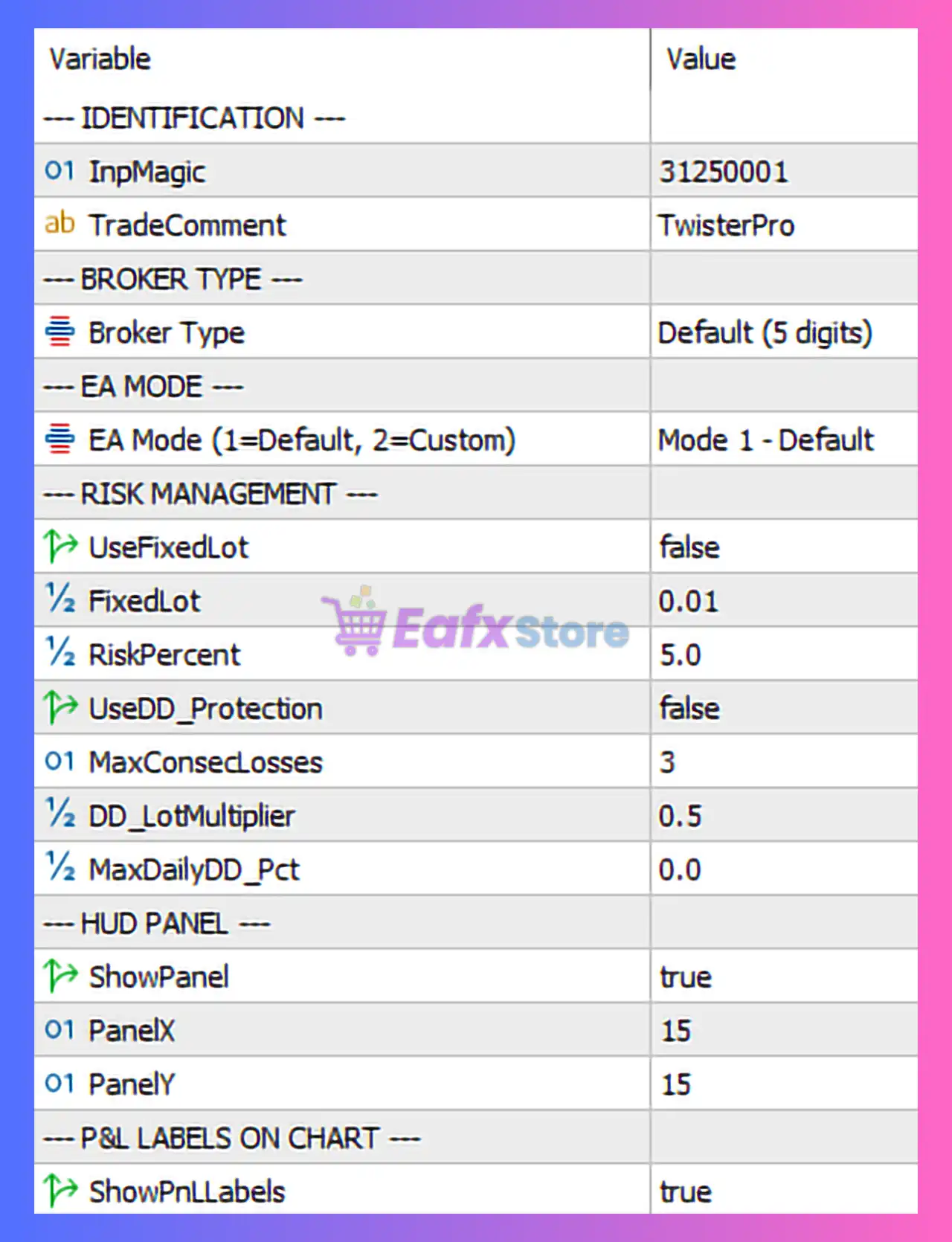
🔶 Identification Settings
| Parameter | Value | Explanation |
|---|---|---|
| Magic Number | 31250001 | A unique identifier used by the EA to manage its trades independently from other strategies. |
| Trade Comment | TwisterPro | Custom label attached to each trade to help identify positions opened by this EA. |
➡️ These parameters ensure that the EA can track and manage its own trades without interference.
🔶 Broker Type Configuration
| Parameter | Value | Explanation |
|---|---|---|
| Broker Type | Default (5 digits) | Indicates that the EA is configured for brokers that use five-digit pricing (e.g., EURUSD quoted as 1.12345). |
➡️ This ensures correct pip calculations and order execution.
🔶 EA Operating Mode
| Parameter | Value | Explanation |
|---|---|---|
| EA Mode | Mode 1 – Default | Activates the standard trading algorithm provided by the developer. Custom mode allows advanced parameter adjustments. |
➡️ The default mode is typically optimized for general trading conditions.
🔶 Risk Management Settings
| Parameter | Value | Explanation |
|---|---|---|
| Use Fixed Lot | false | Enables dynamic lot sizing instead of fixed lot size. |
| Fixed Lot | 0.01 | Default lot size used if fixed lot mode is enabled. |
| Risk Percent | 5.0 | Determines the percentage of account balance risked per trade. |
| Use Drawdown Protection | false | Drawdown protection feature is disabled in this configuration. |
| Max Consecutive Losses | 3 | Limits the number of consecutive losing trades before additional risk adjustments occur. |
| DD Lot Multiplier | 0.5 | Reduces lot size by half when drawdown conditions are detected. |
| Max Daily Drawdown (%) | 0.0 | No daily drawdown limit is currently set. |
➡️ These settings provide flexible risk management and allow the EA to adapt position sizes according to market conditions.
🔶 HUD Panel Settings
| Parameter | Value | Explanation |
|---|---|---|
| Show Panel | true | Displays the EA dashboard directly on the trading chart. |
| Panel X | 15 | Horizontal position of the panel on the chart. |
| Panel Y | 15 | Vertical position of the panel on the chart. |
➡️ The panel provides real-time information about EA performance and trading activity.
🔶 Chart Label Settings
| Parameter | Value | Explanation |
|---|---|---|
| Show PnL Labels | true | Displays profit and loss labels directly on the chart for active trades. |
➡️ This feature helps traders monitor performance visually without opening the trade terminal.
🔶 Strategy Overview
TwisterPro Scalper EA MT5 is designed for high-frequency scalping strategies, where trades are opened and closed quickly to capture small price movements. The EA uses dynamic risk management to adjust lot sizes based on account balance and trading results.
➡️ The ability to reduce lot size after consecutive losses helps maintain account stability during unfavorable market conditions.
🔶 Risk Management Perspective
Key protective features include:
- Adjustable risk percentage per trade
- Automatic lot size reduction after losses
- Consecutive loss control
- Optional drawdown protection
- Visual monitoring through an on-chart panel
➡️ These features aim to reduce emotional decision-making and maintain consistent trading discipline.
🔶 Conclusion
TwisterPro Scalper EA is a flexible automated scalping system designed for fast-paced trading environments. With dynamic risk management, customizable execution modes, and a visual monitoring interface, the EA offers traders a structured approach to short-term Forex trading.
For optimal performance, traders should use brokers with low spreads and fast execution speeds, as scalping strategies rely heavily on tight spreads and quick order processing. Proper risk configuration and account management remain essential to achieving consistent long-term results with automated trading systems.