
Vortex Turbo EA MT4 is an automated trading robot built for high-speed execution with controlled risk, combining limit-order entries, time filters, spread protection, and a robust news filter. The Expert Advisor (EA) is designed to trade frequently but selectively, aiming for consistent intraday profits while avoiding unstable market conditions such as high spreads and high-impact news.
📌📌📌 Buy this unlimited Vortex Turbo EA MT4 product here 📌📌📌
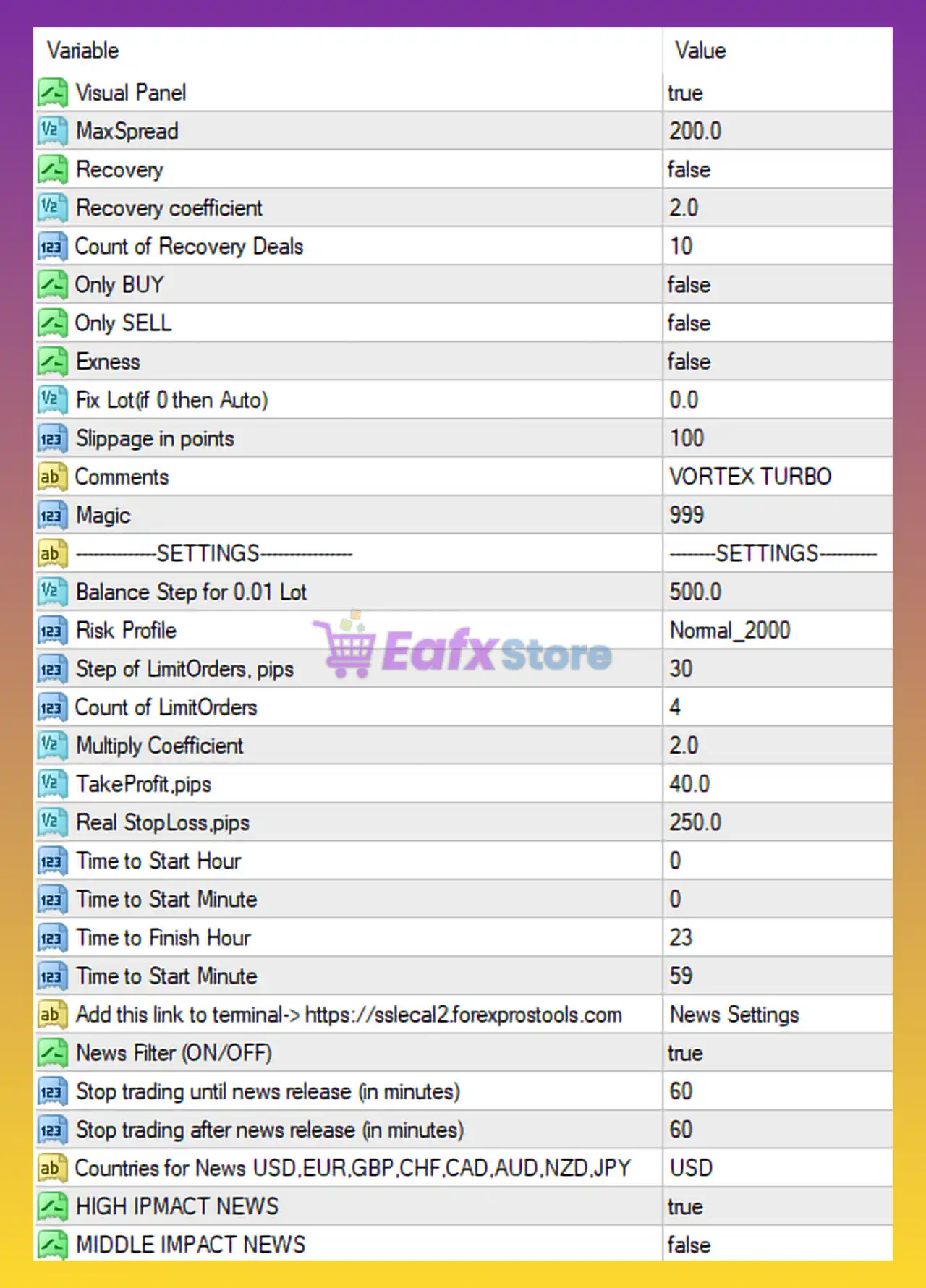
🔧 General & Execution Settings
| Parameter | Value | Explanation | Impact |
|---|---|---|---|
Visual Panel | true | Displays EA info on chart | Easy monitoring |
MaxSpread | 200.0 | Maximum allowed spread (points) | Avoids bad liquidity |
Slippage in points | 100 | Max slippage tolerance | Execution safety |
Magic | 999 | Unique trade identifier | No order conflict |
Comments | VORTEX TURBO | Trade labeling | Easy tracking |
Insight:
These parameters ensure that the EA trades only when execution conditions are acceptable, which is crucial for scalping and short-term strategies.
🔄 Recovery & Trade Direction Control
| Parameter | Value | Description |
|---|---|---|
Recovery | false | Recovery/martingale disabled |
Recovery coefficient | 2.0 | Recovery multiplier (inactive) |
Count of Recovery Deals | 10 | Max recovery trades |
Only BUY | false | Buy trades allowed |
Only SELL | false | Sell trades allowed |
Exness | false | Broker-specific mode |
Analysis:
With Recovery = false, Vortex Turbo EA operates as a non-martingale system, which significantly reduces drawdown risk compared to grid or recovery EAs.
💰 Lot Size & Risk Profile
| Parameter | Value | Meaning |
|---|---|---|
Fix Lot (if 0 then Auto) | 0.0 | Auto lot sizing enabled |
Balance Step for 0.01 Lot | 500.0 | $500 per 0.01 lot |
Risk Profile | Normal_2000 | Balanced risk mode |
Impact:
The EA scales lot size gradually with balance, making it suitable for small to medium accounts when properly capitalized.
📈 Order Logic & Profit Targets
| Parameter | Value | Explanation |
|---|---|---|
Step of LimitOrders (pips) | 30 | Distance between pending orders |
Count of LimitOrders | 4 | Number of pending entries |
Multiply Coefficient | 2.0 | Position scaling factor |
TakeProfit (pips) | 40.0 | Profit target |
Real StopLoss (pips) | 250.0 | Hard stop loss |
Trading Logic:
- Uses limit orders to catch pullbacks
- Moderate TP with wider SL
- Scaling factor is present but not aggressive, especially with recovery disabled
⏰ Trading Time Window
| Parameter | Value |
|---|---|
Time to Start Hour | 0 |
Time to Start Minute | 0 |
Time to Finish Hour | 23 |
Time to Finish Minute | 59 |
Result:
The EA is allowed to trade 24/5, relying on spread and news filters rather than strict session timing.
📰 News Filter & Fundamental Protection
| Parameter | Value | Purpose |
|---|---|---|
News Filter (ON/OFF) | true | Enable news protection |
Stop trading before news (min) | 60 | Pre-news safety |
Stop trading after news (min) | 60 | Post-news stabilization |
Countries for News | USD | Focus on USD events |
HIGH IMPACT NEWS | true | Filter red news |
MIDDLE IMPACT NEWS | false | Ignore medium news |
Insight:
This configuration is highly effective for USD pairs, significantly reducing exposure during volatile economic releases.
📊 Strategy & Risk Profile Summary
With the current settings, Vortex Turbo EA MT4 behaves as:
- A limit-order based automated EA
- Auto lot sizing with balance scaling
- No martingale / no grid recovery
- Strong spread and slippage protection
- Full-day trading with strict high-impact news filter
- Balanced risk profile (Normal_2000)
This makes it suitable for:
- Traders seeking steady intraday automation
- Accounts with moderate risk tolerance
- Users trading USD-based pairs
✅ Conclusion
The settings shown for Vortex Turbo EA MT4 define a balanced, execution-focused trading system with strong emphasis on risk control and news avoidance.
In conclusion:
Vortex Turbo EA MT4 is a professional automated trading robot designed for consistent intraday performance, combining limit-order precision, adaptive lot sizing, and robust fundamental protection.
🔶 Recommended Usage
- Small to medium live accounts ($500+ per 0.01 lot)
- USD pairs with good liquidity
- Traders who prefer non-martingale, rule-based EAs
🔶 Optional Safer Optimization
| Setting | Suggested Value |
|---|---|
| MaxSpread | 150 |
| Count of LimitOrders | 3 |
| Multiply Coefficient | 1.5 |
These adjustments further reduce drawdown while maintaining the EA’s core trading edge.