

Zing Trading Bot is an AI-powered automated FX trading system for MetaTrader 5 (MT5), combining adaptive risk controls and dynamic trade management. Below is a deep-dive into its configuration parameters from version 1.03.
==>> Buy this unlimited Zing Trading Bot MT5 product here
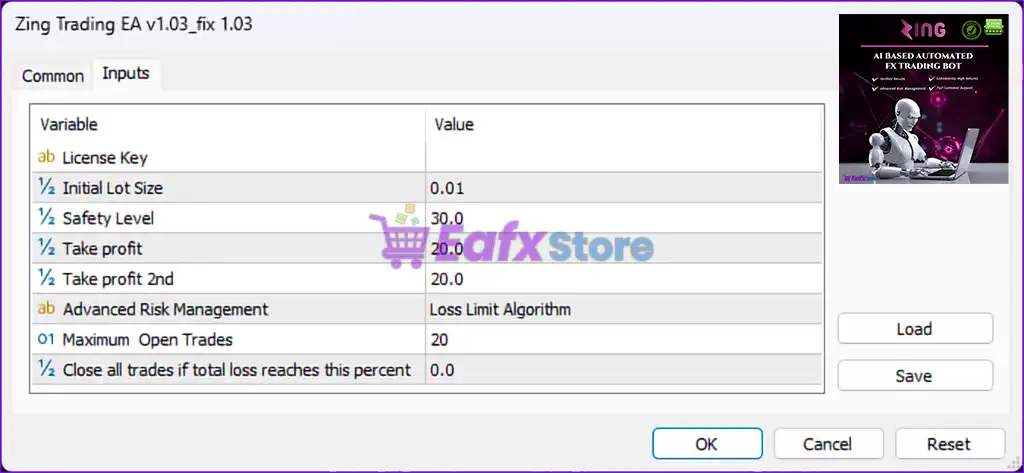
⚙️ Core Trading Parameters
| Parameter | Value | Explanation |
|---|---|---|
| License Key | — | Placeholder for EA activation (typically tied to account or email). |
| Initial Lot Size | 0.01 | Minimum starting trade size – ideal for small capital or risk-averse trading. |
| Safety Level | 30.0 | This likely represents a risk limiter (e.g. % of equity, margin buffer, or equity safeguard). |
| Take Profit | 20.0 pips | Primary take profit target – closes partial/full trade upon reaching 20 pips. |
| Take Profit 2nd | 20.0 pips | Secondary TP – possibly for a layered or trailing take profit system. |
🛡️ Risk Management Features
| Parameter | Value | Explanation |
|---|---|---|
| Advanced Risk Management | Loss Limit Algorithm | Enables a built-in logic to cut losses before heavy drawdowns occur. |
| Maximum Open Trades | 20 | Caps the number of simultaneous open trades, useful for avoiding over-leverage. |
| Close all trades if total loss reaches | 0.0% | Set to 0.0%, which likely disables this feature; when activated, it will close all positions once cumulative loss exceeds a threshold. |
🧠 Expert Features & Strategy Hints
- AI Logic Enabled: Zing Trading Bot references "AI-Based Automated FX Trading" in its product identity, indicating use of machine learning or adaptive signal generation.
- Dual TP System: The presence of both “Take Profit” and “Take Profit 2nd” suggests potential scaling out of trades or multi-leg closure mechanisms.
- Loss Limit Algorithm: This hints at internal logic for dynamic stop-outs, possibly using trailing equity protection or volatility thresholds.
📌 Best Use Case
- Suitable for low-lot grid or semi-scalping strategies.
- Best when used with ECN brokers with tight spreads and fast execution.
- Recommended for gold (XAUUSD) or major currency pairs with low slippage.
🏁 Final Thoughts
Zing Trading Bot version 1.03 is clearly structured with built-in safety controls and flexible take-profit logic. It’s designed for traders who want automated execution with a moderate level of customization. With a capped number of open trades and built-in loss-limiting features, it aims to balance profitability with capital preservation — especially for prop firm challenges or regulated portfolio trading.