



🔢 Do IT EA MT4 Settings Guide – Complete Parameters Explained
Do IT EA is a powerful automated Forex trading Expert Advisor (EA) designed for MetaTrader 4 traders who want advanced trade management, smart trailing systems, recovery modes and integrated news filtering.
The EA combines flexible risk management, breakout protection, loop trailing stop technology, and trading hour optimization to improve trading efficiency and reduce unnecessary market exposure.

🔢 Complete Do IT EA MT4 Settings Explained
Below are the details of the parameters in the advisor’s trading system settings table:
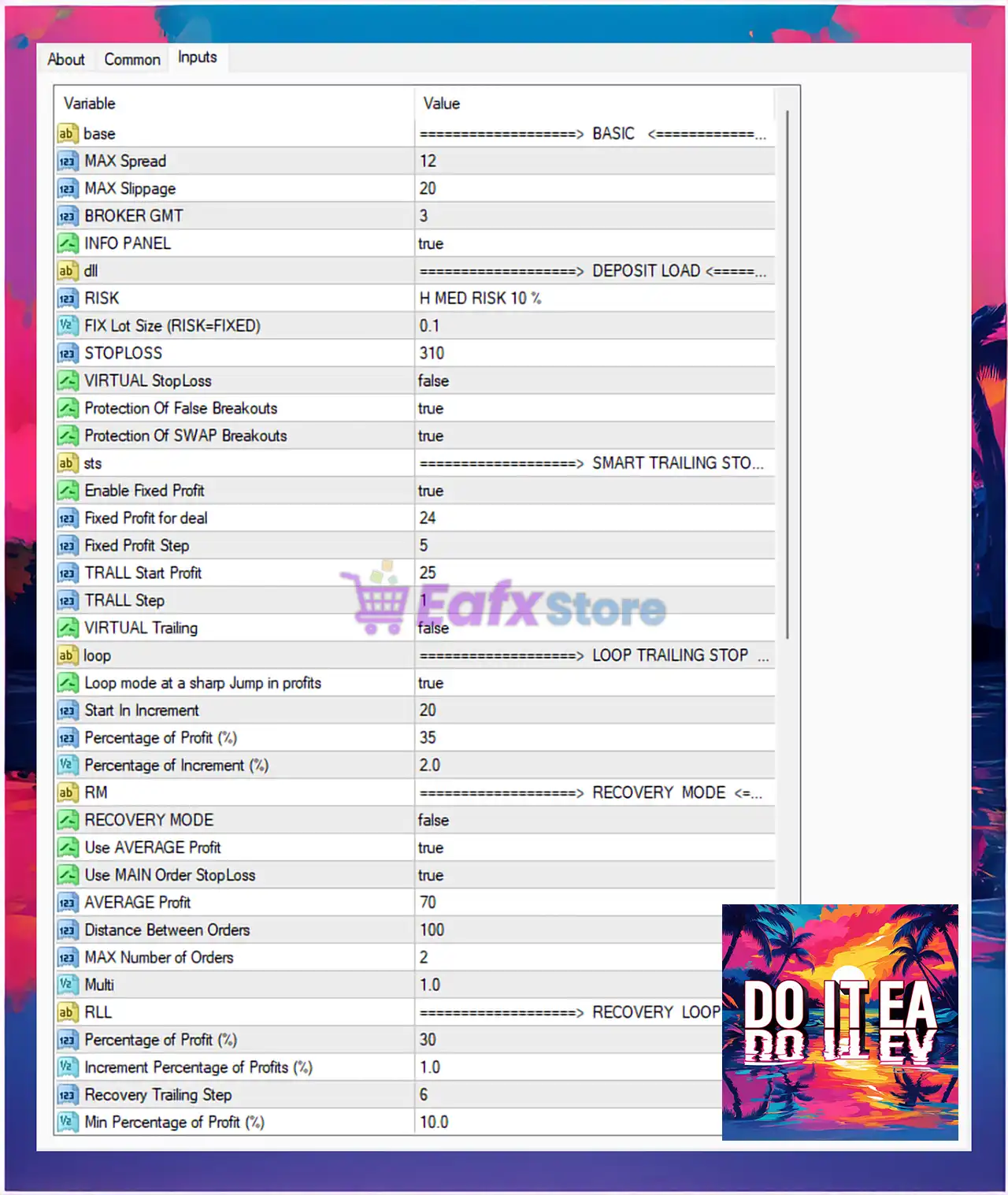
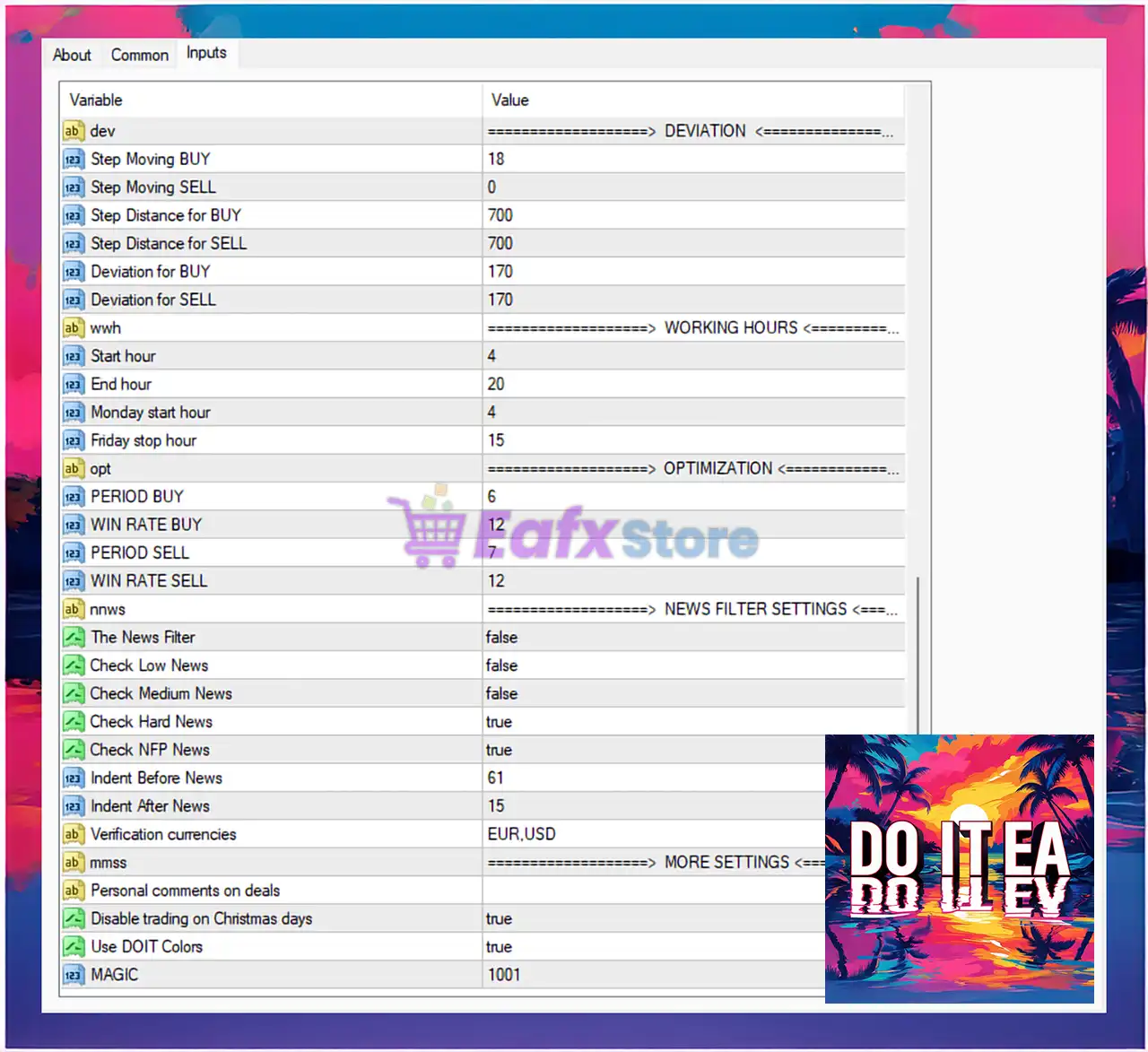
🔶 Basic Settings
🔹 MAX Spread = 12: Maximum allowed market spread for opening trades is 12.
🔹 MAX Slippage = 20: Maximum slippage tolerance during order execution is 20.
🔹 BROKER GMT = 3: Broker server GMT offset is configured at 3.
🔹 INFO PANEL = true: Enables the on-chart information dashboard.
🔶 Deposit Load Settings
🔹 RISK = H MED RISK 10 %: Trading risk profile is configured to H MED RISK 10 %.
🔹 FIX Lot Size (RISK=FIXED) = 0.1: Fixed trading lot size is set to 0.1.
🔹 STOPLOSS = 310: Stop-loss value is configured at 310 points.
🔹 VIRTUAL StopLoss = false: Virtual stop-loss functionality is disabled.
🔹 Protection Of False Breakouts = true: Enables protection against false breakout signals.
🔹 Protection Of SWAP Breakouts = true: Enables swap breakout protection logic.
🔶 Smart Trailing Stop Settings
🔹 Enable Fixed Profit = true: Fixed profit locking system is enabled.
🔹 Fixed Profit for deal = 24: Fixed profit target per trade is set to 24.
🔹 Fixed Profit Step = 5: Fixed profit increment step is configured at 5.
🔹 TRALL Start Profit = 25: Trailing stop activates after 25 profit points.
🔹 TRALL Step = 1: Trailing stop adjustment step is set to 1.
🔹 VIRTUAL Trailing = false: Virtual trailing stop feature is disabled.
🔶 Loop Trailing Stop Settings
🔹 Loop mode at a sharp Jump in profits = true: Enables loop trailing mode during sudden profit spikes.
🔹 Start In Increment = 20: Increment loop begins after 20 points.
🔹 Percentage of Profit (%) = 35: Loop trailing activates at 35% profit.
🔹 Percentage of Increment (%) = 2.0: Increment percentage step is configured at 2.0%.
🔶 Recovery Mode Settings
🔹 RECOVERY MODE = false: Recovery trading mode is disabled.
🔹 Use AVERAGE Profit = true: Average profit calculation is enabled.
🔹 Use MAIN Order StopLoss = true: Main order stop-loss protection is enabled.
🔹 AVERAGE Profit = 70: Average profit target is set to 70.
🔹 Distance Between Orders = 100: Distance between recovery orders is 100 points.
🔹 MAX Number of Orders = 2: Maximum recovery orders allowed is 2.
🔹 Multi = 1.0: Lot multiplier coefficient is configured at 1.0.
🔶 Recovery Loop Settings
🔹 Percentage of Profit (%) = 30: Recovery loop profit target is set to 30%.
🔹 Increment Percentage of Profits (%) = 1.0: Profit increment percentage is 1.0%.
🔹 Recovery Trailing Step = 6: Recovery trailing stop step is configured at 6.
🔹 Min Percentage of Profit (%) = 10.0: Minimum profit percentage requirement is 10.0%.
🔶 Deviation Settings
🔹 Step Moving BUY = 18: Buy-side moving step is configured at 18.
🔹 Step Moving SELL = 0: Sell-side moving step is set to 0.
🔹 Step Distance for BUY = 700: Distance between buy orders is 700 points.
🔹 Step Distance for SELL = 700: Distance between sell orders is 700 points.
🔹 Deviation for BUY = 170: Allowed buy-side deviation is 170.
🔹 Deviation for SELL = 170: Allowed sell-side deviation is 170.
🔶 Working Hours Settings
🔹 Start hour = 4: Daily trading session starts at hour 4.
🔹 End hour = 20: Daily trading session ends at hour 20.
🔹 Monday start hour = 4: Monday trading begins at hour 4.
🔹 Friday stop hour = 15: Friday trading stops at hour 15.
🔶 Optimization Settings
🔹 PERIOD BUY = 6: Buy optimization period is configured at 6.
🔹 WIN RATE BUY = 12: Buy-side win rate parameter is set to 12.
🔹 PERIOD SELL = 7: Sell optimization period is configured at 7.
🔹 WIN RATE SELL = 12: Sell-side win rate parameter is set to 12.
🔶 News Filter Settings
🔹 The News Filter = false: News filter system is disabled.
🔹 Check Low News = false: Low-impact news events are ignored.
🔹 Check Medium News = false: Medium-impact news events are ignored.
🔹 Check Hard News = true: High-impact news events are monitored.
🔹 Check NFP News = true: Non-Farm Payroll news filter is enabled.
🔹 Indent Before News = 61: Trading pauses 61 minutes before major news.
🔹 Indent After News = 15: Trading resumes 15 minutes after news events.
🔹 Verification currencies = EUR,USD: News filtering applies to EUR and USD currencies.
🔶 More Settings
🔹 Personal comments on deals: Allows custom comments to be added to trades.
🔹 Disable trading on Christmas days = true: Trading is automatically disabled during Christmas holidays.
🔹 Use DOIT Colors = true: Enables the EA’s custom interface color theme.
🔹 MAGIC = 1001: Unique magic number used to identify EA trades is 1001.
🔢 Conclusion
Do IT EA MT4 is an advanced Forex Expert Advisor that combines smart trailing technology, recovery systems, breakout protection, and trading session optimization into one comprehensive automated trading solution.
With extensive customization options for risk control, profit management, and news filtering, the EA is suitable for traders seeking flexible and intelligent MetaTrader 4 automation.
🔢 FAQs
❓ What is Do IT EA MT4?
Do IT EA MT4 is an automated Forex trading Expert Advisor for MetaTrader 4 with advanced trailing and recovery systems.
❓ Does Do IT EA MT4 include a news filter?
Yes, the EA supports high-impact and NFP news filtering.
❓ What is the default stop-loss setting in Do IT EA MT4?
The default stop-loss value is 310 points.
❓ Can Do IT EA MT4 use recovery trading strategies?
Yes, the EA includes configurable recovery mode and recovery loop settings.
❓ What trading hours are configured in Do IT EA MT4?
The EA trades between hour 4 and hour 20, with Friday trading ending at hour 15.



