
🔢 IS SevenTrade EA MT4 Settings Guide – Complete Parameters Explained
IS SevenTrade EA is an automated Forex trading robot designed for MetaTrader 4 traders who want multi-pair trading, flexible lot management and high-speed execution.
The EA supports several major currency pairs, adjustable risk control, custom pip distance settings and trading session management.
With configurable profit targets and order limits, IS SevenTrade EA MT4 is suitable for both conservative and aggressive trading strategies.
🔢 Installation Panel Parameters
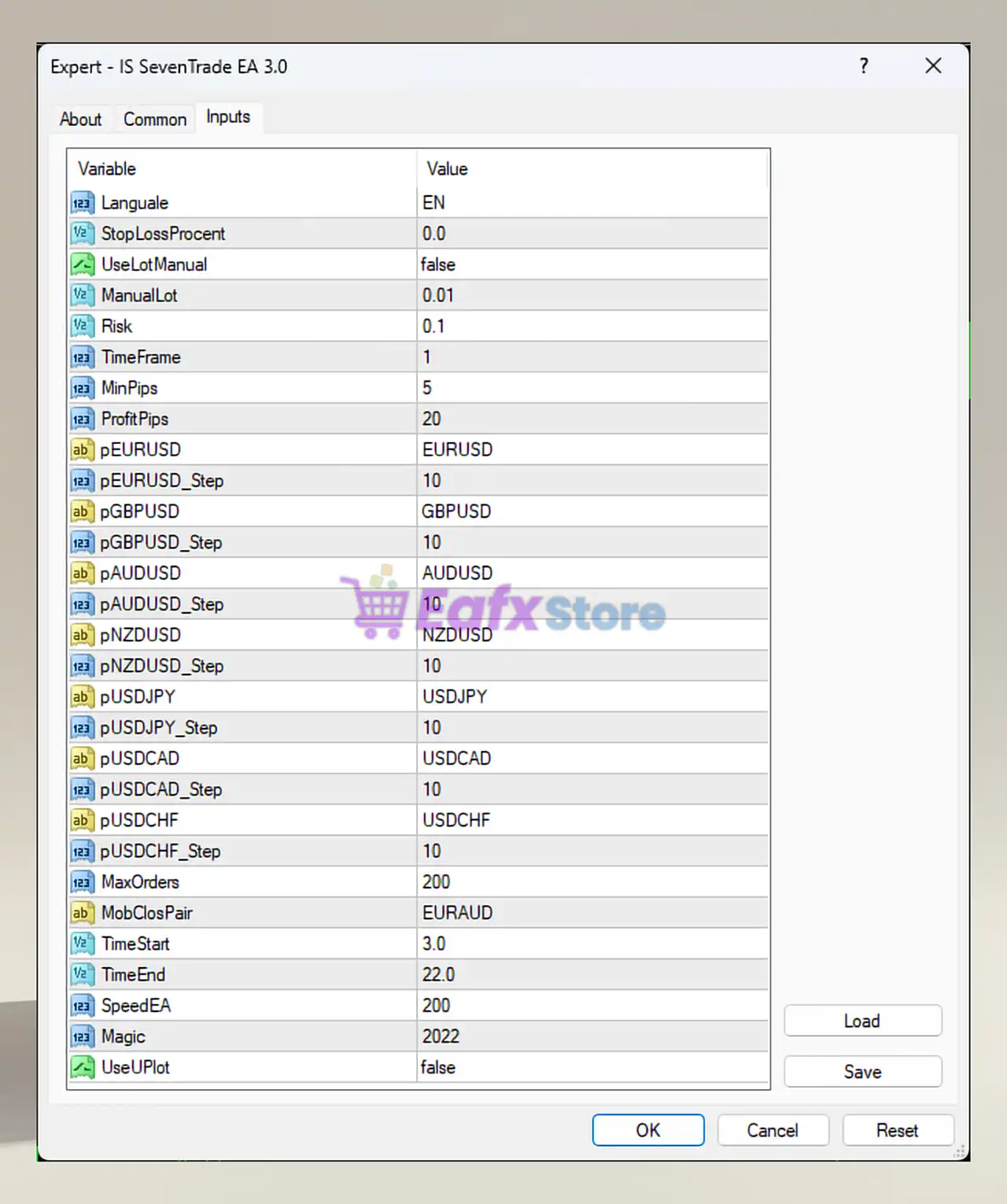
Below are the details of the parameters in the advisor’s trading system settings table:
🔶 Complete IS SevenTrade EA MT4 Settings Explained
🔹 Language = EN: Sets the EA interface language to English (EN).
🔹 StopLossProcent = 0.0: Stop-loss percentage protection is disabled with a value of 0.0.
🔹 UseLotManual = false: Manual lot sizing is disabled, allowing automatic lot management.
🔹 ManualLot = 0.01: Fixed manual lot size is configured at 0.01.
🔹 Risk = 0.1: Risk level per trade is set to 0.1.
🔹 TimeFrame = 1: The EA operates on timeframe setting 1 (commonly M1 timeframe).
🔹 MinPips = 5: Minimum pip movement required before opening trades is 5 pips.
🔹 ProfitPips = 20: Target profit for each trade is set to 20 pips.
🔶 Currency Pair Settings
🔹 pEURUSD = EURUSD: Enables trading on the EURUSD currency pair.
🔹 pEURUSD_Step = 10: Trading step distance for EURUSD is 10.
🔹 pGBPUSD = GBPUSD: Enables trading on the GBPUSD currency pair.
🔹 pGBPUSD_Step = 10: Trading step distance for GBPUSD is 10.
🔹 pAUDUSD = AUDUSD: Enables trading on the AUDUSD currency pair.
🔹 pAUDUSD_Step = 10: Trading step distance for AUDUSD is 10.
🔹 pNZDUSD = NZDUSD: Enables trading on the NZDUSD currency pair.
🔹 pNZDUSD_Step = 10: Trading step distance for NZDUSD is 10.
🔹 pUSDJPY = USDJPY: Enables trading on the USDJPY currency pair.
🔹 pUSDJPY_Step = 10: Trading step distance for USDJPY is 10.
🔹 pUSDCAD = USDCAD: Enables trading on the USDCAD currency pair.
🔹 pUSDCAD_Step = 10: Trading step distance for USDCAD is 10.
🔹 pUSDCHF = USDCHF: Enables trading on the USDCHF currency pair.
🔹 pUSDCHF_Step = 10: Trading step distance for USDCHF is 10.
🔶 Trading Management Settings
🔹 MaxOrders = 200: Maximum number of simultaneous orders allowed is 200.
🔹 MobClosPair = EURAUD: Mobile close pair or monitoring pair is set to EURAUD.
🔹 TimeStart = 3.0: Trading session starts at hour 3.0.
🔹 TimeEnd = 22.0: Trading session ends at hour 22.0.
🔹 SpeedEA = 200: EA execution speed parameter is configured at 200.
🔹 Magic = 2022: Unique magic number used for identifying EA trades is 2022.
🔹 UseUIplot = false: Graphical UI plotting feature is disabled.
🔢 Conclusion
IS SevenTrade EA MT4 is a versatile multi-currency Expert Advisor that combines automated trade execution, customizable risk settings, and session management into one trading system. With support for major Forex pairs, adjustable pip steps, and scalable order handling, the EA provides traders with flexibility for various market conditions and trading styles.
🔢 FAQs
❓ What is IS SevenTrade EA MT4?
IS SevenTrade EA MT4 is an automated Forex trading robot for MetaTrader 4 that supports multi-pair trading and customizable risk management.
❓ Which currency pairs does IS SevenTrade EA MT4 support?
The EA supports EURUSD, GBPUSD, AUDUSD, NZDUSD, USDJPY, USDCAD, and USDCHF.
❓ What is the default profit target in IS SevenTrade EA MT4?
The default take-profit target is 20 pips.
❓ Can IS SevenTrade EA MT4 trade automatically?
Yes, the EA is fully automated and can manage trades without manual intervention.
❓ What is the maximum number of orders allowed?
The EA allows up to 200 simultaneous orders.