







FX CORE GOLD V9 EA Source Code MQ4 + SetFiles

Subscriptions for Special Plan
- 30 EA package is more economical!
- Special package with 99%
- Download 1 EA/Day

Subscriptions for Premium Membership
- Download Unlimited in 1 Year
- Get 100% Discount
- Get free access to all

Subscriptions for Gold Membership
- 1 Year Membership
- Get 100% Discount
- Access EA+Indicator+Course
Frequently bought together 🎁
Add these products to enhance your purchase




What is FX CORE GOLD EA?
FX CORE GOLD EA is an Expert Advisor (EA) for trading Gold (XAUUSD). This powerful Source Code version is compatible with the MetaTrader 4 (MT4) platform. From this source code it is possible to change and develop strategies to increase profits and be more suitable to the market. Real trading performance verified by Myfxbook.
🔶 Vendor Website: Click here
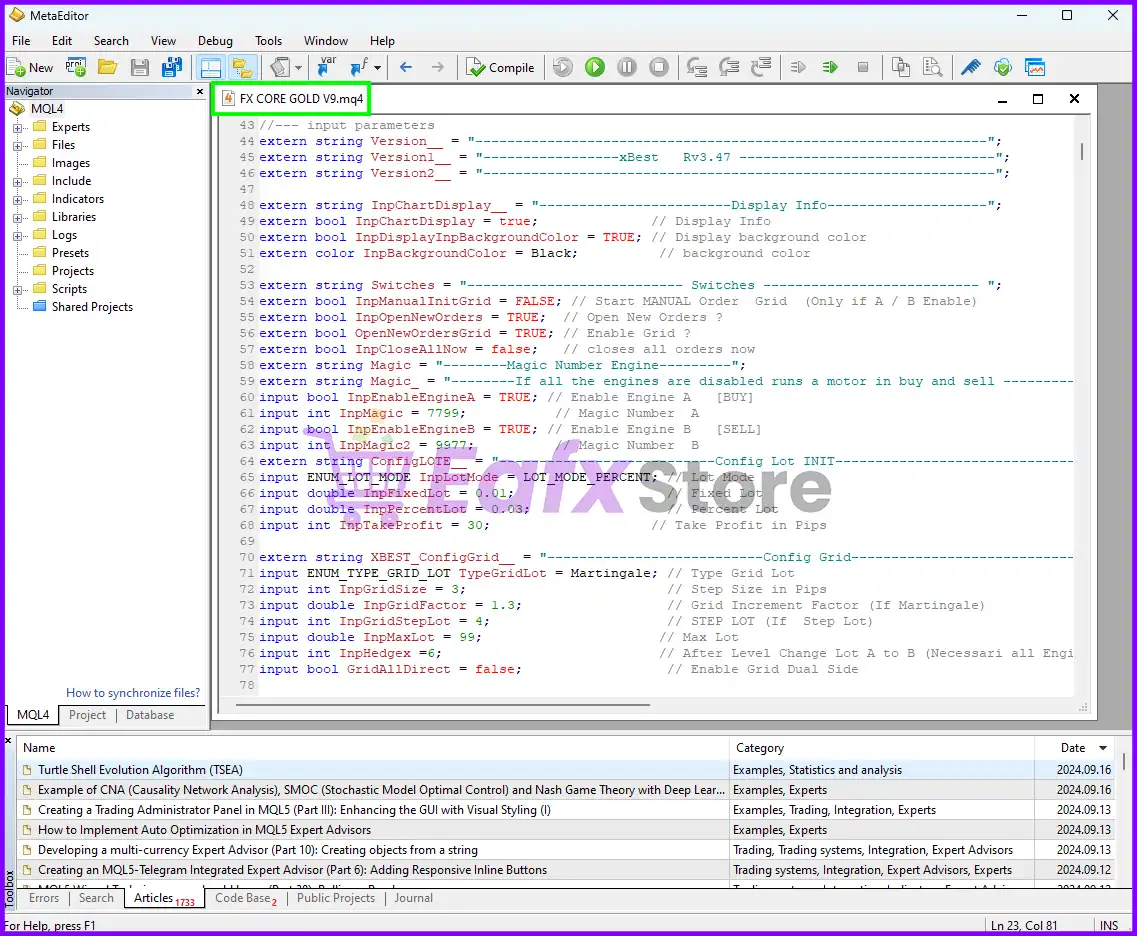
FX CORE GOLD Source Code Overview
Key Features of FX CORE GOLD EA
A wide range of professional and basic trading features are used and integrated on FX CORE GOLD, including:
🔹 Martingale – Grid strategy: Use the Martingale, Grid method to manage trading orders.
🔹 Flexible customization: Allows users to customize parameters to suit their trading style and risk tolerance.
🔹 Adapt to the market: Able to adapt to market fluctuations.
🔹 Powerful risk management: Equipped with risk management features to protect trading accounts.
🔹 Asset diversity and market conditions: Can be applied to many different asset types and in different market conditions.
🔹 Profit potential: Aim to take advantage of market fluctuations to create profits.
FX CORE GOLD EA Review
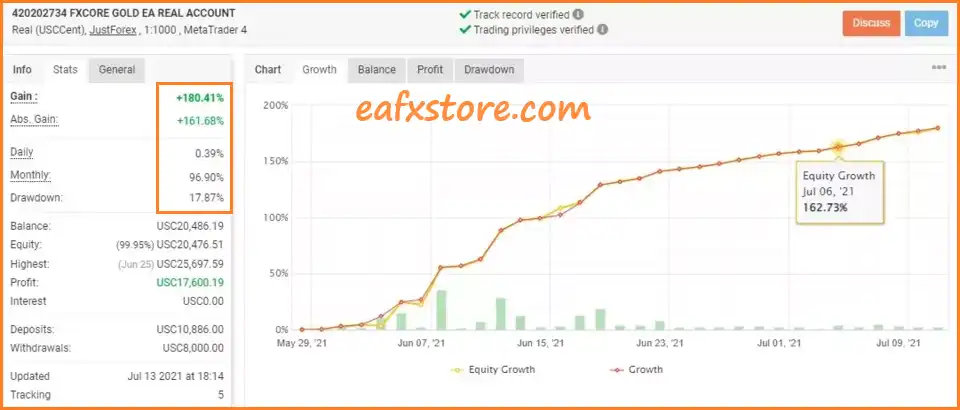
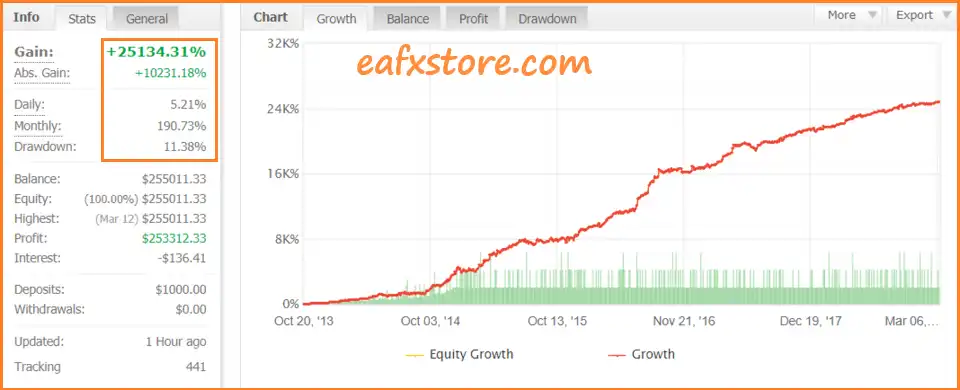
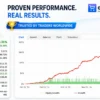
FX CORE GOLD’s real trading performance is verified by Myfxbook in the long term and has achieved high and amazing results.
The transparency in the transactions of this advisor strengthens the peace of mind in using it for today’s traders.
FX CORE GOLD EA Myfxbook Results
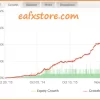
FX CORE GOLD EA Trading Results
FX CORE GOLD EA Trading Strategy
Trend-Based Market Analysis
The trading strategy begins by evaluating the current market direction through technical filters.
FX CORE GOLD EA uses an Exponential Moving Average based on the current chart timeframe to identify the broader price direction.
The EA also integrates a HILO filter as an additional confirmation tool.
Both filters are enabled in the supplied configuration, allowing the system to combine multiple technical conditions rather than relying on a single market signal.
This approach is designed to help the EA identify more suitable trading conditions and reduce unnecessary entries when market direction is unclear.
BUY and SELL Trading Engines
FX CORE GOLD EA operates with separate trading engines for BUY and SELL positions.
This structure allows the system to manage each trading direction independently while maintaining clear identification of its positions.
When the relevant trading conditions are satisfied, the EA can open new positions automatically.
The system is also configured to allow both trading directions, giving it flexibility to respond to changing gold market conditions.
Grid Trading Strategy
One of the core components of FX CORE GOLD EA is its grid trading mechanism.
When grid trading is active, the EA can add positions as the market develops instead of relying on a single entry.
The grid uses a predefined spacing between positions and applies a progressive lot-sizing approach.
This allows the system to build a sequence of positions and manage the average entry price of the overall trade structure.
The EA also includes protection mechanisms designed specifically for managing profitable positions within the grid.
These functions can help the system close or protect parts of the position structure when the required profit conditions are reached.
Dynamic Position and Lot Management
FX CORE GOLD EA uses percentage-based lot management for its initial position sizing.
The grid component can then adjust position volume according to its configured progression model.
This means the EA does not simply treat every trade independently. Instead, it considers the relationship between the initial position and subsequent grid positions.
Because the strategy uses progressive position sizing, traders should understand that exposure can increase when additional grid positions are opened.
Proper account sizing and risk management are therefore important when using this type of automated trading strategy.
One-Order-Per-Candle Protection
To control the speed at which new positions are opened, FX CORE GOLD EA includes a candle-based entry filter.
The system is configured to limit new entries to one order per candle on the current trading timeframe.
This helps prevent excessive order execution within a single market candle and can make the grid expansion process more controlled.
Take Profit and Basket Profit Management
FX CORE GOLD EA combines individual trade management with overall position management.
The system includes a Take Profit mechanism for its trading positions while also providing an equity-based profit protection function.
When the configured floating-profit condition is reached, the EA can close the active orders as a group.
This basket-level approach allows the system to focus not only on the performance of individual trades but also on the total result of the active trading cycle.
Break-Even Protection
The EA includes an automatic Break-Even mechanism to protect profitable positions.
Once a trade reaches the required profit condition, the system can adjust its protection toward the entry area.
This helps reduce the possibility of a profitable position turning into a losing trade when the market reverses.
Break-Even management works alongside the grid and profit-protection functions, creating an additional layer of trade management.
Grid Profit Protection
Another important component is the Minimal Profit Close and Grid Protection system.
When the required conditions are satisfied, the EA can use profitable positions to help manage the overall grid structure.
This allows the system to focus on protecting accumulated profit rather than simply waiting for every individual position to reach its own target.
This feature is particularly relevant to the EA’s grid-based trading architecture because it provides an additional mechanism for managing groups of open positions.
Spread Protection
FX CORE GOLD EA includes a maximum spread filter to help avoid opening trades when market transaction costs become unfavorable.
The spread filter is especially useful for a grid strategy because multiple positions can increase the impact of trading costs.
By restricting trading when spread conditions are outside the configured range, the EA attempts to maintain more suitable execution conditions.
News Filter
The strategy also incorporates a news filter to reduce exposure around important economic events.
When the news filter is active, the EA can temporarily stop opening new trades before and after qualifying high-impact events.
This is designed to help avoid entering new grid cycles during periods when gold can experience sudden volatility and rapid price movements.
The news filter therefore works as an additional market-condition protection layer alongside the technical indicators and spread filter.
Trading Time Management
FX CORE GOLD EA includes a trading schedule that allows the user to control when automated trading is permitted.
The supplied configuration enables trading during the main weekdays and provides a broad daily trading window.
This allows the EA to operate automatically while still providing a dedicated time-management layer that can be adjusted according to the trader’s preferred market sessions.
Recommended settings
Recommended settings and parameters to pay attention to from developers and experts:
| Features | Type |
|---|---|
| Trading platform | MetaTrader 4 (MT4) |
| Currency pairs | XAUUSD (Gold) |
| Time frames | M5, M15, M30, H1 |
| Minimum / Recommended deposit | $1,000+ |
| Setup files | Available |
| Product type | Unlimited |
| Additional services | Unlock and Decompile |
| Recommended brokers | Exness Broker, Icmarkets Broker |
| Recommended VPS | MyfxVPS.com ( Blue VPS, Golden VPS). Lowest Latency, 2 week Free Trial, 100% Free for 12-18 Months. |
Product Download Package?
The download package of the product suite includes:
Source Code MQ4
✅ FX CORE GOLD V9.mq4
Experts
✅ FX CORE GOLD V9.ex4
✅ FX CORE GOLD v1.1_UNLIMITED.ex4
✅ FX CORE GOLD v5.0_UNLIMITED.ex4
✅ FX CORE GOLD v6.0_UNLIMITED.ex4
✅ FX CORE GOLD v7.0_UNLIMITED.ex4
✅ FX CORE GOLD v12_UNLIMITED.ex4
Indicators
✅ FFCal.ex4
SetFiles (v7.0)
✅ 1K_REAL.set
✅ 5K_REAL.set
✅ 10K_REAL.set
✅ 20K_REAL.set
✅ AUDCAD.set
✅ AUDCHF.set
✅ AUDJPY.set
✅ AUDUSD.set
✅ BASIC_SETFILES.set
✅ CADCHF.set
✅ CADJPY.set
✅ CHFJPY.set
✅ EURAUD.set
✅ EURCAD.set
✅ EURCHF.set
✅ EURGBP.set
✅ EURJPY.set
✅ EURNZD.set
✅ EURUSD.set
✅ GBPAUD.set
✅ GBPCAD.set
✅ GBPJPY.set
✅ GBPUSD.set
✅ NZDCAD.set
✅ NZDJPY.set
✅ NZDUSD.set
✅ USDCAD.set
✅ USDCHF.set
✅ USDJPY.set
➡️ Reviewed by David Easton
Conclusion
FX CORE GOLD EA is an automated trading system featuring a comprehensive architecture designed for gold trading and position management, utilizing multiple layers of filters, account protection mechanisms and order management protocols.
Based on the provided parameters, the EA goes beyond simple entry signals by integrating Buy and Sell engines, a grid mechanism, percentage-based volume management, break-even functions, equity-based stops and alerts, as well as filters for spreads and news events, alongside trading time restrictions.
This structure offers users a wide range of options to customize the EA according to their specific strategies, capital levels and risk tolerance.
🔢 FX CORE GOLD EA Settings Guide
FX CORE GOLD EA is a configurable automated trading system designed around gold-focused trading logic, grid management, money management, technical filters, trailing protection, equity controls, and scheduled trading. The supplied settings reveal a flexible architecture with BUY and SELL engines, percentage-based lot sizing, grid expansion, Moving Average and HILO filters, Break Even, Take Equity Stop, spread protection, news filtering, and visual monitoring tools.
This guide explains all visible parameters and their exact values from the supplied screenshots, preserving the numerical details, true/false states, time values, and configuration strings.
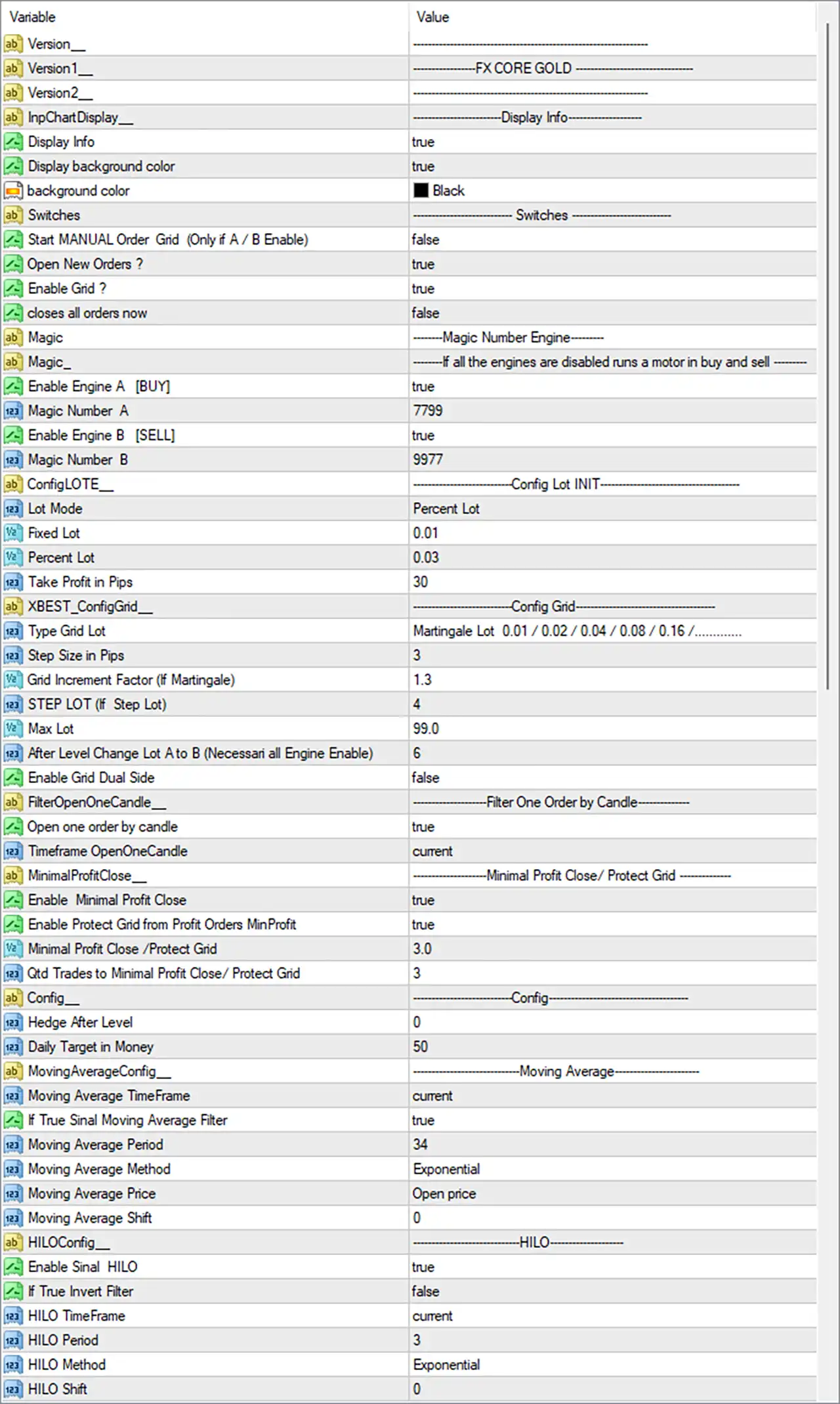
FX CORE GOLD EA MT4 Settings Panel
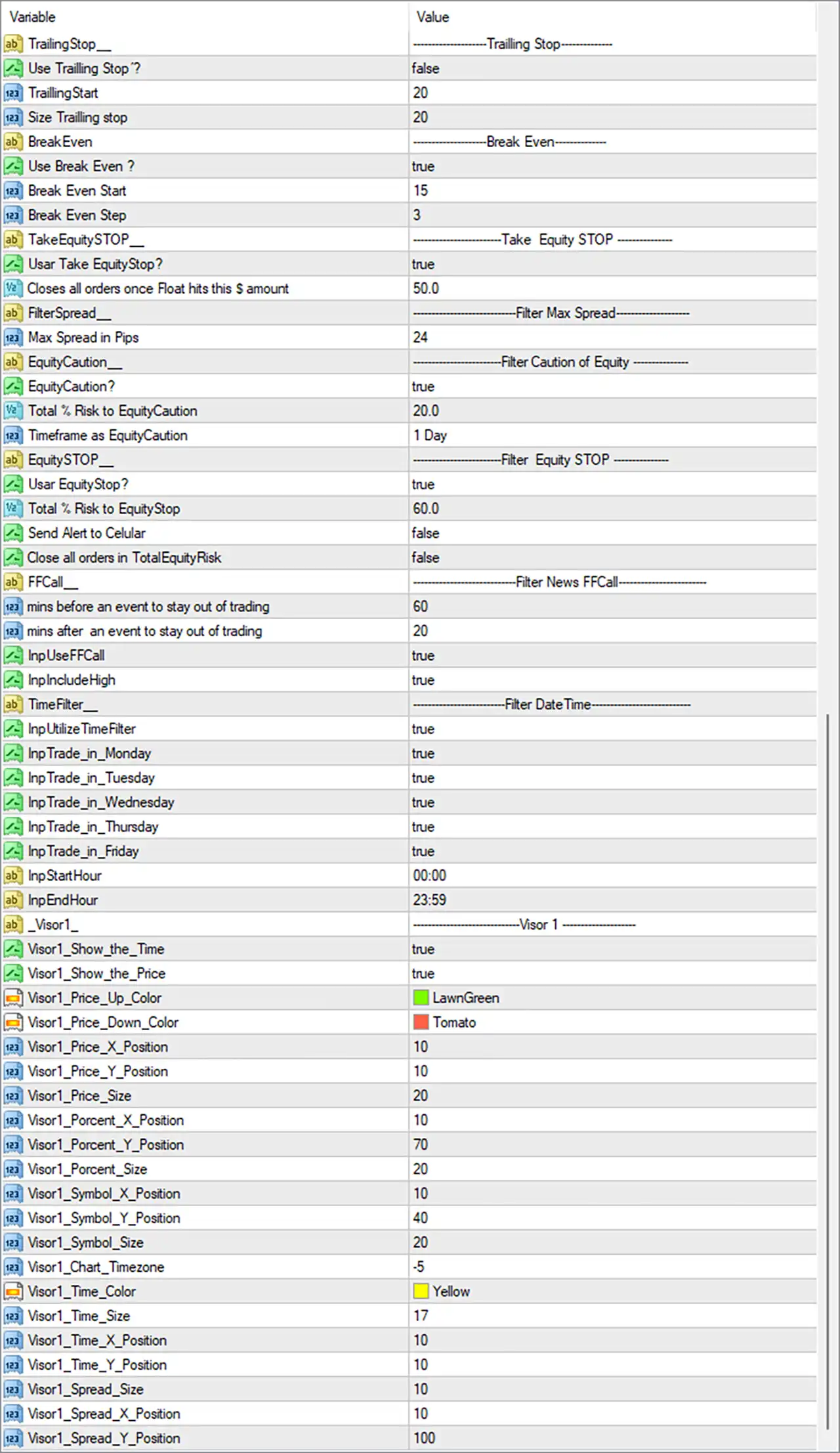
FX CORE GOLD EA Settings Panel
🔄 Trailing Stop Settings
🔹 Trailing Stop: ----- Trailing Stop ----- — Section header for the EA’s trailing-stop configuration.
🔹 Use Trailing Stop ?: false — Disables the trailing-stop function in the current configuration.
🔹 TrailingStart: 20 — Defines 20 points as the profit level at which trailing protection would begin if enabled.
🔹 Size Trailing stop: 20 — Sets the trailing-stop distance/size to 20 points.
🔄 Break Even Settings
🔹 BreakEven: ----- Break Even ----- — Section header for Break Even management.
🔹 Use Break Even ?: true — Enables Break Even functionality.
🔹 Break Even Start: 15 — Sets the Break Even activation level at 15 points.
🔹 Break Even Step: 3 — Defines a 3-point step for Break Even adjustment.
🔄 Take Equity Stop
🔹 TakeEquitySTOP: ----- Take Equity STOP ----- — Section header for account-equity-based profit protection.
🔹 Usar Take EquityStop?: true — Enables the Take Equity Stop function.
🔹 Closes all orders once Float hits this $ amount: 50.0 — Closes all orders when floating profit reaches the configured $50.0 amount.
🔄 Maximum Spread Filter
🔹 FilterSpread__: ----- Filter Max Spread ----- — Section header for spread filtering.
🔹 Max Spread in Pips: 24 — Sets the maximum permitted spread threshold to 24 pips.
🔄 Equity Caution
🔹 EquityCaution__: ----- Filter Caution of Equity ----- — Section header for equity-caution protection.
🔹 EquityCaution?: true — Enables the equity-caution mechanism.
🔹 Total % Risk to EquityCaution: 20.0 — Sets the equity-caution risk threshold to 20.0%.
🔹 Timeframe as EquityCaution: 1 Day — Uses the 1 Day timeframe for evaluating the equity-caution condition.
🔄 Equity Stop
🔹 EquitySTOP__: ----- Filter Equity STOP ----- — Section header for the equity-stop system.
🔹 Usar EquityStop?: true — Enables the Equity Stop function.
🔹 Total % Risk to EquityStop: 60.0 — Sets the total equity-stop risk threshold to 60.0%.
🔹 Send Alert to Cellular: false — Disables cellular/mobile alerts for the equity-stop event.
🔹 Close all orders in TotalEquityRisk: false — Prevents the EA from automatically closing all orders when the total equity-risk threshold is reached.
🔄 FFCall News Filter
🔹 FFCall: ----- Filter News FFCall ----- — Section header for the Forex Factory-style news-event filter.
🔹 mins before an event to stay out of trading: 60 — Keeps the EA out of trading for 60 minutes before a qualifying event.
🔹 mins after an event to stay out of trading: 20 — Keeps the EA out of trading for 20 minutes after a qualifying event.
🔹 InpUseFF: true — Enables the FF news filter.
🔹 InpIncludeHigh: true — Includes high-impact news events in the filter.
🔄 Trading Date & Time Filter
🔹 TimeFilter__: ----- Filter DateTime ----- — Section header for date/time trading restrictions.
🔹 InpUtilizeTimeFilter: true — Enables the trading-time filter.
🔹 InpTrade_in_Monday: true — Allows trading on Monday.
🔹 InpTrade_in_Tuesday: true — Allows trading on Tuesday.
🔹 InpTrade_in_Wednesday: true — Allows trading on Wednesday.
🔹 InpTrade_in_Thursday: true — Allows trading on Thursday.
🔹 InpTrade_in_Friday: true — Allows trading on Friday.
🔹 InpStartHour: 00:00 — Sets the trading start time to 00:00.
🔹 InpEndHour: 23:59 — Sets the trading end time to 23:59.
🔄 Visual Monitor — Visor 1
🔹 Visor1__: --------------- Visor 1 --------------- — Section header for the first visual information display.
🔹 Visor1_Show_the_Time: true — Displays the current time on the chart.
🔹 Visor1_Show_the_Price: true — Displays price information on the chart.
🔹 Visor1_Price_Up_Color: LawnGreen — Uses LawnGreen for upward price movement.
🔹 Visor1_Price_Down_Color: Tomato — Uses Tomato for downward price movement.
🔹 Visor1_Price_X_Position: 10 — Sets the price display horizontal position to 10.
🔹 Visor1_Price_Y_Position: 10 — Sets the price display vertical position to 10.
🔹 Visor1_Price_Size: 20 — Sets the displayed price font/element size to 20.
🔹 Visor1_Percent_X_Position: 10 — Sets the percentage display horizontal position to 10.
🔹 Visor1_Percent_Y_Position: 70 — Sets the percentage display vertical position to 70.
🔹 Visor1_Percent_Size: 20 — Sets the percentage display size to 20.
🔹 Visor1_Symbol_X_Position: 10 — Sets the symbol display horizontal position to 10.
🔹 Visor1_Symbol_Y_Position: 40 — Sets the symbol display vertical position to 40.
🔹 Visor1_Symbol_Size: 20 — Sets the symbol display size to 20.
🔹 Visor1_Chart_Timezone: -5 — Applies a chart-timezone adjustment of -5.
🔹 Visor1_Time_Color: Yellow — Uses Yellow for the displayed time.
🔹 Visor1_Time_Size: 17 — Sets the time display size to 17.
🔹 Visor1_Time_X_Position: 10 — Sets the time display horizontal position to 10.
🔹 Visor1_Time_Y_Position: 10 — Sets the time display vertical position to 10.
🔹 Visor1_Spread_Size: 10 — Sets the spread display size to 10.
🔹 Visor1_Spread_X_Position: 10 — Sets the spread display horizontal position to 10.
🔹 Visor1_Spread_Y_Position: 100 — Sets the spread display vertical position to 100.
🔄 Version & Display Information
🔹 Version__: ------------------------------- — Section separator for version information.
🔹 Version1__: ---------------FX CORE GOLD ---------------- — Identifies the displayed EA/version label as FX CORE GOLD.
🔹 Version2__: ------------------------------- — Additional version information field with no separate descriptive value shown.
🔹 InpChartDisplay__: ---------------Display Info--------------- — Section header for chart information display.
🔹 Display Info: true — Enables the EA information display.
🔹 Display background color: true — Enables the display background.
🔹 background color: Black — Sets the information panel background color to Black.
🔄 Trading Switches
🔹 Switches: ---------------- Switches ---------------- — Section header for the main trading switches.
🔹 Start MANUAL Order Grid (Only if A / B Enable): false — Disables manually starting the order grid under the A/B engine condition.
🔹 Open New Orders ?: true — Allows the EA to open new orders.
🔹 Enable Grid ?: true — Enables the grid trading mechanism.
🔹 Closes all orders now: false — Does not immediately close all current orders.
🔄 Magic Number Engine
🔹 Magic: --------Magic Number Engine-------- — Section header for the separate BUY/SELL magic-number engines.
🔹 Magic_: -------If all the engines are disabled runs a motor in buy and sell ------- — Descriptive configuration field explaining the fallback BUY/SELL engine behavior.
🔹 Enable Engine A [BUY]: true — Enables Engine A for BUY operations.
🔹 Magic Number A: 7799 — Assigns Magic Number 7799 to Engine A.
🔹 Enable Engine B [SELL]: true — Enables Engine B for SELL operations.
🔹 Magic Number B: 9977 — Assigns Magic Number 9977 to Engine B.
🔄 Lot Configuration
🔹 ConfigLOTE__: ----------------Config Lot INIT---------------- — Section header for initial lot configuration.
🔹 Lot Mode: Percent Lot — Uses percentage-based lot calculation rather than fixed-lot sizing.
🔹 Fixed Lot: 0.01 — Defines a fixed lot value of 0.01 when fixed-lot mode is used.
🔹 Percent Lot: 0.03 — Sets the percentage-based lot parameter to 0.03.
🔹 Take Profit in Pips: 30 — Sets the Take Profit distance to 30 pips.
🔄 Grid Configuration
🔹 xBEST_ConfigGrid__: --------------Config Grid---------------- — Section header for grid configuration.
🔹 Type Grid Lot: Martingale Lot 0.01 / 0.02 / 0.04 / 0.08 / 0.16 /......... — Uses a Martingale lot progression beginning with 0.01, followed by 0.02, 0.04, 0.08, 0.16, and continuing according to the configured progression.
🔹 Step Size in Pips: 3 — Sets the grid spacing to 3 pips.
🔹 Grid Increment Factor (If Martingale): 1.3 — Sets the Martingale/grid lot multiplication factor to 1.3.
🔹 STEP LOT (If Step Lot): 4 — Defines the step-lot increment parameter as 4.
🔹 Max Lot: 99.0 — Sets the maximum permitted lot size to 99.0.
🔹 After Level Change Lot A to B (Necessari all Engine Enable): 6 — Sets the lot/engine transition level to 6.
🔹 Enable Grid Dual Side: false — Disables simultaneous dual-side grid operation.
🔄 Candle-Based Order Filter
🔹 FilterOpenOneCandle__: --------------Filter One Order by Candle---------------- — Section header for candle-based order filtering.
🔹 Open one order by candle: true — Restricts the EA to opening one order per candle.
🔹 Timeframe OpenOneCandle: current — Uses the current chart timeframe for the one-order-per-candle filter.
🔄 Minimum Profit Close / Grid Protection
🔹 MinimalProfitClose__: --------------Minimal Profit Close / Protect Grid---------------- — Section header for minimum-profit and grid protection.
🔹 Enable Minimal Profit Close: true — Enables minimum-profit closing.
🔹 Enable Protect Grid from Profit Orders MinProfit: true — Enables grid protection based on profitable orders.
🔹 Minimal Profit Close / Protect Grid: 3.0 — Sets the minimum profit/protection threshold to 3.0.
🔹 Qtd Trades to Minimal Profit Close / Protect Grid: 3 — Requires 3 trades for the configured minimum-profit close/grid-protection condition.
🔄 General Configuration
🔹 Config__: ----------------Config---------------- — Section header for general configuration.
🔹 Hedge After Level: 0 — Sets the hedge activation level to 0.
🔹 Daily Target in Money: 50 — Sets the daily monetary target to 50.
🔄 Moving Average Configuration
🔹 MovingAverageConfig__: ---------------Moving Average---------------- — Section header for Moving Average settings.
🔹 Moving Average TimeFrame: current — Uses the current chart timeframe for the Moving Average.
🔹 If True Sinal Moving Average Filter: true — Enables the Moving Average signal filter.
🔹 Moving Average Period: 34 — Sets the Moving Average period to 34.
🔹 Moving Average Method: Exponential — Uses an Exponential Moving Average (EMA).
🔹 Moving Average Price: Open price — Calculates the Moving Average using the Open price.
🔹 Moving Average Shift: 0 — Uses a Moving Average shift of 0.
🔄 HILO Configuration
🔹 HILOConfig__: ----------------HILO---------------- — Section header for HILO settings.
🔹 Enable Sinal HILO: true — Enables the HILO signal filter.
🔹 If True Invert Filter: false — Does not invert the HILO filter signal.
🔹 HILO TimeFrame: current — Uses the current chart timeframe for HILO analysis.
🔹 HILO Period: 3 — Sets the HILO period to 3.
🔹 HILO Method: Exponential — Uses an Exponential calculation method.
🔹 HILO Shift: 0 — Sets the HILO shift to 0.
🔢 Key FX CORE GOLD EA Settings at a Glance
🔹 EA Name: FX CORE GOLD
🔹 Grid Trading: true
🔹 BUY Engine: true
🔹 SELL Engine: true
🔹 BUY Magic Number: 7799
🔹 SELL Magic Number: 9977
🔹 Lot Mode: Percent Lot
🔹 Percent Lot: 0.03
🔹 Fixed Lot: 0.01
🔹 Take Profit: 30 pips
🔹 Grid Type: Martingale Lot 0.01 / 0.02 / 0.04 / 0.08 / 0.16 /.........
🔹 Grid Step: 3 pips
🔹 Grid Increment Factor: 1.3
🔹 Maximum Lot: 99.0
🔹 Grid Dual Side: false
🔹 One Order per Candle: true
🔹 Moving Average Filter: true
🔹 Moving Average Period: 34
🔹 Moving Average Method: Exponential
🔹 HILO Signal: true
🔹 HILO Period: 3
🔹 HILO Method: Exponential
🔹 Break Even: true
🔹 Break Even Start: 15
🔹 Break Even Step: 3
🔹 Trailing Stop: false
🔹 Trailing Start: 20
🔹 Trailing Stop Size: 20
🔹 Take Equity Stop: true
🔹 Equity Close Target: 50.0
🔹 Maximum Spread: 24 pips
🔹 Equity Caution: true
🔹 Equity Caution Risk: 20.0%
🔹 Equity Stop: true
🔹 Equity Stop Risk: 60.0%
🔹 FF News Filter: true
🔹 High-Impact News Filter: true
🔹 News Protection Before Event: 60 minutes
🔹 News Protection After Event: 20 minutes
🔹 Trading Days: Monday–Friday enabled
🔹 Trading Hours: 00:00–23:59
🔹 Daily Target: 50
🔢 Conclusion
FX CORE GOLD EA presents a highly configurable trading architecture combining grid execution, BUY/SELL engines, percentage-based money management, technical filters, Break Even protection, equity controls, news protection, and chart visualization.
The supplied configuration has Grid Trading enabled, with both Engine A [BUY] = true and Engine B [SELL] = true, using Magic Numbers 7799 and 9977 respectively. The grid configuration uses a Martingale progression starting from 0.01 / 0.02 / 0.04 / 0.08 / 0.16 / ..., a 3-pip step, a 1.3 increment factor, and a maximum lot of 99.0.
Risk-management features are also active: Break Even = true, Take Equity Stop = true, Equity Caution = true, and Equity Stop = true. At the same time, the standard trailing stop is disabled with Use Trailing Stop = false.
The strategy also uses an Exponential Moving Average with period 34 and an Exponential HILO filter with period 3, while the news filter is configured to avoid trading around qualifying events for 60 minutes before and 20 minutes after an event.
Because the configuration combines grid and Martingale-style lot progression with a maximum lot of 99.0, traders should carefully evaluate exposure, drawdown behavior, broker margin requirements, and worst-case market conditions before deploying it on a live account.
User Reviews
Only logged in customers who have purchased this product may leave a review.
❓ What market is FX CORE GOLD EA designed for?
FX CORE GOLD EA is designed for Gold trading, using automated BUY and SELL engines with grid management and technical filters for structured trade execution.
❓ Does FX CORE GOLD EA use grid trading?
Yes. FX CORE GOLD EA has Grid Trading enabled, with a 3-pip grid step and configurable lot progression for additional grid positions.
❓ Does FX CORE GOLD EA use Martingale lot sizing?
Yes. The configured grid uses a Martingale progression of 0.01 / 0.02 / 0.04 / 0.08 / 0.16 / ..., with a 1.3 increment factor.
❓ Can FX CORE GOLD EA trade both BUY and SELL positions?
Yes. Both trading engines are enabled: BUY Engine A = true with Magic Number 7799, and SELL Engine B = true with Magic Number 9977.
❓ What is the maximum lot size of FX CORE GOLD EA?
The configured maximum lot is 99.0, making careful position sizing, margin analysis, and drawdown testing important before using the EA on a live account.
❓ Does FX CORE GOLD EA have Break Even protection?
Yes. Break Even is enabled with a 15-point start and a 3-point step, helping adjust protection once the configured profit level is reached.
❓ Is the trailing stop enabled in FX CORE GOLD EA?
No. The standard trailing stop is disabled, although TrailingStart = 20 and Size Trailing stop = 20 remain configured in the settings.
❓ Does FX CORE GOLD EA provide equity protection?
Yes. Equity Caution and Equity Stop are enabled at 20.0% and 60.0% risk thresholds, while Take Equity Stop closes orders at $50.0 floating profit.
❓ Does FX CORE GOLD EA include a news filter?
Yes. The news filter is enabled for high-impact events, blocking trading 60 minutes before and 20 minutes after qualifying news events.
❓ What technical filters does FX CORE GOLD EA use?
FX CORE GOLD EA uses an Exponential Moving Average with period 34 and an Exponential HILO filter with period 3, both enabled in the configuration.
🔥 Get This EA for FREE with Our Membership! 🚀🚀
Unlock access to this EA, premium Indicators, and exclusive trading tools completely FREE with any of our Membership Plans! Thousands of traders already benefit from our VIP library—join them and level up your trading instantly. Choose Your Membership:
- SPECIAL – 1 Month Membership
- GOLD – 1 Year Membership
- PREMIUM – 1 Year Membership
-
 Original price was: $4,250.00.$249.00Current price is: $249.00.
 -
 Original price was: $2,000.00.$249.00Current price is: $249.00.
 -
 Original price was: $1,450.00.$249.00Current price is: $249.00.
 -
 Original price was: $2,000.00.$249.00Current price is: $249.00.
-
 0Original price was: $1,999.00.$249.00Current price is: $249.00.
 -
 1Original price was: $799.00.$129.00Current price is: $129.00.
 -
 2Original price was: $10,000.00.$199.00Current price is: $199.00.
 -
 0Original price was: $598.00.$159.00Current price is: $159.00.
There are no reviews yet.