


🔢 Syna EA MT5 – Complete Settings & Parameters Guide
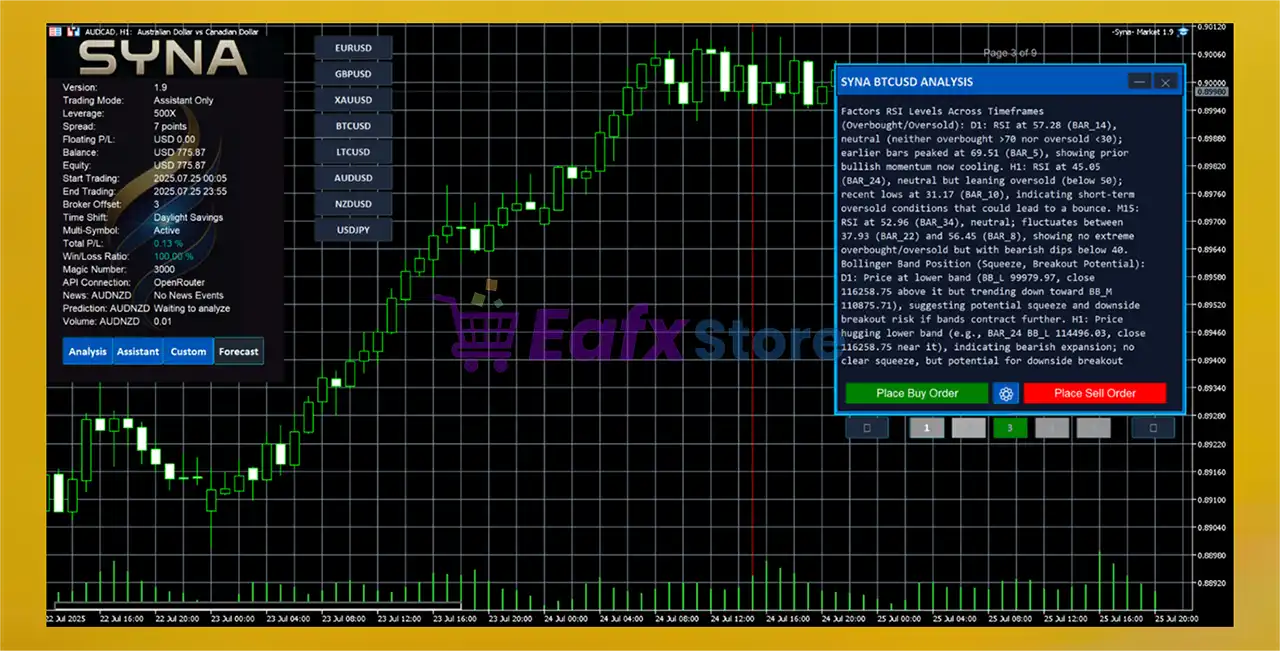
Syna EA is an advanced AI-powered Expert Advisor for MetaTrader 5 that integrates multiple artificial intelligence models, adaptive trading logic, volatility filtering, XGBoost optimization, news analysis and smart position management.
Designed for prop firm trading and professional forex traders, Syna EA MT5 combines automated execution with AI-assisted market analysis for intelligent trading decisions.
🔢 Syna EA MT5 Installation & Setup Settings
Below are the details of the parameters in the advisor’s trading system settings table:
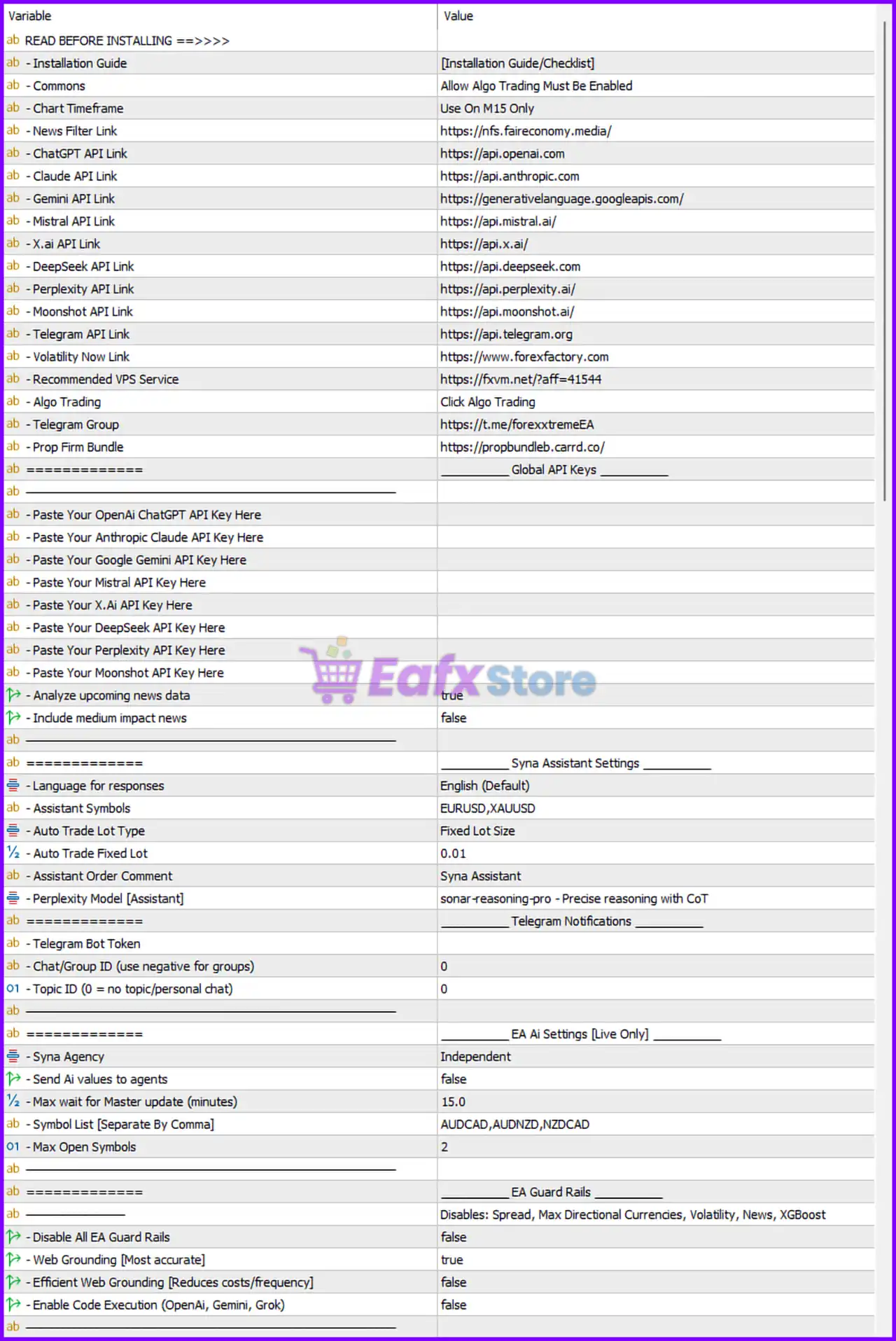
🔹 Installation Guide = [Installation Guide/Checklist] — Reference section containing setup instructions for the EA.
🔹 Commons = Allow Algo Trading Must Be Enabled — Algo Trading must be enabled inside MT5 for the EA to function properly.
🔹 Chart Timeframe = Use On M15 Only — Recommended timeframe for running the EA is M15.
🔹 News Filter Link = https://nfs.faireconomy.media/ — Economic calendar source used for news filtering.
🔹 ChatGPT API Link = https://api.openai.com — API endpoint for OpenAI integration.
🔹 Claude API Link = https://api.anthropic.com — API endpoint for Anthropic Claude integration.
🔹 Gemini API Link = https://generativelanguage.googleapis.com/ — Google Gemini API endpoint.
🔹 Mistral API Link = https://api.mistral.ai/ — API endpoint for Mistral AI.
🔹 X.ai API Link = https://api.x.ai/ — API endpoint for X.AI integration.
🔹 DeepSeek API Link = https://api.deepseek.com — API endpoint for DeepSeek AI.
🔹 Perplexity API Link = https://api.perplexity.ai/ — API endpoint for Perplexity AI.
🔹 Moonshot API Link = https://api.moonshot.ai/ — API endpoint for Moonshot AI.
🔹 Telegram API Link = https://api.telegram.org — Telegram notification API endpoint.
🔹 Volatility Now Link = https://www.forexfactory.com — Volatility/news reference source.
🔹 Recommended VPS Service = https://fxvm.net/?aff=41544 — Suggested VPS provider for stable EA hosting.
🔹 Algo Trading = Click Algo Trading — Reminder to enable automated trading inside MT5.
🔹 Telegram Group = https://t.me/forexxtremeEA — Official Telegram community.
🔹 Prop Firm Bundle = https://propbundleb.carrd.co/ — Prop firm trading package resource.
Syna EA MT5 Global API Keys
🔹 Paste Your OpenAi ChatGPT API Key Here — Field for entering OpenAI API credentials.
🔹 Paste Your Anthropic Claude API Key Here — Field for entering Claude API credentials.
🔹 Paste Your Google Gemini API Key Here — Field for entering Gemini API credentials.
🔹 Paste Your Mistral API Key Here — Field for entering Mistral API credentials.
🔹 Paste Your X.Ai API Key Here — Field for entering X.AI API credentials.
🔹 Paste Your DeepSeek API Key Here — Field for entering DeepSeek API credentials.
🔹 Paste Your Perplexity API Key Here — Field for entering Perplexity API credentials.
🔹 Paste Your Moonshot API Key Here — Field for entering Moonshot API credentials.
🔹 Analyze upcoming news data = true — Enables AI-based news event analysis.
🔹 Include medium impact news = false — Medium-impact news events are ignored.
Syna Assistant Settings
🔹 Language for responses = English (Default) — Assistant response language is English.
🔹 Assistant Symbols = EURUSD,XAUUSD — Symbols monitored by the assistant.
🔹 Auto Trade Lot Type = Fixed Lot Size — Uses fixed lot sizing for assistant trading.
🔹 Auto Trade Fixed Lot = 0.01 — Fixed lot size value is 0.01 lots.
🔹 Assistant Order Comment = Syna Assistant — Comment attached to assistant trades.
🔹 Perplexity Model [Assistant] = sonar-reasoning-pro - Precise reasoning with CoT — AI reasoning model used by the assistant.
Telegram Notifications
🔹 Telegram Bot Token — Field for entering Telegram bot token.
🔹 Chat/Group ID (use negative for groups) = 0 — Telegram chat/group identifier.
🔹 Topic ID (0 = no topic/personal chat) = 0 — Telegram topic ID configuration.
EA AI Settings (Live Only)
🔹 Syna Agency = Independent — Independent AI operating mode.
🔹 Send Ai values to agents = false — AI values are not shared with external agents.
🔹 Max wait for Master update (minutes) = 15.0 — Maximum synchronization delay allowed.
🔹 Symbol List [Separate By Comma] = AUDCAD,AUDNZD,NZDCAD — Trading symbol list.
🔹 Max Open Symbols = 2 — Maximum simultaneously active symbols.
EA Guard Rails
🔹 Disable All EA Guard Rails = false — Safety protections remain enabled.
🔹 Web Grounding [Most accurate] = true — Enables web-grounded AI analysis.
🔹 Efficient Web Grounding [Reduces costs/frequency] = false — Cost-saving grounding mode disabled.
🔹 Enable Code Execution (OpenAi, Gemini, Grok) = false — AI code execution disabled.
AI API Selection
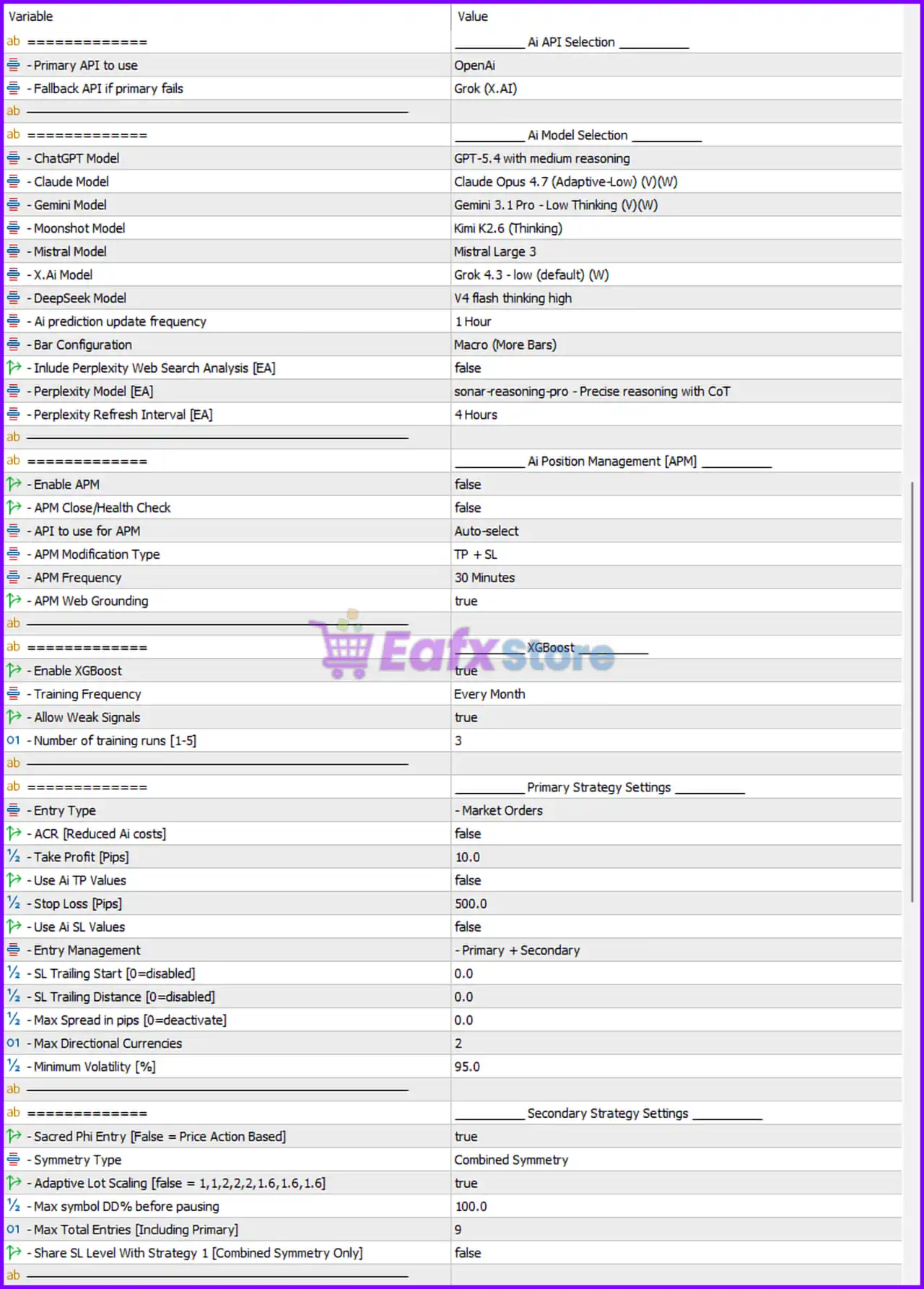
🔹 Primary API to use = OpenAi — OpenAI selected as the primary AI provider.
🔹 Fallback API if primary fails = Grok (X.AI) — Grok used as backup AI provider.
AI Model Selection
🔹 ChatGPT Model = GPT-5.4 with medium reasoning — Selected OpenAI reasoning model.
🔹 Claude Model = Claude Opus 4.7 (Adaptive-Low) (V)(W) — Claude model configuration.
🔹 Gemini Model = Gemini 3.1 Pro - Low Thinking (V)(W) — Gemini AI model selection.
🔹 Moonshot Model = Kimi K2.6 (Thinking) — Moonshot AI model configuration.
🔹 Mistral Model = Mistral Large 3 — Selected Mistral model.
🔹 X.Ai Model = Grok 4.3 - low (default) (W) — Selected X.AI Grok model.
🔹 DeepSeek Model = V4 flash thinking high — DeepSeek reasoning model.
🔹 Ai prediction update frequency = 1 Hour — AI predictions refresh every hour.
🔹 Bar Configuration = Macro (More Bars) — Uses macro-level candle analysis.
🔹 Include Perplexity Web Search Analysis [EA] = false — Perplexity web search disabled.
🔹 Perplexity Model [EA] = sonar-reasoning-pro - Precise reasoning with CoT — Perplexity reasoning model.
🔹 Perplexity Refresh Interval [EA] = 4 Hours — Perplexity data refresh interval.
AI Position Management (APM)
🔹 Enable APM = false — AI Position Management disabled.
🔹 APM Close/Health Check = false — Position health monitoring disabled.
🔹 API to use for APM = Auto-select — Automatic AI API selection for APM.
🔹 APM Modification Type = TP + SL — APM can modify Take Profit and Stop Loss.
🔹 APM Frequency = 30 Minutes — Position analysis frequency.
🔹 APM Web Grounding = true — Enables grounded AI position analysis.
XGBoost Settings
🔹 Enable XGBoost = true — Machine learning optimization enabled.
🔹 Training Frequency = Every Month — XGBoost retraining interval.
🔹 Allow Weak Signals = true — Weak market signals are allowed.
🔹 Number of training runs [1-5] = 3 — Number of AI training cycles.
Primary Strategy Settings
🔹 Entry Type = Market Orders — Trades executed as market orders.
🔹 ACR [Reduced Ai costs] = false — AI cost reduction mode disabled.
🔹 Take Profit [Pips] = 10.0 — Default TP value is 10 pips.
🔹 Use Ai TP Values = false — AI TP calculations disabled.
🔹 Stop Loss [Pips] = 500.0 — Default SL value is 500 pips.
🔹 Use Ai SL Values = false — AI SL calculations disabled.
🔹 Entry Management = Primary + Secondary — Dual-layer entry management enabled.
🔹 SL Trailing Start [0=disabled] = 0.0 — Trailing stop disabled.
🔹 SL Trailing Distance [0=disabled] = 0.0 — No trailing stop distance.
🔹 Max Spread in pips [0=deactivate] = 0.0 — Spread filter disabled.
🔹 Max Directional Currencies = 2 — Limits directional currency exposure.
🔹 Minimum Volatility [%] = 95.0 — Minimum market volatility requirement.
Secondary Strategy Settings
🔹 Sacred Phi Entry [False = Price Action Based] = true — Enables Sacred Phi entry logic.
🔹 Symmetry Type = Combined Symmetry — Uses combined symmetry calculations.
🔹 Adaptive Lot Scaling [false = 1,1,2,2,2,1.6,1.6,1.6] = true — Adaptive lot progression enabled.
🔹 Max symbol DD% before pausing = 100.0 — Drawdown threshold before pausing trades.
🔹 Max Total Entries [Including Primary] = 9 — Maximum total open entries allowed.
🔹 Share SL Level With Strategy 1 [Combined Symmetry Only] = false — Separate SL logic between strategies.
Lot Size Settings
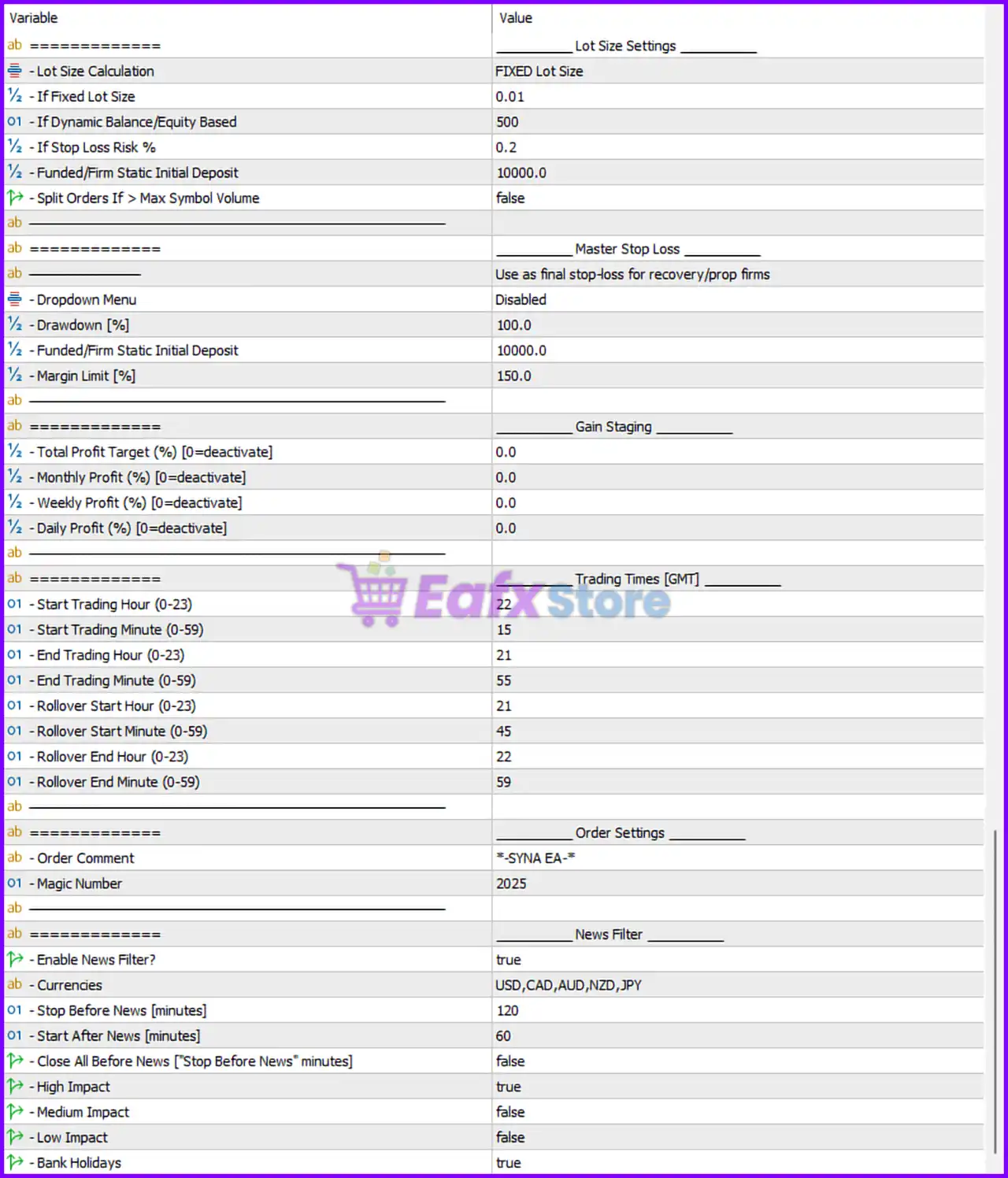
🔹 Lot Size Calculation = FIXED Lot Size — Uses fixed lot sizing mode.
🔹 If Fixed Lot Size = 0.01 — Fixed lot size is 0.01 lots.
🔹 If Dynamic Balance/Equity Based = 500 — Dynamic lot sizing balance reference.
🔹 If Stop Loss Risk % = 0.2 — Risk percentage used for SL calculations.
🔹 Funded/Firm Static Initial Deposit = 10000.0 — Static account size reference.
🔹 Split Orders If > Max Symbol Volume = false — Order splitting disabled.
Master Stop Loss
🔹 Dropdown Menu = Disabled — Master stop loss dropdown disabled.
🔹 Drawdown [%] = 100.0 — Maximum drawdown limit.
🔹 Funded/Firm Static Initial Deposit = 10000.0 — Deposit reference for master SL calculations.
🔹 Margin Limit [%] = 150.0 — Margin safety threshold.
Gain Staging
🔹 Total Profit Target (%) [0=deactivate] = 0.0 — Total profit target disabled.
🔹 Monthly Profit (%) [0=deactivate] = 0.0 — Monthly profit target disabled.
🔹 Weekly Profit (%) [0=deactivate] = 0.0 — Weekly profit target disabled.
🔹 Daily Profit (%) [0=deactivate] = 0.0 — Daily profit target disabled.
Trading Times [GMT]
🔹 Start Trading Hour (0-23) = 22 — Trading begins at 22:00 GMT.
🔹 Start Trading Minute (0-59) = 15 — Trading starts at minute 15.
🔹 End Trading Hour (0-23) = 21 — Trading ends at 21:00 GMT.
🔹 End Trading Minute (0-59) = 55 — Trading stops at minute 55.
🔹 Rollover Start Hour (0-23) = 21 — Rollover begins at 21:00 GMT.
🔹 Rollover Start Minute (0-59) = 45 — Rollover start minute.
🔹 Rollover End Hour (0-23) = 22 — Rollover ends at 22:00 GMT.
🔹 Rollover End Minute (0-59) = 59 — Rollover final minute.
Order Settings
🔹 **Order Comment = -SYNA EA- ** — Comment attached to EA trades.
🔹 Magic Number = 2025 — Unique identifier for EA orders.
News Filter Settings
🔹 Enable News Filter? = true — News filter enabled.
🔹 Currencies = USD,CAD,AUD,NZD,JPY — News filter currencies.
🔹 Stop Before News [minutes] = 120 — Stops trading 120 minutes before news.
🔹 Start After News [minutes] = 60 — Resumes trading 60 minutes after news.
🔹 Close All Before News ["Stop Before News" minutes] = false — Existing trades remain open before news.
🔹 High Impact = true — High-impact news filtering enabled.
🔹 Medium Impact = false — Medium-impact news ignored.
🔹 Low Impact = false — Low-impact news ignored.
🔹 Bank Holidays = true — Bank holiday filtering enabled.
Conclusion
Syna EA MT5 is a highly advanced AI-integrated trading robot designed for traders seeking intelligent automation, multi-model AI analysis, adaptive risk control, and prop firm compatibility. With support for OpenAI, Claude, Gemini, Grok, XGBoost optimization, news filtering, and advanced market symmetry logic, Syna EA MT5 delivers a powerful next-generation automated trading environment for MetaTrader 5 users.
FAQs
❓ What is Syna EA MT5?
Syna EA MT5 is an AI-powered automated trading Expert Advisor for MetaTrader 5.
❓ Which AI models are supported by Syna EA MT5?
The EA supports OpenAI, Claude, Gemini, Grok, DeepSeek, Mistral, Moonshot, and Perplexity AI models.
❓ Does Syna EA MT5 include news filtering?
Yes, the EA includes advanced economic news filtering with currency selection.
❓ Can Syna EA MT5 work with prop firm accounts?
Yes, the EA includes prop firm protection and funded account settings.
❓ Does Syna EA MT5 support automatic lot sizing?
Yes, the EA supports both fixed lot sizing and dynamic equity-based lot management.


