AI Gold Sniper MT5 Settings Explained
AI Gold Sniper MT5 is an advanced AI-powered Expert Advisor designed for MetaTrader 5 traders who focus on XAUUSD (Gold) trading. The EA combines artificial intelligence, news filtering, server-side market analysis and automated risk management to deliver smarter trading decisions.
With multiple AI layers, broker optimization, and real-time market filtering, AI Gold Sniper MT5 aims to provide stable and adaptive automated trading performance for both beginners and professional traders.
AI Gold Sniper MT5 Full Settings Explanation
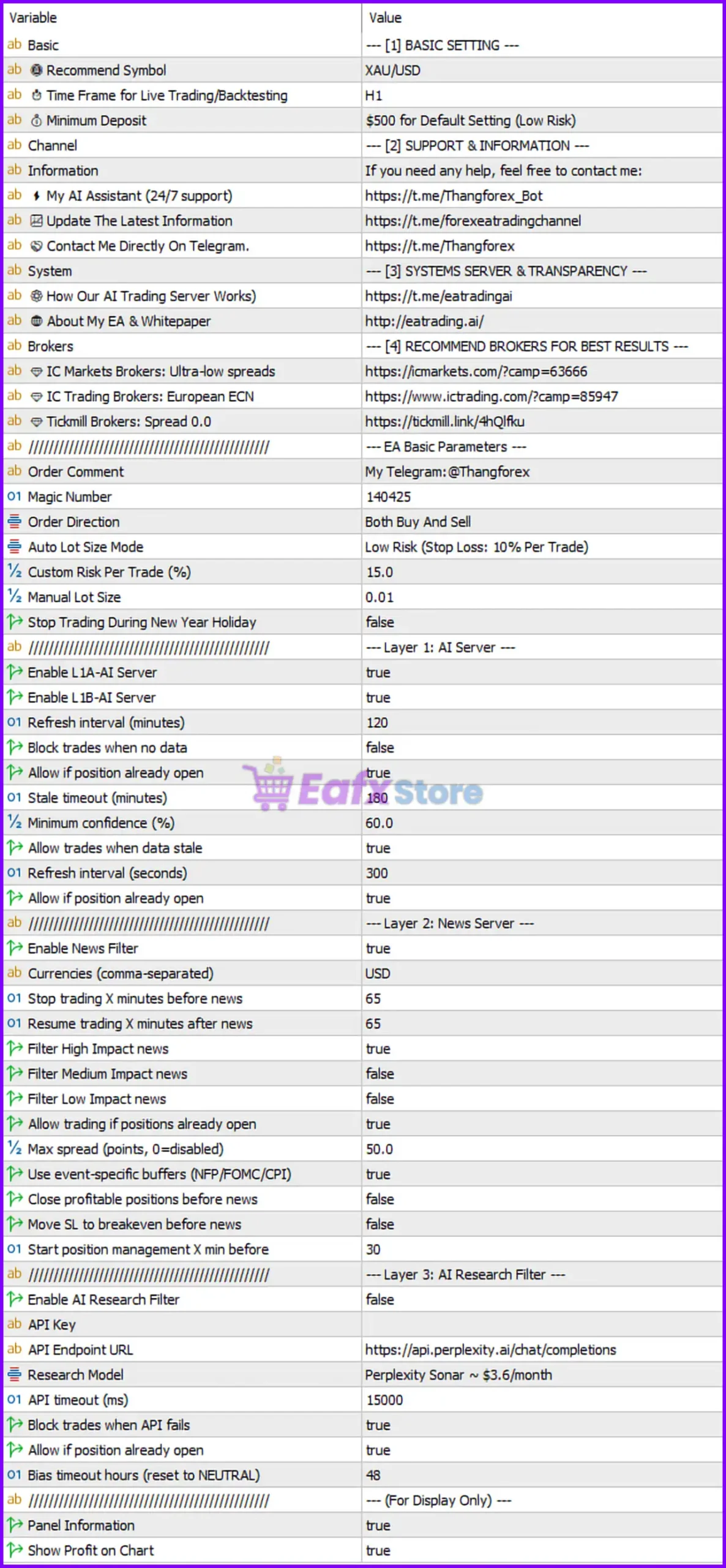
Below are the details of the parameters in the advisor’s trading system settings table:
Basic Settings
🔹 Recommend Symbol = XAU/USD: The EA is optimized for trading the XAU/USD Gold pair.
🔹 Time Frame for Live Trading/Backtesting = H1: Recommended chart timeframe for trading and backtesting is H1.
🔹 Minimum Deposit = $500 for Default Setting (Low Risk): Suggested minimum account balance is $500 when using default low-risk settings.
EA Basic Parameters
🔹 Magic Number = 140425: Unique identifier used by the EA for trade management.
🔹 Order Direction = Both Buy And Sell: Allows the EA to open both buy and sell positions.
🔹 Auto Lot Size Mode = Low Risk (Stop Loss: 10% Per Trade): Enables automatic low-risk lot sizing with a 10% stop-loss model.
🔹 Custom Risk Per Trade (%) = 15.0: Custom risk percentage per trade is set to 15.0%.
🔹 Manual Lot Size = 0.01: Fixed manual lot size is configured at 0.01.
🔹 Stop Trading During New Year Holiday = false: The EA will continue trading during New Year holidays.
Layer 1: AI Server Settings
🔹 Enable L1A-AI Server = true: Enables the first AI server analysis layer.
🔹 Enable L1B-AI Server = true: Enables the secondary AI server analysis layer.
🔹 Refresh Interval (minutes) = 120: AI server data refreshes every 120 minutes.
🔹 Block trades when no data = false: Trades are not blocked if server data is unavailable.
🔹 Allow if position already open = true: Allows new operations even if positions are already open.
🔹 Stale timeout (minutes) = 180: AI data becomes outdated after 180 minutes.
🔹 Minimum confidence (%) = 60.0: Minimum AI confidence level required for trading is 60.0%.
🔹 Allow trades when data stale = true: EA can continue trading even when data becomes stale.
🔹 Refresh interval (seconds) = 300: AI server checks update every 300 seconds.
🔹 Allow if position already open = true: Duplicate setting allowing operation while positions exist.
Layer 2: News Server Settings
🔹 Enable News Filter = true: Activates the economic news filter.
🔹 Currencies (comma-separated) = USD: News filter monitors USD economic events.
🔹 Stop trading X minutes before news = 65: Trading stops 65 minutes before news releases.
🔹 Resume trading X minutes after news = 65: Trading resumes 65 minutes after news events.
🔹 Filter High Impact news = true: High-impact economic news events are filtered.
🔹 Filter Medium Impact news = false: Medium-impact news events are ignored.
🔹 Filter Low Impact news = false: Low-impact news events are ignored.
🔹 Allow trading if positions already open = true: Existing positions remain active during news periods.
🔹 Max spread (points, 0=disabled) = 50.0: Maximum allowed spread for opening trades is 50.0 points.
🔹 Use event-specific buffers (NFP/FOMC/CPI) = true: Applies special handling for major economic events like NFP, FOMC, and CPI.
🔹 Close profitable positions before news = false: EA will not close profitable trades before news releases.
🔹 Move SL to breakeven before news = false: Stop Loss is not moved to breakeven before news.
🔹 Start position management X min before = 30: Position management starts 30 minutes before major news.
Layer 3: AI Research Filter Settings
🔹 Enable AI Research Filter = false: Disables the AI research analysis filter.
🔹 API Key = blank: API key field for external AI research integration.
🔹 API Endpoint URL = https: // api.perplexity.ai/chat/completions: API endpoint used for AI research requests.
🔹 Research Model = Perplexity Sonar ~ $3.6/month: External AI model selected for research analysis.
🔹 API timeout (ms) = 15000: API request timeout is 15000 milliseconds.
🔹 Block trades when API fails = true: Trading is blocked if the AI API connection fails.
🔹 Allow if position already open = true: Allows existing positions during API interruptions.
🔹 Bias timeout hours (reset to NEUTRAL) = 48: AI market bias resets to neutral after 48 hours.
Display Settings
🔹 Panel Information = true: Enables information panel display on the chart.
🔹 Show Profit on Chart = true: Displays trading profit information directly on the chart.
Conclusion
AI Gold Sniper MT5 is a sophisticated AI-driven Gold trading Expert Advisor built for MetaTrader 5 traders seeking automated market analysis, advanced news filtering and intelligent risk management. With multiple AI server layers, configurable risk controls, broker optimization, and economic event filtering, the EA provides a modern solution for automated XAU/USD trading. Traders can customize the system for conservative or aggressive trading styles while benefiting from AI-enhanced decision-making.
FAQs
❓ What is AI Gold Sniper MT5?
AI Gold Sniper MT5 is an AI-powered automated trading Expert Advisor for MetaTrader 5 focused on XAU/USD trading.
❓ Which symbol is recommended for AI Gold Sniper MT5?
The EA is optimized for trading XAU/USD.
❓ Does AI Gold Sniper MT5 include a news filter?
Yes, the EA includes an advanced news filter with support for high-impact events such as NFP, FOMC, and CPI.
❓ What timeframe should be used with AI Gold Sniper MT5?
The recommended timeframe is H1.
❓ Can AI Gold Sniper MT5 automatically manage lot sizes?
Yes, the EA supports automatic low-risk lot sizing and custom risk percentage management.