








Ultimate Breakout System EA MT5 (Latest version) | Available
Select a variant to see availability.
Quick Verdict
The Ultimate Breakout System MT5 is not just another Expert Advisor. It is a professional-grade breakout strategy framework developed over 8 years, allowing traders to build, optimize, and deploy hundreds of unique breakout systems across Forex, Gold, Indices and other CFD markets.
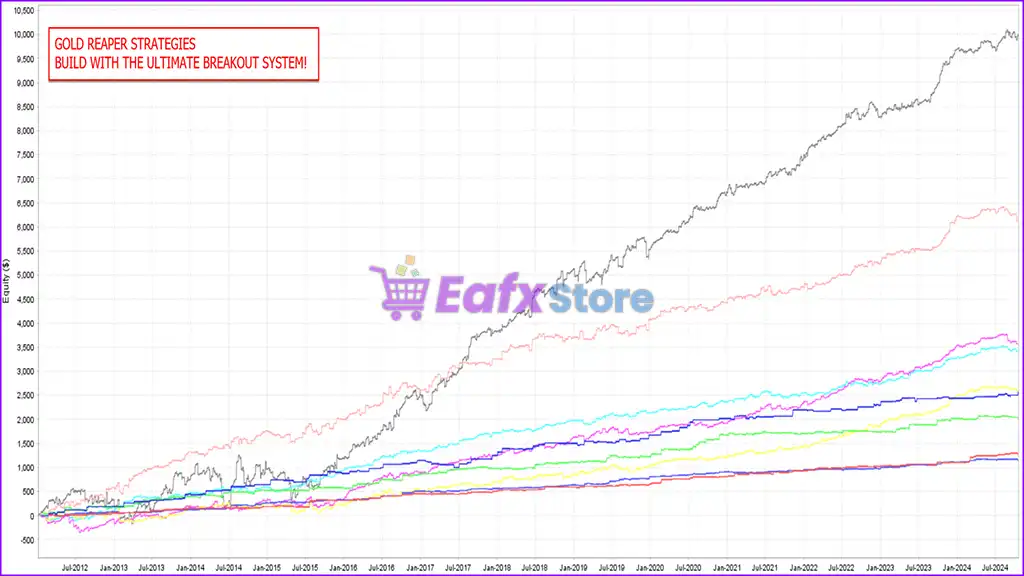
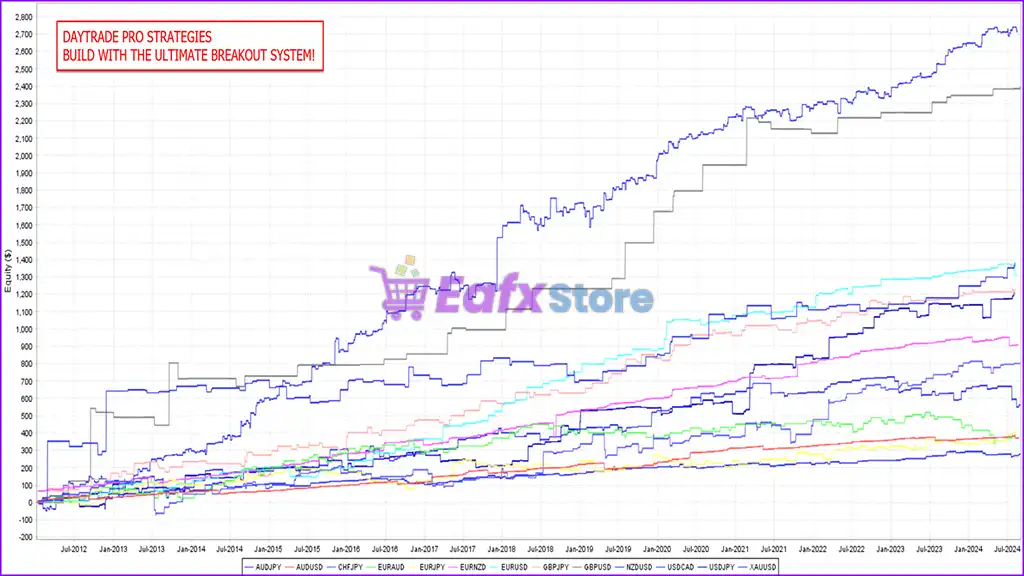
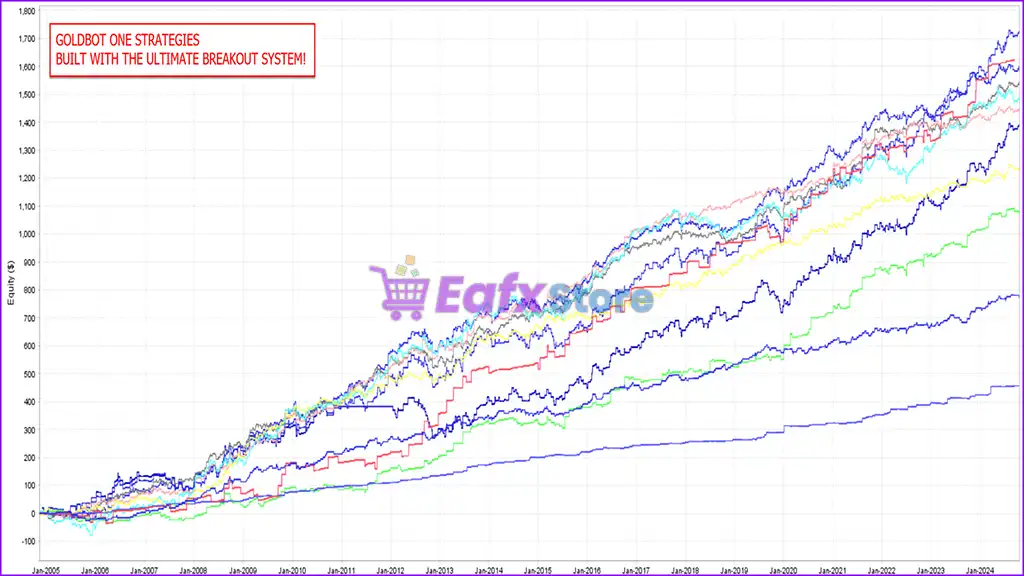
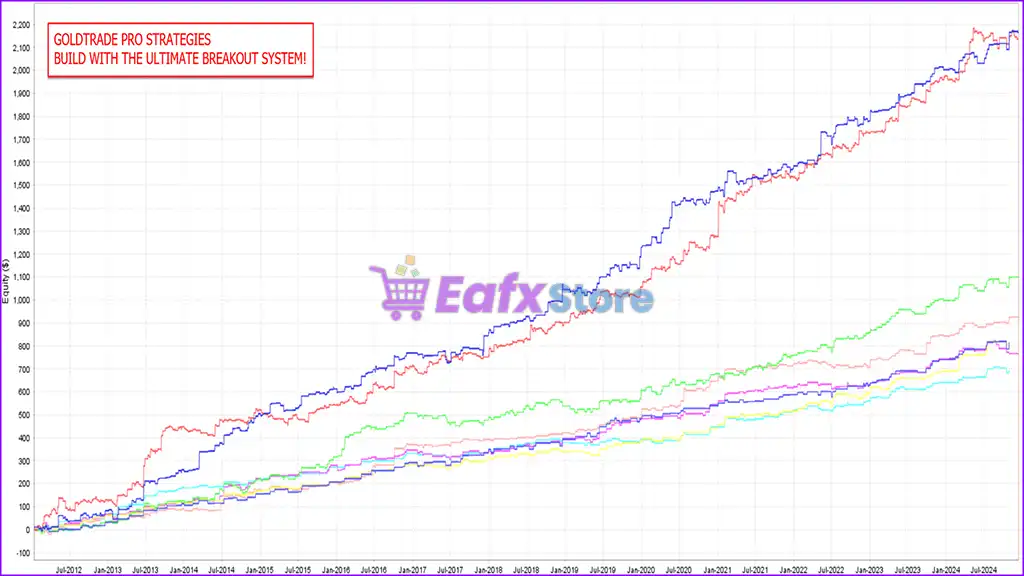
Created by the same developer behind several successful MQL5 products such as Gold Reaper, Goldtrade Pro, Goldbot One, Indicement, and Daytrade Pro, this EA provides traders with both a powerful black-box engine and an extensive collection of ready-to-use strategies.
Best For
Ultimate Breakout System MT5 is ideal for:
✅ Traders who want full control over strategy development
✅ Prop firm traders seeking unique, non-copy-trading strategies
✅ Portfolio traders managing multiple systems
✅ Forex and Gold traders looking for breakout opportunities
✅ Advanced users interested in optimization and backtesting
✅ Traders who want access to 100+ ready-made strategies
Overall Rating
⭐⭐⭐⭐⭐ 9.2/10
| Category | Rating |
|---|---|
| Strategy Flexibility | 10/10 |
| Customization | 10/10 |
| Ease of Use | 8.5/10 |
| Live Performance | 9/10 |
| Risk Management | 9.5/10 |
| Support & Community | 9.5/10 |
| Value for Money | 9/10 |
What is Ultimate Breakout System MT5?
Ultimate Breakout System MT5 is a professional-grade breakout trading Expert Advisor (EA) designed to help traders build and deploy customized breakout strategies across virtually any market and timeframe.
The EA is based on the same proprietary technology behind several successful MQL5 products, including:
Rather than offering only one strategy, the system acts as a complete framework where traders can:
✔ Create unlimited breakout systems
✔ Optimize parameters for different markets
✔ Backtest strategies quickly
✔ Build diversified portfolios
✔ Trade Forex, Gold, Indices, and CFDs
✔ Utilize over 100 pre-built set files
Key Features:
✔ 100+ pre-developed strategy set files
✔ Continuous future updates
✔ Detailed user manuals
✔ Video training courses
✔ Optimization templates
✔ Private trader community
✔ MT4 and MT5 compatibility
✔ Advanced trailing stop technologies
About the Developer
Ultimate Breakout System was developed by Profalgo Limited, led by veteran algorithmic trader Wim Schrynemakers.
Wim is a well-known developer in the MQL5 marketplace and has built multiple top-selling Expert Advisors over the years. His breakout-based systems have consistently attracted positive feedback from users due to their flexibility, transparency, and ongoing support.
One of the strongest selling points of this EA is the active developer involvement. Users receive direct guidance, optimization assistance, and access to a private trading community where strategies and set files are regularly shared.
Developer Highlights:
✔ 8+ years of EA development
✔ Multiple top-ranked MQL5 products
✔ Large active user base
✔ Regular software updates
🔶 Vendor Website: View here
🔶 This is GroupBuy ==> How to Join
How Does Ultimate Breakout System MT5 Work?
The EA is built around one of the most proven concepts in trading: breakout trading.
Breakout Trading Logic
The system identifies important support and resistance zones and places pending orders around these levels.
When price breaks through a resistance level:
✔ Buy orders are triggered
When price breaks below a support level:
✔ Sell orders are triggered
Strategy Customization
Users can customize:
✔ Breakout sensitivity
✔ Entry filters
✔ Time filters
✔ Session filters
✔ Stop-loss settings
✔ Take-profit targets
✔ Trailing stop mechanisms
✔ Risk management rules
This flexibility allows traders to create unique strategies that match their own risk tolerance and market preferences.
Advanced Trailing Technologies
The EA includes several sophisticated trade management options:
Standard Trailing Stop
✔ Adjustable start level
✔ Adjustable step size
✔ Adjustable stop distance
Time-Based Trailing Stop
The stop loss automatically adjusts based on trade duration.
Support & Resistance Trailing
Stops follow newly formed support and resistance levels.
MagicTrail SL
An aggressive trailing method designed for scalping and short-term breakout systems.
Trailing Take Profit
Instead of locking profits at a fixed target, the EA dynamically extends winning trades when momentum continues.
Verified Live Signal Performance
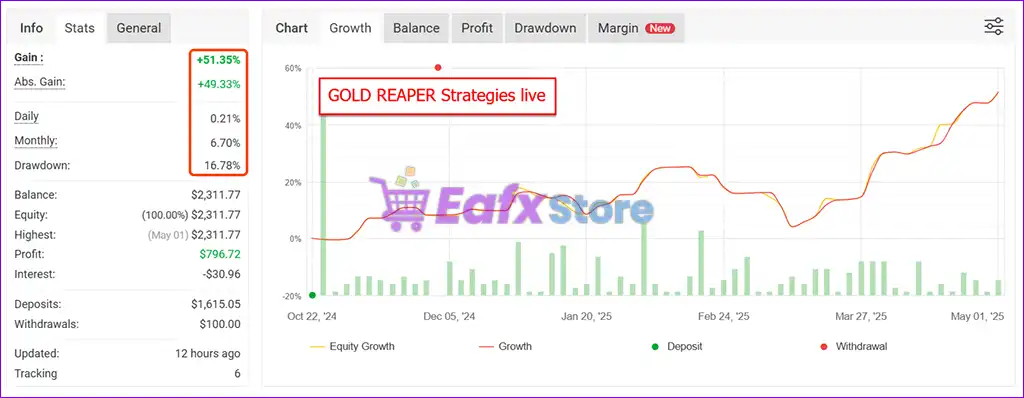
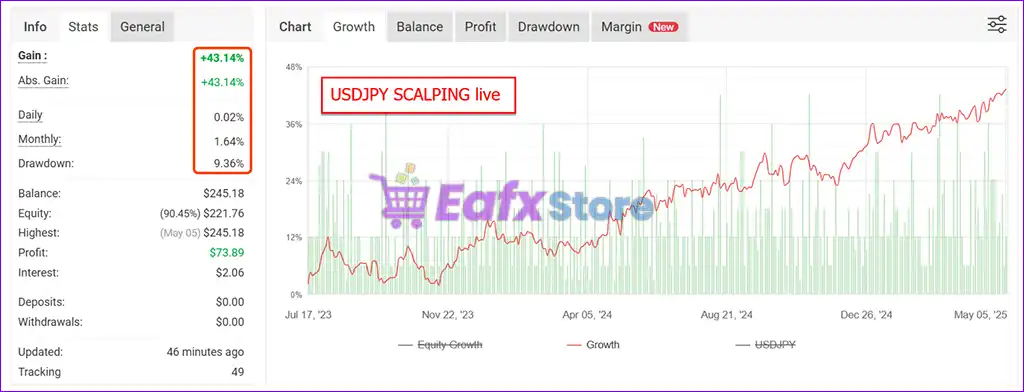
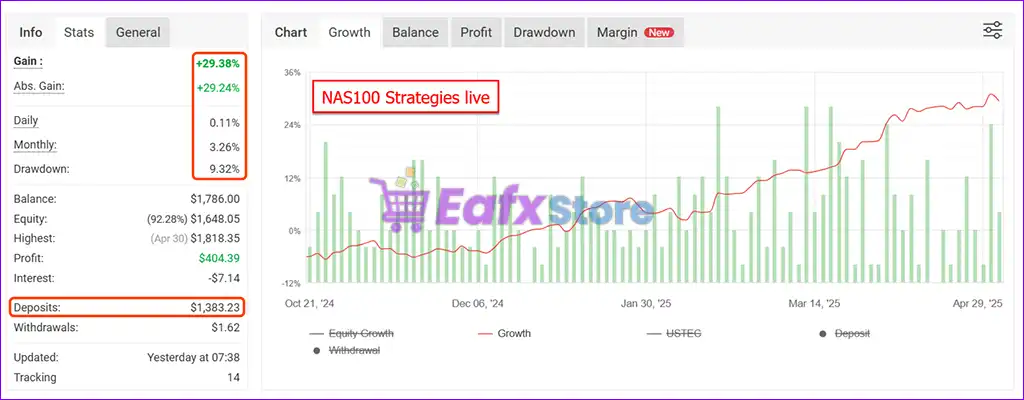
The developer showcases multiple live strategy examples derived from the Ultimate Breakout System framework.
Performance verified by MyFxBook
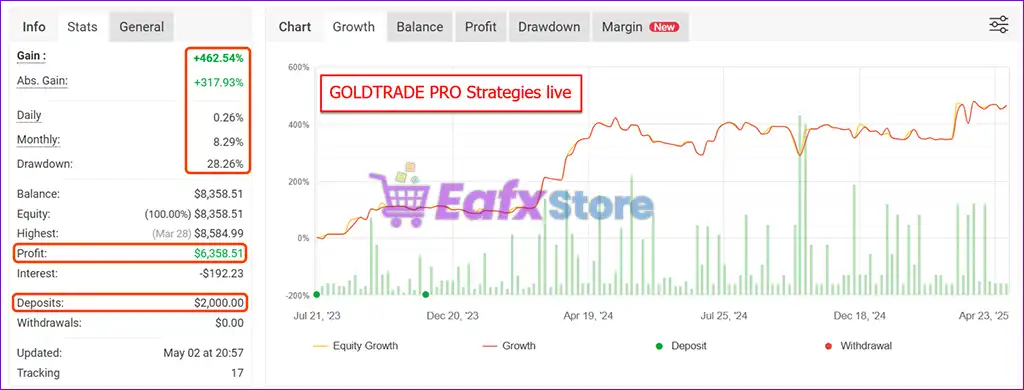
Ultimate Breakout System EA Live Signal Myfxbook
| Metric | Result |
|---|---|
| Gain | +462.54% |
| Absolute Gain | +317.93% |
| Monthly Return | 8.29% |
| Drawdown | 28.26% |
| Initial Deposit | $2,000 |
| Profit | $6,358.51 |
| Track Record | Since July 2023 |
✔ Analysis: This strategy demonstrates strong long-term growth with substantial profitability. The drawdown remains moderate considering the overall return profile.
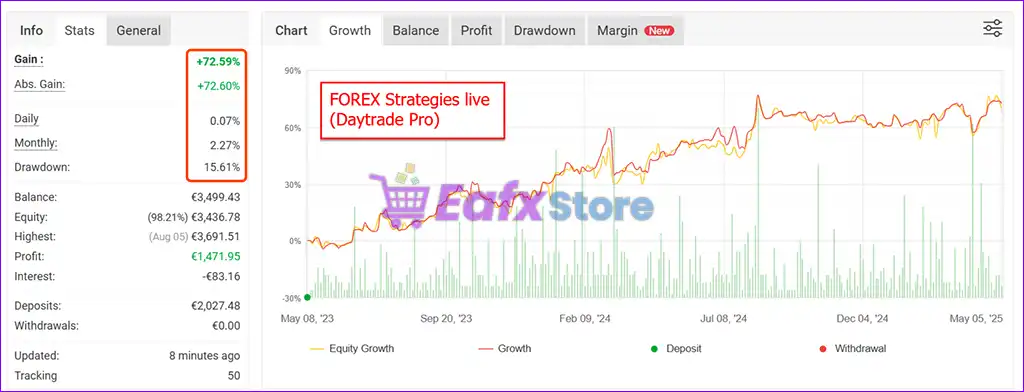
Forex Daytrade Pro Example
Ultimate Breakout System EA MT5 Live Signal Myfxbook
| Metric | Result |
|---|---|
| Gain | +72.59% |
| Absolute Gain | +72.60% |
| Monthly Return | 2.27% |
| Drawdown | 15.61% |
| Deposit | €2,027 |
| Profit | €1,471.95 |
| Track Record | Since May 2023 |
✔ Analysis: This account shows a more conservative risk profile with significantly lower drawdown while maintaining steady growth.
Myfxbook Verification
The performance screenshots appear to be sourced from live-tracking services commonly used by algorithmic traders.
While the displayed metrics show promising results, traders should independently verify any live account through official Myfxbook links if available before making investment decisions.
What Real Users Are Saying
User feedback is overwhelmingly positive, with many traders highlighting both the EA’s performance and Wim’s support.
Naimeshkumar J. Patel
“I tested many EAs on MQL5 and found Ultimate Breakout System to be the best. The portfolio-building guidance is amazing.”
Robert Carmona
“The architecture is well thought out, diversified, and clearly built with experience. Both the EA and support are first class.”
Oliver Fischer
“I’ve been using several of Wim’s EAs and Ultimate Breakout System stands out due to its flexibility, community support, and portfolio capabilities.”
Community Consensus
Most users consistently praise:
✔ Strategy flexibility
✔ Excellent support
✔ Portfolio construction tools
Why Ultimate Breakout System MT5 Stands Out
Not a Single Strategy Robot
Most EAs provide one fixed trading approach.
Ultimate Breakout System provides a complete strategy creation framework.
Unlimited Strategy Variations
Users can build:
✔ Gold breakout systems
✔ Forex breakout systems
✔ Scalping systems
✔ Swing trading systems
✔ Session-based strategies
Prop Firm Friendly
Because traders can create their own unique configurations, there is less risk of being flagged for copy trading.
Extensive Educational Resources
Included:
✔ Detailed manuals
✔ Video tutorials
✔ Optimization workflows
✔ Strategy-building guides
Private Community Access
Users gain access to a network of traders sharing:
✔ New set files
✔ Optimization ideas
✔ Performance results
✔ Technical support
Risk Management Features
Risk management is one of the strongest areas of this EA.
Multiple Stop Loss Options
✔ Fixed SL
✔ Dynamic SL
✔ Support/Resistance SL
✔ Time-Based SL
Advanced Trade Management
✔ Trailing Stop Loss
✔ Trailing Take Profit
✔ Break-even functionality
✔ MagicTrail protection
Portfolio Diversification
Instead of relying on one strategy, traders can distribute risk across:
✔ Multiple symbols
✔ Multiple timeframes
✔ Multiple breakout models
Capital Protection
The EA allows traders to control:
✔ Lot sizing
✔ Risk percentage
✔ Maximum exposure
✔ Position scaling
Recommended Trading Conditions
Recommended settings and parameters to pay attention to from developers and experts:
| Features | Type |
|---|---|
| Trading platform | MetaTrader 5 (MT5) |
| Time frames | M1 to D1 |
| Currency pairs | XAUUSD (Gold), Forex, Commodities, Indices or Cryptocurrencies. |
| Minimum / Recommended deposit | $100 |
| Minimum / Recommended leverage | Any |
| Product type | Original version |
| Additional services | Unlock and Decompile |
| Recommended brokers | Exness Broker, Icmarkets Broker |
| Recommended VPS | MyfxVPS.com ( Blue VPS, Golden VPS). Lowest Latency, 2 week Free Trial, 100% Free for 12-18 Months. |
Product Download Package?
The download package of the product suite includes:
Experts
✅ Setting (If Any).docx
✅ Installation Guide.docx
✅ Ultimate Breakout System_6.0_fix.ex5
✅ Ultimate Breakout System_5.6_fix.ex5
✅ Ultimate Breakout System_4.3_fix.ex5
SetFiles
✅ Ultimate breakout system_SL_TP_M5.set
✅ Ultimate breakout system_SL_TP_M15.set
✅ Ultimate breakout system_SL_TP_H1.set
➡️ Reviewed by David Easton
Potential Risks (Weaknesses and Risk Warnings)
Learning Curve
Because of the extensive customization available, beginners may require time to fully understand all parameters.
Optimization Risk
Poor optimization practices can lead to overfitting.
Market Dependency
Breakout systems generally perform best during trending or volatile market conditions.
Drawdown Is Still Possible
Even strong breakout systems can experience temporary drawdowns during unfavorable market environments.
Requires Active Involvement
Although ready-made set files are included, traders seeking maximum performance should periodically review and optimize their portfolios.
Who Should Use Ultimate Breakout System EA?
Ideal Users
✅ Forex traders
✅ Gold traders
✅ Prop firm traders
✅ Portfolio builders
✅ Algorithmic traders
✅ Advanced EA users
✅ Traders seeking diversification
Not Ideal For
❌ Traders looking for a simple one-click robot
❌ Traders unwilling to learn optimization
❌ Traders expecting guaranteed profits
Final Verdict
The Ultimate Breakout System EA is one of the most comprehensive breakout trading frameworks currently available for MetaTrader traders.
Rather than offering a single strategy that may eventually lose effectiveness, it empowers users to build, optimize, and manage an unlimited number of unique breakout systems across different markets and timeframes.
With over 100 ready-made strategy files, extensive educational resources, advanced risk management tools, private community access, and a proven development history spanning more than eight years, Ultimate Breakout System provides exceptional value for traders serious about systematic trading.
Ultimate Breakout System EA MT5 – Complete Settings Guide & Explanation
Ultimate Breakout System EA is a professional automated breakout trading Expert Advisor (EA) designed for the MetaTrader 5 platform. The EA combines breakout strategies, support and resistance analysis, ATR volatility detection, trailing stop systems, grid management, news filters and advanced money management tools.
With highly customizable settings for risk control, trade execution, and market filtering, Ultimate Breakout System EA MT5 is suitable for traders seeking a fully automated breakout trading solution.
Ultimate Breakout System MT5 Settings
Installation Panel Parameters
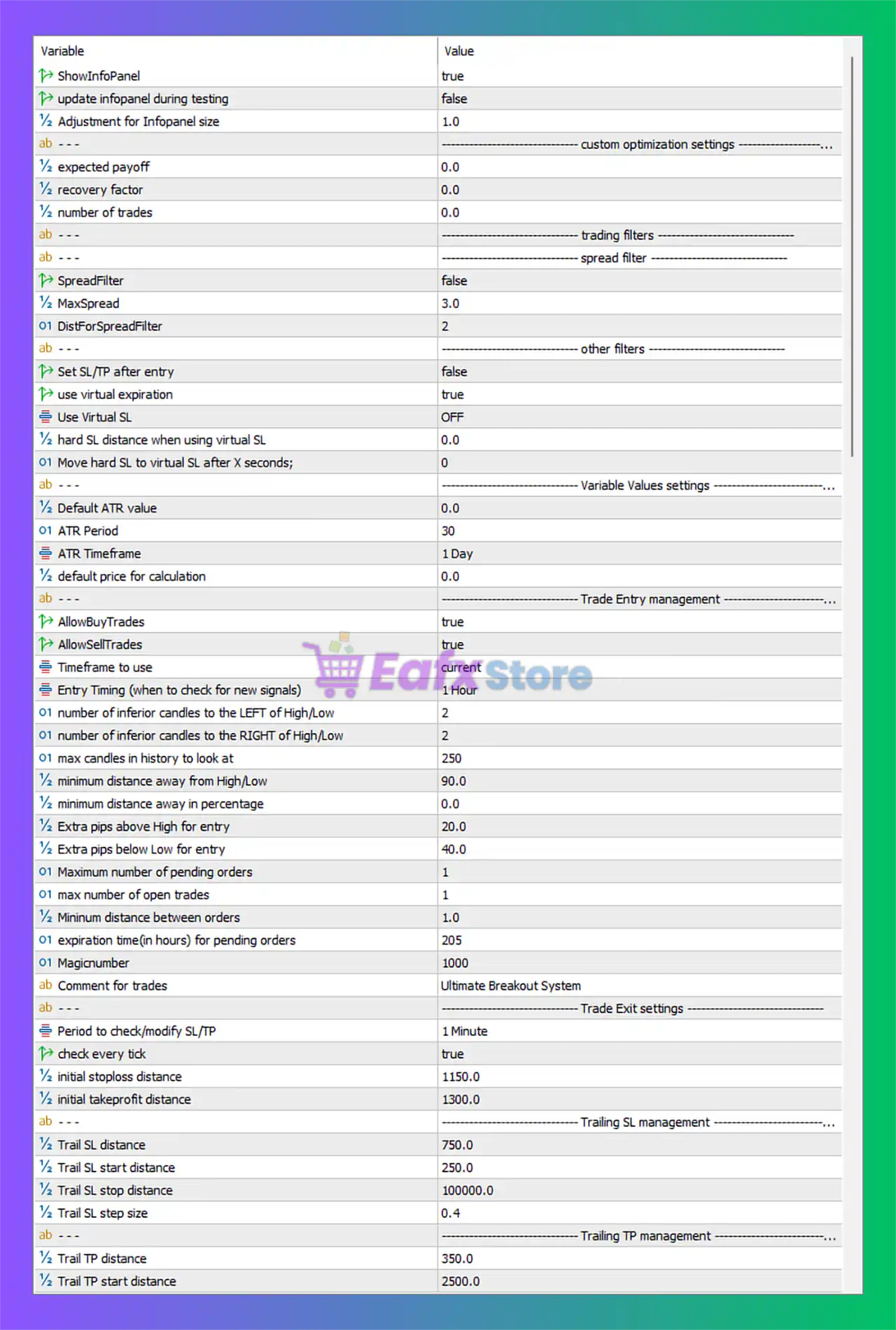
Below are the details of the parameters in the advisor’s trading system settings table:
Ultimate Breakout System MT5 Settings Panel
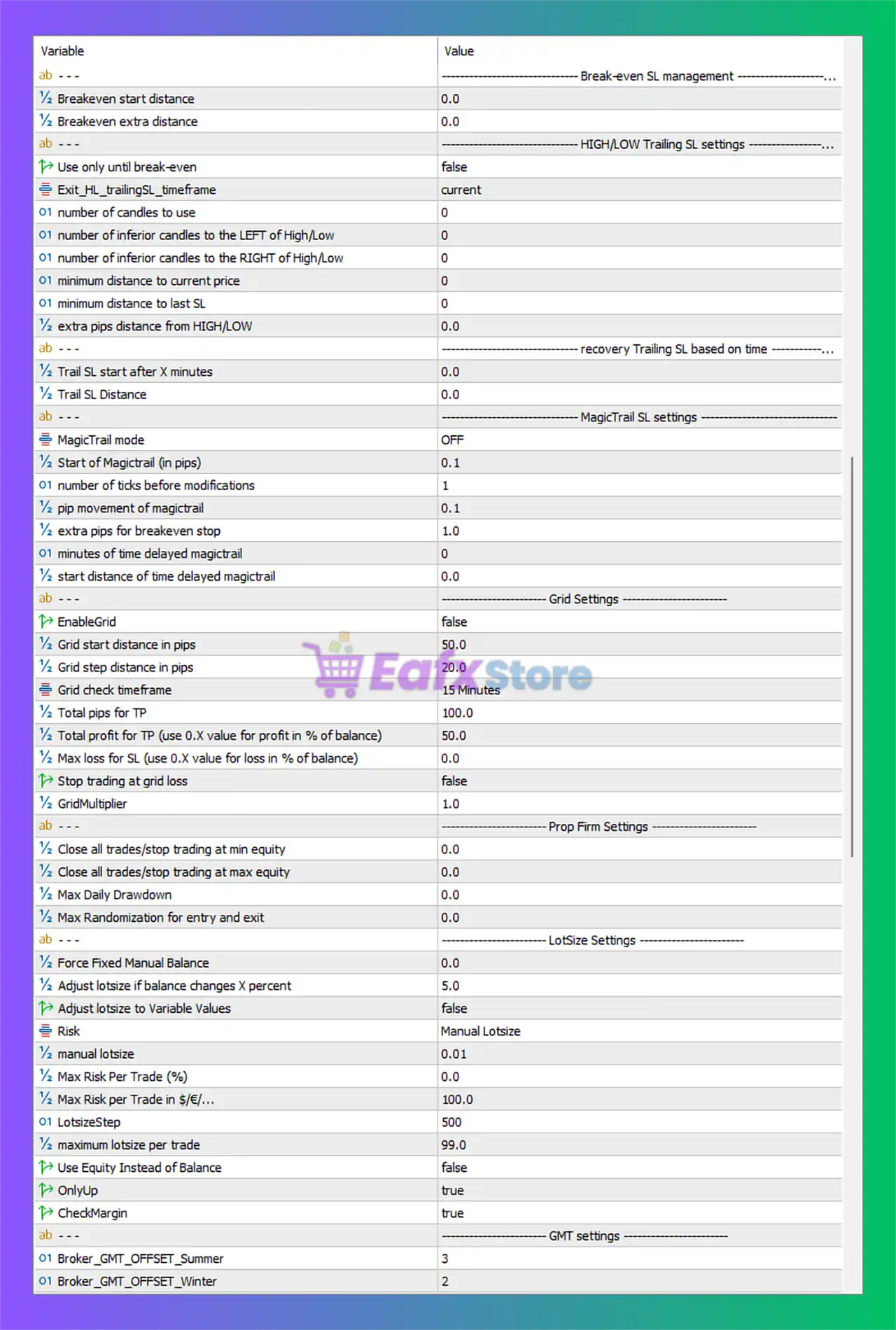
Ultimate Breakout System EA MT5 Settings Panel
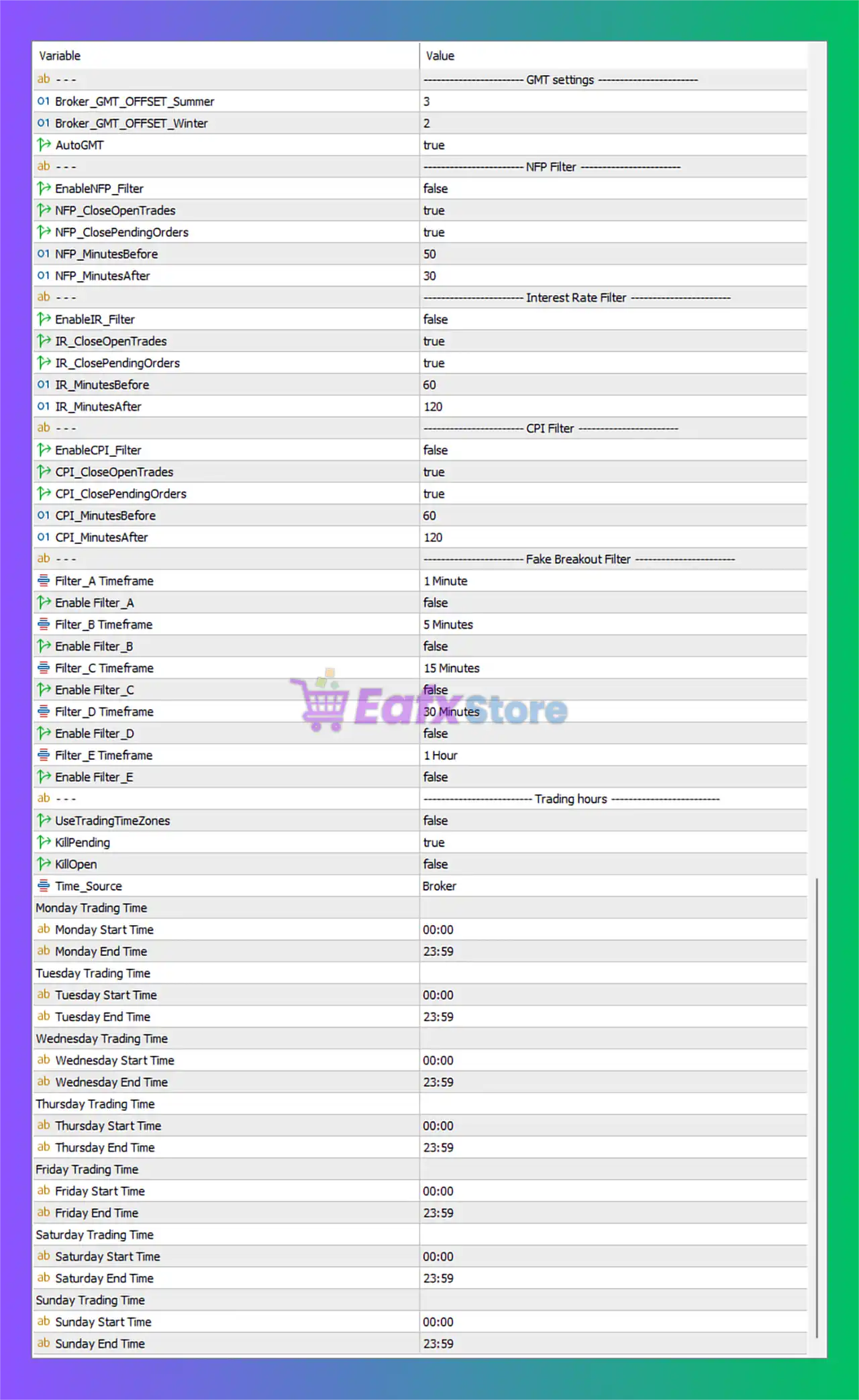
Ultimate Breakout System EA Settings Panel
General & Display Settings
🔹 PrintLogs = true — Enables detailed EA activity logs in the MetaTrader terminal.
🔹 ShowInfoPanel = true — Displays the on-chart information panel.
🔹 update infopanel during testing = false — Disables info panel updates during strategy tester operations.
🔹 Adjustment for Infopanel size = 1.0 — Controls the scaling factor for the information panel size.
🔹 Force Font Size (0=disabled) = 0 — Disables forced font sizing for the information panel.
Custom Optimization Settings
🔹 expected payoff = 0.0 — Optimization parameter for expected trade profitability.
🔹 recovery factor = 0.0 — Optimization parameter used for recovery factor analysis.
🔹 Minimum number of trades = 0.0 — Minimum trade count requirement for optimization results.
🔹 Maximum number of trades = 0.0 — Maximum trade count limit for optimization filtering.
Spread Filter Settings
🔹 SpreadFilter = false — Disables spread filtering during trade execution.
🔹 MaxSpread = 3.0 — Maximum allowed spread when spread filtering is enabled.
🔹 DistForSpreadFilter = 2 — Distance parameter used for spread filtering calculations.
Other Filter Settings
🔹 Set SL/TP after entry = false — Disables delayed stop loss and take profit assignment after order execution.
🔹 use virtual expiration = true — Enables virtual expiration time management for pending orders.
🔹 Use Virtual SL = OFF — Disables virtual stop loss functionality.
🔹 hard SL distance when using virtual SL = 0.0 — Hard stop loss distance value when virtual SL is active.
🔹 Move hard SL to virtual SL after X seconds; = 0 — Delay time before moving hard stop loss to virtual stop loss.
🔹 Run_Strategy = Breakout Support/Resistance — Uses the Breakout Support and Resistance trading strategy.
Variable Values Settings
🔹 Default ATR value = 0.0 — Default ATR value used in calculations.
🔹 ATR Period = 30 — Uses a 30-period ATR calculation.
🔹 ATR Timeframe = 1 Day — ATR calculations are based on the Daily timeframe.
🔹 default price for calculation = 0.0 — Default price parameter for EA calculations.
Volatility Breakout Entry Settings
🔹 Timeframe to monitor = current — Uses the current chart timeframe for monitoring breakout signals.
🔹 number of Candles to Monitor = 1 — Monitors one candle for breakout detection.
🔹 Minimum Candle Size (pips) = 0.0 — Minimum candle size requirement for breakout signals.
🔹 ATR Period = 21 — ATR period used for volatility breakout analysis.
🔹 ATR Timeframe = current — Uses the current timeframe for ATR calculations.
🔹 Deviation factor (candle size compared to ATR) = 2.4 — Candle size must exceed 2.4 times the ATR value.
🔹 Max number of open trades = 1 — Limits the EA to one open trade at a time.
Breakout Support/Resistance Entry Settings
🔹 AllowBuyTrades = true — Enables BUY trade execution.
🔹 AllowSellTrades = true — Enables SELL trade execution.
🔹 Timeframe to use = current — Uses the current timeframe for support and resistance calculations.
🔹 Entry Timing (when to check for new signals) = current — Checks for breakout signals on the current timeframe.
🔹 number of inferior candles to the LEFT of High/Low = 2 — Requires two candles to the left for valid high/low breakout confirmation.
🔹 number of inferior candles to the RIGHT of High/Low = 2 — Requires two candles to the right for valid high/low breakout confirmation.
🔹 max candles in history to look at = 250 — Uses 250 historical candles for analysis.
🔹 minimum distance away from High/Low = 90.0 — Minimum breakout distance from support/resistance levels.
🔹 minimum distance away in percentage = 0.0 — Percentage-based breakout distance requirement.
🔹 Extra pips above High for entry = 20.0 — Adds 20.0 pips above resistance before BUY entry.
🔹 Extra pips below Low for entry = 40.0 — Adds 40.0 pips below support before SELL entry.
🔹 Maximum number of pending orders = 1 — Allows only one pending order simultaneously.
🔹 max number of open trades = 1 — Allows only one active open trade.
🔹 Minimum distance between orders = 1.0 — Minimum spacing between orders.
🔹 expiration time(in hours) for pending orders = 205 — Pending orders expire after 205 hours.
🔹 Magicnumber = 1000 — Unique identifier used by the EA to manage trades.
🔹 Comment for trades = Ultimate Breakout System — Adds “Ultimate Breakout System” as trade comment.
Trade Exit Settings
🔹 Period to check/modify SL/TP = 1 Minute — Checks and updates stop loss/take profit every minute.
🔹 check every tick = true — Continuously checks conditions on every market tick.
🔹 initial stoploss distance = 1150.0 — Initial stop loss distance set to 1150.0 points.
🔹 initial takeprofit distance = 1300.0 — Initial take profit distance set to 1300.0 points.
GMT Settings
🔹 Broker_GMT_OFFSET_Summer = 3 — Broker GMT offset during summer time is +3.
🔹 Broker_GMT_OFFSET_Winter = 2 — Broker GMT offset during winter time is +2.
🔹 AutoGMT = true — Automatically detects GMT offset settings.
News Filter Settings
🔹 UseMQL5Calendar = true — Uses the MQL5 economic calendar for news filtering.
NFP Filter Settings
🔹 EnableNFP_Filter = false — Disables Non-Farm Payroll news filtering.
🔹 NFP_CloseOpenTrades = true — Closes open trades during NFP events.
🔹 NFP_ClosePendingOrders = true — Deletes pending orders during NFP events.
🔹 NFP_MinutesBefore = 50 — Blocks trading 50 minutes before NFP news.
🔹 NFP_MinutesAfter = 30 — Blocks trading 30 minutes after NFP news.
Interest Rate Filter Settings
🔹 EnableIR_Filter = false — Disables interest rate news filtering.
🔹 IR_CloseOpenTrades = true — Closes open trades during interest rate events.
🔹 IR_ClosePendingOrders = true — Deletes pending orders during interest rate events.
🔹 IR_MinutesBefore = 60 — Blocks trading 60 minutes before interest rate news.
🔹 IR_MinutesAfter = 120 — Blocks trading 120 minutes after interest rate news.
CPI Filter Settings
🔹 EnableCPI_Filter = false — Disables CPI news filtering.
🔹 CPI_CloseOpenTrades = true — Closes trades during CPI events.
🔹 CPI_ClosePendingOrders = true — Deletes pending orders during CPI events.
🔹 CPI_MinutesBefore = 60 — Blocks trading 60 minutes before CPI releases.
🔹 CPI_MinutesAfter = 120 — Blocks trading 120 minutes after CPI releases.
Fake Breakout Filter Settings
🔹 Filter_A Timeframe = 1 Minute — Timeframe used for Filter A.
🔹 EnableFilter_A = false — Disables Filter A.
🔹 Filter_B Timeframe = 5 Minutes — Timeframe used for Filter B.
🔹 EnableFilter_B = false — Disables Filter B.
🔹 Filter_C Timeframe = 15 Minutes — Timeframe used for Filter C.
🔹 EnableFilter_C = false — Disables Filter C.
🔹 Filter_D Timeframe = 30 Minutes — Timeframe used for Filter D.
🔹 EnableFilter_D = false — Disables Filter D.
🔹 Filter_E Timeframe = 1 Hour — Timeframe used for Filter E.
🔹 EnableFilter_E = false — Disables Filter E.
Trading Hours Settings
🔹 UseTradingTimeZones = false — Disables trading session restrictions.
🔹 KillPending = true — Deletes pending orders outside trading hours.
🔹 KillOpen = false — Keeps open positions active outside trading hours.
🔹 Time_Source = Broker — Uses broker server time for scheduling.
🔹 Monday Start Time = 00:00 — Monday trading begins at 00:00.
🔹 Monday End Time = 23:59 — Monday trading ends at 23:59.
🔹 Tuesday Start Time = 00:00 — Tuesday trading begins at 00:00.
🔹 Tuesday End Time = 23:59 — Tuesday trading ends at 23:59.
🔹 Wednesday Start Time = 00:00 — Wednesday trading begins at 00:00.
🔹 Wednesday End Time = 23:59 — Wednesday trading ends at 23:59.
🔹 Thursday Start Time = 00:00 — Thursday trading begins at 00:00.
🔹 Thursday End Time = 23:59 — Thursday trading ends at 23:59.
🔹 Friday Start Time = 00:00 — Friday trading begins at 00:00.
🔹 Friday End Time = 23:59 — Friday trading ends at 23:59.
🔹 Saturday Start Time = 00:00 — Saturday trading begins at 00:00.
🔹 Saturday End Time = 23:59 — Saturday trading ends at 23:59.
🔹 Sunday Start Time = 00:00 — Sunday trading begins at 00:00.
🔹 Sunday End Time = 23:59 — Sunday trading ends at 23:59.
Trailing Stop Loss Management
🔹 Trail SL distance = 750.0 — Distance used for trailing stop loss adjustment.
🔹 Trail SL start distance = 250.0 — Profit distance before trailing stop activates.
🔹 Trail SL stop distance = 100000.0 — Maximum trailing stop limit.
🔹 Trail SL step size = 0.4 — Increment step for trailing stop updates.
Trailing Take Profit Management
🔹 Trail TP distance = 350.0 — Distance used for trailing take profit.
🔹 Trail TP start distance = 2500.0 — Profit distance before trailing take profit activates.
Break-even SL Management
🔹 Breakeven start distance = 0.0 — Profit distance before breakeven activates.
🔹 Breakeven extra distance = 0.0 — Additional pips added during breakeven adjustment.
HIGH/LOW Trailing SL Settings
🔹 Use only until break-even = false — Keeps trailing stop active after breakeven.
🔹 Exit_HL_trailingSL_timeframe = current — Uses current timeframe for trailing SL analysis.
🔹 number of candles to use = 0 — Candle count used for trailing calculations.
🔹 number of inferior candles to the LEFT of High/Low = 0 — Left-side candle requirement for trailing logic.
🔹 number of inferior candles to the RIGHT of High/Low = 0 — Right-side candle requirement for trailing logic.
🔹 minimum distance to current price = 0 — Minimum trailing distance from market price.
🔹 minimum distance to last SL = 0 — Minimum spacing from previous stop loss.
🔹 extra pips distance from HIGH/LOW = 0.0 — Additional pip offset from highs/lows.
Recovery Trailing SL Settings
🔹 Trail SL start after X minutes = 0.0 — Delay before recovery trailing stop activates.
🔹 Trail SL Distance = 0.0 — Recovery trailing stop distance.
MagicTrail SL Settings
🔹 MagicTrail mode = OFF — Disables MagicTrail stop loss system.
🔹 Start of Magictrail (in pips) = 0.1 — Profit distance before MagicTrail activation.
🔹 number of ticks before modifications = 1 — Number of ticks before stop modifications occur.
🔹 pip movement of magictrail = 0.1 — Minimum pip movement for MagicTrail updates.
🔹 extra pips for breakeven stop = 1.0 — Extra pip buffer added to breakeven stop.
🔹 minutes of time delayed magictrail = 0 — Delay before MagicTrail activation.
🔹 start distance of time delayed magictrail = 0.0 — Distance before delayed MagicTrail starts.
Grid Settings
🔹 EnableGrid = false — Disables grid trading functionality.
🔹 Grid start distance in pips = 50.0 — Distance before starting grid orders.
🔹 Grid step distance in pips = 20.0 — Spacing between grid orders.
🔹 Grid check timeframe = 15 Minutes — Timeframe used for grid management.
🔹 Total pips for TP = 100.0 — Combined take profit target for grid trades.
🔹 Total profit for TP (use 0.X value for profit in % of balance) = 50.0 — Profit target value for closing all grid positions.
🔹 Max loss for SL (use 0.X value for loss in % of balance) = 0.0 — Maximum loss threshold for grid trades.
🔹 Stop trading at grid loss = false — Continues trading after grid losses.
🔹 GridMultiplier = 1.0 — Multiplier used for increasing grid lot sizes.
Prop Firm Settings
🔹 Close all trades/stop trading at min equity = 0.0 — Disables minimum equity shutdown protection.
🔹 Close all trades/stop trading at max equity = 0.0 — Disables maximum equity stop target.
🔹 Max Daily Drawdown = 0.0 — Disables maximum daily drawdown protection.
🔹 Max Randomization for entry and exit = 0.0 — No randomization added to trade execution.
Lot Size Settings
🔹 Force Fixed Manual Balance = 0.0 — Disables forced manual balance sizing.
🔹 Adjust lotsize if balance changes X percent = 5.0 — Recalculates lot size when balance changes by 5.0%.
🔹 Adjust lotsize to Variable Values = false — Disables variable lot size adjustment.
🔹 Risk = Manual Lotsize — Uses manual lot sizing mode.
🔹 manual lotsize = 0.01 — Fixed manual lot size value.
🔹 Max Risk Per Trade (%) = 0.0 — Maximum percentage risk per trade.
🔹 Max Risk per Trade in $/€/… = 100.0 — Maximum monetary risk allowed per trade.
🔹 LotsizeStep = 500.0 — Balance step used for lot size increases.
🔹 maximum lotsize per trade = 99.0 — Maximum lot size allowed per trade.
🔹 Use Equity Instead of Balance = false — Uses account balance instead of equity for calculations.
🔹 OnlyUp = true — Allows lot size increases only upward.
🔹 CheckMargin = true — Verifies margin availability before placing trades.
Conclusion
Ultimate Breakout System EA MT5 is a comprehensive breakout trading solution that combines support and resistance strategies, volatility breakout analysis, advanced trailing stop systems, grid management, news filtering and dynamic lot sizing.
With highly customizable risk controls and extensive trade management tools, the EA is suitable for traders seeking professional-level automation and breakout trading precision on MetaTrader 5.
FAQs
❓ What is Ultimate Breakout System EA MT5?
Ultimate Breakout System EA MT5 is an automated breakout trading Expert Advisor for MetaTrader 5 that focuses on support/resistance and volatility breakout strategies.
❓ Does Ultimate Breakout System EA MT5 include news filters?
Yes, the EA includes filters for NFP, CPI, and Interest Rate news events using the MQL5 economic calendar.
❓ Can the EA use trailing stop and breakeven features?
Yes, the EA supports multiple trailing stop systems, trailing take profit, breakeven management, and MagicTrail functionality.
❓ Does Ultimate Breakout System EA MT5 support grid trading?
Yes, the EA includes optional grid trading functionality with configurable grid distance, multiplier, and profit targets.
❓ Is Ultimate Breakout System EA MT5 suitable for prop firm trading?
Yes, the EA includes prop firm protection settings such as daily drawdown controls, equity protection, and advanced risk management features.
User Reviews
Only logged in customers who have purchased this product may leave a review.
1. What is the Ultimate Breakout System EA and how does it work?
The Ultimate Breakout System EA is a professional-grade, fully automated trading robot for MetaTrader 5 that executes trades using a proprietary breakout strategy, placing pending orders at key support and resistance levels across various markets.
2. What assets and timeframes does the EA support?
It supports Forex, Gold (XAUUSD), Commodities, Indices, and Cryptocurrencies on any timeframe from M1 to D1, allowing flexible trading styles like scalping, swing, or portfolio trading.
3. Is it beginner-friendly or more suitable for advanced users?
While powerful and flexible, the EA is best suited for intermediate to advanced traders who understand breakout strategies. However, it includes default settings and tutorials to help beginners get started.
4. What makes this EA different from other breakout EAs?
This EA includes a highly refined breakout engine developed over 8+ years and used in several top-rated EAs. It also offers unlimited customization, allowing users to build and test custom strategies with detailed SL/TP and trailing logic.
5. What is the recommended deposit to start using it?
The minimum recommended deposit is $100, though higher capital is advised for more aggressive or diversified strategies.
6. Can I use the Ultimate Breakout System EA for proprietary trading firm challenges?
Yes. It allows custom strategy creation, so your trades won’t be flagged as copy trading — making it ideal for prop firm accounts and funded challenges.
7. What is the performance history of the EA?
Live trading results have shown consistent growth, including:
+462.54% total gain on Goldtrade Pro
+72.59% on Daytrade Pro
+43.14% on USDJPY scalping
Performance varies by symbol and strategy configuration.
8. Is it plug-and-play or do I need to configure it manually?
The EA includes default plug-and-play settings for XAUUSD D1 and over 100 preconfigured setup files for various instruments and timeframes. You can start quickly or customize extensively.
-
 Original price was: $499.00.$249.00Current price is: $249.00.
 -
 Original price was: $30,000.00.$249.00Current price is: $249.00.
 -
 Original price was: $30,000.00.$249.00Current price is: $249.00.
 -
 Original price was: $30,000.00.$249.00Current price is: $249.00.
-
 4
4 -
 0
0 -
 3Price range: $89.00 through $599.00
 -
 1
1
There are no reviews yet.