

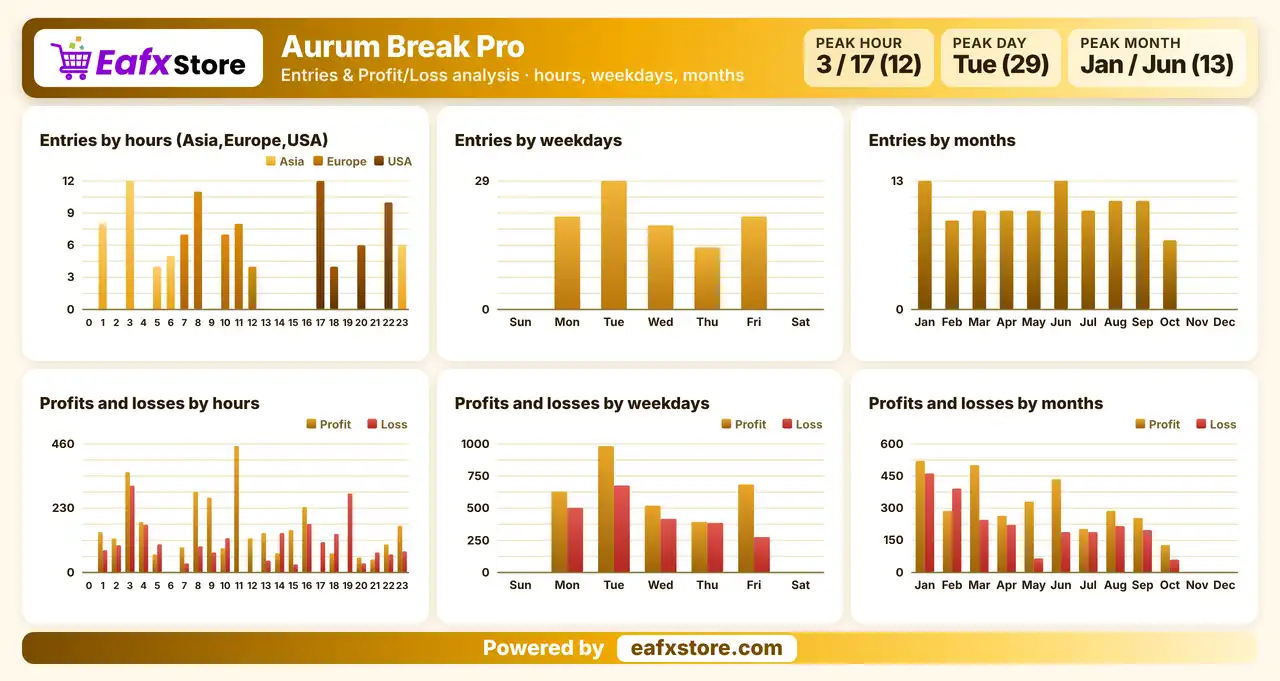
What is Aurum Break Pro EA?
Aurum Break Pro EA is an automated trading robot for MetaTrader 5, featuring account protection tools such as daily loss limits, margin level monitoring, maximum lot control, trading session and spread filters, and a built-in status panel for managing trading activity.
How Does Aurum Break Pro EA Work?
Volume Choice
One fixed lot or a share of the account at risk.
Loss Brakes
Daily cap, margin guard, lot ceiling.
Entry Filters
Hours, custom session and spread guard.
Monitoring
Chart panel and optional detailed log.
Aurum Break Pro EA Trading Strategy
Protect the Account First
Most of the settings deal with limiting damage, from a daily loss cap to a margin check, rather than with entry signals.
Enter on Breakouts
The robot is labeled as breakout based, yet the documentation never says how a level is chosen or when an order is placed.
Pick the Volume Method
Orders use either one fixed lot or a share of the account at risk, and a hard lot ceiling limits the largest order.
Filter by Time and Spread
Trades can be restricted to chosen hours, and entries are skipped while the spread is wider than the allowed gap.
Manage Open Trades If Enabled
A break-even move and a trailing stop are included, but the shown setup keeps both switched off.
Historical Trading Results Performance
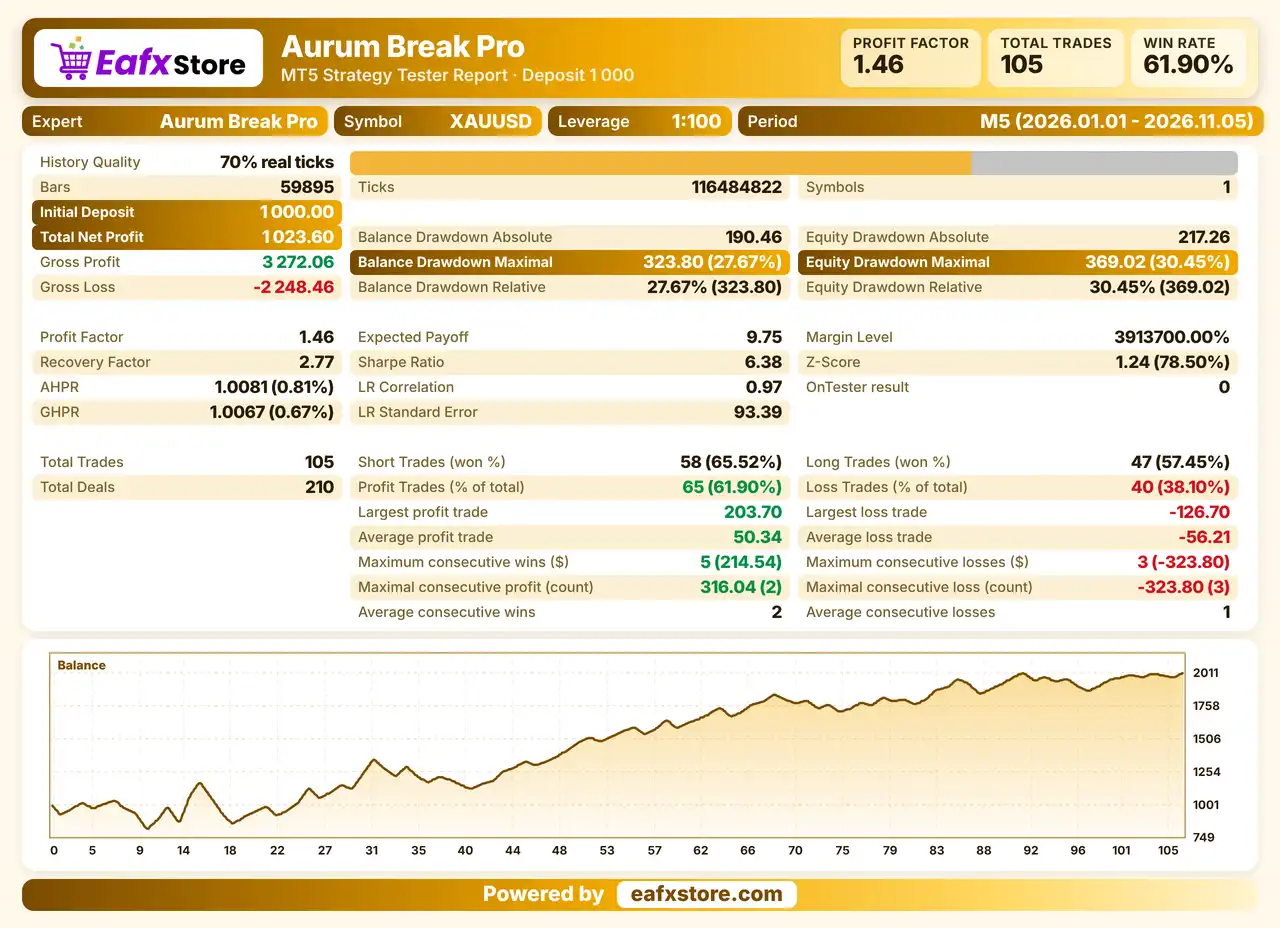
✅ Aurum Break Pro EA was backtested on XAUUSD (Gold) M5 from January 1 to November 5, 2026, with a $1,000 initial deposit, generating $1,023.60 net profit, a 61.90% win rate, and 30.45% maximum equity drawdown.
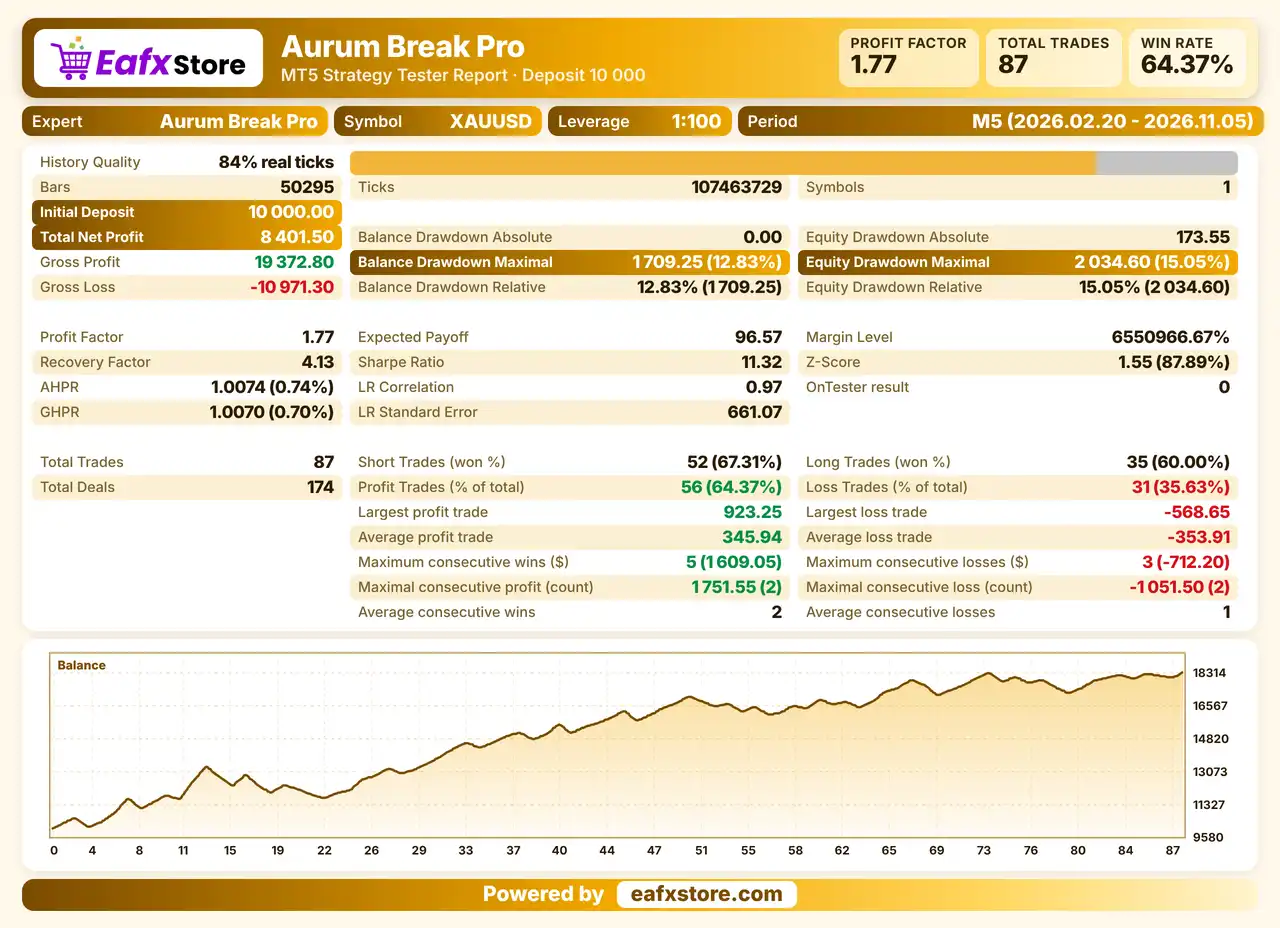
✅ Aurum Break Pro EA was backtested on XAUUSD (Gold) M5 from February 20 to November 5, 2026, with a $10,000 initial deposit, generating $8,401.50 net profit, a 64.37% win rate, and 15.05% maximum equity drawdown.
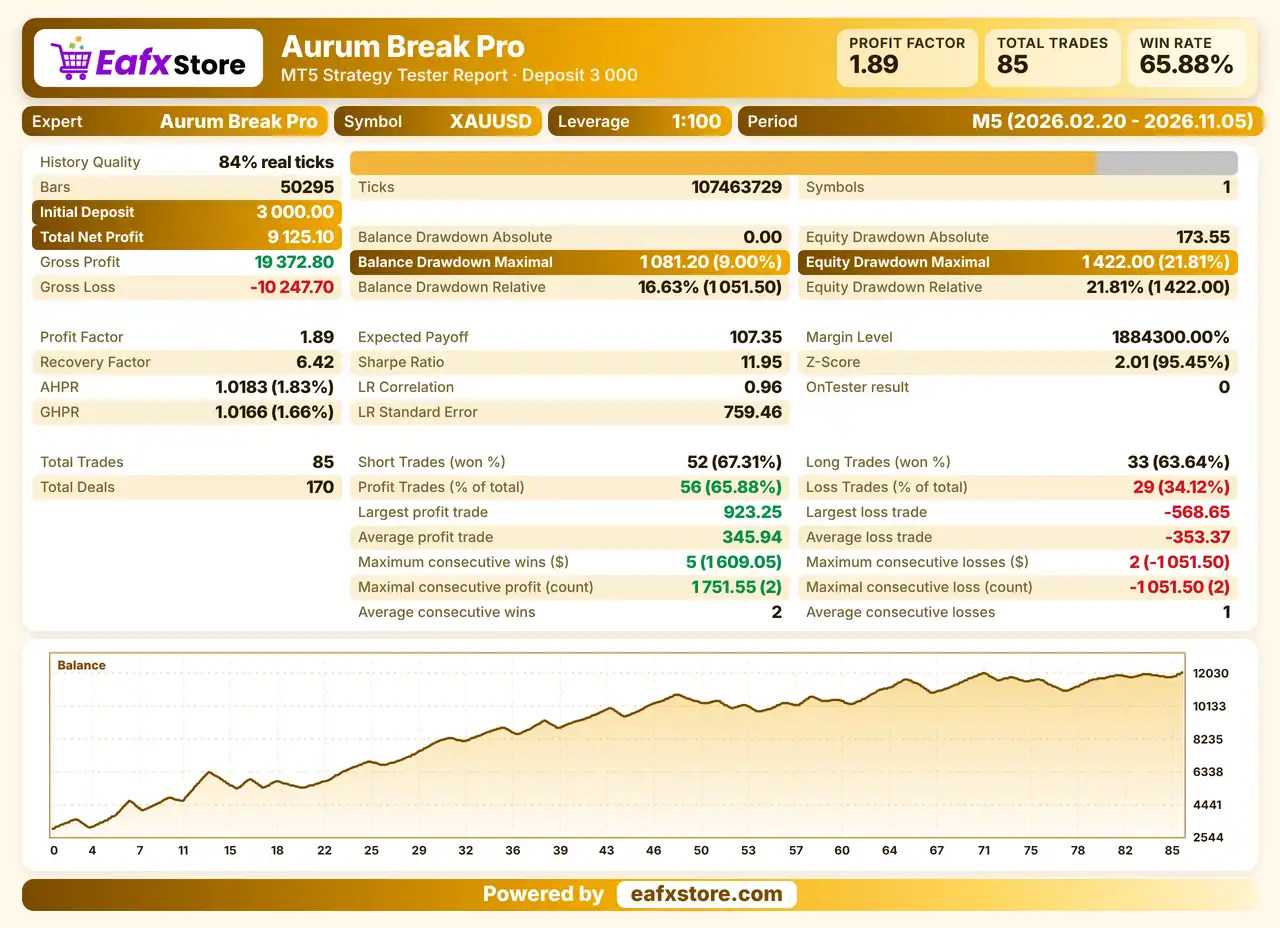
✅ Aurum Break Pro EA was backtested on XAUUSD (Gold) M5 from February 20 to November 5, 2026, with a $3,000 initial deposit, generating $9,125.10 net profit, a 65.88% win rate, and 21.81% maximum equity drawdown.
Key Features of Aurum Break Pro EA
Daily Loss Cap
Trading can halt for the rest of the day after a chosen loss, which stops one bad session from growing into a much larger setback.
Margin Level Guard
New positions are refused when the margin level drops below a chosen floor, so the account is not pushed further when it is stretched.
Two Ways to Size Orders
A fixed lot suits simple testing, while the risk based method scales volume with the balance, and a ceiling caps either choice.
Hour Filter and Custom Session
The robot can follow an internal hour filter or a custom session that crosses midnight, with a shift for broker server time.
Spread and Slippage Guard
Wide spreads block new entries, and a slippage limit sets how far the executed price may drift from the requested one.
Stop Adjustment Tools
Break-even and trailing stop options can move the stop after entry, but they stay disabled until the trader turns them on.
Risk Management
False Breakouts Cost Money
Price often returns after crossing a level, so a stop-loss can trigger many times in a ranging market.
A High Ceiling Can Hurt Fast
The shown limit per trade is large enough for one loss to cause a serious drawdown in the account.
Open Profit Is Exposed
Break-even and trailing stop are disabled in the shown setup, so a winning trade can reverse into a loss.
Targets May Not Be Reached
A take-profit works only when price gets there, and a fast reversal can come before that.
Caps Do Not Stop Gaps
A daily loss cap cannot prevent a large loss that happens inside one sudden move or a market gap.
Strengths and Limitations of Aurum Break Pro EA
Strengths
🔹 Protection focus: the loss cap, margin guard and lot ceiling working together give the account several separate brakes against heavy losses.
🔹 Flexible schedule: an internal filter, a custom session and a time shift allow precise control over the trading hours of the robot.
🔹 Better fills: the spread guard and the slippage limit reduce the chance of entering at a poor price during fast markets.
🔹 Readable status: the chart panel and the optional log make the behavior of the robot much easier to follow during testing.
Limitations
🔹 Entry method unknown: the documentation never explains how breakouts are found, so the real logic cannot be judged beforehand.
🔹 Symbol and timeframe missing: neither is named, which makes correct setup impossible without asking the seller first.
🔹 Generous default risk ceiling: the per trade limit shown is very high, and it is dangerous if the trader leaves it alone.
🔹 No results shown: there is no backtest or live record, so nothing about returns or losses of the robot can be stated here.
Product Download Package?
The download package of the product suite includes:
MQ5 (Source Code)
✅ Aurum Break Pro.mq5
Experts
✅ Aurum Break Pro.ex5
SetFiles
✅ xauusd_fixed lot_0.01.set
✅ xauusd_risk % equity_1%.set
✅ xauusd_risk % equity_2%.set
✅ xauusd_risk % equity_3%.set
✅ xauusd_risk % equity_4%.set
✅ xauusd_risk % equity_5%.set
➡️ Reviewed by David Easton
Final Verdict
Aurum Break Pro EA is a breakout robot whose settings lean toward protecting the account, with a daily loss cap, a margin level guard, a lot ceiling, session and spread filters and a status panel on the chart. How it finds breakouts, which symbol it trades and what results it gives are all left unexplained, and the shown risk ceiling is far too generous.