

This guide walks through the inputs of AI Gen XII MT4 with the values recommended for live trading. The set files that come with the EA already contain these settings, so you can load them in one click and adjust only what your broker or account needs.
🔢 AI Gen XII MT4 – Complete Settings & Parameters Guide
AI Gen XII MT4 is an advanced AI-powered Expert Advisor (EA) for MetaTrader 4 that combines automated trade management, GPT-assisted market analysis, recovery systems, trailing stop protection, prop firm compatibility and intelligent risk control.
Designed for both conservative and aggressive trading styles, the EA provides flexible money management features, news filtering tools, and AI-enhanced strategy optimization for forex traders seeking automation and precision.

🔢 AI Gen XII MT4 Settings Explained
Below are the details of the parameters in the advisor’s trading system settings table:
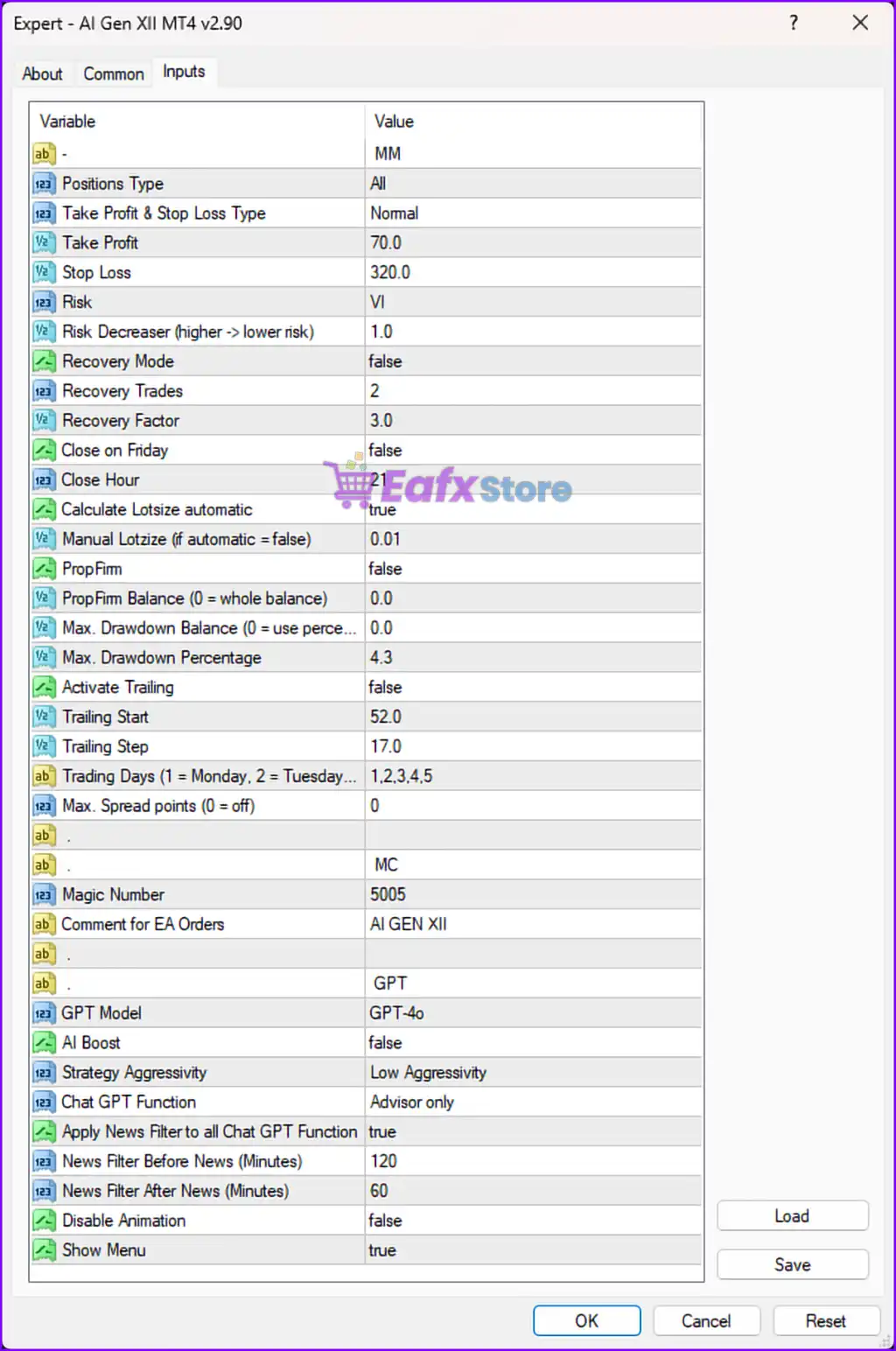
🔹 Positions Type = All — Allows the EA to open and manage all trade position types.
🔹 Take Profit & Stop Loss Type = Normal — Uses standard Take Profit and Stop Loss calculation methods.
🔹 Take Profit = 70.0 — Sets the Take Profit target to 70.0 points/pips.
🔹 Stop Loss = 320.0 — Defines the Stop Loss distance at 320.0 points/pips.
🔹 Risk = VI — Specifies the internal EA risk profile level as VI.
🔹 Risk Decreaser (higher -> lower risk) = 1.0 — Controls automatic risk reduction, where higher values reduce trading risk.
🔹 Recovery Mode = false — Disables the trade recovery or recovery grid system.
🔹 Recovery Trades = 2 — Allows up to 2 recovery trades if Recovery Mode is enabled.
🔹 Recovery Factor = 3.0 — Multiplies recovery trade sizing by a factor of 3.0.
🔹 Close on Friday = false — Keeps trades open over the weekend instead of closing on Friday.
🔹 Close Hour = 21 — Defines the hour for closing trades if Friday close is activated.
🔹 Calculate Lotsize automatic = true — Enables automatic lot size calculation based on account conditions.
🔹 Manual Lotsize (if automatic = false) = 0.01 — Uses a fixed manual lot size of 0.01 when automatic sizing is disabled.
🔹 PropFirm = false — Disables proprietary trading firm protection settings.
🔹 PropFirm Balance (0 = whole balance) = 0.0 — Uses the entire account balance for calculations when set to 0.0.
🔹 Max. Drawdown Balance (0 = use percentage) = 0.0 — Uses percentage-based drawdown protection instead of fixed balance value.
🔹 Max. Drawdown Percentage = 4.3 — Maximum allowed account drawdown is limited to 4.3%.
🔹 Activate Trailing = false — Disables trailing stop functionality.
🔹 Trailing Start = 52.0 — Trailing stop would activate after 52.0 points/pips if enabled.
🔹 Trailing Step = 17.0 — Defines the trailing stop adjustment step as 17.0 points/pips.
🔹 Trading Days (1 = Monday, 2 = Tuesday...) = 1,2,3,4,5 — Allows trading only from Monday to Friday.
🔹 Max. Spread points (0 = off) = 0 — Spread filter is disabled because the value is set to 0.
🔶 Magic & Comment Settings
🔹 Magic Number = 5005 — Unique identifier used by AI Gen XII MT4 to manage its own trades.
🔹 Comment for EA Orders = AI GEN XII — Adds the trade comment “AI GEN XII” to EA-generated positions.
🔶 GPT & AI Trading Settings
🔹 GPT Model = GPT-4o — Uses the GPT-4o AI model for strategy analysis and assistance.
🔹 AI Boost = false — Disables enhanced AI optimization mode.
🔹 Strategy Aggressivity = Low Aggressivity — Configures the EA to trade with conservative risk behavior.
🔹 Chat GPT Function = Advisor only — Limits GPT functionality to advisory analysis instead of direct execution.
🔹 Apply News Filter to all Chat GPT Function = true — Applies news filtering to all GPT-related trading functions.
🔹 News Filter Before News (Minutes) = 120 — Stops trading 120 minutes before major news releases.
🔹 News Filter After News (Minutes) = 60 — Resumes trading 60 minutes after major news events.
🔹 Disable Animation = false — Keeps chart animations and interface effects enabled.
🔹 Show Menu = true — Displays the EA control panel and interface menu on the chart.
🔢 Conclusion
AI Gen XII MT4 is a modern AI-enhanced MetaTrader 4 Expert Advisor that integrates automated money management, GPT-assisted analysis, drawdown protection, and flexible trading controls into a single trading solution.
With features such as automatic lot sizing, intelligent news filtering, recovery management, and prop firm compatibility, the EA is suitable for traders seeking advanced automation with customizable risk management settings.
🔢 FAQs
❓ What is AI Gen XII MT4?
AI Gen XII MT4 is an AI-powered MetaTrader 4 Expert Advisor that combines automated trading with GPT-assisted market analysis.
❓ Does AI Gen XII MT4 support automatic lot sizing?
Yes, the EA includes automatic lot size calculation based on account balance and risk settings.
❓ Can AI Gen XII MT4 be used for prop firm trading?
Yes, the EA includes PropFirm settings and drawdown protection tools suitable for funded accounts.
❓ What GPT model does AI Gen XII MT4 use?
The EA is configured to use the GPT-4o model for AI-assisted analysis and advisory functions.
❓ Does AI Gen XII MT4 include a news filter?
Yes, the EA includes configurable news filters with trading pauses before and after high-impact news events.
Get AI Gen XII MT4
Download AI Gen XII MT4 with its set files, read the full product details and requirements here: AI Gen XII MT4 →