

Introduction to Big Gold AI MT5
Big Gold AI MT5 is an automated trading Expert Advisor (EA) designed for trading Gold (XAUUSD) on the MetaTrader 5 platform. According to its default configuration, the EA is optimized for the XAUUSD H1 timeframe and combines AI Gravity parameters, configurable risk management, trailing stop functionality, additional trade management, and economic news filters.

The settings allow traders to customize Stop Loss (SL) and Take Profit (TP) distances, adjust risk profiles, configure AI model parameters, manage additional trading opportunities, and control trading conditions around major economic events. Understanding each input is essential for configuring Big Gold AI MT5 according to your trading strategy and account risk tolerance.
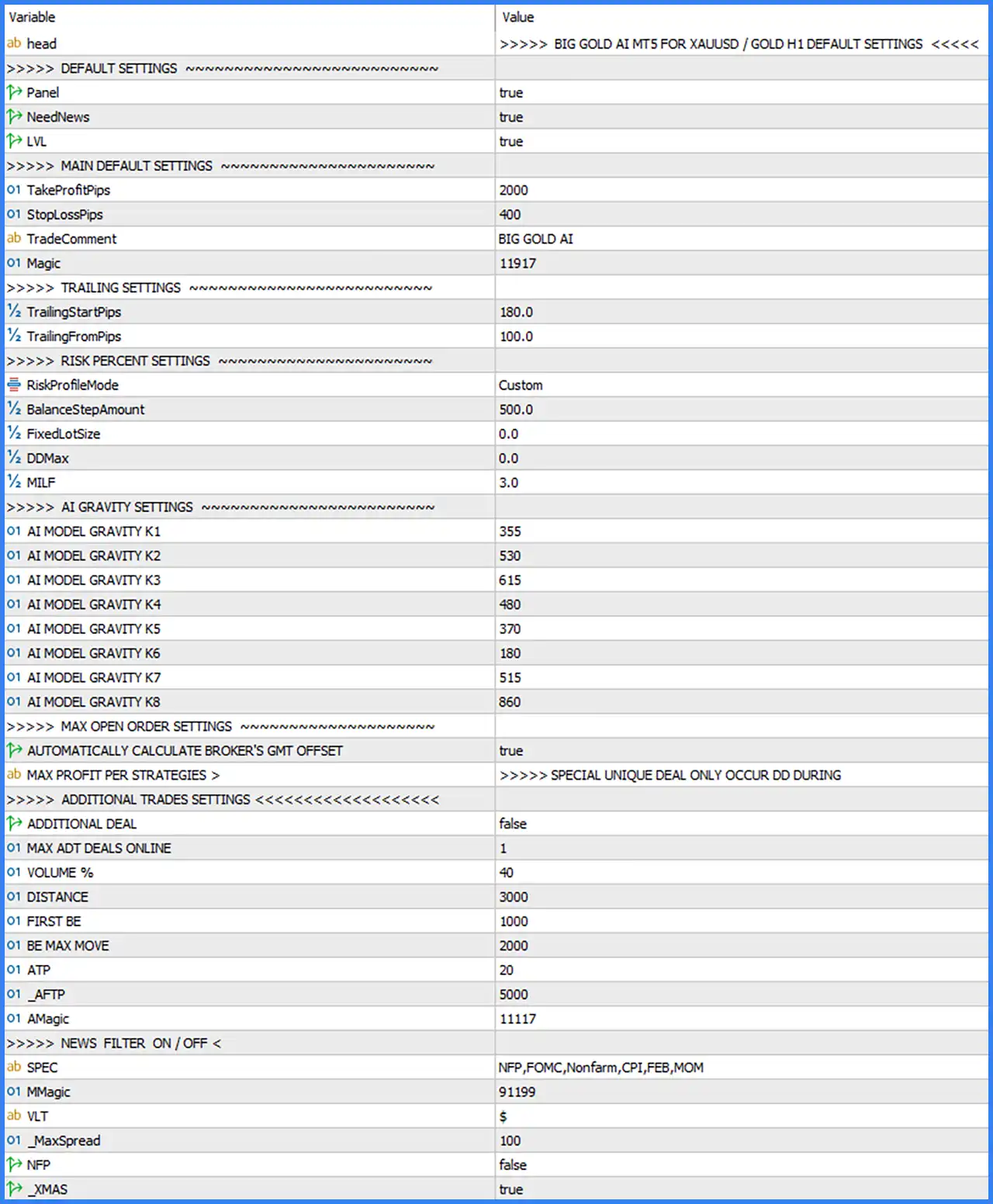
Default Settings
These settings control the EA's main interface and several general operating features.
🔹 Panel = true: Enables the EA's information panel on the trading chart, allowing traders to monitor available trading information and the EA's operating status.
🔹 NeedNews = true: Enables the news-related functionality, allowing the EA to use its configured economic news filtering features during trading operations.
🔹 LVL = true: Enables the LVL option, which is likely associated with displaying or activating the EA's trading levels. Its exact function depends on the internal EA implementation.
Main Default Settings
These parameters define the primary trade management configuration, including profit targets, stop-loss distances, trade identification, and order management.
🔹 TakeProfitPips = 2000: Sets the default take-profit distance to 2000 pips, defining the intended profit target for an individual trading position.
🔹 StopLossPips = 400: Sets the default stop-loss distance to 400 pips, establishing a predefined exit level to limit losses when the market moves against an open position.
🔹 TradeComment = BIG GOLD AI: Defines the comment attached to trades opened by the EA, making it easier to identify Big Gold AI MT5 positions in the MetaTrader 5 terminal.
🔹 Magic = 11917: Sets the EA's unique Magic Number to 11917, allowing MetaTrader 5 to distinguish and identify positions managed by this trading robot.
Trailing Settings
The trailing settings control how the EA manages stop-loss levels as an open trade moves into profit.
🔹 TrailingStartPips = 180.0: Defines the profit distance of 180 pips at which the trailing stop mechanism is designed to start managing an open position.
🔹 TrailingFromPips = 100.0: Sets the trailing distance to 100 pips, defining the distance used by the EA when adjusting the stop-loss relative to the market price.
Risk Percent Settings
These parameters configure the EA's risk management profile and position sizing behavior.
🔹 RiskProfileMode = Custom: Selects the Custom risk profile, allowing the EA to use its individually configured risk parameters instead of relying entirely on a predefined risk preset.
🔹 BalanceStepAmount = 500.0: Sets the balance increment to 500.0, which may serve as a reference amount for calculating or adjusting position sizes according to account balance.
🔹 FixedLotSize = 0.0: Sets the fixed lot size to 0.0. This indicates that a positive fixed lot size has not been specified in the default configuration; the EA may use another position-sizing method.
🔹 DDMax = 0.0: Sets the maximum drawdown parameter to 0.0. The screenshot does not specify how this value is interpreted or whether zero disables the corresponding drawdown restriction.
🔹 MTLF = 3.0: Sets the MTLF parameter to 3.0. This is an internal risk configuration value, and its precise calculation or trading function cannot be determined from the displayed Inputs alone.
AI Gravity Settings
The AI Gravity section contains eight numerical parameters, from K1 to K8. These values form part of the EA's internal AI model configuration and may influence its trading calculations or decision-making process.
🔹 AI MODEL GRAVITY K1 = 355: Defines the first AI Gravity model parameter with a value of 355, contributing to the EA's internal calculation framework.
🔹 AI MODEL GRAVITY K2 = 530: Sets the second AI Gravity parameter to 530, providing an additional numerical input for the model's trading calculations.
🔹 AI MODEL GRAVITY K3 = 615: Configures the third AI Gravity parameter with a value of 615, forming part of the EA's multi-parameter model configuration.
🔹 AI MODEL GRAVITY K4 = 480: Sets the fourth AI Gravity parameter to 480, maintaining the numerical configuration used by the internal AI model.
🔹 AI MODEL GRAVITY K5 = 370: Defines the fifth AI Gravity parameter at 370, contributing to the model's overall configuration.
🔹 AI MODEL GRAVITY K6 = 180: Sets the sixth AI Gravity parameter to 180, providing another numerical input for the EA's internal processing.
🔹 AI MODEL GRAVITY K7 = 515: Configures the seventh AI Gravity parameter with a value of 515, forming part of the model's eight-parameter structure.
🔹 AI MODEL GRAVITY K8 = 860: Sets the eighth AI Gravity parameter to 860, completing the default AI Gravity configuration.
Max Open Order Settings
This section is labeled Max Open Order Settings in the EA's Inputs panel. However, the screenshot does not display a separate numerical maximum-open-orders parameter.
🔹 AUTOMATICALLY CALCULATE BROKER'S GMT OFFSET = true: Enables automatic calculation of the broker's GMT offset, helping the EA synchronize its time-based operations with the broker's server time.
🔹 MAX PROFIT PER STRATEGIES: The displayed description contains the text "SPECIAL UNIQUE DEAL ONLY OCCUR DD DURING". This appears to be an explanatory heading or annotation rather than a configurable numerical input.
Additional Trades Settings
This section provides additional trade management parameters, including additional deal activation, volume adjustments, trading distances, and breakeven-related settings.
🔹 ADDITIONAL DEAL = false: Disables the additional deal functionality by default, preventing this particular additional trading feature from being activated under the default configuration.
🔹 MAX ADT DEALS ONLINE = 1: Sets the maximum number of additional deals online to 1, defining the configured limit for this additional trading feature.
🔹 VOLUME % = 40: Sets the additional trade volume percentage to 40, providing a percentage-based volume parameter for the EA's additional deal management.
🔹 DISTANCE = 3000: Sets the additional trade distance parameter to 3000, defining the configured price-distance threshold used by the additional trading mechanism.
🔹 FIRST BE = 1000: Sets the first breakeven-related threshold to 1000, potentially determining when the EA begins applying its initial breakeven management logic.
🔹 BE MAX MOVE = 2000: Sets the maximum breakeven movement parameter to 2000, controlling the configured movement limit associated with the breakeven mechanism.
🔹 ATP = 20: Sets the ATP parameter to 20, providing a numerical input for an additional trade management function. Its exact calculation is not specified in the Inputs panel.
🔹 AFTP = 5000: Sets the AFTP parameter to 5000, representing an additional trade management value used by the EA's internal configuration.
🔹 AMagic = 11117: Assigns the Magic Number 11117 to the additional trading functionality, helping distinguish additional deals from the EA's primary trading positions.
News Filter On / Off Settings
The News Filter section contains parameters for configuring economic event filters and related trading restrictions. These settings are particularly relevant when trading Gold because major economic announcements can increase market volatility and spread fluctuations.
🔹 SPEC = NFP,FOMC,Nonfarm,CPI,FEB,MOM: Specifies the economic event keywords used by the news filtering configuration, including NFP, FOMC, Nonfarm, CPI, FEB, and MOM. These entries define the configured event identifiers.
🔹 MMagic = 91199: Sets the Magic Number for the news filter functionality to 91199, providing a separate identifier for the corresponding EA operations.
🔹 VLT = $: Sets the VLT parameter to the dollar symbol ($), representing the configured currency or symbol identifier used by this part of the news filter.
🔹 _MaxSpread = 100: Sets the maximum spread threshold to 100, defining the configured spread limit for the EA's trading conditions.
🔹 NFP = false: Disables the specific NFP filter option by default, indicating that this individual news-filter setting is inactive.
🔹 _XMAS = true: Enables the Christmas-related filter option, allowing the EA to apply its corresponding seasonal trading restriction or condition.