
🔄 Overview
CyNera EA is a fully automated trading robot for MetaTrader 4 (MT4), utilizing AI-based decision-making, advanced money management and risk control features.
Below is a breakdown of the EA's internal settings to understand its strategy, risk profile, and suitability for live or prop firm trading.
🔄 Core Configuration Overview
| Category | Setting | Analysis |
|---|---|---|
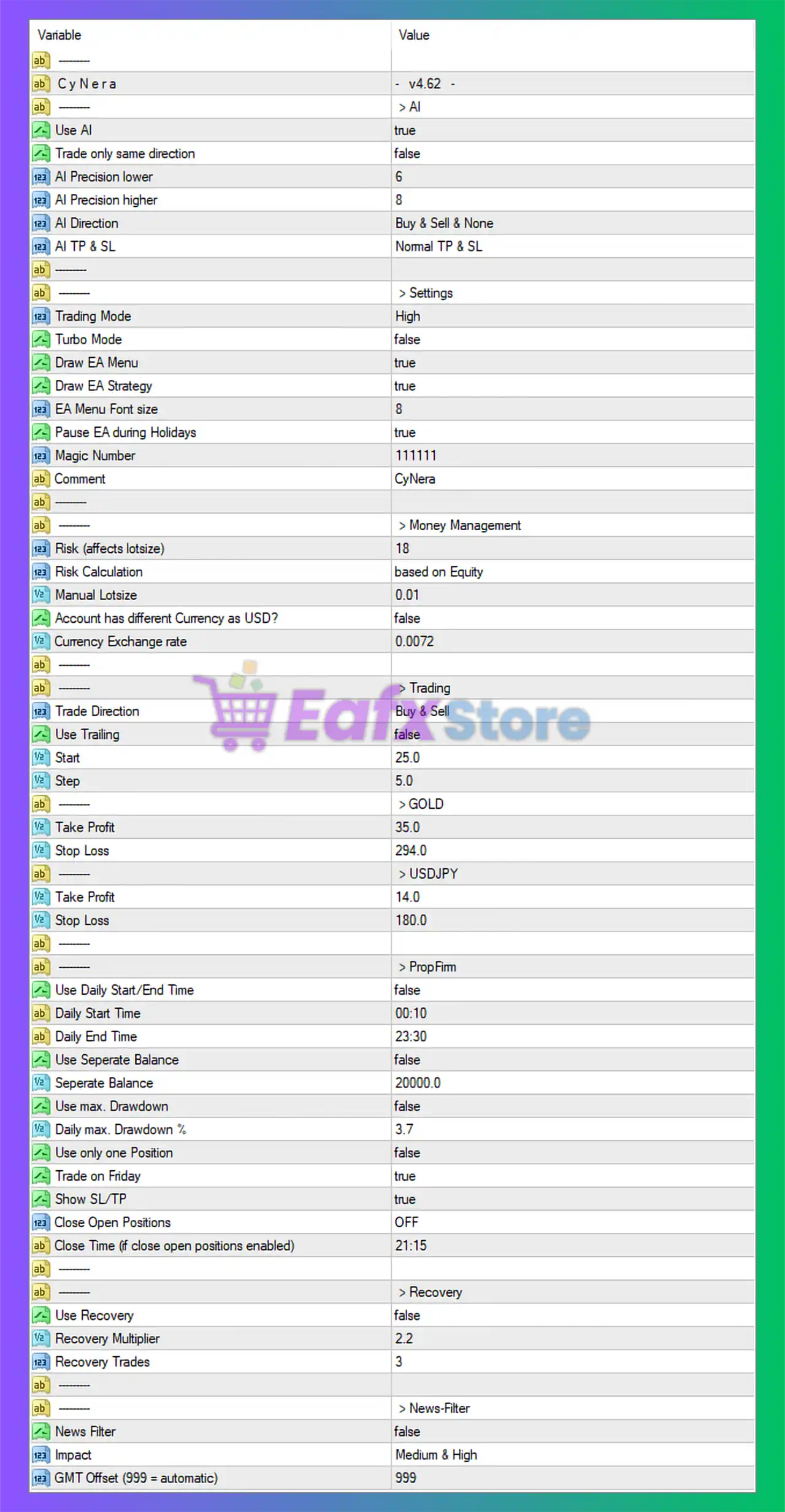
| AI Trading | Enabled (Use AI = true) | EA uses AI logic to open/close trades dynamically. |
| AI Precision Range | 6 (lower) to 8 (higher) | Mid-range filtering; tighter logic could reduce noise. |
| AI Direction | Buy & Sell & None | Trades in both directions based on market conditions. |
| AI TP & SL Mode | Normal TP & SL | Fixed Take Profit and Stop Loss levels used. |
🔄 General Settings
| Setting | Value | Comment |
|---|---|---|
| Trading Mode | High | Likely uses more trades or aggressive entry filters. |
| Turbo Mode | false | No turbo execution — safer and more stable performance. |
| Pause During Holidays | true | Avoids trading during low-liquidity or volatile periods. |
| Magic Number | 1111111 | Unique identifier for this EA's trades. |
| Comment | CyNera | Easily tracks trades in history. |
🔄 Money Management
| Parameter | Value | Analysis |
|---|---|---|
| Risk Level | 18% | High risk per trade; suitable only for aggressive traders or demo/backtest. |
| Risk Calculation | Based on Equity | Dynamic lot sizing for better capital adaptation. |
| Manual Lot Size | 0.01 | Likely backup if equity-based sizing fails. |
| Currency Conversion | false, rate = 0.0072 | Only relevant for non-USD accounts. |
🔄 Trading Strategy Settings
| Symbol | Take Profit | Stop Loss |
|---|---|---|
| GOLD | 35.0 | 294.0 |
| USDJPY | 14.0 | 180.0 |
Other key trading rules:
- Trade Direction: Buy & Sell
- Trailing Stop: Disabled
- Step Size: 5.0 (likely pip-based)
- Use SL/TP: Enabled (manual or calculated)
- Trade on Friday: true (EA trades all week)
🔄 Prop Firm & Risk Controls
| Prop Firm Compliance | Setting | Analysis |
|---|---|---|
| Daily Drawdown Limit | Disabled (limit = 3.7%) | Limit exists but is not enforced; needs manual monitoring. |
| Max Drawdown Protection | false | Not enabled – risky for prop firm accounts. |
| Use Daily Trading Window | false | Trades anytime; not restricted to specific sessions. |
| Close Open Positions | OFF | No forced closures at a fixed time. |
| Prop Firm Balance Control | false (value: $20,000) | Prop firm logic configured but not enabled. |
🔄 Recovery System
| Use Recovery | false |
|---|---|
| Recovery Multiplier | 2.2 |
| Max Recovery Trades | 3 |
🔁 Although recovery logic is programmed, it is disabled, which avoids potential Martingale-like behavior but reduces recovery ability after losses.
🔄 News Filter
| Setting | Value |
|---|---|
| News Filter | false |
| Impact Filtered | Medium & High |
| GMT Offset | 999 (automatic detection) |
⚠️ News filter is disabled, which may lead to trading during high-impact events — not recommended for low-drawdown goals.
🔄 Strengths of CyNera for MT4
- ✅ AI-driven decision-making with directional flexibility (Buy/Sell).
- ✅ Supports equity-based dynamic risk control.
- ✅ Prop firm-compatible options included (though not all enabled).
- ✅ Holiday protection and custom trading comment/magic number.
- ✅ Custom TP/SL levels per symbol for tailored strategy.
🔄 Weaknesses & Considerations
- ⚠️ Risk level (18%) is extremely high, not suitable for live accounts without modification.
- ⚠️ No active drawdown or daily trading session limits – risky for prop firm use unless user enables them manually.
- ⚠️ News filter disabled – trading through high-impact events could cause unexpected losses.
- ⚠️ Recovery and trailing stop features disabled – may limit trade exit optimization.
🔄 Final Verdict: Is CyNera MT4 a Good Choice?
CyNera is a flexible and intelligent trading robot equipped with advanced features for AI-based strategy execution.
However, its current settings lean toward aggressive trading, making it more suitable for demo trading, backtesting, or high-risk accounts, unless the risk and drawdown controls are adjusted.