

🔢 CyNera MT4 Settings Explained – Complete Configuration Guide
CyNera MT4 is an advanced AI-powered Expert Advisor (EA) designed for MetaTrader 4 traders who want automated forex and gold trading with intelligent risk management and recovery systems.
The EA combines Artificial intelligence precision filters, flexible trading direction controls, smart money management, and customizable news filters to optimize performance across multiple market conditions.
CyNera MT4 is especially suitable for traders seeking a balance between automation, precision and risk control.
🔢 CyNera MT4 Full Settings Explanation
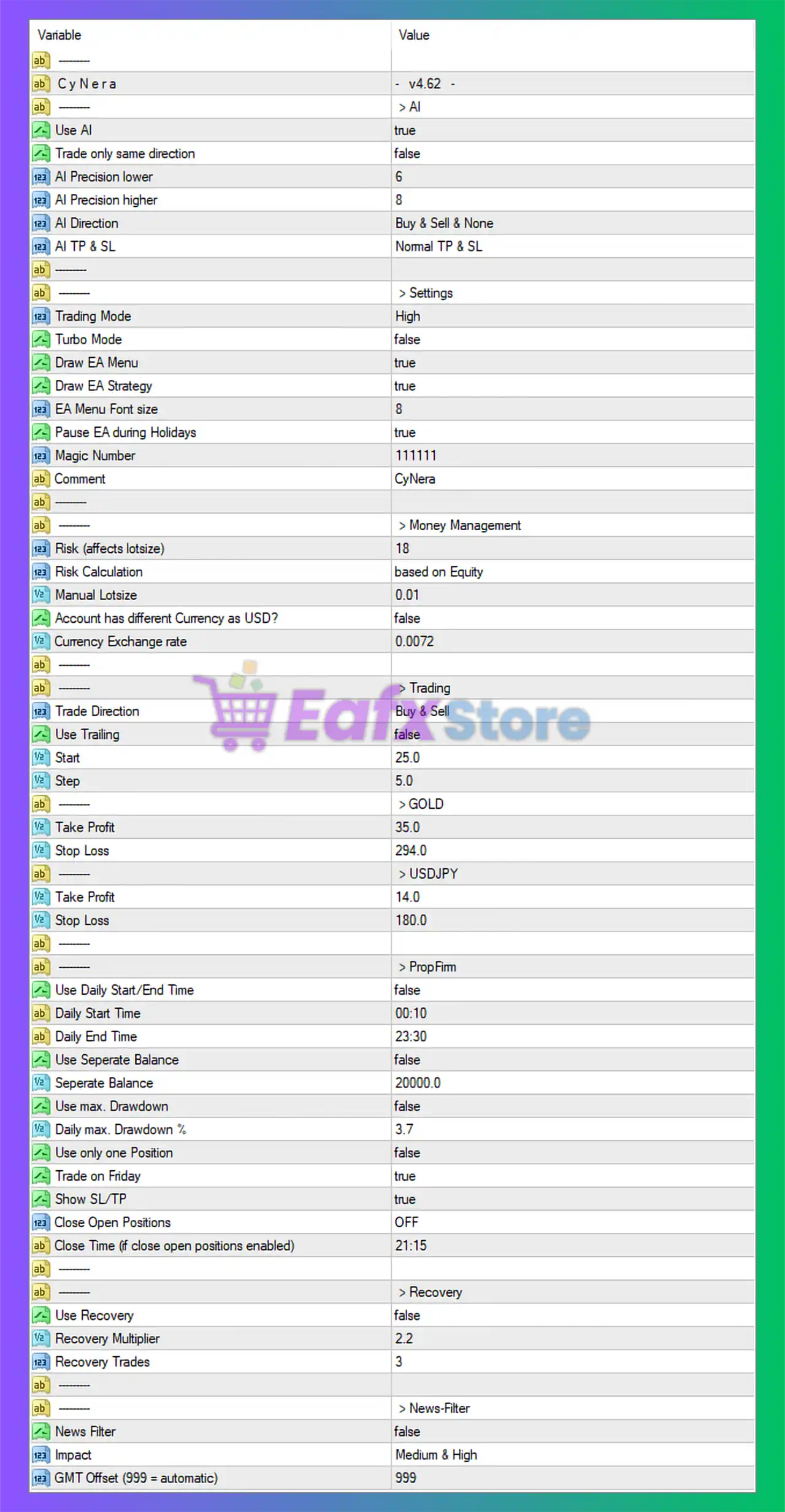
Below are the details of the parameters in the advisor’s trading system settings table:
🔶 General Information
🔹 CyNera Version = v4.62: The installed EA version is v4.62.
🔶 AI Settings
🔹 Use AI = true: Enables the built-in artificial intelligence trading engine.
🔹 Trade only same direction = false: The EA is allowed to open trades in both directions instead of a single trend direction.
🔹 AI Precision lower = 6: Minimum AI precision level is set to 6.
🔹 AI Precision higher = 8: Maximum AI precision level is set to 8.
🔹 AI Direction = Buy & Sell & None: AI can generate Buy, Sell, or no trade signals.
🔹 AI TP & SL = Normal TP & SL: Uses standard Take Profit and Stop Loss calculations.
🔶 Main Settings
🔹 Trading Mode = High: Trading aggressiveness level is configured to High.
🔹 Turbo Mode = false: Turbo trading mode is disabled.
🔹 Draw EA Menu = true: Displays the EA control panel on the chart.
🔹 Draw EA Strategy = true: Displays strategy information directly on the chart.
🔹 EA Menu Font size = 8: Chart panel font size is set to 8.
🔹 Pause EA during Holidays = true: The EA pauses trading during holiday periods.
🔹 Magic Number = 111111: Unique trade identifier number is 111111.
🔹 Comment = CyNera: Trade comment label is set to CyNera.
🔶 Money Management Settings
🔹 Risk (affects lotsize) = 18: Risk level affecting lot size calculation is 18.
🔹 Risk Calculation = based on Equity: Risk management is calculated using account equity.
🔹 Manual Lotsize = 0.01: Manual fixed lot size is 0.01.
🔹 Account has different Currency as USD? = false: Account currency is assumed to be USD.
🔹 Currency Exchange rate = 0.0072: Exchange rate conversion value is 0.0072.
🔶 Trading Settings
🔹 Trade Direction = Buy & Sell: The EA is allowed to open both buy and sell trades.
🔹 Use Trailing = false: Trailing stop functionality is disabled.
🔹 Start = 25.0: Trailing start trigger is 25.0 points.
🔹 Step = 5.0: Trailing stop step distance is 5.0 points.
🔶 GOLD Settings
🔹 Take Profit = 35.0: Gold trade Take Profit target is 35.0 points.
🔹 Stop Loss = 294.0: Gold trade Stop Loss distance is 294.0 points.
🔶 USDJPY Settings
🔹 Take Profit = 14.0: USDJPY Take Profit target is 14.0 points.
🔹 Stop Loss = 180.0: USDJPY Stop Loss distance is 180.0 points.
🔶 Prop Firm Settings
🔹 Use Daily Start/End Time = false: Daily trading session filter is disabled.
🔹 Daily Start Time = 00:10: Configured trading start time is 00:10.
🔹 Daily End Time = 23:30: Configured trading end time is 23:30.
🔹 Use Separate Balance = false: Separate balance calculation mode is disabled.
🔹 Separate Balance = 20000.0: Separate balance value is 20000.0.
🔹 Use max. Drawdown = false: Maximum drawdown protection is disabled.
🔹 Daily max. Drawdown % = 3.7: Daily drawdown protection level is 3.7%.
🔹 Use only one Position = false: Multiple positions are allowed simultaneously.
🔹 Trade on Friday = true: Friday trading is enabled.
🔹 Show SL/TP = true: Stop Loss and Take Profit lines are displayed on the chart.
🔹 Close Open Positions = OFF: Automatic closing of open positions is disabled.
🔹 Close Time (if close open positions enabled) = 21:15: Configured closing time is 21:15.
🔶 Recovery Settings
🔹 Use Recovery = false: Recovery trading system is disabled.
🔹 Recovery Multiplier = 2.2: Recovery lot multiplier value is 2.2.
🔹 Recovery Trades = 3: Maximum recovery trades allowed is 3.
🔶 News Filter Settings
🔹 News Filter = false: News filter system is disabled.
🔹 Impact = Medium & High: The filter monitors Medium and High impact news events.
🔹 GMT Offset (999 = automatic) = 999: GMT offset is automatically detected using value 999.
🔢 Conclusion
CyNera MT4 is a sophisticated AI-based trading robot that combines automated decision-making, dynamic risk management, and customizable recovery systems for forex and gold trading.
With built-in AI precision filtering, multi-asset support, and prop-firm-friendly settings, CyNera MT4 offers traders a flexible and modern automated trading experience for MetaTrader 4.
🔢 FAQs
❓ What is CyNera MT4?
CyNera MT4 is an AI-powered Expert Advisor for MetaTrader 4 designed for automated forex and gold trading.
❓ Does CyNera MT4 support both buy and sell trading?
Yes, the EA supports both buy and sell trade directions simultaneously.
❓ Can CyNera MT4 trade during holidays?
The EA includes a holiday pause feature which is currently enabled.
❓ Does CyNera MT4 include recovery trading features?
Yes, the EA includes configurable recovery trading settings, although recovery is disabled in this configuration.
❓ Is CyNera MT4 suitable for prop firm trading?
Yes, the EA contains prop-firm-oriented settings such as daily drawdown controls and trading session management.