

This guide walks through the inputs of Dominant EA MT5 with the values recommended for live trading. The set files that come with the EA already contain these settings, so you can load them in one click and adjust only what your broker or account needs.
🔢 Dominant EA MT5 – Complete Settings Guide for Automated Forex Trading
Dominant EA MT5 is a professional automated Forex trading Expert Advisor (EA) designed for MetaTrader 5 (MT5). The EA combines fully automatic trading, position averaging systems, MACD and Bollinger Band indicators, break-even protection, unified take profit management and advanced risk control features.
With flexible position management and technical analysis tools, Dominant EA MT5 is suitable for traders looking for advanced automated trading solutions across multiple market conditions.
🔢 Installation Panel Parameters
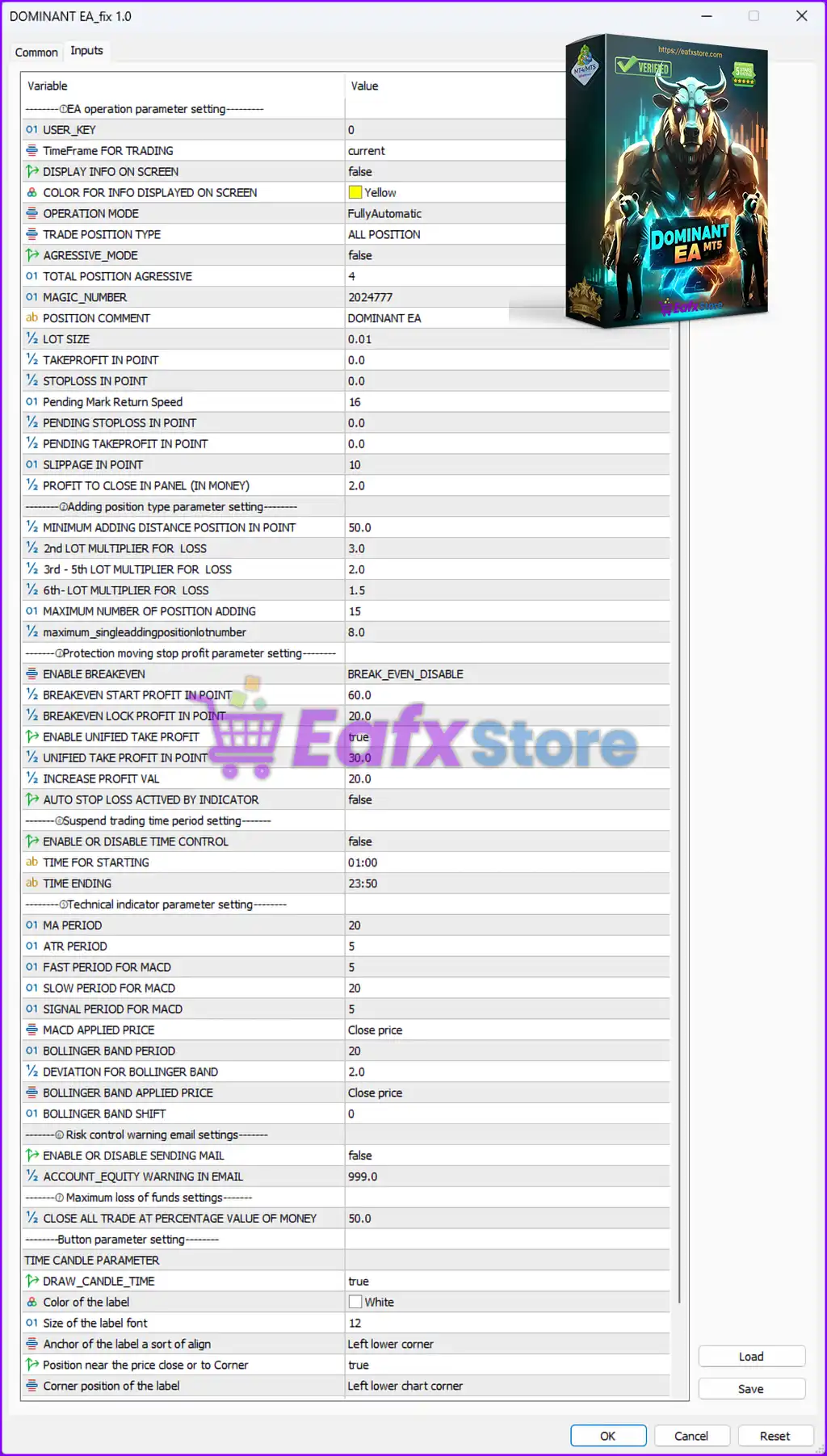
Below are the details of the parameters in the advisor’s trading system settings table:
🔶 EA Operation Parameter Settings
🔹 USER_KEY = 0 — Defines the user authentication or licensing key value as 0.
🔹 TimeFrame FOR TRADING = current — Uses the currently selected chart timeframe for trading operations.
🔹 DISPLAY INFO ON SCREEN = false — Disables displaying trading information directly on the chart.
🔹 COLOR FOR INFO DISPLAYED ON SCREEN = Yellow — Sets the information display color to Yellow.
🔹 OPERATION MODE = FullyAutomatic — Enables fully automatic trading execution.
🔹 TRADE POSITION TYPE = ALL POSITION — Allows all trading position types.
🔹 AGRESSIVE_MODE = false — Disables aggressive trading mode.
🔹 TOTAL POSITION AGRESSIVE = 4 — Sets the aggressive position limit to 4 trades.
🔹 MAGIC_NUMBER = 2024777 — Assigns the unique Magic Number 2024777 for identifying EA trades.
🔹 POSITION COMMENT = DOMINANT EA — Adds the comment “DOMINANT EA” to all trades.
🔹 LOT SIZE = 0.01 — Sets the default trading lot size to 0.01 lots.
🔹 TAKEPROFIT IN POINT = 0.0 — Disables fixed Take Profit target.
🔹 STOPLOSS IN POINT = 0.0 — Disables fixed Stop Loss protection.
🔹 Pending Mark Return Speed = 16 — Defines the pending market return speed parameter as 16.
🔹 PENDING STOPLOSS IN POINT = 0.0 — Disables Stop Loss for pending orders.
🔹 PENDING TAKEPROFIT IN POINT = 0.0 — Disables Take Profit for pending orders.
🔹 SLIPPAGE IN POINT = 10 — Sets the maximum allowed slippage to 10 points.
🔹 PROFIT TO CLOSE IN PANEL (IN MONEY) = 2.0 — Closes positions automatically after reaching 2.0 account currency profit.
🔶 Adding Position Type Parameter Settings
🔹 MINIMUM ADDING DISTANCE POSITION IN POINT = 50.0 — Defines the minimum distance of 50.0 points before opening additional positions.
🔹 2nd LOT MULTIPLIER FOR LOSS = 3.0 — Multiplies the second recovery position lot size by 3.0 after losses.
🔹 3rd - 5th LOT MULTIPLIER FOR LOSS = 2.0 — Multiplies lot sizes by 2.0 for the third to fifth recovery trades.
🔹 6th- LOT MULTIPLIER FOR LOSS = 1.5 — Multiplies lot sizes by 1.5 starting from the sixth recovery trade.
🔹 MAXIMUM NUMBER OF POSITION ADDING = 15 — Limits additional recovery positions to 15 trades.
🔹 maximum_singleaddingpositionlotnumber = 8.0 — Limits the maximum lot size for a single added position to 8.0 lots.
🔶 Protection Moving Stop Profit Parameter Settings
🔹 ENABLE BREAKEVEN = BREAK_EVEN_DISABLE — Disables automatic break-even functionality.
🔹 BREAKEVEN START PROFIT IN POINT = 60.0 — Activates break-even protection after 60.0 points profit if enabled.
🔹 BREAKEVEN LOCK PROFIT IN POINT = 20.0 — Locks 20.0 points profit after break-even activation.
🔹 ENABLE UNIFIED TAKE PROFIT = true — Enables unified Take Profit management across positions.
🔹 UNIFIED TAKE PROFIT IN POINT = 30.0 — Sets unified Take Profit target to 30.0 points.
🔹 INCREASE PROFIT VAL = 20.0 — Increases profit target value by 20.0 points.
🔹 AUTO STOP LOSS ACTIVED BY INDICATOR = false — Disables automatic Stop Loss activation using indicators.
🔶 Suspend Trading Time Period Settings
🔹 ENABLE OR DISABLE TIME CONTROL = false — Disables trading time restrictions.
🔹 TIME FOR STARTING = 01:00 — Defines trading start time as 01:00.
🔹 TIME ENDING = 23:50 — Defines trading end time as 23:50.
🔶 Technical Indicator Parameter Settings
🔹 MA PERIOD = 20 — Sets Moving Average period to 20.
🔹 ATR PERIOD = 5 — Sets Average True Range period to 5.
🔹 FAST PERIOD FOR MACD = 5 — Sets MACD fast EMA period to 5.
🔹 SLOW PERIOD FOR MACD = 20 — Sets MACD slow EMA period to 20.
🔹 SIGNAL PERIOD FOR MACD = 5 — Sets MACD signal line period to 5.
🔹 MACD APPLIED PRICE = Close price — Uses candle close price for MACD calculations.
🔹 BOLLINGER BAND PERIOD = 20 — Sets Bollinger Bands period to 20.
🔹 DEVIATION FOR BOLLINGER BAND = 2.0 — Uses a deviation value of 2.0 for Bollinger Bands.
🔹 BOLLINGER BAND APPLIED PRICE = Close price — Uses candle close price for Bollinger Bands calculations.
🔹 BOLLINGER BAND SHIFT = 0 — Applies no shift to Bollinger Bands.
🔶 Risk Control Warning Email Settings
🔹 ENABLE OR DISABLE SENDING MAIL = false — Disables email notification alerts.
🔹 ACCOUNT_EQUITY WARNING IN EMAIL = 999.0 — Sets account equity warning threshold to 999.0.
🔶 Maximum Loss of Funds Settings
🔹 CLOSE ALL TRADE AT PERCENTAGE VALUE OF MONEY = 50.0 — Closes all trades when losses reach 50.0% of account value.
🔶 Button Parameter Settings
Time Candle Parameter:
🔹 DRAW_CANDLE_TIME = true — Displays candle countdown timer on the chart.
🔹 Color of the label = White — Sets candle timer label color to White.
🔹 Size of the label font = 12 — Defines the candle timer font size as 12.
🔹 Anchor of the label a sort of align = Left lower corner — Aligns the candle timer label to the lower-left area.
🔹 Position near the price close or to Corner = true — Displays the label near the price close or chart corner.
🔹 Corner position of the label = Left lower chart corner — Places the label in the left lower chart corner.
🔢 Conclusion
Dominant EA MT5 is a feature-rich automated Forex trading robot for MetaTrader 5 that combines automatic execution, recovery trading systems, MACD and Bollinger Band indicators, and advanced profit management tools.
With configurable lot multipliers, unified Take Profit settings, technical indicators, and risk control systems, the EA provides traders with a powerful and flexible automated trading solution. Proper optimization of recovery parameters and technical settings is essential for stable long-term performance.
🔢 FAQs
❓ What is Dominant EA MT5?
Dominant EA MT5 is an automated Forex Expert Advisor for MT5 featuring fully automatic trading, recovery systems, and technical indicator analysis.
❓ Does Dominant EA MT5 support automatic recovery trading?
Yes, the EA includes multiple lot multiplier settings for recovery and position averaging strategies.
❓ Which indicators are used in Dominant EA MT5?
The EA uses Moving Average (MA), ATR, MACD, and Bollinger Bands for technical analysis.
❓ Can Dominant EA MT5 automatically close all trades during heavy losses?
Yes, the EA can close all trades when losses reach 50.0% of account value.
❓ Does Dominant EA MT5 include break-even functionality?
Yes, the EA supports break-even management, although it is currently disabled in the displayed settings.
Get Dominant EA MT5
Download Dominant EA MT5 with its set files, read the full product details and requirements here: Dominant EA MT5 →