

The configuration of EA Pips Hunter MT5 reflects a strategy built around pending order positioning, volatility channel filters (Keltner + Bollinger + Standard Deviation), swing confirmation, and MACD/RSI trend filtration. This makes it a precision-entry EA designed to capture pips within controlled market conditions rather than aggressive grid or martingale expansion.
📌📌📌 Buy this unlimited EA Pips Hunter MT5 product here 📌📌📌
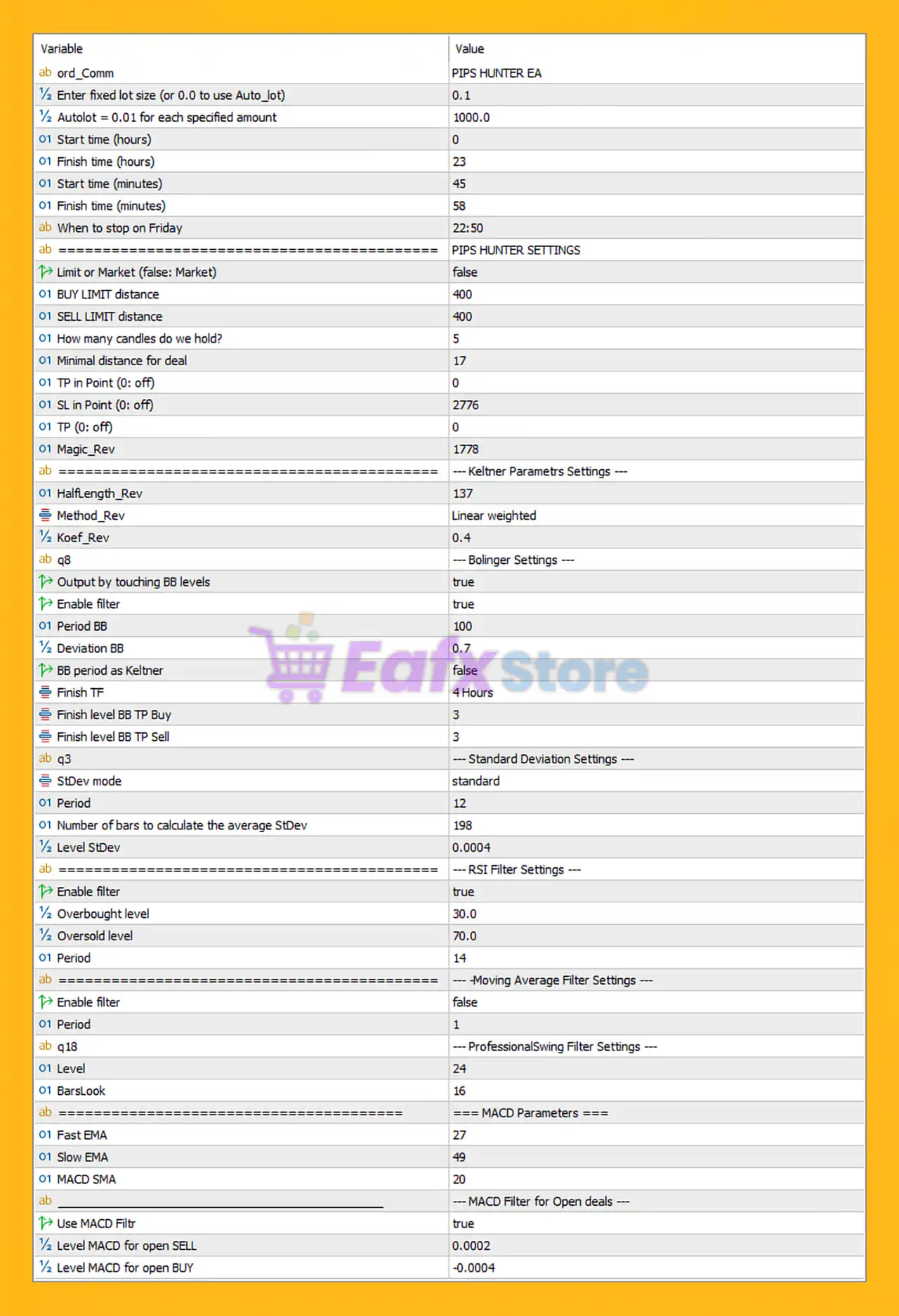
🧩General Trading Parameters
| Setting | Value | Insight |
|---|---|---|
| Initial Lot | 0.1 | Fixed lot trading; medium exposure if no AutoLot is used. |
| AutoLot | 0.01 per 1000 USD | Scales risk automatically, suitable for various account sizes. |
| Trading Time | 00:00 → 23:58 | Operates almost 24h, capturing multi-session volatility. |
| Friday Stop Time | 22:50 | Avoids weekend gaps and swap rollover risk. |
Comment: Flexible for continuous trading, with built-in safety for Friday close.
🧩Order Execution Settings – Pips Hunter Core Logic
| Key Parameters | Value |
|---|---|
| Limit Orders Mode | Market Execution (false) |
| Buy/Sell Limit Distance | 400 points |
| TP in Points | 0 (disabled) |
| SL in Points | 2776 |
| Candle Hold Before Entry | 5 |
| Minimal Deal Distance | 17 points |
This shows the EA focuses on market execution instead of limit-pullback entries, waiting 5 candles for structure confirmation. A large stop loss (2776 pts) and no fixed TP imply exits rely heavily on indicator signals rather than static targets – suitable for trend riding or mean-reversion swings.
Magic Number: 1778 (isolated for multi-EA environments)
🧩Volatility & Channel Filters
🔷 Keltner Channel
- Period Length: 137
- Weighted Method
- Coef: 0.4
This large smoothing period filters out noise and prioritizes stable trend direction recognition.
🔷 Bollinger Band System
| Parameter | Value |
|---|---|
| Enable BB | true |
| Period | 100 |
| Deviation | 0.7 |
| TP Level Buy/Sell | 3 |
Low BB deviation = early breakout signals. Combined with Keltner, it forms a squeeze detection mechanism for volatility expansion trades.
🔷 Standard Deviation Filter
- Period: 12
- Bars for Avg: 198
- StDev Level: 0.0004
Used to confirm volatility strength before trade execution. Prevents trades in flat markets.
🧩Trend Confirmation Filters
🔶 RSI Filter
| Setting | Value |
|---|---|
| Enabled | true |
| Overbought | 30 |
| Oversold | 70 |
| Period | 14 |
Reverse logic:
Buy near oversold (70) and sell near overbought (30). Indicates a mean-reversion entry logic, contrary to standard application.
🔶 Moving Average Filter
- Disabled
MA is optional, allowing traders to enable it for trend filtering.
🔶 Professional Swing Filter
- Level: 24
- BarsLook: 16
Used to validate higher timeframe swing structure, reducing false signals during choppy conditions.
🧩MACD Entry Filter
| Fast EMA | 27 |
| Slow EMA | 49 |
| Signal SMA | 20 |
| MACD Used for Entry | true |
| Level SELL | 0.0002 |
| Level BUY | -0.0004 |
These settings indicate trend-momentum filtering, only allowing trades when MACD confirms directional momentum. Tight levels mean sensitive trigger detection suitable for scalping swings.
🧩Final Conclusion
The EA Pips Hunter MT5 configuration reveals a sophisticated trading system built around volatility breakout detection, mean-reversion entries, and multi-indicator confirmation using Bollinger Bands, Keltner Channel, RSI, Standard Deviation, and MACD filters. With AutoLot available, time-based execution protection, and Friday safe shutdown, the EA is designed for controlled, signal-based entries with a focus on quality over frequency. No fixed TP and a wide SL suggest dynamic exit logic, allowing trades to breathe during volatility.
Overall, EA Pips Hunter is a high-precision algorithm suitable for swing traders and scalpers who prefer filtered entries, strong risk logic, and indicator-based confirmation rather than grid or martingale strategies. Ideal for traders seeking steady, technical, and indicator-driven automation.