




EA Pips Hunter MT5 Settings Explained – Complete Configuration Guide
EA Pips Hunter MT5 is an advanced automated Forex trading robot for MetaTrader 5 that combines Bollinger Bands, Keltner Channels, RSI filters, MACD confirmation and Standard Deviation analysis to identify high-probability trading opportunities.
The EA is designed for traders who want precision entry systems with flexible lot management, time filtering and technical indicator-based trade validation.
With multiple customizable filters and trade execution controls, EA Pips Hunter MT5 offers a comprehensive framework for automated scalping and trend-following strategies.

EA Pips Hunter MT5 Full Settings Explanation
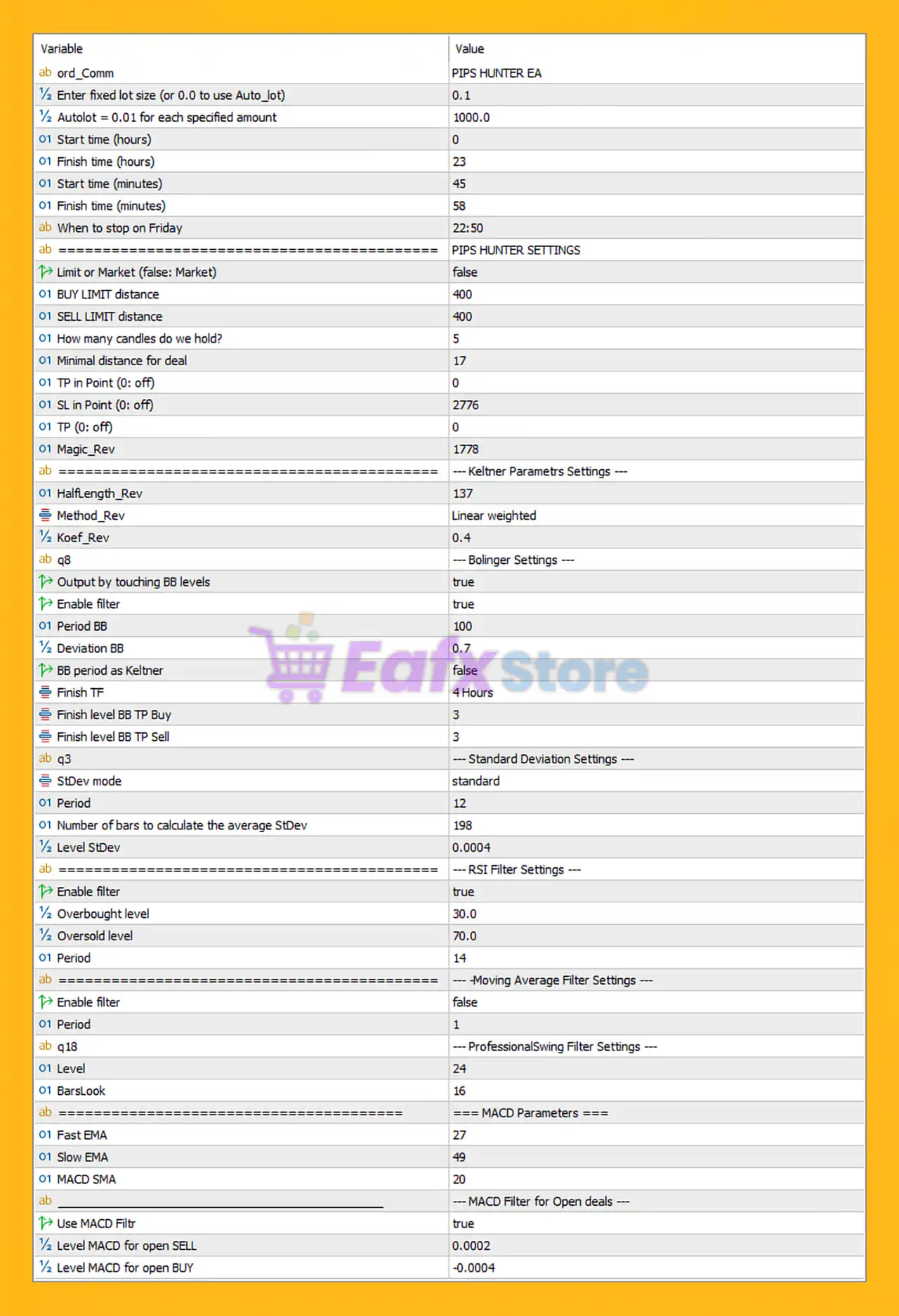
Below are the details of the parameters in the advisor’s trading system settings table:
General Trading Settings
🔹 ord_Comm = PIPS HUNTER EA: Trade comment attached to orders opened by the EA.
🔹 Enter fixed lot size (or 0.0 to use Auto_lot) = 0.1: Sets a fixed trading lot size of 0.1 lots.
🔹 Auto_Lot (0: Fix_Lot) = 1.0: Enables automatic lot sizing when value is not 0.
🔹 Autolot = 0.01 for each specified amount = 1000.0: Uses 0.01 lots for every $1000.0 account balance.
🔹 Start time (hours) = 0: Trading session starts at hour 0.
🔹 Finish time (hours) = 23: Trading session ends at hour 23.
🔹 Start time (minutes) = 45: Trading starts at minute 45.
🔹 Finish time (minutes) = 58: Trading ends at minute 58.
🔹 When to stop on Friday = 22:50: EA stops trading on Friday at 22:50.
Pips Hunter Settings
🔹 Limit or Market (false: Market) = false: Uses Market Orders instead of Limit Orders.
🔹 BUY LIMIT distance = 400: Distance for Buy Limit pending orders is 400 points.
🔹 SELL LIMIT distance = 400: Distance for Sell Limit pending orders is 400 points.
🔹 How many candles do we hold? = 5: Holds trade logic for 5 candles.
🔹 Minimal distance for deal = 17: Minimum distance between trades is 17 points.
🔹 TP in Point (0: off) = 0: Point-based Take Profit is disabled.
🔹 SL in Point (0: off) = 2776: Stop Loss distance is 2776 points.
🔹 TP (0: off) = 0: General Take Profit setting is disabled.
🔹 Magic_Rev = 1778: Unique magic number used for reverse/order identification.
Keltner Parameters Settings
🔹 HalfLength_Rev = 137: Half-length parameter for Keltner calculations is 137.
🔹 Method_Rev = Linear weighted: Uses the Linear Weighted moving average method.
🔹 Koef_Rev = 0.4: Coefficient multiplier for Keltner calculations is 0.4.
Bollinger Settings
🔹 Output by touching BB levels = true: Trade signals activate when price touches Bollinger Band levels.
🔹 Enable filter = true: Enables Bollinger Band filtering.
🔹 Period BB = 100: Bollinger Bands period is 100.
🔹 Deviation BB = 0.7: Bollinger Bands deviation level is 0.7.
🔹 BB period as Keltner = false: Bollinger Band period does not follow Keltner settings.
🔹 Finish TF = 4 Hours: Confirmation timeframe is H4.
🔹 Finish level BB TP Buy = 3: Buy Take Profit confirmation level is 3.
🔹 Finish level BB TP Sell = 3: Sell Take Profit confirmation level is 3.
Standard Deviation Settings
🔹 StDev mode = standard: Uses standard deviation calculation mode.
🔹 Period = 12: Standard deviation period is 12.
🔹 Number of bars to calculate the average StDev = 198: Uses 198 bars for average deviation calculation.
🔹 Level StDev = 0.0004: Standard deviation threshold level is 0.0004.
RSI Filter Settings
🔹 Enable filter = true: Enables RSI filtering.
🔹 Overbought level = 30.0: RSI overbought threshold is 30.0.
🔹 Oversold level = 70.0: RSI oversold threshold is 70.0.
🔹 Period = 14: RSI calculation period is 14.
Moving Average Filter Settings
🔹 Enable filter = false: Moving Average filter is disabled.
🔹 Period = 1: Moving Average period is 1.
ProfessionalSwing Filter Settings
🔹 Level = 24: Swing filter level is 24.
🔹 BarsLook = 16: Number of bars used for swing analysis is 16.
MACD Parameters
🔹 Fast EMA = 27: Fast EMA period for MACD is 27.
🔹 Slow EMA = 49: Slow EMA period for MACD is 49.
🔹 MACD SMA = 20: Signal SMA period for MACD is 20.
MACD Filter for Open Deals
🔹 Use MACD Filtr = true: Enables MACD confirmation filter for opening trades.
🔹 Level MACD for open SELL = 0.0002: Minimum MACD level required for Sell entries is 0.0002.
🔹 Level MACD for open BUY = -0.0004: Minimum MACD level required for Buy entries is -0.0004.
Conclusion
EA Pips Hunter MT5 is a sophisticated MetaTrader 5 Expert Advisor that combines Bollinger Bands, Keltner Channels, RSI, MACD and Standard Deviation analysis into a highly customizable automated trading system.
The EA provides traders with advanced market filtering, intelligent entry conditions, and dynamic risk management tools suitable for scalping and precision Forex trading.
With extensive technical filter customization and automated execution logic, EA Pips Hunter MT5 offers a powerful solution for traders seeking systematic and indicator-driven trading strategies.
FAQs
❓ What is EA Pips Hunter MT5?
EA Pips Hunter MT5 is an automated Forex trading robot for MetaTrader 5 that uses multiple technical indicators for trade confirmation.
❓ Does EA Pips Hunter MT5 use Bollinger Bands?
Yes, the EA includes Bollinger Band filtering with customizable periods and deviation settings.
❓ Can EA Pips Hunter MT5 automatically calculate lot sizes?
Yes, the EA supports automatic lot sizing based on account balance.
❓ Does EA Pips Hunter MT5 include MACD confirmation?
Yes, MACD filtering is enabled with custom Buy and Sell threshold levels.
❓ What timeframe does EA Pips Hunter MT5 use for confirmation?
The EA uses the 4 Hours (H4) timeframe for final trade confirmation.



