

This guide explains every setting in the EA's Inputs tab in simple words. Pips are counted the way your broker quotes them (a 5-digit broker is handled automatically).

Quick Start
Attach the EA to a chart (for example EURUSD), then press F7 to open the Inputs tab.
Click Load and choose a .set file that matches your balance and risk level.
Make sure AutoTrading is on, then press OK.
Test on a demo account first. Change only one setting at a time.
The control panel on the chart shows balance, equity, open trades and has buttons for switching strategies and closing trades.
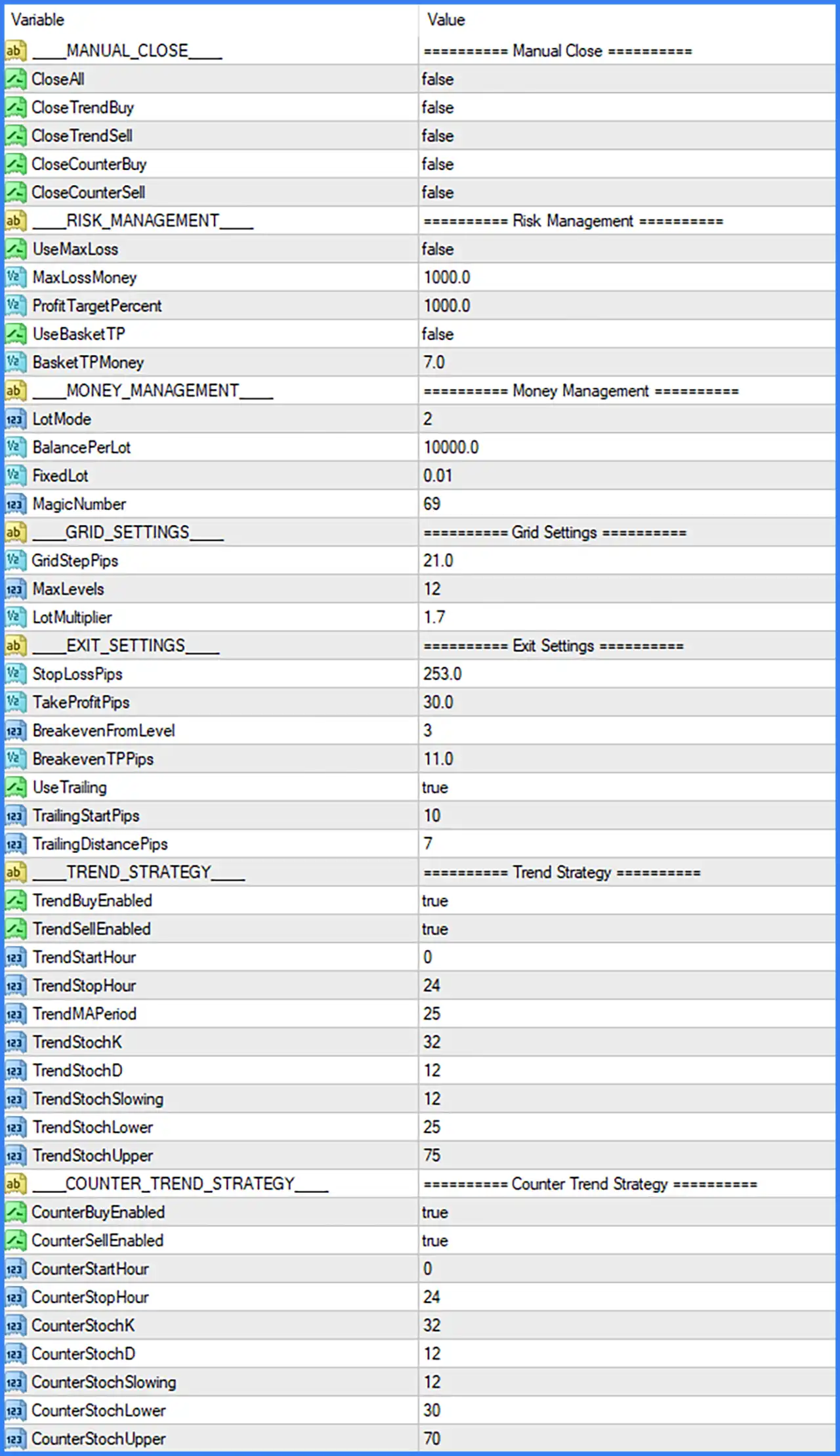
Manual Close
Emergency switches. Set to true to close trades; set back to false to resume normal trading.
Input | Default | What it does |
CloseAll | false | Closes every trade of this EA and stops opening new ones while it is true. |
CloseTrendBuy | false | Closes the Trend Buy basket and blocks new Trend Buy entries while true. |
CloseTrendSell | false | Closes the Trend Sell basket and blocks new Trend Sell entries while true. |
CloseCounterBuy | false | Closes the Counter Trend Buy basket and blocks new entries while true. |
CloseCounterSell | false | Closes the Counter Trend Sell basket and blocks new entries while true. |
Risk Management
Protective limits for the whole account. All of them close every EA trade when reached.
Input | Default | What it does |
UseMaxLoss | false | Turn on the equity stop. Recommended: true. |
MaxLossMoney | 1000 | Maximum loss in account currency. When equity falls this far below the balance recorded at EA start, all trades are closed. |
ProfitTargetPercent | 1000 | Closes all trades when equity gains this % of the starting balance. 1000 means practically off. Example: 10 = close at +10%. |
UseBasketTP | false | Turn on the basket take profit. |
BasketTPMoney | 7.0 | Closes all trades when total floating profit reaches this amount in account currency. |
Money Management
How big each starting trade is.
Input | Default | What it does |
LotMode | 2 | 1 = Compound (lot grows with the balance). 2 = Fixed lot. |
BalancePerLot | 10000 | Compound mode only: lot = Balance / BalancePerLot. Example: balance 5,000 gives 0.5 lot. |
FixedLot | 0.01 | Fixed mode: lot size of the first trade in each basket. |
MagicNumber | 69 | Base ID used to mark this EA's trades. The EA uses four numbers (+9, +99, +999, +9999). Change it if you run several copies on the same account. |
Grid Settings
Controls how the EA adds trades when price moves against the first trade.
Input | Default | What it does |
GridStepPips | 21 | Distance in pips between grid trades. Larger = safer and slower. |
MaxLevels | 12 | Maximum number of trades in one basket. Lower = less risk. |
LotMultiplier | 1.7 | Each new trade uses the previous lot times this value. Lower = less risk. |
Exit Settings
How trades are closed.
Input | Default | What it does |
StopLossPips | 253 | Stop loss of each trade in pips. 0 = no stop loss. |
TakeProfitPips | 30 | Take profit in pips for the first trades of a basket. |
BreakevenFromLevel | 3 | From this level on, take profit is moved to the basket average price instead. |
BreakevenTPPips | 11 | Take profit distance (pips) from the basket average price. |
UseTrailing | true | Turn the trailing stop on or off. |
TrailingStartPips | 10 | Profit in pips needed before trailing starts. |
TrailingDistancePips | 7 | Distance in pips between price and the trailing stop. |
Trend Strategy
Opens trades in the direction of the Moving Average, filtered by Stochastic.
Input | Default | What it does |
TrendBuyEnabled | true | Allow new Trend Buy baskets. |
TrendSellEnabled | true | Allow new Trend Sell baskets. |
TrendStartHour | 0 | Hour (server time) when new trades may start. |
TrendStopHour | 24 | Hour (server time) when new trades stop. 0 to 24 = all day. |
TrendMAPeriod | 25 | Period of the Moving Average (LWMA). |
TrendStochK / D / Slowing | 32 / 12 / 12 | Stochastic %K, %D and slowing periods. |
TrendStochLower / Upper | 25 / 75 | Stochastic levels used as entry filters. |
Counter Trend Strategy
Opens trades against the move using Stochastic levels only.
Input | Default | What it does |
CounterBuyEnabled | true | Allow new Counter Trend Buy baskets. |
CounterSellEnabled | true | Allow new Counter Trend Sell baskets. |
CounterStartHour | 0 | Hour (server time) when new trades may start. |
CounterStopHour | 24 | Hour (server time) when new trades stop. |
CounterStochK / D / Slowing | 32 / 12 / 12 | Stochastic %K, %D and slowing periods. |
CounterStochLower / Upper | 30 / 70 | Buy below the lower level, sell above the upper level. |
Good to Know
• Equity stop and profit target use the balance recorded when the EA starts. After one triggers, the EA stays idle until you reload it on the chart.
• The panel buttons (ON/OFF) only change the EA while it runs; they go back to the Inputs values when the EA is reloaded.
• Lower MaxLevels and LotMultiplier, wider GridStepPips, and a smaller FixedLot all reduce risk.
• Always keep UseMaxLoss on and set MaxLossMoney to an amount you can afford to lose.
Risk warning: trading Forex involves a high level of risk. Grid and martingale systems can lose a large part of an account. Past results do not guarantee future performance.