

This guide walks through the inputs of EA Dragon Fire X.10 Source Code MQ4 with the values recommended for live trading. The set files that come with the EA already contain these settings, so you can load them in one click and adjust only what your broker or account needs.
🔢 EA Dragon Fire X.10 Settings: Complete Inputs Guide
EA Dragon Fire X.10 is an automated trading Expert Advisor for MetaTrader 4 that uses configurable lot sizing, position spacing, trade multipliers, and basket-management controls. Its inputs allow traders to adjust trading volume, define the distance between price levels, configure trade limits, and manage equity protection.
Understanding these settings is essential because progressive lot sizing and averaging can increase market exposure during extended price movements.
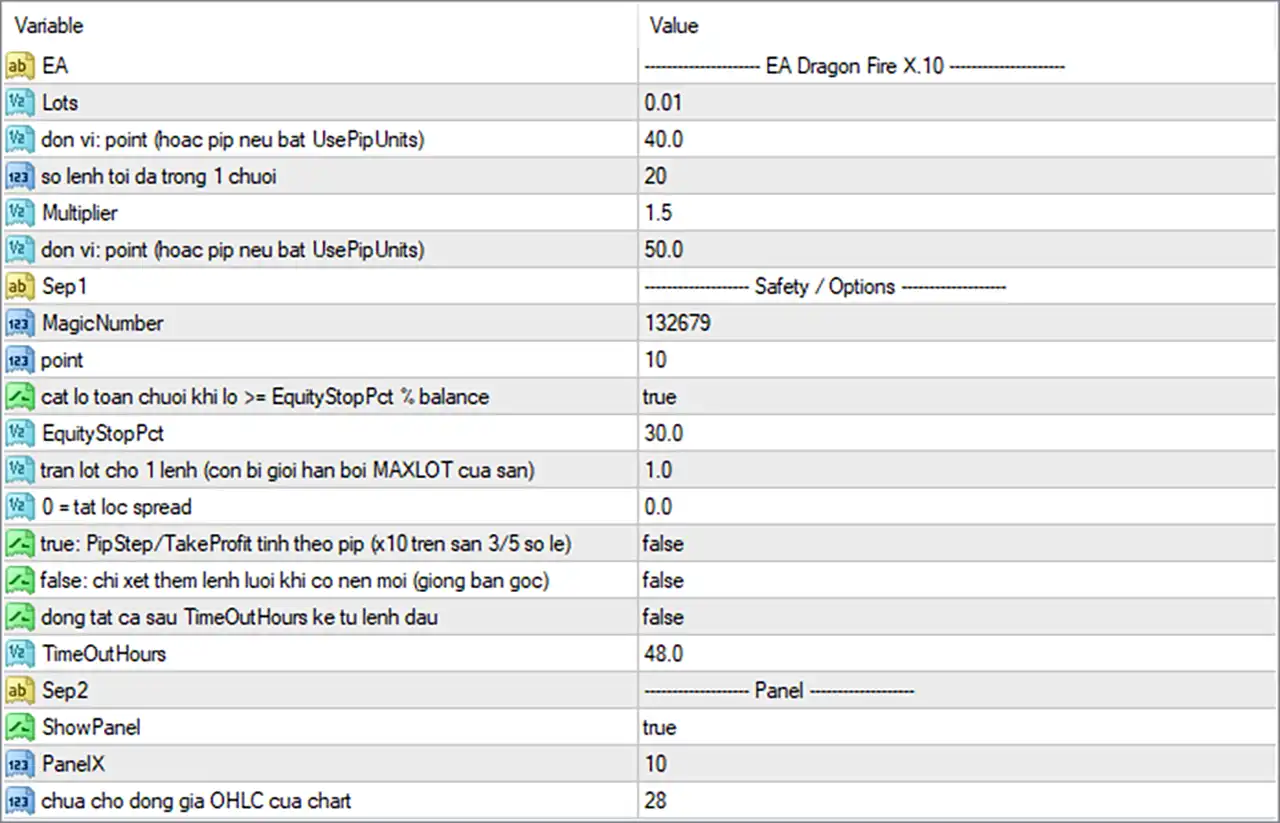
⚙️ Basic Trading Settings
🔹 Lots = 0.01: Sets the initial trading volume to 0.01 lots, providing the starting position size for the EA's trading sequence.
🔹 don vi: point (hoac pip neu bat UsePipUnits) = 40.0: Sets the first distance-related parameter to 40.0 points, or pips if the EA's UsePipUnits option is enabled. This parameter's exact function should be confirmed from the EA's internal logic.
🔹 so lenh toi da trong 1 chuoi = 20: Sets the maximum number of trades in one sequence to 20, limiting how many positions can be opened within the applicable trading sequence.
🔹 Multiplier = 1.5: Sets the lot multiplier to 1.5. If the EA applies this multiplier to each subsequent position, the lot size increases by a factor of 1.5 at each level.
🔹 don vi: point (hoac pip neu bat UsePipUnits) = 50.0: Sets the second distance-related parameter to 50.0 points, or pips if UsePipUnits is enabled. Because the screenshot does not show separate descriptive labels for the two distance fields, their individual roles cannot be identified with certainty from the image alone.
⚙️ Safety and Options Settings
🔹 MagicNumber = 132679: Assigns the trade identifier 132679, helping the EA distinguish its own orders from trades managed by other Expert Advisors.
🔹 point = 10: Sets the point-related parameter to 10. The exact purpose depends on the EA's implementation and may relate to distance calculations or point-to-pip handling.
🔹 cat lo toan chuoi khi lo >= EquityStopPct % balance = true: Enables the option to close the entire trading sequence when its loss reaches the configured equity-stop threshold relative to the account balance.
🔹 EquityStopPct = 30.0: Sets the equity-stop threshold to 30.0% of the balance. With the sequence-closing option enabled, this value is intended to trigger the corresponding loss-control action when the EA's calculated condition is met.
🔹 tran lot cho 1 lenh (con bi gioi han boi MAXLOT cua san) = 1.0: Sets the maximum lot size for an individual order to 1.0 lot, subject to any lower maximum-lot restriction imposed by the broker or the EA.
🔹 0 = tat loc spread = 0.0: Sets the spread-filter parameter to 0.0, which the label indicates disables the spread filter.
🔹 true: PipStep/TakeProfit tinh theo pip (x10 tren san 3/5 so le) = false: Disables the option to calculate PipStep and Take Profit in pip units with a ×10 conversion for 3/5-digit brokers. With this option set to false, the EA uses its alternative point-unit calculation.
🔹 false: chi xet them lenh luoi khi co nen moi (giong ban goc) = false: Keeps the option for adding grid trades only when a new candle appears disabled. The EA's exact order-entry timing therefore depends on its other internal rules.
🔹 dong tat ca sau TimeOutHours ke tu lenh dau = false: Disables the option to close all trades after the configured number of hours has elapsed since the first order.
🔹 TimeOutHours = 48.0: Sets the timeout duration to 48.0 hours. This duration becomes relevant if the timeout-based close-all option is enabled.
⚙️ Panel Settings
🔹 ShowPanel = true: Enables the EA's on-chart information panel, allowing supported trading information to be displayed directly on the chart.
🔹 PanelX = 10: Sets the panel's horizontal positioning parameter to 10, controlling its placement along the chart's X-axis.
🔹 chua cho dong gia OHLC cua chart = 28: Sets the parameter associated with the chart's OHLC price display to 28. The exact display behavior and positioning should be verified in the running EA because the label does not fully specify its function.
🔢 Conclusion
EA Dragon Fire X.10 provides adjustable trade volume, distance parameters, a maximum of 20 trades per sequence, a 1.5 lot multiplier, and configurable safety controls. The displayed settings also enable the 30.0% equity-stop threshold and the option to close a sequence when its loss reaches that threshold, while the spread filter and timeout-based close-all feature are disabled.
The most important settings to review are Multiplier = 1.5, the maximum of 20 trades per sequence, and EquityStopPct = 30.0. A multiplier can cause exposure to grow rapidly, and an equity-stop setting is not a guarantee that losses will be capped at precisely 30.0% under all market conditions. Backtesting, demo testing, and monitoring margin usage are recommended before live deployment.
Get EA Dragon Fire X.10 Source Code MQ4
Download EA Dragon Fire X.10 Source Code MQ4 with its set files, read the full product details and requirements here: EA Dragon Fire X.10 Source Code MQ4 →