

This guide walks through the inputs of FX CORE GOLD EA Source Code MQ4 with the values recommended for live trading. The set files that come with the EA already contain these settings, so you can load them in one click and adjust only what your broker or account needs.
🔢 FX CORE GOLD EA Settings Guide
FX CORE GOLD EA is a configurable automated trading system designed around gold-focused trading logic, grid management, money management, technical filters, trailing protection, equity controls, and scheduled trading. The supplied settings reveal a flexible architecture with BUY and SELL engines, percentage-based lot sizing, grid expansion, Moving Average and HILO filters, Break Even, Take Equity Stop, spread protection, news filtering, and visual monitoring tools.
This guide explains all visible parameters and their exact values from the supplied screenshots, preserving the numerical details, true/false states, time values, and configuration strings.
🔄 Trailing Stop Settings
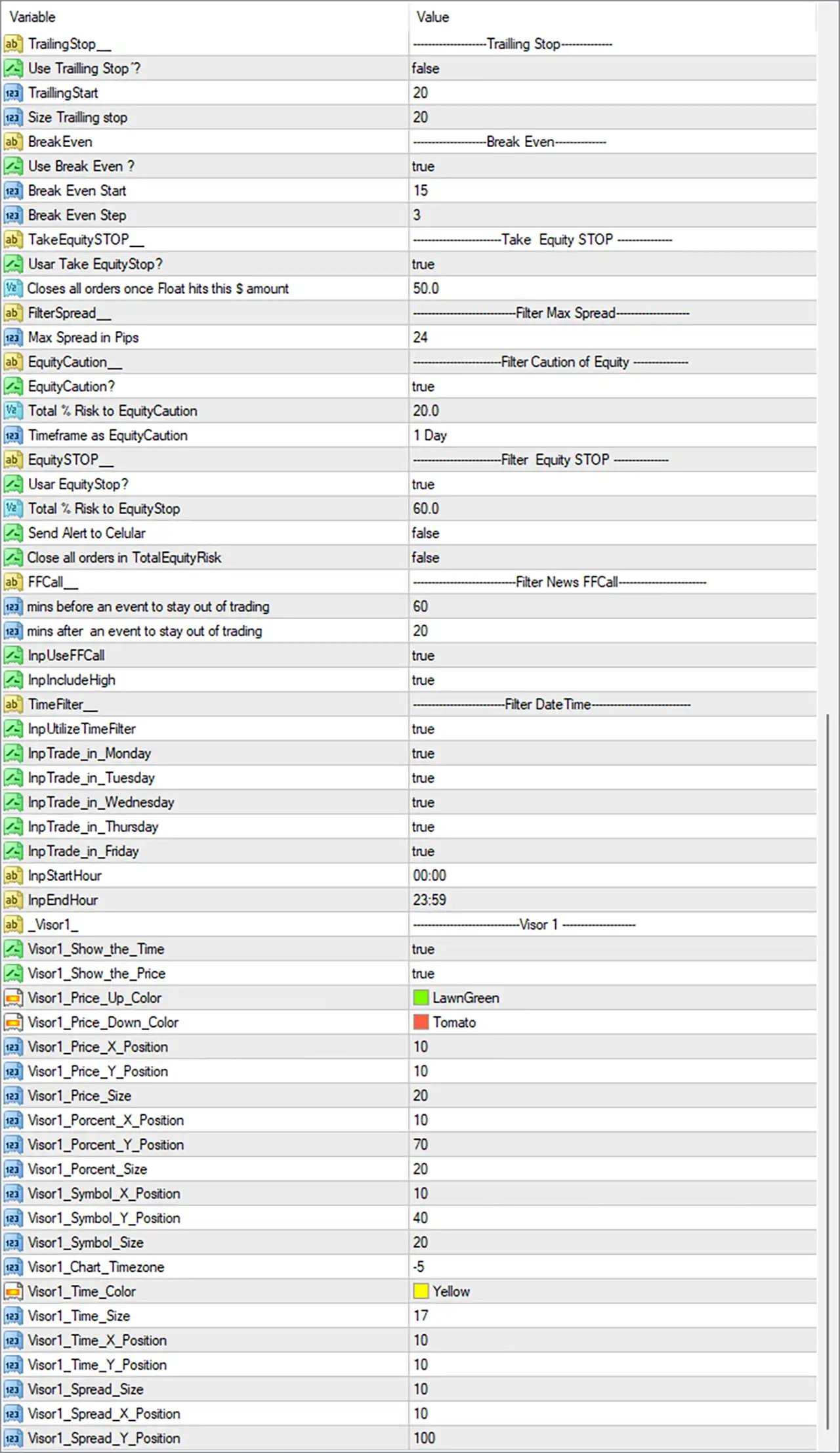
🔹 Trailing Stop: ----- Trailing Stop ----- — Section header for the EA's trailing-stop configuration.
🔹 Use Trailing Stop ?: false — Disables the trailing-stop function in the current configuration.
🔹 TrailingStart: 20 — Defines 20 points as the profit level at which trailing protection would begin if enabled.
🔹 Size Trailing stop: 20 — Sets the trailing-stop distance/size to 20 points.
🔄 Break Even Settings
🔹 BreakEven: ----- Break Even ----- — Section header for Break Even management.
🔹 Use Break Even ?: true — Enables Break Even functionality.
🔹 Break Even Start: 15 — Sets the Break Even activation level at 15 points.
🔹 Break Even Step: 3 — Defines a 3-point step for Break Even adjustment.
🔄 Take Equity Stop
🔹 TakeEquitySTOP: ----- Take Equity STOP ----- — Section header for account-equity-based profit protection.
🔹 Usar Take EquityStop?: true — Enables the Take Equity Stop function.
🔹 Closes all orders once Float hits this $ amount: 50.0 — Closes all orders when floating profit reaches the configured $50.0 amount.
🔄 Maximum Spread Filter
🔹 FilterSpread__: ----- Filter Max Spread ----- — Section header for spread filtering.
🔹 Max Spread in Pips: 24 — Sets the maximum permitted spread threshold to 24 pips.
🔄 Equity Caution
🔹 EquityCaution__: ----- Filter Caution of Equity ----- — Section header for equity-caution protection.
🔹 EquityCaution?: true — Enables the equity-caution mechanism.
🔹 Total % Risk to EquityCaution: 20.0 — Sets the equity-caution risk threshold to 20.0%.
🔹 Timeframe as EquityCaution: 1 Day — Uses the 1 Day timeframe for evaluating the equity-caution condition.
🔄 Equity Stop
🔹 EquitySTOP__: ----- Filter Equity STOP ----- — Section header for the equity-stop system.
🔹 Usar EquityStop?: true — Enables the Equity Stop function.
🔹 Total % Risk to EquityStop: 60.0 — Sets the total equity-stop risk threshold to 60.0%.
🔹 Send Alert to Cellular: false — Disables cellular/mobile alerts for the equity-stop event.
🔹 Close all orders in TotalEquityRisk: false — Prevents the EA from automatically closing all orders when the total equity-risk threshold is reached.
🔄 FFCall News Filter
🔹 FFCall: ----- Filter News FFCall ----- — Section header for the Forex Factory-style news-event filter.
🔹 mins before an event to stay out of trading: 60 — Keeps the EA out of trading for 60 minutes before a qualifying event.
🔹 mins after an event to stay out of trading: 20 — Keeps the EA out of trading for 20 minutes after a qualifying event.
🔹 InpUseFF: true — Enables the FF news filter.
🔹 InpIncludeHigh: true — Includes high-impact news events in the filter.
🔄 Trading Date & Time Filter
🔹 TimeFilter__: ----- Filter DateTime ----- — Section header for date/time trading restrictions.
🔹 InpUtilizeTimeFilter: true — Enables the trading-time filter.
🔹 InpTrade_in_Monday: true — Allows trading on Monday.
🔹 InpTrade_in_Tuesday: true — Allows trading on Tuesday.
🔹 InpTrade_in_Wednesday: true — Allows trading on Wednesday.
🔹 InpTrade_in_Thursday: true — Allows trading on Thursday.
🔹 InpTrade_in_Friday: true — Allows trading on Friday.
🔹 InpStartHour: 00:00 — Sets the trading start time to 00:00.
🔹 InpEndHour: 23:59 — Sets the trading end time to 23:59.
🔄 Visual Monitor — Visor 1
🔹 Visor1__: --------------- Visor 1 --------------- — Section header for the first visual information display.
🔹 Visor1_Show_the_Time: true — Displays the current time on the chart.
🔹 Visor1_Show_the_Price: true — Displays price information on the chart.
🔹 Visor1_Price_Up_Color: LawnGreen — Uses LawnGreen for upward price movement.
🔹 Visor1_Price_Down_Color: Tomato — Uses Tomato for downward price movement.
🔹 Visor1_Price_X_Position: 10 — Sets the price display horizontal position to 10.
🔹 Visor1_Price_Y_Position: 10 — Sets the price display vertical position to 10.
🔹 Visor1_Price_Size: 20 — Sets the displayed price font/element size to 20.
🔹 Visor1_Percent_X_Position: 10 — Sets the percentage display horizontal position to 10.
🔹 Visor1_Percent_Y_Position: 70 — Sets the percentage display vertical position to 70.
🔹 Visor1_Percent_Size: 20 — Sets the percentage display size to 20.
🔹 Visor1_Symbol_X_Position: 10 — Sets the symbol display horizontal position to 10.
🔹 Visor1_Symbol_Y_Position: 40 — Sets the symbol display vertical position to 40.
🔹 Visor1_Symbol_Size: 20 — Sets the symbol display size to 20.
🔹 Visor1_Chart_Timezone: -5 — Applies a chart-timezone adjustment of -5.
🔹 Visor1_Time_Color: Yellow — Uses Yellow for the displayed time.
🔹 Visor1_Time_Size: 17 — Sets the time display size to 17.
🔹 Visor1_Time_X_Position: 10 — Sets the time display horizontal position to 10.
🔹 Visor1_Time_Y_Position: 10 — Sets the time display vertical position to 10.
🔹 Visor1_Spread_Size: 10 — Sets the spread display size to 10.
🔹 Visor1_Spread_X_Position: 10 — Sets the spread display horizontal position to 10.
🔹 Visor1_Spread_Y_Position: 100 — Sets the spread display vertical position to 100.
🔄 Version & Display Information
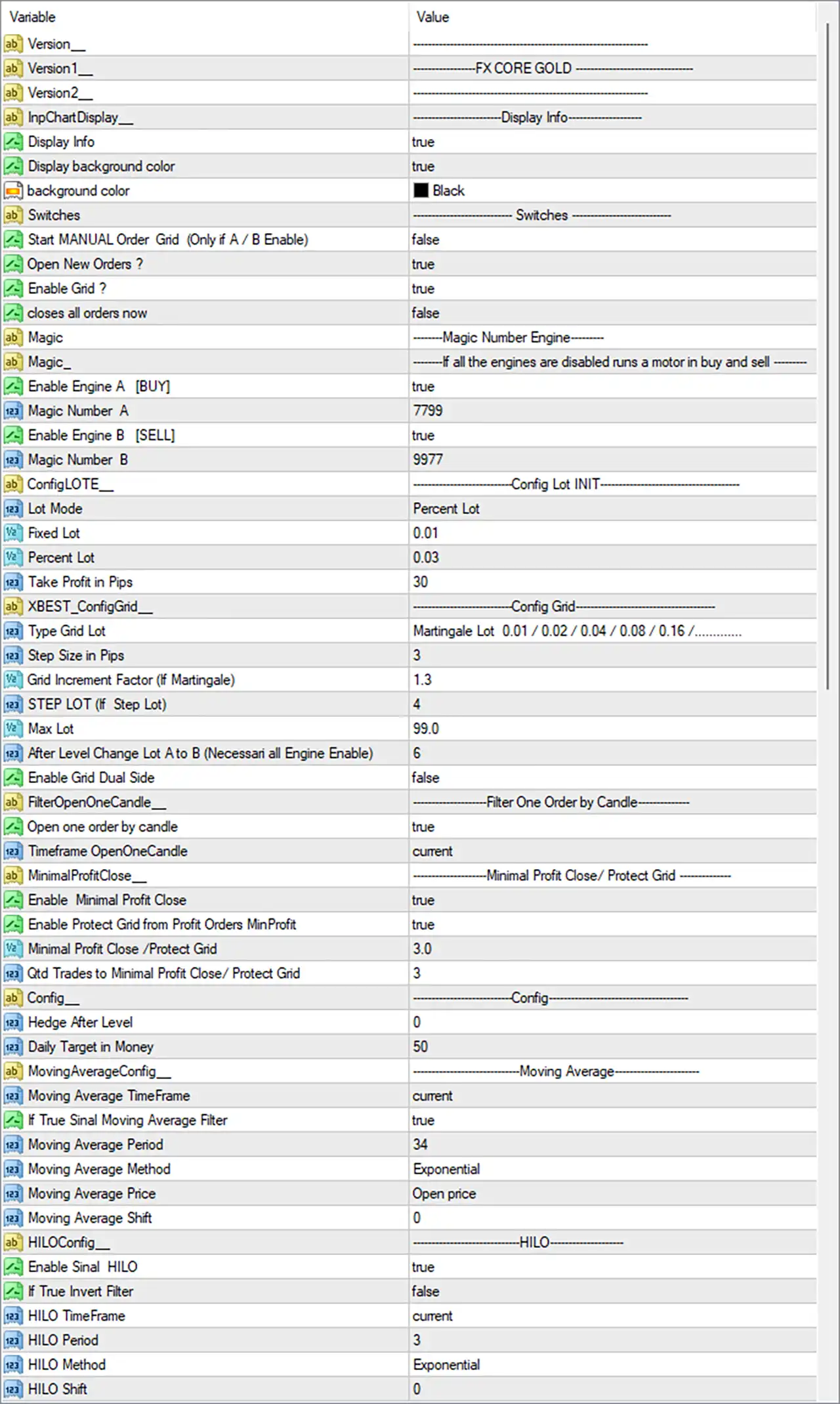
🔹 Version__: ------------------------------- — Section separator for version information.
🔹 Version1__: ---------------FX CORE GOLD ---------------- — Identifies the displayed EA/version label as FX CORE GOLD.
🔹 Version2__: ------------------------------- — Additional version information field with no separate descriptive value shown.
🔹 InpChartDisplay__: ---------------Display Info--------------- — Section header for chart information display.
🔹 Display Info: true — Enables the EA information display.
🔹 Display background color: true — Enables the display background.
🔹 background color: Black — Sets the information panel background color to Black.
🔄 Trading Switches
🔹 Switches: ---------------- Switches ---------------- — Section header for the main trading switches.
🔹 Start MANUAL Order Grid (Only if A / B Enable): false — Disables manually starting the order grid under the A/B engine condition.
🔹 Open New Orders ?: true — Allows the EA to open new orders.
🔹 Enable Grid ?: true — Enables the grid trading mechanism.
🔹 Closes all orders now: false — Does not immediately close all current orders.
🔄 Magic Number Engine
🔹 Magic: --------Magic Number Engine-------- — Section header for the separate BUY/SELL magic-number engines.
🔹 Magic_: -------If all the engines are disabled runs a motor in buy and sell ------- — Descriptive configuration field explaining the fallback BUY/SELL engine behavior.
🔹 Enable Engine A [BUY]: true — Enables Engine A for BUY operations.
🔹 Magic Number A: 7799 — Assigns Magic Number 7799 to Engine A.
🔹 Enable Engine B [SELL]: true — Enables Engine B for SELL operations.
🔹 Magic Number B: 9977 — Assigns Magic Number 9977 to Engine B.
🔄 Lot Configuration
🔹 ConfigLOTE__: ----------------Config Lot INIT---------------- — Section header for initial lot configuration.
🔹 Lot Mode: Percent Lot — Uses percentage-based lot calculation rather than fixed-lot sizing.
🔹 Fixed Lot: 0.01 — Defines a fixed lot value of 0.01 when fixed-lot mode is used.
🔹 Percent Lot: 0.03 — Sets the percentage-based lot parameter to 0.03.
🔹 Take Profit in Pips: 30 — Sets the Take Profit distance to 30 pips.
🔄 Grid Configuration
🔹 xBEST_ConfigGrid__: --------------Config Grid---------------- — Section header for grid configuration.
🔹 Type Grid Lot: Martingale Lot 0.01 / 0.02 / 0.04 / 0.08 / 0.16 /......... — Uses a Martingale lot progression beginning with 0.01, followed by 0.02, 0.04, 0.08, 0.16, and continuing according to the configured progression.
🔹 Step Size in Pips: 3 — Sets the grid spacing to 3 pips.
🔹 Grid Increment Factor (If Martingale): 1.3 — Sets the Martingale/grid lot multiplication factor to 1.3.
🔹 STEP LOT (If Step Lot): 4 — Defines the step-lot increment parameter as 4.
🔹 Max Lot: 99.0 — Sets the maximum permitted lot size to 99.0.
🔹 After Level Change Lot A to B (Necessari all Engine Enable): 6 — Sets the lot/engine transition level to 6.
🔹 Enable Grid Dual Side: false — Disables simultaneous dual-side grid operation.
🔄 Candle-Based Order Filter
🔹 FilterOpenOneCandle__: --------------Filter One Order by Candle---------------- — Section header for candle-based order filtering.
🔹 Open one order by candle: true — Restricts the EA to opening one order per candle.
🔹 Timeframe OpenOneCandle: current — Uses the current chart timeframe for the one-order-per-candle filter.
🔄 Minimum Profit Close / Grid Protection
🔹 MinimalProfitClose__: --------------Minimal Profit Close / Protect Grid---------------- — Section header for minimum-profit and grid protection.
🔹 Enable Minimal Profit Close: true — Enables minimum-profit closing.
🔹 Enable Protect Grid from Profit Orders MinProfit: true — Enables grid protection based on profitable orders.
🔹 Minimal Profit Close / Protect Grid: 3.0 — Sets the minimum profit/protection threshold to 3.0.
🔹 Qtd Trades to Minimal Profit Close / Protect Grid: 3 — Requires 3 trades for the configured minimum-profit close/grid-protection condition.
🔄 General Configuration
🔹 Config__: ----------------Config---------------- — Section header for general configuration.
🔹 Hedge After Level: 0 — Sets the hedge activation level to 0.
🔹 Daily Target in Money: 50 — Sets the daily monetary target to 50.
🔄 Moving Average Configuration
🔹 MovingAverageConfig__: ---------------Moving Average---------------- — Section header for Moving Average settings.
🔹 Moving Average TimeFrame: current — Uses the current chart timeframe for the Moving Average.
🔹 If True Sinal Moving Average Filter: true — Enables the Moving Average signal filter.
🔹 Moving Average Period: 34 — Sets the Moving Average period to 34.
🔹 Moving Average Method: Exponential — Uses an Exponential Moving Average (EMA).
🔹 Moving Average Price: Open price — Calculates the Moving Average using the Open price.
🔹 Moving Average Shift: 0 — Uses a Moving Average shift of 0.
🔄 HILO Configuration
🔹 HILOConfig__: ----------------HILO---------------- — Section header for HILO settings.
🔹 Enable Sinal HILO: true — Enables the HILO signal filter.
🔹 If True Invert Filter: false — Does not invert the HILO filter signal.
🔹 HILO TimeFrame: current — Uses the current chart timeframe for HILO analysis.
🔹 HILO Period: 3 — Sets the HILO period to 3.
🔹 HILO Method: Exponential — Uses an Exponential calculation method.
🔹 HILO Shift: 0 — Sets the HILO shift to 0.
🔢 Key FX CORE GOLD EA Settings at a Glance
🔹 EA Name: FX CORE GOLD
🔹 Grid Trading: true
🔹 BUY Engine: true
🔹 SELL Engine: true
🔹 BUY Magic Number: 7799
🔹 SELL Magic Number: 9977
🔹 Lot Mode: Percent Lot
🔹 Percent Lot: 0.03
🔹 Fixed Lot: 0.01
🔹 Take Profit: 30 pips
🔹 Grid Type: Martingale Lot 0.01 / 0.02 / 0.04 / 0.08 / 0.16 /.........
🔹 Grid Step: 3 pips
🔹 Grid Increment Factor: 1.3
🔹 Maximum Lot: 99.0
🔹 Grid Dual Side: false
🔹 One Order per Candle: true
🔹 Moving Average Filter: true
🔹 Moving Average Period: 34
🔹 Moving Average Method: Exponential
🔹 HILO Signal: true
🔹 HILO Period: 3
🔹 HILO Method: Exponential
🔹 Break Even: true
🔹 Break Even Start: 15
🔹 Break Even Step: 3
🔹 Trailing Stop: false
🔹 Trailing Start: 20
🔹 Trailing Stop Size: 20
🔹 Take Equity Stop: true
🔹 Equity Close Target: 50.0
🔹 Maximum Spread: 24 pips
🔹 Equity Caution: true
🔹 Equity Caution Risk: 20.0%
🔹 Equity Stop: true
🔹 Equity Stop Risk: 60.0%
🔹 FF News Filter: true
🔹 High-Impact News Filter: true
🔹 News Protection Before Event: 60 minutes
🔹 News Protection After Event: 20 minutes
🔹 Trading Days: Monday–Friday enabled
🔹 Trading Hours: 00:00–23:59
🔹 Daily Target: 50
🔢 Conclusion
FX CORE GOLD EA presents a highly configurable trading architecture combining grid execution, BUY/SELL engines, percentage-based money management, technical filters, Break Even protection, equity controls, news protection, and chart visualization.
The supplied configuration has Grid Trading enabled, with both Engine A [BUY] = true and Engine B [SELL] = true, using Magic Numbers 7799 and 9977 respectively. The grid configuration uses a Martingale progression starting from 0.01 / 0.02 / 0.04 / 0.08 / 0.16 / ..., a 3-pip step, a 1.3 increment factor, and a maximum lot of 99.0.
Risk-management features are also active: Break Even = true, Take Equity Stop = true, Equity Caution = true, and Equity Stop = true. At the same time, the standard trailing stop is disabled with Use Trailing Stop = false.
The strategy also uses an Exponential Moving Average with period 34 and an Exponential HILO filter with period 3, while the news filter is configured to avoid trading around qualifying events for 60 minutes before and 20 minutes after an event.
Because the configuration combines grid and Martingale-style lot progression with a maximum lot of 99.0, traders should carefully evaluate exposure, drawdown behavior, broker margin requirements, and worst-case market conditions before deploying it on a live account.
Get FX CORE GOLD EA Source Code MQ4
Download FX CORE GOLD EA Source Code MQ4 with its set files, read the full product details and requirements here: FX CORE GOLD EA Source Code MQ4 →